




Skip to content
View in the app

A better way to browse. Learn more.

Unraid

A full-screen app on your home screen with push notifications, badges and more.

To install this app on iOS and iPadOS
  1. Tap the Share icon in Safari
  2. Scroll the menu and tap Add to Home Screen.
  3. Tap Add in the top-right corner.
To install this app on Android
  1. Tap the 3-dot menu (⋮) in the top-right corner of the browser.
  2. Tap Add to Home screen or Install app.
  3. Confirm by tapping Install.

[7.2.0-beta.3] New notifications will instantly close and is missing info.

  • Closed
  • Minor

i noticed after updating to the 7.2.0-beta i would no longer see any notifications without having to open the new notifications sidebar so i ran a test and it seems like the notification will disappear in a couple seconds ignoring the settings.

During the test i also noticed that it is missing both the description and date info which was visible in older versions.

They did however add the "open" button if a link is sent through the notification - which is nice.😊

running /usr/local/emhttp/webGui/scripts/notify -s "Test Complete" -d "Test has been completed" -l "/Main" in the terminal

Here is the old notification from 7.0.1
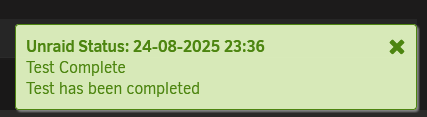
firefox_wdhrlzGazP.png

and here is the new one from 7.2.0-beta
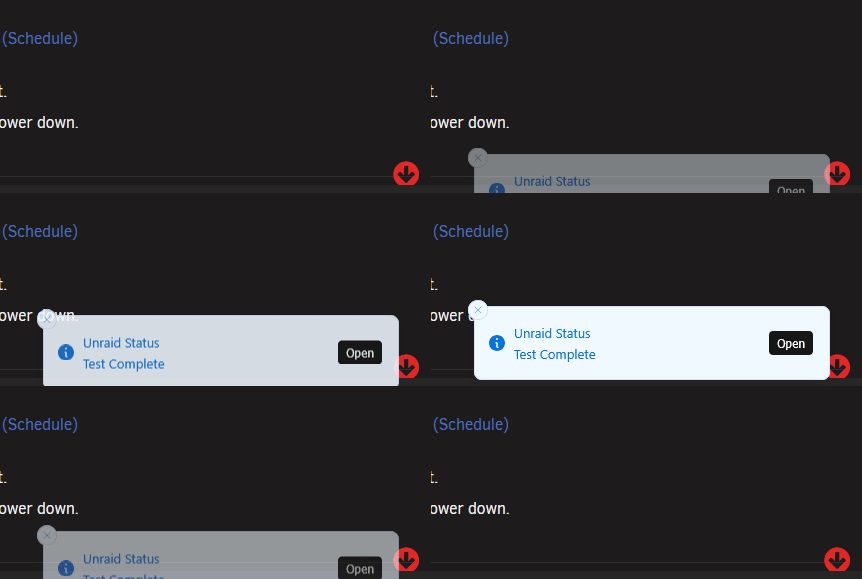
firefox_xesU9Azow0.gif

Here are my settings in 7.2.0-beta.2, it is completely removed in 7.2.0-beta.3firefox_ZTInb4545V.png
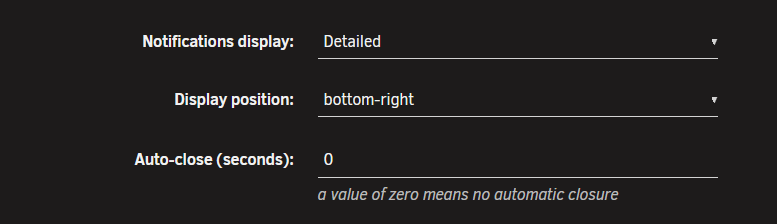
Hopefully this can be fixed

Account

Navigation

Search

Search

Configure browser push notifications

Chrome (Android)
  1. Tap the lock icon next to the address bar.
  2. Tap Permissions → Notifications.
  3. Adjust your preference.
Chrome (Desktop)
  1. Click the padlock icon in the address bar.
  2. Select Site settings.
  3. Find Notifications and adjust your preference.
