





- Solved
- Annoyance
While I am not sure if it's specific to having IPv6 assignment set to "automatic" or just having both eth0 and wlan0 interface up at the same time but what I can see is that the messages are only spammed when VM Manager is enabled in the settings. The last 6 lines in the snippet below repeat ad-nauseam until VM manager is disabled.


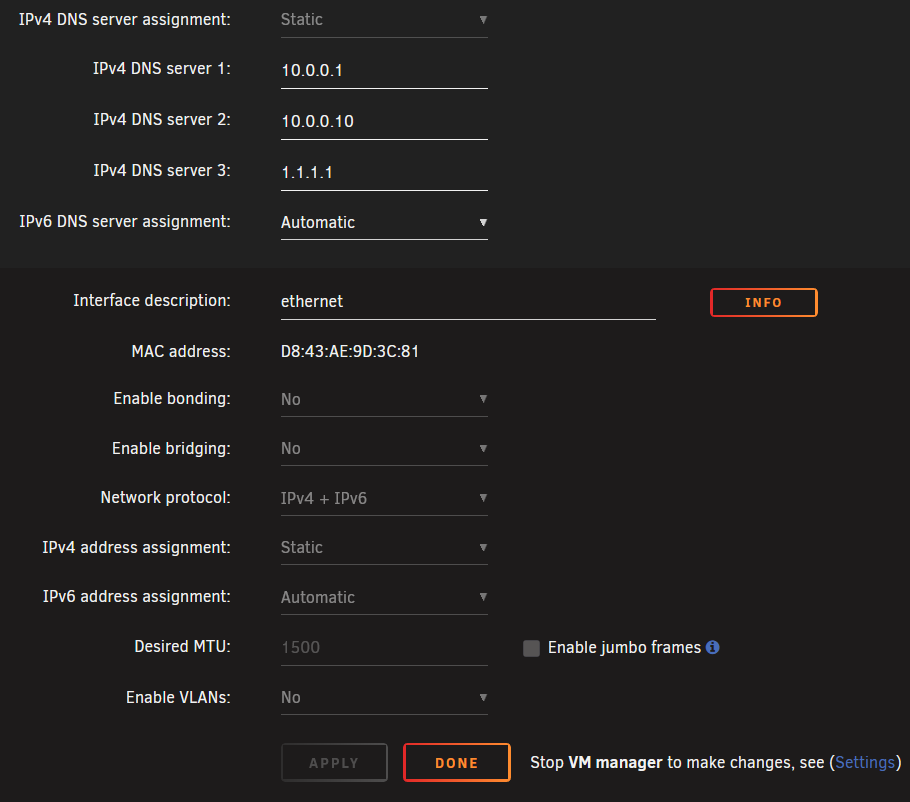

Apr 30 13:53:16 PlexRAID rc.libvirt: libvirt daemon...  Started.
Apr 30 13:53:16 PlexRAID dnsmasq[108420]: started, version 2.91 cachesize 150
Apr 30 13:53:16 PlexRAID dnsmasq[108420]: compile time options: IPv6 GNU-getopt DBus no-UBus i18n IDN2 DHCP DHCPv6 no-Lua TFTP conntrack ipset no-nftset auth DNSSEC loop-detect inotify dumpfile
Apr 30 13:53:16 PlexRAID dnsmasq-dhcp[108420]: DHCP, IP range 192.168.122.2 -- 192.168.122.254, lease time 1h
Apr 30 13:53:16 PlexRAID dnsmasq-dhcp[108420]: DHCP, sockets bound exclusively to interface virbr0
Apr 30 13:53:16 PlexRAID dnsmasq[108420]: reading /etc/resolv.conf
Apr 30 13:53:16 PlexRAID dnsmasq[108420]: using nameserver 10.0.0.1#53
Apr 30 13:53:16 PlexRAID dnsmasq[108420]: using nameserver 10.0.0.10#53
Apr 30 13:53:16 PlexRAID dnsmasq[108420]: using nameserver 1.1.1.1#53
Apr 30 13:53:16 PlexRAID dnsmasq[108420]: using nameserver 10.0.0.1#53
Apr 30 13:53:16 PlexRAID dnsmasq[108420]: using nameserver fda4:4dcd:75de::1#53
Apr 30 13:53:16 PlexRAID dnsmasq[108420]: read /etc/hosts - 3 names
Apr 30 13:53:16 PlexRAID dnsmasq[108420]: read /var/lib/libvirt/dnsmasq/default.addnhosts - 0 names
Apr 30 13:53:16 PlexRAID dnsmasq-dhcp[108420]: read /var/lib/libvirt/dnsmasq/default.hostsfile
Apr 30 13:53:16 PlexRAID usb_manager: Info: rc.usb_manager Reset Connected Status
Apr 30 13:54:22 PlexRAID dnsmasq[108420]: reading /etc/resolv.conf
Apr 30 13:54:22 PlexRAID dnsmasq[108420]: using nameserver 10.0.0.1#53
Apr 30 13:54:22 PlexRAID dnsmasq[108420]: using nameserver 10.0.0.10#53
Apr 30 13:54:22 PlexRAID dnsmasq[108420]: using nameserver 1.1.1.1#53
Apr 30 13:54:22 PlexRAID dnsmasq[108420]: using nameserver fda4:4dcd:75de::1#53
Apr 30 13:54:22 PlexRAID dnsmasq[108420]: using nameserver 10.0.0.1#53
Apr 30 13:54:22 PlexRAID dnsmasq[108420]: reading /etc/resolv.conf
Apr 30 13:54:22 PlexRAID dnsmasq[108420]: using nameserver 10.0.0.1#53
Apr 30 13:54:22 PlexRAID dnsmasq[108420]: using nameserver 10.0.0.10#53
Apr 30 13:54:22 PlexRAID dnsmasq[108420]: using nameserver 1.1.1.1#53
Apr 30 13:54:22 PlexRAID dnsmasq[108420]: using nameserver 10.0.0.1#53
Apr 30 13:54:22 PlexRAID dnsmasq[108420]: using nameserver fda4:4dcd:75de::1#53