




Skip to content
View in the app

A better way to browse. Learn more.

Unraid

A full-screen app on your home screen with push notifications, badges and more.

To install this app on iOS and iPadOS
  1. Tap the Share icon in Safari
  2. Scroll the menu and tap Add to Home Screen.
  3. Tap Add in the top-right corner.
To install this app on Android
  1. Tap the 3-dot menu (⋮) in the top-right corner of the browser.
  2. Tap Add to Home screen or Install app.
  3. Confirm by tapping Install.

Can't choose "custom eth0" as network type for Docker

  • Solved
  • Minor

Unsure if this is a Bug or if I'm the "problem"

I had till date a "Big" System which was only started "on demand" wiich holds the storage (#1), and another system (Tiny - #2) for 24/7 Services like Immich, Vaultwarden etc.

But somehow i thought this 2 systems (which are also a littled aged) shouldn't be necessary, so i bought a new Ugreen NAS DXP2800 which should become my 24/7 all purpose Server.

Everything works on this Ugreen, though i can't fully transfer my Dockers as some of them are using their own IP in eth0 Network.

But when i try to configure this now on the Ugreen (using the USB stick from #1) it doesn't show this option:

image.png.2b52232637413c7e08bf4866608cbda5.png

I think my Docker- and Network config should be ok:
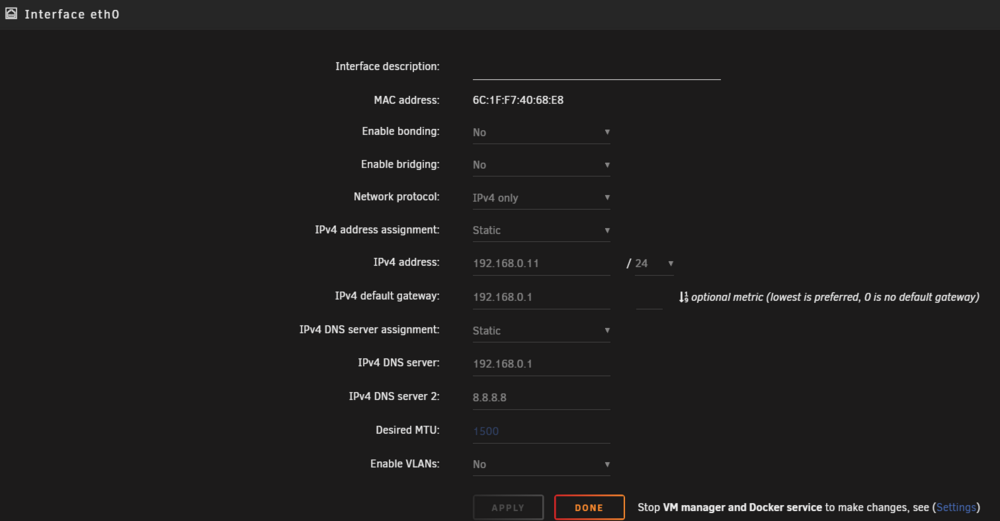
image.png.dea9e189a4905dac69ebeb7af50ff707.pngimage.png.ccd8c86c27681696f13f9beb98a9b93c.png


So is there a Bug? Or where is my mistake?


unraid-diagnostics-20250406-1117.zip

Account

Navigation

Search

Search

Configure browser push notifications

Chrome (Android)
  1. Tap the lock icon next to the address bar.
  2. Tap Permissions → Notifications.
  3. Adjust your preference.
Chrome (Desktop)
  1. Click the padlock icon in the address bar.
  2. Select Site settings.
  3. Find Notifications and adjust your preference.