




Skip to content
View in the app

A better way to browse. Learn more.

Unraid

A full-screen app on your home screen with push notifications, badges and more.

To install this app on iOS and iPadOS
  1. Tap the Share icon in Safari
  2. Scroll the menu and tap Add to Home Screen.
  3. Tap Add in the top-right corner.
To install this app on Android
  1. Tap the 3-dot menu (⋮) in the top-right corner of the browser.
  2. Tap Add to Home screen or Install app.
  3. Confirm by tapping Install.

Wrong Pool State box_3_sas - replacement device too small

  • Solved
  • Minor

Hi,

I am trying to change to a larger disk, but I got that error. This does not make sense to me.
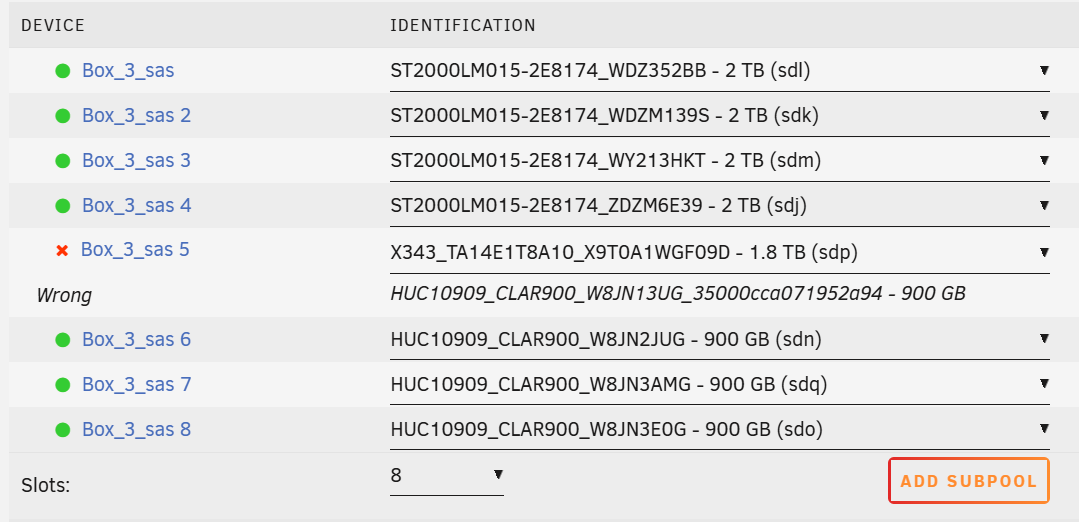
image.png

Basically, I am trying to swap one of the 900G to a 1.8T drive, but not working. Btw these 2TB ones and 900GB ones are under different vdevs. Seems Unraid is expecting 2TB drives, which is not necessary.

A temporary solution is:
You can replace the drive with

zpool replace you_tank_name /dev/sd* /dev/sd*

After resilvering, stop the array, unassign all drives from the pool, click the pool name, and delete the pool. Then add a new pool and assign all the drives back.

Account

Navigation

Search

Search

Configure browser push notifications

Chrome (Android)
  1. Tap the lock icon next to the address bar.
  2. Tap Permissions → Notifications.
  3. Adjust your preference.
Chrome (Desktop)
  1. Click the padlock icon in the address bar.
  2. Select Site settings.
  3. Find Notifications and adjust your preference.