






lazydaze
Members
-
Joined
-
GAME TIME!
-
Has anyone been able to set up port forwarding in Deluge with ProtonVPN using wireguard? Deluge is running downloading fine and I've added a wireguard config with port forwarding. But it comes up unconnectable when I check on a few sites. edit: upnp is active on the netowrk. How can I check what port deluge is trying to use? edit 2: drrr +pmp
-
Dark Theme?
-
Dang, it was my config file the whole time. Sorry
-
Just had a usb failure. I have got everything back up minus my wireguard setup. Previously I had my VPN provider setup though wireguard. I was able to set individual dockers to run through wiregualrd via wg1 in the docker network type. I have tried deleting the tunnel and re-importing, but no luck. I know im missing something simple here. I swear there was a tutorial on how to set this up, but i cant track it down. Any help would be great, thanks!
-
Oh, that will work too thanks!
-
I'm trying to find the command where it shows memory information. I need to check if its dual or single rank, I saw it a few months back, but can't seem to track it down...
-
k
-
Well, setting it up as a second pool seemed to work just fine. nm, i guess
-
Installed a new nmve 250g today. Unraid allows me to format it, but not mount with out a preclear? How do I get around this? Edit: This is just as a Unassigned Device. not for cache pool. blackbox-diagnostics-20220729-1702.zip
-
lol, no way. awesome, and thanks!
-
I am currently moving my setup to a larger case. I am also trying to put the HDDs in order with labels for future expansion or crash. Is there a way, via unraid or seperate computer, to figure out which drive is which? The drives are encrypted, so mounting a HDD on my laptop has proved challenging. I currently have a laptop with linux mint, is there a way to mount these 1 by 1 to figure out what is on it? Or can this be done in unraid?
-
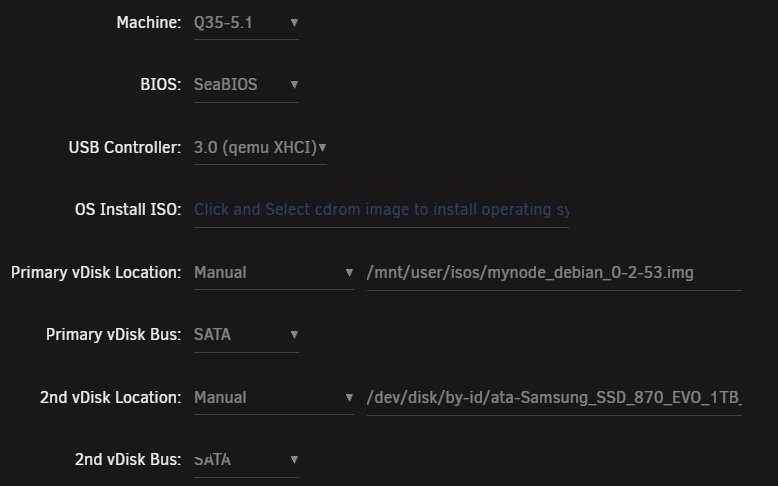
Figured it out.... Passed through the SSD then:
-
I have been trying to get myNode img to run correctly. I've allocated 4 cores and 4g of ram. It shows started, but when I go to view it all I get is Shell command line. Is there something I'm missing in setting up an IMG in VM?
-
com' on man

