





gideva
Members
-
Joined
-
Last visited
Everything posted by gideva
-
Here the diags if you need it for any reason monstruo-diagnostics-20221228-1350.zip
-
Now the MOUNT option is not gray anymore but if I selct it it does not mount anyway the disk... I used the -L option and this is what I got root@Monstruo:~# xfs_repair -v /dev/sdt1 -L Phase 1 - find and verify superblock... - block cache size set to 1496272 entries Phase 2 - using internal log - zero log... zero_log: head block 2492970 tail block 2492970 xfs_repair: libxfs_device_zero write failed: Input/output error root@Monstruo:~#
-
root@Monstruo:~# xfs_repair -v /dev/sdt1 Phase 1 - find and verify superblock... bad primary superblock - bad magic number !!! attempting to find secondary superblock... .found candidate secondary superblock... verified secondary superblock... writing modified primary superblock - block cache size set to 1496280 entries sb realtime bitmap inode value 18446744073709551615 (NULLFSINO) inconsistent with calculated value 97 resetting superblock realtime bitmap inode pointer to 97 sb realtime summary inode value 18446744073709551615 (NULLFSINO) inconsistent with calculated value 98 resetting superblock realtime summary inode pointer to 98 Phase 2 - using internal log - zero log... zero_log: head block 2492958 tail block 2492954 ERROR: The filesystem has valuable metadata changes in a log which needs to be replayed. Mount the filesystem to replay the log, and unmount it before re-running xfs_repair. If you are unable to mount the filesystem, then use the -L option to destroy the log and attempt a repair. Note that destroying the log may cause corruption -- please attempt a mount of the filesystem before doing this. root@Monstruo:~#
-
This is what I got: root@Monstruo:~# mkdir /x root@Monstruo:~# mount -v -t xfs /dev/sdt1 /x mount: /x: wrong fs type, bad option, bad superblock on /dev/sdt1, missing codepage or helper program, or other error. dmesg(1) may have more information after failed mount system call. root@Monstruo:~#
-
Sorry but I had to restart the server... Now is (sdt)monstruo-diagnostics-20221227-2040.zip
-
root@Monstruo:~# xfs_repair -n /dev/sdx1 Phase 1 - find and verify superblock... Phase 2 - using internal log - zero log... ALERT: The filesystem has valuable metadata changes in a log which is being ignored because the -n option was used. Expect spurious inconsistencies which may be resolved by first mounting the filesystem to replay the log. - scan filesystem freespace and inode maps... Metadata CRC error detected at 0x44108d, xfs_bnobt block 0xe8e05f38/0x1000 btree block 2/1 is suspect, error -74 bad magic # 0x4fc37090 in btbno block 2/1 Metadata CRC error detected at 0x44108d, xfs_cntbt block 0xe8e05f40/0x1000 btree block 2/2 is suspect, error -74 bad magic # 0x6df45080 in btcnt block 2/2 agf_freeblks 10312971, counted 0 in ag 2 agf_longest 2916269, counted 0 in ag 2 Metadata CRC error detected at 0x44108d, xfs_bnobt block 0x74702fa0/0x1000 btree block 1/1 is suspect, error -74 bad magic # 0xfcaf665b in btbno block 1/1 Metadata CRC error detected at 0x46fd5d, xfs_inobt block 0xe8e05f48/0x1000 btree block 2/3 is suspect, error -74 bad magic # 0xa6f13819 in inobt block 2/3 Metadata CRC error detected at 0x46fd5d, xfs_inobt block 0x15d508ee0/0x1000 btree block 3/3 is suspect, error -74 bad magic # 0xdedcec39 in inobt block 3/3 Metadata CRC error detected at 0x44108d, xfs_cntbt block 0x74702fa8/0x1000 btree block 1/2 is suspect, error -74 bad magic # 0xecf7febd in btcnt block 1/2 agf_freeblks 15647096, counted 0 in ag 1 agf_longest 7341807, counted 0 in ag 1 inode chunk claims untracked block, finobt block - agno 2, bno 476940, inopb 8 inode chunk claims untracked block, finobt block - agno 2, bno 476941, inopb 8 inode chunk claims untracked block, finobt block - agno 2, bno 476942, inopb 8 inode chunk claims untracked block, finobt block - agno 2, bno 476943, inopb 8 inode chunk claims untracked block, finobt block - agno 2, bno 476944, inopb 8 inode chunk claims untracked block, finobt block - agno 2, bno 476945, inopb 8 inode chunk claims untracked block, finobt block - agno 2, bno 476946, inopb 8 inode chunk claims untracked block, finobt block - agno 2, bno 476947, inopb 8 undiscovered finobt record, ino 4298782816 (2/3815520) undiscovered finobt record, ino 4305958752 (2/10991456) undiscovered finobt record, ino 4305975552 (2/11008256) undiscovered finobt record, ino 4305982944 (2/11015648) undiscovered finobt record, ino 4305983296 (2/11016000) undiscovered finobt record, ino 4341756096 (2/46788800) undiscovered finobt record, ino 4341756864 (2/46789568) undiscovered finobt record, ino 4341790048 (2/46822752) undiscovered finobt record, ino 4341804896 (2/46837600) undiscovered finobt record, ino 4341837440 (2/46870144) inode chunk claims untracked block, finobt block - agno 3, bno 3467496, inopb 8 inode chunk claims untracked block, finobt block - agno 3, bno 3467497, inopb 8 inode chunk claims untracked block, finobt block - agno 3, bno 3467498, inopb 8 inode chunk claims untracked block, finobt block - agno 3, bno 3467499, inopb 8 inode chunk claims untracked block, finobt block - agno 3, bno 3467500, inopb 8 inode chunk claims untracked block, finobt block - agno 3, bno 3467501, inopb 8 inode chunk claims untracked block, finobt block - agno 3, bno 3467502, inopb 8 inode chunk claims untracked block, finobt block - agno 3, bno 3467503, inopb 8 undiscovered finobt record, ino 4341839424 (2/46872128) undiscovered finobt record, ino 6470190912 (3/27739968) undiscovered finobt record, ino 4350566592 (2/55599296) undiscovered finobt record, ino 6470191808 (3/27740864) undiscovered finobt record, ino 4361066432 (2/66099136) undiscovered finobt record, ino 6502355808 (3/59904864) undiscovered finobt record, ino 4372845952 (2/77878656) undiscovered finobt record, ino 6502356960 (3/59906016) undiscovered finobt record, ino 4373009184 (2/78041888) undiscovered finobt record, ino 6502357728 (3/59906784) undiscovered finobt record, ino 5096362720 (2/801395424) undiscovered finobt record, ino 6502358368 (3/59907424) agi_count 8960, counted 0 in ag 2 undiscovered finobt record, ino 6502363488 (3/59912544) agi_freecount 103, counted 0 in ag 2 undiscovered finobt record, ino 6510636512 (3/68185568) undiscovered finobt record, ino 6662690336 (3/220239392) undiscovered finobt record, ino 6662690976 (3/220240032) undiscovered finobt record, ino 7015763712 (3/573312768) Metadata CRC error detected at 0x46fd5d, xfs_inobt block 0x74702fb0/0x1000 undiscovered finobt record, ino 7312148512 (3/869697568) btree block 1/3 is suspect, error -74 bad magic # 0xf5625fc6 in inobt block 1/3 agi_count 7296, counted 0 in ag 3 agi_freecount 84, counted 0 in ag 3 inode chunk claims untracked block, finobt block - agno 1, bno 1000280, inopb 8 inode chunk claims untracked block, finobt block - agno 1, bno 1000281, inopb 8 inode chunk claims untracked block, finobt block - agno 1, bno 1000282, inopb 8 inode chunk claims untracked block, finobt block - agno 1, bno 1000283, inopb 8 inode chunk claims untracked block, finobt block - agno 1, bno 1000284, inopb 8 inode chunk claims untracked block, finobt block - agno 1, bno 1000285, inopb 8 inode chunk claims untracked block, finobt block - agno 1, bno 1000286, inopb 8 inode chunk claims untracked block, finobt block - agno 1, bno 1000287, inopb 8 undiscovered finobt record, ino 2155485888 (1/8002240) undiscovered finobt record, ino 2155487040 (1/8003392) undiscovered finobt record, ino 2155734272 (1/8250624) undiscovered finobt record, ino 2258856128 (1/111372480) undiscovered finobt record, ino 2258858304 (1/111374656) undiscovered finobt record, ino 2258864608 (1/111380960) undiscovered finobt record, ino 2258865280 (1/111381632) undiscovered finobt record, ino 2258866528 (1/111382880) undiscovered finobt record, ino 2258878368 (1/111394720) undiscovered finobt record, ino 2258878912 (1/111395264) undiscovered finobt record, ino 2258879936 (1/111396288) undiscovered finobt record, ino 2258906336 (1/111422688) undiscovered finobt record, ino 2266728864 (1/119245216) undiscovered finobt record, ino 2266744800 (1/119261152) undiscovered finobt record, ino 2267221856 (1/119738208) undiscovered finobt record, ino 2267231936 (1/119748288) undiscovered finobt record, ino 2267528896 (1/120045248) agi_count 4800, counted 0 in ag 1 agi_freecount 71, counted 0 in ag 1 sb_icount 32704, counted 11648 sb_ifree 426, counted 168 sb_fdblocks 539327502, counted 514834453 - found root inode chunk Phase 3 - for each AG... - scan (but don't clear) agi unlinked lists... found inodes not in the inode allocation tree
-
root@Monstruo:~# fdisk -l /dev/sdx The backup GPT table is not on the end of the device. Disk /dev/sdx: 3.64 TiB, 4000787030016 bytes, 7814037168 sectors Disk model: WDC WD40EZRZ-00W Units: sectors of 1 * 512 = 512 bytes Sector size (logical/physical): 512 bytes / 4096 bytes I/O size (minimum/optimal): 4096 bytes / 4096 bytes Disklabel type: gpt Disk identifier: 3B1388DB-2DE5-4EE0-9610-618966CC50A5 Device Start End Sectors Size Type /dev/sdx1 64 7814037134 7814037071 3.6T Linux filesystem root@Monstruo:~#
-
Here is the diagnostic monstruo-diagnostics-20221227-1843.zip
-
Just got home... now one of the disks is recognized by UD but I cannot mount it (the MOUNT option is grayed out and not selectable) Any idea? I tried to add it to the array but obviously is thelling me that it will be formatted and all data overwritten

-
Great. Thanks
-
I will as soon back home… Will I be va able to access the files that are in the disks through UD?
-
Ok... all is working now! I was able to get back one of the burned disks (I changed the circuit board as suggested by trurl) and now looks like is back working. Now I need to understand if there is a way to put it back or if I can retreive the data from it... How sholud I proceed? thanks once a gain for the help
-
Ok that is clear... so if I just install 2 new disks on slot nr 3 and 9 I will be not able to recover anithing correct?
-
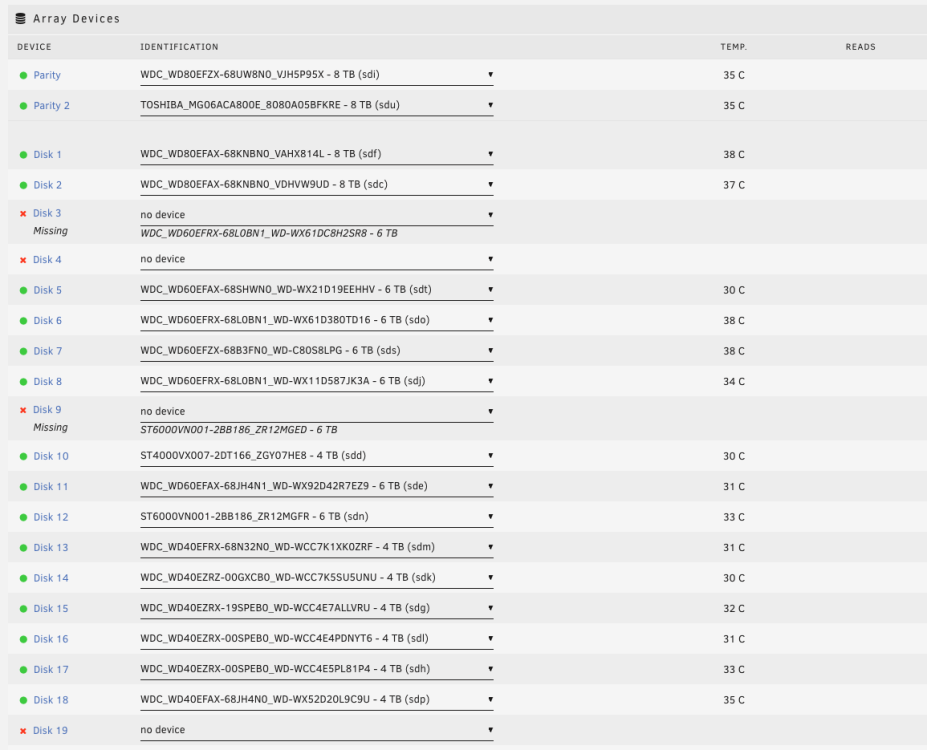
I am almost done with the Preclear process.... And I am preparing to install the new drives (3 x 8Tb WD Red) to replace the burned ones... I went through the on-line guide but still things are not too clear for me: Since I lost 4 disks due to a faulty cable that apparently burned them (the are totally dead and unusable in any way) now I would like to rebuilt at least the 2 disks that are still considered missing by the system (the other two are not even mentioned anymore in the Array Device list). I case the disk was I would have followed the standard procedure but but multiple disk failure I am really not sure on how to proceed According to your instruction in order to recover some of the data I shall use New Config Tool and I went through the guide itimpi suggested me but reading the first lines I am scared I will make a mess... the guide says in the very first lines the following: This tool is not part of the standard process for recovering from a disk failure... it will have the opposite effect and stop you being able to recover the contents of a failed disk intact; Now my main question... should I go ahead anyway with this? Sorry again if I am a pain but I guess that 20 Tb of data lost in a month are enough...
-
Do you mind to guide me through this? I already lost 22TB of data and I would love to stop this disaster here... I am preclearing disks now (guess that will take other 2/3 days for that) and than I will be ready for the "operation". But I really feel I need some advices for that because I am afraid to make a mess! Thanks in advance for your patience and help
-
Ok 2 better than nothing... To recover data is the same procedure used to recover 1 faulty disk correct? Shall I do it both at the same time or one after the other?
-
Sorry... I explained myself really bad.... I was talking about the data in the burned disks (disks are all gone and not working anymore unfortunately)...
-
That is what I was suspecting....
-
I was pre-clearing a 6TB to add to my Array and I got back the following error: Dec 18 13:52:31 preclear_disk_WSD403N5_6338: Post-Read: dd output: 162561+0 records inDec 18 13:52:31 preclear_disk_WSD403N5_6338: Post-Read: dd output: 162560+0 records outDec 18 13:52:31 preclear_disk_WSD403N5_6338: Post-Read: dd output: 340913029120 bytes (341 GB, 318 GiB) copied, 1819.75 s, 187 MB/sDec 18 13:52:31 preclear_disk_WSD403N5_6338: Post-Read: dd output: 163282+0 records inDec 18 13:52:31 preclear_disk_WSD403N5_6338: Post-Read: dd output: 163281+0 records outDec 18 13:52:31 preclear_disk_WSD403N5_6338: Post-Read: dd output: 342425075712 bytes (342 GB, 319 GiB) copied, 1832.61 s, 187 MB/sDec 18 13:52:31 preclear_disk_WSD403N5_6338: Post-Read: dd output: 163320+0 records inDec 18 13:52:31 preclear_disk_WSD403N5_6338: Post-Read: dd output: 163319+0 records outDec 18 13:52:31 preclear_disk_WSD403N5_6338: Post-Read: dd output: 342504767488 bytes (343 GB, 319 GiB) copied, 1845.02 s, 186 MB/sDec 18 13:52:31 preclear_disk_WSD403N5_6338: Post-Read: dd output: 164051+0 records inDec 18 13:52:31 preclear_disk_WSD403N5_6338: Post-Read: dd output: 164051+0 records outDec 18 13:52:31 preclear_disk_WSD403N5_6338: Post-Read: dd output: 344039882752 bytes (344 GB, 320 GiB) copied, 1861.85 s, 185 MB/sDec 18 13:52:31 preclear_disk_WSD403N5_6338: Post-Read: dd output: dd: error reading '/dev/sdu': Input/output errorDec 18 13:52:31 preclear_disk_WSD403N5_6338: Post-Read: dd output: 164051+1 records inDec 18 13:52:31 preclear_disk_WSD403N5_6338: Post-Read: dd output: 164051+1 records outDec 18 13:52:31 preclear_disk_WSD403N5_6338: Post-Read: dd output: 344041271296 bytes (344 GB, 320 GiB) copied, 1864.09 s, 185 MB/sDec 18 13:52:32 preclear_disk_WSD403N5_6338: Post-Read: post-read verification failed!Dec 18 13:52:33 preclear_disk_WSD403N5_6338: ssmtp: Authorization failed (535 5.7.8 https://support.google.com/mail/?p=BadCredentials m35-20020a05600c092300b003b3307fb98fsm8091701wmp.24 - gsmtp)Dec 18 13:52:33 preclear_disk_WSD403N5_6338: S.M.A.R.T.: Error:Dec 18 13:52:33 preclear_disk_WSD403N5_6338: S.M.A.R.T.:Dec 18 13:52:33 preclear_disk_WSD403N5_6338: S.M.A.R.T.: ATTRIBUTE INITIAL NOW STATUSDec 18 13:52:33 preclear_disk_WSD403N5_6338: S.M.A.R.T.: Reallocated_Sector_Ct 0 616 Up 616Dec 18 13:52:33 preclear_disk_WSD403N5_6338: S.M.A.R.T.: Power_On_Hours 0 21 Up 21Dec 18 13:52:33 preclear_disk_WSD403N5_6338: S.M.A.R.T.: Reported_Uncorrect 0 3 Up 3Dec 18 13:52:33 preclear_disk_WSD403N5_6338: S.M.A.R.T.: Airflow_Temperature_Cel 29 43 Up 14Dec 18 13:52:33 preclear_disk_WSD403N5_6338: S.M.A.R.T.: Current_Pending_Sector 0 8 Up 8Dec 18 13:52:33 preclear_disk_WSD403N5_6338: S.M.A.R.T.: Offline_Uncorrectable 0 8 Up 8Dec 18 13:52:33 preclear_disk_WSD403N5_6338: S.M.A.R.T.: UDMA_CRC_Error_Count 0 0 -Dec 18 13:52:33 preclear_disk_WSD403N5_6338: S.M.A.R.T.: Dec 18 13:52:33 preclear_disk_WSD403N5_6338: error encountered, exiting ... What should I do? Shall I send it back or do I have other options? Thanks for any advice
-
I had some problems connected to cable so I decided to change them all and guess... 1 was faulty and 4 drives got burned!!! I have a 2 Parity Array configuration... How many disks can I recover? Thanks for the help
-
Ok will try it Thanks for help
-
Got this message after mount -v -t xfs /dev/sdy1 /x root@Monstruo:~# mount -v -t xfs /dev/sdy1 /y mount: /y: wrong fs type, bad option, bad superblock on /dev/sdy1, missing codepage or helper program, or other error. dmesg(1) may have more information after failed mount system call.
-
Here you have (hope is what you are asking): The backup GPT table is not on the end of the device. Disk /dev/sdy: 3.64 TiB, 4000787030016 bytes, 7814037168 sectors Disk model: WDC WD40EZRZ-00W Units: sectors of 1 * 512 = 512 bytes Sector size (logical/physical): 512 bytes / 4096 bytes I/O size (minimum/optimal): 4096 bytes / 4096 bytes Disklabel type: gpt Disk identifier: 3B1388DB-2DE5-4EE0-9610-618966CC50A5 Device Start End Sectors Size Type /dev/sdy1 64 7814037134 7814037071 3.6T Linux filesystem /dev/sda1: LABEL_FATBOOT="UNRAID" LABEL="UNRAID" UUID="5E44-1B01" BLOCK_SIZE="512" TYPE="vfat" /dev/loop1: TYPE="squashfs" /dev/md11: UUID="e5e91b75-ab28-4e86-a2ec-a12831114fae" BLOCK_SIZE="512" TYPE="xfs" /dev/sdf1: UUID="61b9a789-f119-4854-8b43-6d647c82c95a" BLOCK_SIZE="512" TYPE="xfs" PARTUUID="28f95189-5225-4ea1-9b59-a7be5e65c07b" /dev/md8: UUID="689b68aa-63e2-4f0c-9a97-89a96249811e" BLOCK_SIZE="512" TYPE="xfs" /dev/sdo1: UUID="d58b6acc-80a4-42b2-8929-b8bd471d3650" BLOCK_SIZE="512" TYPE="xfs" PARTUUID="2ee78350-0b64-410b-947e-80559ab6a476" /dev/sdw1: UUID="9fad86a9-363f-4d45-9713-bf70164c2efb" BLOCK_SIZE="512" TYPE="xfs" PARTUUID="4d3db4d8-02e7-4375-bcaf-ae861a8e821a" /dev/sdd1: UUID="e5e91b75-ab28-4e86-a2ec-a12831114fae" BLOCK_SIZE="512" TYPE="xfs" PARTUUID="e6e6a390-e3c1-68a8-94b2-b9b546ec36b0" /dev/md6: UUID="9fad86a9-363f-4d45-9713-bf70164c2efb" BLOCK_SIZE="512" TYPE="xfs" /dev/md18: UUID="823dd1ca-be31-47ba-8d5c-e391916c25ad" BLOCK_SIZE="512" TYPE="xfs" /dev/sdm1: UUID="2334d706-96f5-472a-9a4e-a5e942893aa6" BLOCK_SIZE="512" TYPE="xfs" PARTUUID="21b90859-da06-430e-bd0c-ad95e1b89cd0" /dev/sdu1: UUID="3786651d-896f-4f89-9437-483fefd06d03" UUID_SUB="2187370a-efa0-42f2-92fd-b0cea9b516f9" BLOCK_SIZE="4096" TYPE="btrfs" /dev/sdb1: UUID="6f08c371-2a2f-4856-b3f6-2e1f3f8e5aaa" BLOCK_SIZE="512" TYPE="xfs" PARTUUID="6d3c580e-3a09-451e-906c-77bfe904ec15" /dev/md4: UUID="61b9a789-f119-4854-8b43-6d647c82c95a" BLOCK_SIZE="512" TYPE="xfs" /dev/md16: UUID="def0418b-e736-442c-8f0a-a67bbd2c4d67" BLOCK_SIZE="512" TYPE="xfs" /dev/sdk1: UUID="ad7c72f4-a08b-4bc0-b32b-737700c19bf1" BLOCK_SIZE="512" TYPE="xfs" PARTUUID="0833ac48-fa4a-4f71-b1ee-ba4c436e2342" /dev/sds1: UUID="a3c70469-fe5f-4ef8-84e6-38c1827ff9d0" BLOCK_SIZE="512" TYPE="xfs" PARTUUID="60695e28-dac8-4ea7-93d7-7f9f187aec4b" /dev/md2: UUID="6f08c371-2a2f-4856-b3f6-2e1f3f8e5aaa" BLOCK_SIZE="512" TYPE="xfs" /dev/md14: UUID="ad7c72f4-a08b-4bc0-b32b-737700c19bf1" BLOCK_SIZE="512" TYPE="xfs" /dev/sdi1: UUID="2eb756cd-0432-42ee-991e-b1c796e8c241" BLOCK_SIZE="512" TYPE="xfs" PARTUUID="7531d334-cb00-45ba-9ae0-f4ed1ca87715" /dev/sdq1: UUID="689b68aa-63e2-4f0c-9a97-89a96249811e" BLOCK_SIZE="512" TYPE="xfs" PARTUUID="b070e132-1a41-4b9f-94ed-fe069c7f4ef2" /dev/md12: UUID="2334d706-96f5-472a-9a4e-a5e942893aa6" BLOCK_SIZE="512" TYPE="xfs" /dev/sdz1: UUID="bf2d1d37-309b-4144-a0f3-d29bec8983d6" BLOCK_SIZE="512" TYPE="xfs" PARTUUID="ee10c7e0-1a72-4691-933a-409e4786831b" /dev/md9: UUID="00633fe3-1e50-41b1-9987-fa8c4d04d92a" BLOCK_SIZE="512" TYPE="xfs" /dev/loop0: TYPE="squashfs" /dev/md10: UUID="69d83396-a98c-4624-9633-1ea9ecbf3f9d" BLOCK_SIZE="512" TYPE="xfs" /dev/sdx1: UUID="823dd1ca-be31-47ba-8d5c-e391916c25ad" BLOCK_SIZE="512" TYPE="xfs" PARTUUID="fb326c0b-ab95-413a-b1c1-2766fb881247" /dev/sde1: UUID="2cad65d3-9481-4075-990e-8e518d0d4c88" BLOCK_SIZE="512" TYPE="xfs" PARTUUID="51297471-b9ac-4a5a-8128-f29177b13257" /dev/md7: UUID="858b5c7a-00af-433b-bfc0-23c62d9e1b82" BLOCK_SIZE="512" TYPE="xfs" /dev/md19: UUID="bf2d1d37-309b-4144-a0f3-d29bec8983d6" BLOCK_SIZE="512" TYPE="xfs" /dev/sdn1: UUID="2bb52a8e-818a-4b9e-ac78-fedff1a9716d" BLOCK_SIZE="512" TYPE="xfs" PARTUUID="5dfc7722-3581-4423-bdcd-44f736c923da" /dev/sdv1: UUID="3786651d-896f-4f89-9437-483fefd06d03" UUID_SUB="a4fea608-e78b-42d8-942e-69851e4e85cb" BLOCK_SIZE="4096" TYPE="btrfs" /dev/sdc1: UUID="69d83396-a98c-4624-9633-1ea9ecbf3f9d" BLOCK_SIZE="512" TYPE="xfs" PARTUUID="38737510-474b-42d5-817e-779574c7bfdd" /dev/md5: UUID="a3c70469-fe5f-4ef8-84e6-38c1827ff9d0" BLOCK_SIZE="512" TYPE="xfs" /dev/md17: UUID="2bb52a8e-818a-4b9e-ac78-fedff1a9716d" BLOCK_SIZE="512" TYPE="xfs" /dev/sdl1: UUID="593561e8-412c-4978-b02f-ef47867ef451" BLOCK_SIZE="512" TYPE="xfs" PARTUUID="15d31c81-2be0-4142-8d1a-25a14f166c3e" /dev/sdt1: UUID="858b5c7a-00af-433b-bfc0-23c62d9e1b82" BLOCK_SIZE="512" TYPE="xfs" PARTUUID="40da6839-f5d6-4f0c-a8c0-38f993a68833" /dev/md3: UUID="2eb756cd-0432-42ee-991e-b1c796e8c241" BLOCK_SIZE="512" TYPE="xfs" /dev/md15: UUID="d58b6acc-80a4-42b2-8929-b8bd471d3650" BLOCK_SIZE="512" TYPE="xfs" /dev/sdj1: UUID="def0418b-e736-442c-8f0a-a67bbd2c4d67" BLOCK_SIZE="512" TYPE="xfs" /dev/md1: UUID="2cad65d3-9481-4075-990e-8e518d0d4c88" BLOCK_SIZE="512" TYPE="xfs" /dev/md13: UUID="593561e8-412c-4978-b02f-ef47867ef451" BLOCK_SIZE="512" TYPE="xfs" /dev/sdh1: UUID="00633fe3-1e50-41b1-9987-fa8c4d04d92a" BLOCK_SIZE="512" TYPE="xfs" PARTUUID="570c3c0a-6737-405b-909a-5f937980b0e1" /dev/sdr1: PARTUUID="7a17a666-2af3-03fd-0003-a388a2245fd9" /dev/sdp1: PARTUUID="912aef58-75f0-48c4-a83d-fa181dab4992"
-
I tried to mount with UD but the mountpb is grayed and does not let me do it....
-


