





Stiibun
Members
-
Joined
-
Last visited
-
Thanks. Darn now I feel stupid, never checked if I could click the folder icon itself. Might be an idea to also have a Remove option on the edit folder page?
-
Maybe a silly question as I couldn't immediately find it, but how do you delete a folder if it was created by mistake?
-
Exactly this, did some quick calculation and for me in Belgium that would add an extra €550 import charges, so not feasible to get one over here. Guess not easy for 45Homelab to get an European office due to logistical reasons.
-
Also updated my two Unraid servers to 7.3.0 without issues, one was running the beta for a while and no problems at all in my setup. Well on that one I lost my key due to my own stupidity though as I thought it was bound to TPM where it was not and I removed the USB stick and had it actually blacklisted. But that was quickly solved by Limetech support 👍 Will need to check if my Supermicro based server can actually have it's key bound to TPM, I suspect not and I will need to get a TPM module for the header.
-
Collab video
-
You can even cover the first three pins as the first two are not used at all, makes it a bit easier to cut the electrical tape to size. I have 10TB shucked WD Elements drives which I had to tape of the first three pins and then had no issues with them.
-
That's correct. Gigabyte doesn't explicitly call it a network port for IPMI but for management, maybe that's what confused you. There is one Intel port on the motherboard for regular network and one Realtek port for management. @itlists , yes 3,5'" slots and hot-swappable at least they are in the HL15 and this X15 will not be different I guess.
-
It should be under Settings -> Platform Power as per the manual of your motherboard. You might want to enable Advanced settings by pressing F2 if you're in the BIOS
-
On Unraid 7.3.0 beta 2 this is the output of runc --version root@Firefly:~# runc --version runc version 1.3.4 commit: v1.3.4-0-gd6d73eb spec: 1.2.1 go: go1.25.8 libseccomp: 2.5.4
-
Totally my fault as I think I put the .key file on the USB stick after I moved the flash boot to the NVMe pool, what a mistak to make. So solved now. I'll keep an eye out when the error is shown again when the server reboots, it did not happen the lest time I booted.
-
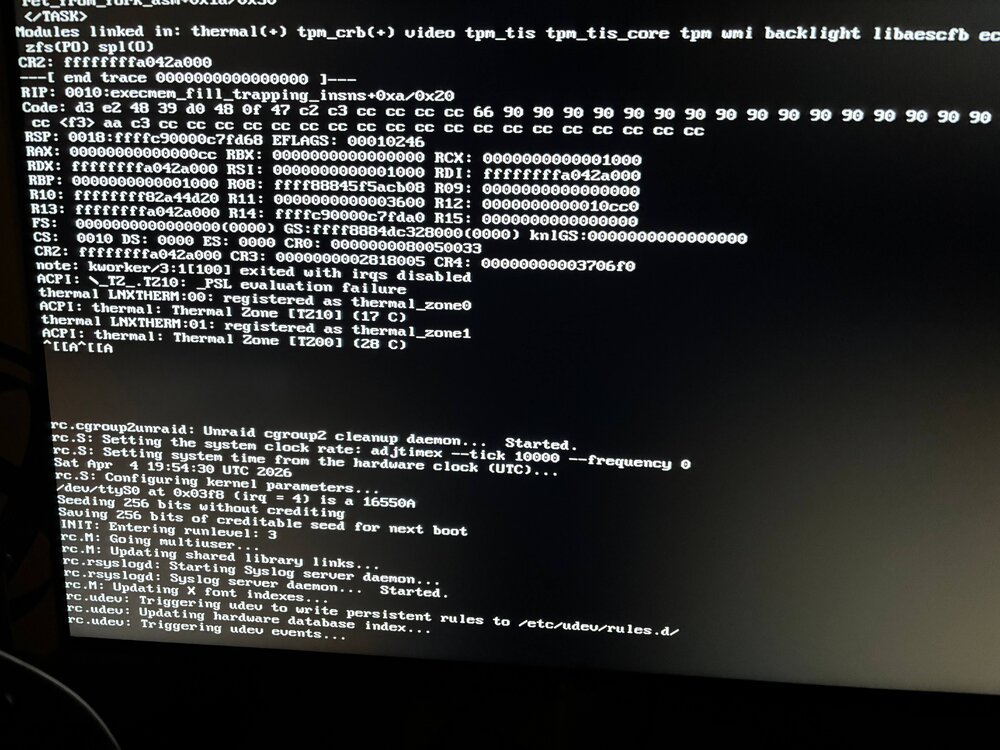
Solved, well kinda off. When I change from USB stick to internal boot seems I get an exception logged now. Is this a know issue with the 7.3.0 beta 2 version?
-
As I had serious issues with my ZFS cache pool which I could not solve after many tries and since I have a backup of the most important data I thought to start a fresh. So i flashed the USB stick again with Unraid 7.3.0 beta 2 as I want to use a mirror of 2 NVMe as boot volume. I did make a backup of the flash drive before reflashing it. As far as I'm aware I just need to copy my .key file from the config folder to the 'new' USB stick and then I can boot. But unfortunately Unraid says my license is unregistered which is odd as it was registered before. How can this be solved so I can continue to setup the server? Not sure if anything can be seen in a new install, but for good measures I've attached the diagnostics file. firefly-diagnostics-20260404-1630.zip
-
@JorgeB , to conclude this thread none of the commands you provided a solution I each time got a ZFS panic warning and needed to reboot each time. Also tried with a Ubuntu Live USB stick but to no avail. So I refreshed my USB stick as I wanted to start a fresh but now I have troubles with the registration. Will create a new post for this.
-
@JorgeB , it panics again when executing the import manually zfs dbgmsg logs the following; timestamp message 1775041272 ffff88811c58b300 metaslab.c:1703:spa_set_allocator(): spa allocator: dynamic 1775041272 ffff88811c58b300 spa.c:6921:spa_tryimport(): spa_tryimport: importing cache 1775041272 ffff88811c58b300 spa_misc.c:430:spa_load_note(): spa_load($import-ffff88811c58b300-cache, config trusted): LOADING 1775041272 ffff8881a77fa200 vdev.c:184:vdev_dbgmsg(): disk vdev '/dev/nvme0n1p1': probe done, cant_read=0 cant_write=1 1775041273 ffff88810696c400 vdev.c:184:vdev_dbgmsg(): disk vdev '/dev/nvme1n1p1': open error=2 timeout=1007543090/1000000000 1775041273 ffff88811c58b300 vdev.c:184:vdev_dbgmsg(): disk vdev '/dev/nvme0n1p1': best uberblock found for spa $import-ffff88811c58b300-cache. txg 3491005 1775041273 ffff88811c58b300 spa_misc.c:430:spa_load_note(): spa_load($import-ffff88811c58b300-cache, config untrusted): using uberblock with txg=3491005 1775041273 ffff8881a77fa200 vdev.c:184:vdev_dbgmsg(): disk vdev '/dev/nvme0n1p1': probe done, cant_read=0 cant_write=1 1775041274 ffff88819b3e0000 vdev.c:184:vdev_dbgmsg(): disk vdev '/dev/nvme1n1p1': open error=2 timeout=1008705958/1000000000 1775041274 ffff88811c58b300 spa_misc.c:2405:spa_import_progress_set_notes_impl(): 'cache' Loading checkpoint txg 1775041274 ffff88811c58b300 spa_misc.c:2405:spa_import_progress_set_notes_impl(): 'cache' Loading indirect vdev metadata 1775041274 ffff88811c58b300 spa_misc.c:2405:spa_import_progress_set_notes_impl(): 'cache' Checking feature flags 1775041274 ffff88811c58b300 spa_misc.c:2405:spa_import_progress_set_notes_impl(): 'cache' Loading special MOS directories 1775041274 ffff88811c58b300 spa_misc.c:2405:spa_import_progress_set_notes_impl(): 'cache' Loading properties 1775041274 ffff88811c58b300 spa_misc.c:2405:spa_import_progress_set_notes_impl(): 'cache' Loading AUX vdevs 1775041274 ffff88811c58b300 spa_misc.c:2405:spa_import_progress_set_notes_impl(): 'cache' Loading vdev metadata 1775041274 ffff88811c58b300 spa_misc.c:2405:spa_import_progress_set_notes_impl(): 'cache' Loading dedup tables 1775041274 ffff88811c58b300 spa_misc.c:2405:spa_import_progress_set_notes_impl(): 'cache' Loading BRT 1775041274 ffff88811c58b300 spa_misc.c:2405:spa_import_progress_set_notes_impl(): 'cache' Verifying Log Devices 1775041274 ffff88811c58b300 spa_misc.c:2405:spa_import_progress_set_notes_impl(): 'cache' Verifying pool data 1775041274 ffff88811c58b300 spa_misc.c:2405:spa_import_progress_set_notes_impl(): 'cache' Calculating deflated space 1775041274 ffff88811c58b300 spa_misc.c:2405:spa_import_progress_set_notes_impl(): 'cache' Starting import 1775041274 ffff88811c58b300 spa.c:9320:spa_async_request(): spa=$import-ffff88811c58b300-cache async request task=2048 1775041274 ffff88811c58b300 spa_misc.c:430:spa_load_note(): spa_load($import-ffff88811c58b300-cache, config trusted): LOADED 1775041274 ffff88811c58b300 spa_misc.c:430:spa_load_note(): spa_load($import-ffff88811c58b300-cache, config trusted): UNLOADING 1775041274 ffff88811c58b300 metaslab.c:1703:spa_set_allocator(): spa allocator: dynamic 1775041274 ffff88811c58b300 spa.c:6766:spa_import(): spa_import: importing cache 1775041274 ffff88811c58b300 spa_misc.c:430:spa_load_note(): spa_load(cache, config trusted): LOADING 1775041274 ffff88819d183300 vdev.c:184:vdev_dbgmsg(): disk vdev '/dev/nvme0n1p1': probe done, cant_read=0 cant_write=1 1775041275 ffff888118a58000 vdev.c:184:vdev_dbgmsg(): disk vdev '/dev/nvme1n1p1': open error=2 timeout=1004162104/1000000000 1775041275 ffff88811c58b300 vdev.c:184:vdev_dbgmsg(): disk vdev '/dev/nvme0n1p1': best uberblock found for spa cache. txg 3491005 1775041275 ffff88811c58b300 spa_misc.c:430:spa_load_note(): spa_load(cache, config untrusted): using uberblock with txg=3491005 1775041275 ffff88819d183300 vdev.c:184:vdev_dbgmsg(): disk vdev '/dev/nvme0n1p1': probe done, cant_read=0 cant_write=1 1775041276 ffff8881027a6600 vdev.c:184:vdev_dbgmsg(): disk vdev '/dev/nvme1n1p1': open error=2 timeout=1000928757/1000000000 1775041276 ffff88811c58b300 spa_misc.c:2405:spa_import_progress_set_notes_impl(): 'cache' Loading checkpoint txg 1775041276 ffff88811c58b300 spa_misc.c:2405:spa_import_progress_set_notes_impl(): 'cache' Loading indirect vdev metadata 1775041276 ffff88811c58b300 spa_misc.c:2405:spa_import_progress_set_notes_impl(): 'cache' Checking feature flags 1775041276 ffff88811c58b300 spa_misc.c:2405:spa_import_progress_set_notes_impl(): 'cache' Loading special MOS directories 1775041276 ffff88811c58b300 spa_misc.c:2405:spa_import_progress_set_notes_impl(): 'cache' Loading properties 1775041276 ffff88811c58b300 spa_misc.c:2405:spa_import_progress_set_notes_impl(): 'cache' Loading AUX vdevs 1775041276 ffff88811c58b300 spa_misc.c:2405:spa_import_progress_set_notes_impl(): 'cache' Loading vdev metadata 1775041276 ffff88811c58b300 spa_misc.c:2405:spa_import_progress_set_notes_impl(): 'cache' Loading dedup tables 1775041276 ffff88811c58b300 spa_misc.c:2405:spa_import_progress_set_notes_impl(): 'cache' Loading BRT 1775041276 ffff88811c58b300 spa_misc.c:2405:spa_import_progress_set_notes_impl(): 'cache' Verifying Log Devices 1775041276 ffff88811c58b300 spa_misc.c:2405:spa_import_progress_set_notes_impl(): 'cache' Verifying pool data
-
@JorgeB , server keeps at Array Starting after adding the pool. And taking diagnostics doesn't seem to work either as it hangs at smartctl -x '/dev/sda' 2>/dev/null|todos >'/serenity-diagnostics-20260401-0756/smart/Samsung_Flash_Drive_0355025010003213-0-0-2025-12-18 flash (sda).txt' /usr/sbin/zpool status 2>/dev/null|todos >>'/serenity-diagnostics-20260401-0756/system/zfs-info.txt'




