






Black Aura
Members
-
Joined
-
Last visited
-
I solved this issue, it seems i had the wrong parent for the network. I used parent=br0, rather than eth0 or bond0. docker network create -d macvlan --subnet=192.168.1.0/24 --gateway=192.168.1.1 -o parent=br0 macvlan TBH, I don't understand why that is the right way, no doubt others understand the difference.
-
Hi, "A little knowledge is a dangerous thing" and I am downright deadly with networking. In any case I want to assign static IP addresses to docker containers. But everything I've tried fails. I looked around the forum and everyone else seems to have a subtly different problem to me docker run -d --name='diyHue' --net='br0' --ip='192.168.2.110' -e TZ="Europe/London" -e HOST_OS="Unraid" -e HOST_HOSTNAME="Kings-Cross" -e HOST_CONTAINERNAME="diyHue" -e 'MAC'='bc:5f:f4:cd:c6:19' -e 'IP'='192.168.1.4' -l net.unraid.docker.managed=dockerman -l net.unraid.docker.webui='http://[IP]:[PORT:80]' -l net.unraid.docker.icon='https://raw.githubusercontent.com/cheesemarathon/docker-templates/master/images/diyhue.png' -p '80:80/tcp' -p '443:443/tcp' -p '1900:1900/udp' -p '2100:2100/udp' -v '/mnt/user/appdata/diyHue':'/opt/hue-emulator/config/':'rw' 'diyhue/core:latest' 284e7dc8a8358e50984a4e0a39845eb7fa3aa7cf824113eaf6fb2edc99f074b9 docker: Error response from daemon: Invalid address 192.168.2.110: It does not belong to any of this network's subnets. I have had a scout around and I see that one or two other people have in the past had this kind of issue. I thought perhaps it was because br0 is being used by swag (reverse proxy). In the docker settings it says that "Docker custom network type:" is macvlan. But I am not sure if the two are related. So the snipped output of "docker network inspect br0" is thus "Name": "br0", "Id": "18e4babe66685e8e01cbd6abdcafd4b0e955f78a0649d372360798c55c5aea65", "Created": "2021-10-13T15:37:07.11650494+01:00", "Scope": "local", "Driver": "bridge", "EnableIPv6": false, "IPAM": { "Driver": "default", "Options": {}, "Config": [ { "Subnet": "172.18.0.0/16", "Gateway": "172.18.0.1" } ] }, "Internal": false, "Attachable": false, "Ingress": false, "ConfigFrom": { "Network": "" }, I wondered if that is because device is bridge and not macvlan, so I tried to create a new interface docker network create -d macvlan --subnet=192.168.1.0/24 --gateway=192.168.1.1 -o parent=bond0 macvlan I tried this with both bond0 and eth0 ,both gave similar results docker run -d --name='diyHue' --net='macvlan' --ip='192.168.1.59' -e TZ="Europe/London" -e HOST_OS="Unraid" -e HOST_HOSTNAME="Kings-Cross" -e HOST_CONTAINERNAME="diyHue" -e 'TCP_PORT_80'='80' -e 'TCP_PORT_443'='443' -e 'UDP_PORT_1900'='1900' -e 'UDP_PORT_2100'='2100' -e 'MAC'='bc:5f:f4:cd:c6:19' -e 'IP'='192.168.1.4' -l net.unraid.docker.managed=dockerman -l net.unraid.docker.webui='http://[IP]:[PORT:80]' -l net.unraid.docker.icon='https://raw.githubusercontent.com/cheesemarathon/docker-templates/master/images/diyhue.png' -v '/mnt/user/appdata/diyHue':'/opt/hue-emulator/config/':'rw' 'diyhue/core:latest' 206015123b445e977c86a7d0bb59e00acadffc43d3b52a6f4ab7ae7a2e406823 docker: Error response from daemon: failed to create the macvlan port: device or resource busy. Similar for ipvlan. If anyone can give me a suggestion or point me to another thread , that would be great. Thanks
-
I moved the usb stick to a different port. And everything has been running well for a good few hours, so i am hoping that is it Thanks again 👍
-
Yeah, the flash drive has gone AWOL again. I attached the diagnostics I suppose i have the backup now. And i have ordered another flash drive in anticipation. tower-diagnostics-20220408-1817.zip
-
I rebooted. It came back up fine. Parity check is running And I have made a backup of the flash disk . I do notice this message "Warning: file_put_contents(/boot/config/plugins/parity.check.tuning/parity.check.tuning.manual): failed to open stream: No such file or directory in /usr/local/emhttp/plugins/parity.check.tuning/parity.check.tuning.helpers.php on line 138" at the bottom of the screen. I am not sure if that is a thing to worry about... thanks for the help
-
I did not pull a drive. Maybe it just died. I get a 404 when trying to backup the Flash. i guess ill reboot 😅
-
I have something similar, I find it curious as I upgraded to Version: 6.10.0-rc4 a few days ago. I do not know precisely when the message appeared. i am getting it persistently and although my dockers and my VMs are running ok. Those tabs are missing. To my own annoyance i cannot find my backup. I darent even reboot tower-diagnostics-20220407-1058.zip
-
I am guessing my Macinabox_VARS-pure-efi.fd was somehow corrupted/broken. Or maybe my entire Macinabox was broken! Either way, I am the proud owner of a clean install of Monterey. Now shame I don't have a compatible GPU... Thanks again

-
Black Aura changed their profile photo
-
I deleted the custom_ovmf dir. I believe i am making progress. I will report back later. Thanks all
-
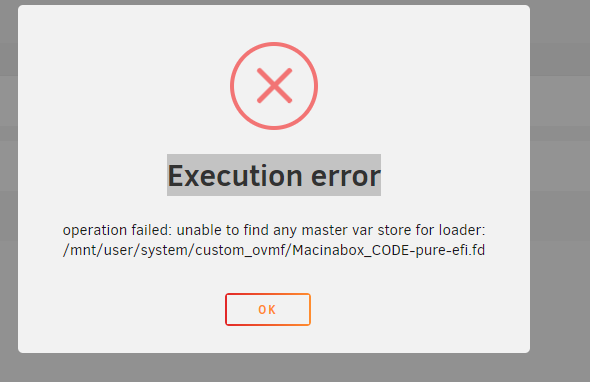
OK. So i have removed Macinabox, the macinabox appdata, deleted the docker template and so on and reinstalled. I no longer have method 1 and 2. So that looks consistent But i am still getting the error "operation failed: unable to find any master var store for loader: /mnt/user/system/custom_ovmf/Macinabox_CODE-pure-efi.fd". my XML has this in it <nvram>/mnt/user/system/custom_ovmf/Macinabox_VARS-pure-efi.fd</nvram> and the file referenced exists root@Tower:/mnt/user/system/custom_ovmf# ls -larth total 3.5M -rwxrwxrwx 1 root root 786 Dec 19 2020 readme.txt* -rwxrwxrwx 1 root root 3.5M Dec 19 2020 Macinabox_CODE-pure-efi.fd* -rwxrwxrwx 1 root root 6.1K Dec 19 2020 .DS_Store* drwxrwxrwx 1 nobody users 48 May 14 2021 ../ drwxrwxrwx 1 nobody root 90 Jan 26 16:17 ./ not sure where to go now...
-
There is where I am looking. In any case, i am almost sure that the media is downloading ok. High Sierra also throws up the same message " Execution error operation failed: unable to find any master var store for loader: /mnt/user/system/custom_ovmf/Macinabox_CODE-pure-efi.f " What is the "master var store"? Or should I attempt to completely remove MacInABox so that i can start again? And does anyone know precisely what that entails? I tried deleting a bunch of stuff but i suspect that has just got me into more mess.... 😒
-
I am having the same issue with Monterey, Big Sur, Catalina. I tried method 1 and method 2. I suppose I could try the other versions.
-
Hi, Firstly "good work" to SpaceInvaderOne. Secondly, I am wondering if anyone can help. I deleted my old Mac VM and now when I am try to run the VM for the first time I get the attached error: I suspect strongly I have b**gered something up, maybe I left half a macinabox lying around. I have tried deleting everything and reinstalling but still no luck. Any pointers? Thanks
-
I gave up and used the auto add directory method. It's not my preferred way but it works ok
-
Hi, I am also having issues setting this up with Privado (to be fair i've not tried with anyone else). I Cannot open the browser website i am getting this snippet 2020-03-01 11:22:33,111 DEBG 'start-script' stdout output: Sun Mar 1 11:22:33 2020 /usr/bin/ip addr add dev tun0 172.21.43.178/23 broadcast 172.21.43.255 2020-03-01 11:22:33,112 DEBG 'start-script' stdout output: Sun Mar 1 11:22:33 2020 /root/openvpnup.sh tun0 1500 1552 172.21.43.178 255.255.254.0 init 2020-03-01 11:22:33,114 DEBG 'start-script' stdout output: Sun Mar 1 11:22:33 2020 /usr/bin/ip route add 91.148.224.10/32 via 172.17.0.1 2020-03-01 11:22:33,116 DEBG 'start-script' stdout output: Sun Mar 1 11:22:33 2020 /usr/bin/ip route add 0.0.0.0/1 via 172.21.34.1 2020-03-01 11:22:33,116 DEBG 'start-script' stdout output: [debug] Waiting for valid IP address from tunnel... 2020-03-01 11:22:33,117 DEBG 'start-script' stdout output: Error: Nexthop has invalid gateway. 2020-03-01 11:22:33,117 DEBG 'start-script' stdout output: Sun Mar 1 11:22:33 2020 ERROR: Linux route add command failed: external program exited with error status: 2 Sun Mar 1 11:22:33 2020 /usr/bin/ip route add 128.0.0.0/1 via 172.21.34.1 2020-03-01 11:22:33,118 DEBG 'start-script' stdout output: Error: Nexthop has invalid gateway. 2020-03-01 11:22:33,118 DEBG 'start-script' stdout output: Sun Mar 1 11:22:33 2020 ERROR: Linux route add command failed: external program exited with error status: 2 Sun Mar 1 11:22:33 2020 Initialization Sequence Completed 2020-03-01 11:22:33,232 DEBG 'start-script' stdout output: [debug] Valid IP address from tunnel acquired '172.21.43.178' 2020-03-01 11:22:33,232 DEBG 'start-script' stdout output: [info] Application does not require port forwarding or VPN provider is != pia, skipping incoming port assignment 2020-03-01 11:22:33,233 DEBG 'start-script' stdout output: [info] Checking we can resolve name 'www.google.com' to address... 2020-03-01 11:22:33,237 DEBG 'start-script' stdout output: [debug] Having issues resolving name 'www.google.com', sleeping before retry... 2020-03-01 11:22:38,241 DEBG 'start-script' stdout output: [debug] Having issues resolving name 'www.google.com', sleeping before retry... and so on... Can anyone point me to anything obvious. I have read a lot of these 200+ pages but not all Thanks i attached more complete logs. binhex-delugevpn.rtf

