





WayneC1972
Members
-
Joined
-
Last visited
-
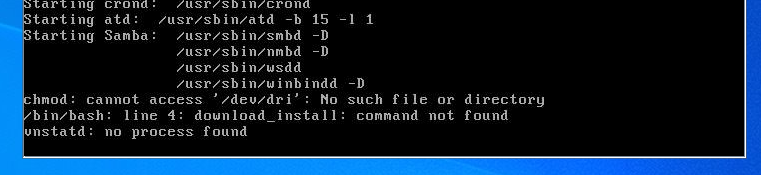
Rebooted UnRaid today and it stop loading with a chmod: cannot access '/dev/dri': No such file or directory. With the error in the image below. It will boot in safe mode when I disable plugins. Where should I begin, to figure out what plugin is causing the issue? unraid-diagnostics-20220222-1957.zip
-
Thank you. The link above provided me the information I needed.
-
I guess I'm using the wrong terminology. I have an array with two parity drives. I want to take one of the drives away from the parity mirror and move it into the array for additional storage.
-
When I built my Unraid server I used 5 x 8TB drives. 3 in the array 2 in the parity. I cant remember why but I probably in head had a good reason. It is possible to move one of the parity drives out of the parity pool, and add it to the array? I believe it is possible and shouldn't be to difficult, but I would greatly appreciate some guidance. Thanks in advance!
