





rykr
Members
-
Joined
-
Last visited
-
vault-diagnostics-20250402-1355.zipHere are the diags. Not sure it will show anything as it's rebuilding parity now.
-
what do you mean diagnostics? I pulled it out of its drive caddy thinking that the caddy might be the problem. So far it's working ok and a parity sync is happening. Once the parity sync finishes, I'm going to try it in a different slot in the caddy to see if that slot was the problem. Stay tuned!
-
got a parity drive that is disabled. I have 2 so still good so far. Looking at attributes the only line that is brown (highlighted) is UDMA CRC error count. This is normally a cable issue. So I power down, swap cables. Take the array offline and remove the drive. Start array, Then stop the array again and add the parity drive back in. It says it will erase all data on the drive which is expected. I start the array and that drive is immediately disabled again. Is there any additional deducing I can do to try and see what the problem is?
-
So how does br0 and br1 relate to host and bridge when picking a network for a docker container?

-
I have 3 NICs in my box and one of them is connected to a port on my switch that is hard linked to a given subnet. I see eth1 as a network when I do `docker network ls`. I also see a br1 listed even though I have no idea what that is or why it's there. What I assumed is that eth1 would get an ip address in my IOT subnet and I would use port forwarding when assigning docker containers to it. However, this doesn't seem to be working like I thought. What am I doing wrong?
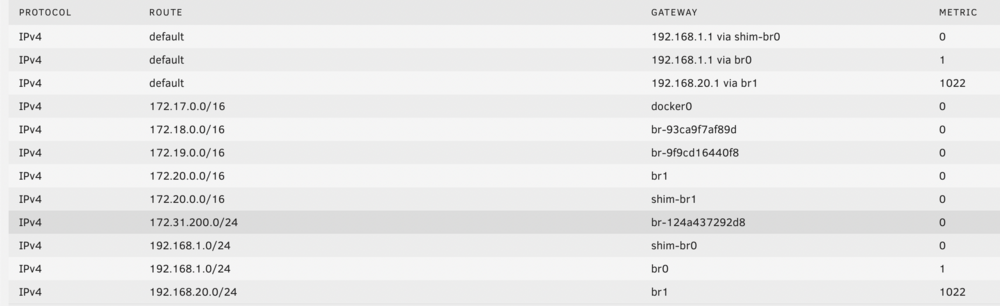
-
Have no idea what. could be causing this. Not much in the logs. Restarting helps for a few days. Still looking for clues
-
Here is sit looking at a dialog from installing an update to unassigned devices plugin. The last lines in the dialog say: plugin: unassigned.devices.plg updated Executing hook script: post_plugin_checks Is it done? who knows... Is it so hard to simply say 'do not close this window until it says installation done' and then print the line 'installation done' when it's done. Would save a lot of questions.
-
So recently I had an xfs drive that would not mount. I ran xfs_repair multiple times before I realized it kept dying because of OOM. I finally adjusted the options to the point that it ran to completion but now I have tons of files in lost+found. These are not backed up so I'm going to try and save what I can out of it. But I'm trying to understand how it is structured. All the files just have a numeric name. I'm assuming this is something like sector numbers. There are big chunks of files that have sequential numbers and all the files in these chunks are generally all the same size. I took one of the files and read it with the file command and it was a jpg. I copied it out to a new folder with a .jpg extension and it loaded up as an image. The thing I don't understand is that I can take the next file (same name as the first one but the number is +1) and it appears to be the _same_ image. So I'm trying to answer the following questions: 1. Can there be multiple files in a single file in lost+found (multiple files in a single sector) 2. why would two files in lost+found that appears to have come from two different sectors be actually the same file (in this case the same image) Any linux filesystem experts give me an insight into this? Thanks!
-
I have an SAS controller that currently has 4 SATA drives hanging off of it. They work well. As I replace drives I'm wondering if it makes sense to replace them with SAS drives. They seem to be faster, more doable, and cost a bit less. I'm seeing 14TB SAS seagate drives brand new for like $175. Would it make sense to go that route?
-
ok, dmesg shows me that xfs_repair is running out of memory going to try again with -m option
-
yeah, I just don't understand why it doesn't finish with either a success or error. could the xfs_repair program be being killed? I just ran it again like this: xfs_repair -vP /dev/md5p1 it produced this output: Phase 1 - find and verify superblock... - block cache size set to 1402128 entries Phase 2 - using internal log - zero log... zero_log: head block 2 tail block 2 - scan filesystem freespace and inode maps... clearing needsrepair flag and regenerating metadata badly aligned inobt rec (starting inode = 10879599959) ir_freecount/free mismatch, inode chunk 5/142181719, freecount 255 nfree 0 invalid inode count, inode chunk 5/142181719, count 255 ninodes 48 agi_count 34401952, counted 34402143 in ag 5 agi_freecount 68, counted 323 in ag 5 sb_icount 266868928, counted 267733823 sb_ifree 244, counted 505 sb_fdblocks 159628764, counted 167451433 - found root inode chunk Phase 3 - for each AG... - scan and clear agi unlinked lists... found inodes not in the inode allocation tree found inodes not in the inode allocation tree - process known inodes and perform inode discovery... - agno = 0 - agno = 1 - agno = 2 - agno = 3 no error, success, or nothing. just stops. I'm on 6.12.4 and I confirmed that 6.12.5 doesn't update the xfs progs
-
why is that? If I tell it to rebuild that drive from parity will it just rebuild it corrupted?
-
what about rebuilding the drive from parity? Would that be an option?
-
relocated sector count is 127 but extended self test completed without error. Safe to readd the drive as a second parity or should I replace it?
-
xfs_repair just keeps quitting. This is now 3 times it has run for *hours* and then finished with this: found inodes not in the inode allocation tree Phase 4 - check for duplicate blocks... - setting up duplicate extent list... - check for inodes claiming duplicate blocks... - agno = 0 - agno = 1 - agno = 2 when. I try to Brin the array back online it still says the drive has no recognizable filesystem. Seems like a bug that is causing xfs_repair to just quit. Trying to mount just gives this: mount: /tmp/mnt: mount(2) system call failed: Structure needs cleaning. dmesg(1) may have more information after failed mount system call.

