






Waddoo
Members
-
Joined
-
Last visited
Everything posted by Waddoo
-
To your second point, you are correct. I see a 1080 hevc file on Jellyfin. I tried a 1080p h.264 which played immediately via direct play. Then I stepped it down to 480p to force a transcode. Logs below. /videos/b7240195-c4ee-3bf6-34df-a0fd9a9b26a2/hls1/main/0.ts {"Protocol":0,"Id":"b7240195c4ee3bf634dfa0fd9a9b26a2","Path":"/movies/Madagascar 3 Europe\u0027s Most Wanted (2012)/Madagascar 3 Europe\u0027s Most Wanted 2012.mp4","EncoderPath":null,"EncoderProtocol":null,"Type":0,"Container":"mov,mp4,m4a,3gp,3g2,mj2","Size":1500115072,"Name":"Madagascar 3 Europe\u0027s Most Wanted 2012","IsRemote":false,"ETag":"a229bcd9db619f222c07d8d042d7666c","RunTimeTicks":56042668032,"ReadAtNativeFramerate":false,"IgnoreDts":false,"IgnoreIndex":false,"GenPtsInput":false,"SupportsTranscoding":true,"SupportsDirectStream":true,"SupportsDirectPlay":true,"IsInfiniteStream":false,"RequiresOpening":false,"OpenToken":null,"RequiresClosing":false,"LiveStreamId":null,"BufferMs":null,"RequiresLooping":false,"SupportsProbing":true,"VideoType":0,"IsoType":null,"Video3DFormat":null,"MediaStreams":[{"Codec":"h264","CodecTag":"avc1","Language":"und","ColorRange":null,"ColorSpace":null,"ColorTransfer":null,"ColorPrimaries":null,"Comment":null,"TimeBase":"1/96000","CodecTimeBase":"1001/48000","Title":null,"VideoRange":"SDR","localizedUndefined":null,"localizedDefault":null,"localizedForced":null,"DisplayTitle":"1080p H264 SDR","NalLengthSize":"0","IsInterlaced":false,"IsAVC":false,"ChannelLayout":null,"BitRate":2041604,"BitDepth":8,"RefFrames":1,"PacketLength":null,"Channels":null,"SampleRate":null,"IsDefault":true,"IsForced":false,"Height":1080,"Width":1920,"AverageFrameRate":23.976025,"RealFrameRate":23.976025,"Profile":"High","Type":1,"AspectRatio":"16:9","Index":0,"Score":null,"IsExternal":false,"DeliveryMethod":null,"DeliveryUrl":null,"IsExternalUrl":null,"IsTextSubtitleStream":false,"SupportsExternalStream":false,"Path":null,"PixelFormat":"yuv420p","Level":40,"IsAnamorphic":null},{"Codec":"aac","CodecTag":"mp4a","Language":"eng","ColorRange":null,"ColorSpace":null,"ColorTransfer":null,"ColorPrimaries":null,"Comment":null,"TimeBase":"1/48000","CodecTimeBase":"1/48000","Title":null,"VideoRange":null,"localizedUndefined":null,"localizedDefault":null,"localizedForced":null,"DisplayTitle":"Eng - AAC - Stereo - Default","NalLengthSize":null,"IsInterlaced":false,"IsAVC":null,"ChannelLayout":"stereo","BitRate":95777,"BitDepth":null,"RefFrames":null,"PacketLength":null,"Channels":2,"SampleRate":48000,"IsDefault":true,"IsForced":false,"Height":null,"Width":null,"AverageFrameRate":null,"RealFrameRate":null,"Profile":"LC","Type":0,"AspectRatio":null,"Index":1,"Score":null,"IsExternal":false,"DeliveryMethod":null,"DeliveryUrl":null,"IsExternalUrl":null,"IsTextSubtitleStream":false,"SupportsExternalStream":false,"Path":null,"PixelFormat":null,"Level":0,"IsAnamorphic":null},{"Codec":"srt","CodecTag":null,"Language":null,"ColorRange":null,"ColorSpace":null,"ColorTransfer":null,"ColorPrimaries":null,"Comment":null,"TimeBase":null,"CodecTimeBase":null,"Title":null,"VideoRange":null,"localizedUndefined":"Undefined","localizedDefault":"Default","localizedForced":"Forced","DisplayTitle":"Undefined","NalLengthSize":null,"IsInterlaced":false,"IsAVC":null,"ChannelLayout":null,"BitRate":null,"BitDepth":null,"RefFrames":null,"PacketLength":null,"Channels":null,"SampleRate":null,"IsDefault":false,"IsForced":false,"Height":null,"Width":null,"AverageFrameRate":null,"RealFrameRate":null,"Profile":null,"Type":2,"AspectRatio":null,"Index":2,"Score":null,"IsExternal":true,"DeliveryMethod":null,"DeliveryUrl":null,"IsExternalUrl":null,"IsTextSubtitleStream":true,"SupportsExternalStream":true,"Path":"/movies/Madagascar 3 Europe\u0027s Most Wanted (2012)/Madagascar 3 Europe\u0027s Most Wanted 2012.srt","PixelFormat":null,"Level":null,"IsAnamorphic":null}],"MediaAttachments":[],"Formats":[],"Bitrate":2141389,"Timestamp":null,"RequiredHttpHeaders":{},"TranscodingUrl":null,"TranscodingSubProtocol":null,"TranscodingContainer":null,"AnalyzeDurationMs":null,"DefaultAudioStreamIndex":null,"DefaultSubtitleStreamIndex":null} /usr/lib/jellyfin-ffmpeg/ffmpeg -hwaccel cuda -hwaccel_output_format cuda -i file:"/movies/Madagascar 3 Europe's Most Wanted (2012)/Madagascar 3 Europe's Most Wanted 2012.mp4" -map_metadata -1 -map_chapters -1 -threads 0 -map 0:0 -map 0:1 -map -0:s -codec:v:0 h264_nvenc -preset default -b:v 1404223 -maxrate 1404223 -bufsize 2808446 -profile:v:0 high -g:v:0 72 -keyint_min:v:0 72 -sc_threshold:v:0 0 -vf "scale_cuda=w=720:h=404:format=nv12" -start_at_zero -vsync -1 -codec:a:0 copy -strict -2 -copyts -avoid_negative_ts disabled -max_muxing_queue_size 2048 -f hls -max_delay 5000000 -hls_time 3 -hls_segment_type mpegts -start_number 0 -hls_segment_filename "/config/transcodes/f78199c876ce294d22bb49441e70d6e4%d.ts" -hls_playlist_type vod -hls_list_size 0 -y "/config/transcodes/f78199c876ce294d22bb49441e70d6e4.m3u8" ffmpeg version 4.3.1-Jellyfin Copyright (c) 2000-2020 the FFmpeg developers built with gcc 10 (Debian 10.2.1-6) configuration: --prefix=/usr/lib/jellyfin-ffmpeg --target-os=linux --extra-version=Jellyfin --disable-doc --disable-ffplay --disable-shared --disable-libxcb --disable-sdl2 --disable-xlib --enable-gpl --enable-version3 --enable-static --enable-libfontconfig --enable-fontconfig --enable-gmp --enable-gnutls --enable-libass --enable-libbluray --enable-libdrm --enable-libfreetype --enable-libfribidi --enable-libmp3lame --enable-libopus --enable-libtheora --enable-libvorbis --enable-libdav1d --enable-libwebp --enable-libvpx --enable-libx264 --enable-libx265 --enable-libzvbi --enable-libzimg --arch=amd64 --enable-opencl --enable-vaapi --enable-amf --enable-libmfx --enable-vdpau --enable-cuda --enable-cuda-llvm --enable-cuvid --enable-nvenc --enable-nvdec --enable-ffnvcodec libavutil 56. 51.100 / 56. 51.100 libavcodec 58. 91.100 / 58. 91.100 libavformat 58. 45.100 / 58. 45.100 libavdevice 58. 10.100 / 58. 10.100 libavfilter 7. 85.100 / 7. 85.100 libswscale 5. 7.100 / 5. 7.100 libswresample 3. 7.100 / 3. 7.100 libpostproc 55. 7.100 / 55. 7.100 Input #0, mov,mp4,m4a,3gp,3g2,mj2, from 'file:/movies/Madagascar 3 Europe's Most Wanted (2012)/Madagascar 3 Europe's Most Wanted 2012.mp4': Metadata: major_brand : isom minor_version : 1 compatible_brands: isomavc1 creation_time : 2012-10-05T06:13:29.000000Z Duration: 01:33:24.27, start: 0.000000, bitrate: 2141 kb/s Stream #0:0(und): Video: h264 (High) (avc1 / 0x31637661), yuv420p, 1920x1080 [SAR 1:1 DAR 16:9], 2041 kb/s, 23.98 fps, 23.98 tbr, 96k tbn, 47.95 tbc (default) Metadata: creation_time : 2012-10-05T06:13:29.000000Z Stream #0:1(eng): Audio: aac (LC) (mp4a / 0x6134706D), 48000 Hz, stereo, fltp, 95 kb/s (default) Metadata: creation_time : 2012-10-05T06:27:46.000000Z handler_name : GPAC ISO Audio Handler [AVHWDeviceContext @ 0x55afd095ba80] cu->cuInit(0) failed -> CUDA_ERROR_UNKNOWN: unknown error Device creation failed: -1313558101. [h264 @ 0x55afd095e680] No device available for decoder: device type cuda needed for codec h264. Stream mapping: Stream #0:0 -> #0:0 (h264 (native) -> h264 (h264_nvenc)) Stream #0:1 -> #0:1 (copy) Device setup failed for decoder on input stream #0:0 : Unknown error occurred
-
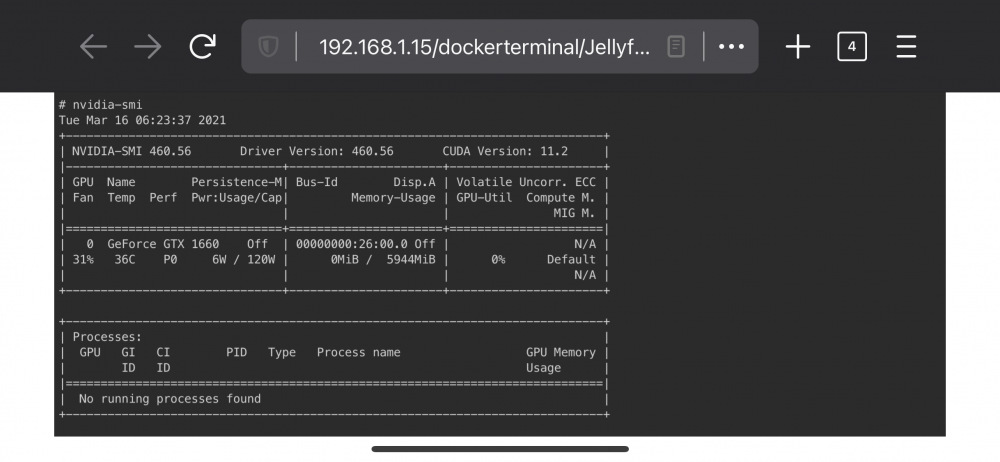
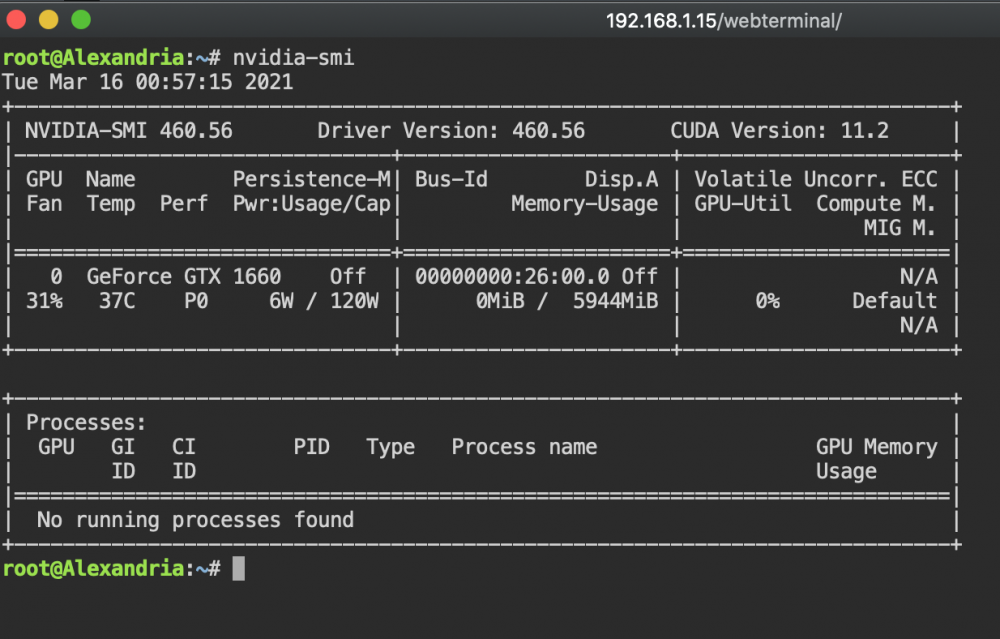
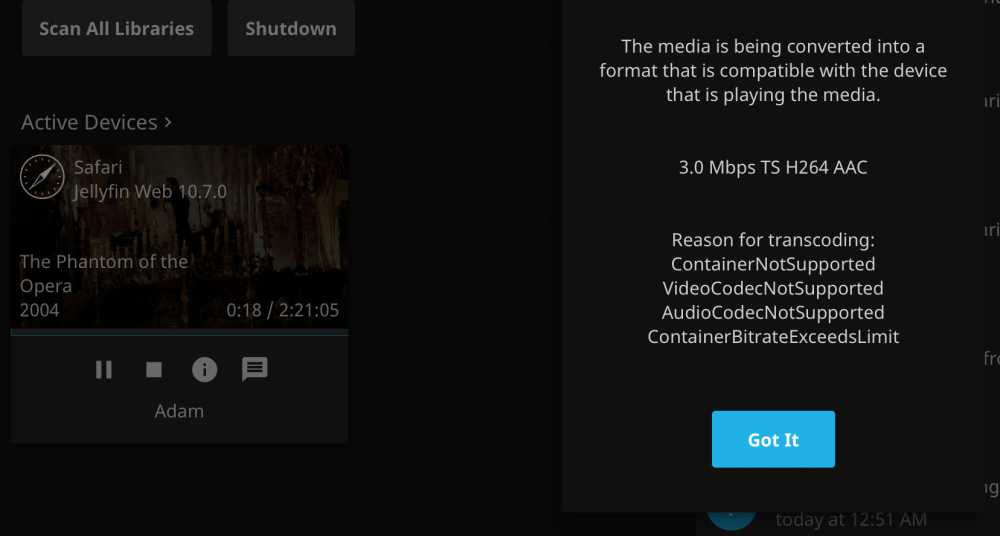
See my docker command from my previous post, shows all the parameters on startup. I have added a photo of the Jellyfin console and nvidia-Smi result. log.log above is the ffmpeg log from a restarted docker to grab the docker command. Would you consider scheduling a time to do a screen share and that way see the Docker image on the fly?
-
If only it were easy as a missing parameter. Yes, I did remember to add —runtime=nvidia. Separated by a space next to the restart statement like in your image. I could give the entire server a reboot but not sure why the docker is t getting the gpu passed. if I typed the nvidia gpu ID incorrectly, wouldn’t the docker not boot? root@localhost:# /usr/local/emhttp/plugins/dynamix.docker.manager/scripts/docker create --name='Jellyfin-AMD-Intel-Nvidia' --net='bridge' -e TZ="America/Chicago" -e HOST_OS="Unraid" -e 'NVIDIA_VISIBLE_DEVICES'='GPU-201c0321-0f64-c185-4e78-ded96ed40231' -e 'NVIDIA_DRIVER_CAPABILITIES'='all' -p '8096:8096/tcp' -p '8920:8920/tcp' -v '/mnt/user/appdata/Jellyfin-AMD-Intel-Nvidia':'/config':'rw' -v '/mnt/user/Entertainment/Movies/':'/movies':'rw' -v '/mnt/user/Entertainment/TV Shows/':'/tv':'rw' -v '/mnt/user/Entertainment/Music/':'/music':'rw' -v '/mnt/user/JellyFin_Cache/':'/cache':'rw' --restart=unless-stopped --runtime=nvidia 'ich777/jellyfin' 16c5f50a532e94b845cdfdb57e499aadc775f10a5e0a23650adc64bb9779173b The command finished successfully!
-
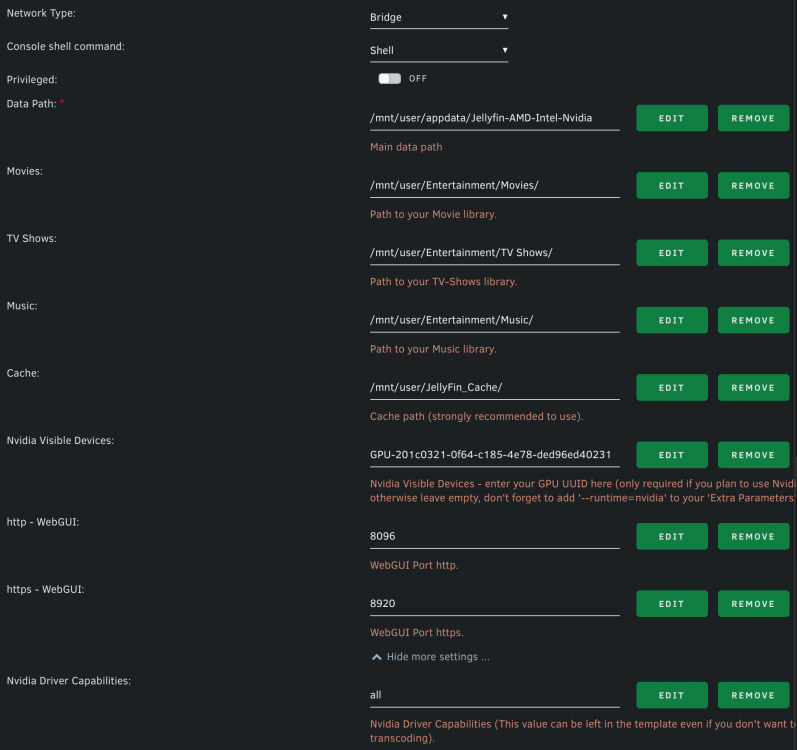
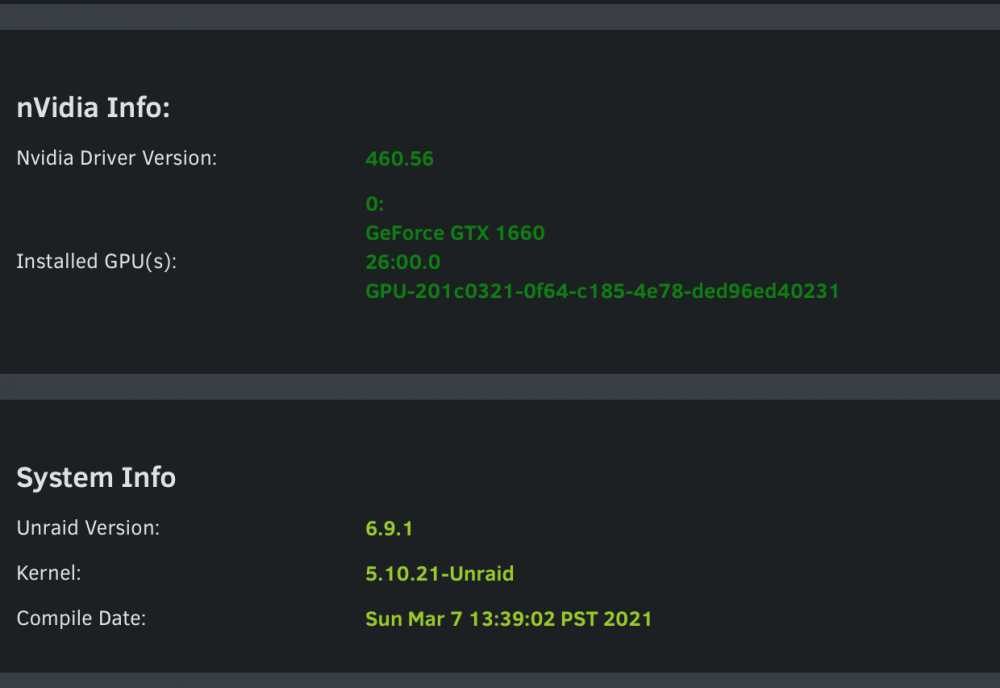
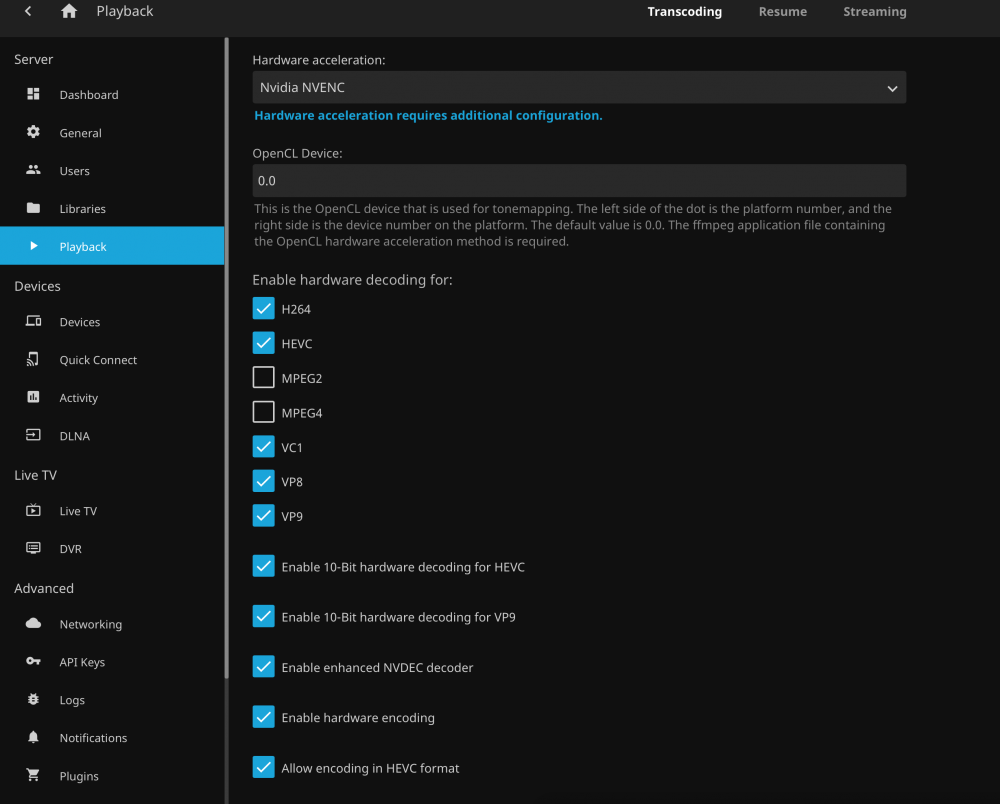
@ich777 I have setup the docker with the images below, let me know what you think is my next best step forward. I did remove the /dev/dri since it read to remove it but apart from that I think my settings are matching yours. I tried it with that checked and without, same result of the JellyFin session recognizing it needs transcode but video is frozen. I have included as many screenshots as I can showing what I see. I have also included a log file of a 1080p video that has the same fate as the 4K HEVC SDR. Sitting frozen with the timeline moving both on my player and dashboard, but no video/audio and no transcode process running. Log.txt
-
I will link my original Reddit post here ( In short, my nvidia GTX 1660 is not being used for hardware transcodes citing a [hevc @ 0x55ec83325180] No device available for decoder: device type cuda needed for codec hevc. Here is a snippet of logs I captured.. The 4K HEVC SDR movie transcode log has the following: [matroska,webm @ 0x55ec830e1180] Could not find codec parameters for stream 4 (Subtitle: hdmv_pgs_subtitle (pgssub)): unspecified size Consider increasing the value for the 'analyzeduration' and 'probesize' options [AVHWDeviceContext @ 0x55ec837f1800] cu->cuInit(0) failed -> CUDA_ERROR_UNKNOWN: unknown error Device creation failed: -1313558101. [hevc @ 0x55ec83325180] No device available for decoder: device type cuda needed for codec hevc. Stream mapping: Stream #0:0 -> #0:0 (hevc (native) -> h264 (h264_nvenc)) Stream #0:1 -> #0:1 (copy) Device setup failed for decoder on input stream #0:0 : Unknown error occurred The 4K HEVC HDR Movie transcode log as the following: [AVHWDeviceContext @ 0x5625c1e2e880] cu->cuInit(0) failed -> CUDA_ERROR_UNKNOWN: unknown error Device creation failed: -1313558101. [hevc @ 0x5625c1e2ff40] No device available for decoder: device type cuda needed for codec hevc. Stream mapping: Stream #0:0 -> #0:0 (hevc (native) -> h264 (h264_nvenc)) Stream #0:1 -> #0:1 (eac3 (native) -> aac (native)) Device setup failed for decoder on input stream #0:0 : Unknown error occurred Previous transcode logs showed the following: [AVHWDeviceContext @ 0x55b64d1ac1c0] Failed to get number of OpenCL platforms: -1001. Device creation failed: -19. Failed to set value 'opencl=ocl:0.0' for option 'init_hw_device': No such device Error parsing global options: No such device Any ideas of what could be my problem? I have the nvidia drivers installed, I can see my GPU on the dashboard and its activity, I have restarted and gotten a fresh JellyFin download, nvidia-smi returns my gtx.
-
Go to page one of this thread. No-IP requires interactive setup.
-
I would recommend DuckDNS over No-Ip. I thought No-Ip was my only option as it was the only choice for my router. It seemed too complicated to have it update via additional scripts than to just automate.
-
I actually have gotten my onlyoffice instance working, apologies for net getting sooner my email client was not getting notifications. Within NginxProxyManager I setup a duckdns entry named SOMETHINGoffice.duckdns.org and forwarded the port to Host Port 1 on my onlyoffice docker image. Within NginxProxyManager I set the scheme to be http however setting all the SSL requirements to enabled and no advanced options. Finally within nextcloud I set my onlyoffice to go to https://SOMETHINGoffice.duckdns.org and that has gotten my instance to work. Make sure with every change you restart nginx proxy manager, nextcloud, and onlyoffice.
-
I think I have set it up correctly however I am getting a 502 error when trying to connect to my OnlyOfficeDocServer when using the newly created subdomain. OnlyOffice https is set to be port 4430 and in nginxproxymanager I have my office.duckdns.org domain pointed to https://local_IP:4430 . NginxProxyManager reads online however otherwise a 502 error.
-
I am unsure if anyone else has this issue and I am happy to provide any logs that would help diagnose my issue. However the No-IP docker is not auto-starting as it should be after my unraid server is restarted from the dashboard. I have to manually trigger the auto-start. Please let me know if there is a fix for this.


