





Squid
Administrators
-
Joined
-
Last visited
Everything posted by Squid
-
Just as an update, For 2 hours starting at 9AM EST CA didn't work. Kudos to @EDACerton for recognizing the issue and fixing the problematic template. I didn't catch this at the time because I was working on CA's code until ~3am and when I woke up the problem was already resolved. Just responding now because during the investigation of why did this happen and how to prevent it going forward in the backend I found bug that this outage triggered that was classified under "Drop everything and fix this immediately" since technically the outage should have been impossible and the code did catch everything from 5:37PM 9/18 until 9A today when the circumstances changed and at that point even though CA went down, it still shouldn't have happened. That issue has now been very much closed. In other news, CA has performance issues when Connect is installed. This performance problem is also a very high priority. I believe that Connect will soon have an update (if it hasn't already) that will fix this problem, but CA itself will also have an update either tonight or tomorrow that will also resolve it. Part of the problem with the performance when Connect was installed is that it was also hit and miss as to whether the user would be affected, and if they were affected then the performance might be perfect one day, and in the toilet the next. (For myself, running 7.2 internal betas, I'd only see it after an initial OS update for a day and it would then disappear completely) Another part of CA's next release is another performance optimization which is completely unrelated to the Connect issue (and was coded prior to that happening) which results in CA's searching / browsing feeling like its ~2x faster than before. There's also further improvements to the "home" page which were implemented for the Connect problem, but have the added bonus of making Home better for everybody, especially mobile users regardless of the OS version they are running. Further revamps for performance are coming, but the current ones are sufficient to get CA back running normally when Connect is installed so this is a priority release. The remainder can wait for a bit. There's also a big fix to how searches work and preventing authors / maintainers from being able to "game" searches for better visibility of their apps. Skinning improvements and more. And while I'm not going to specify what the road map is on CA, I'm extremely excited for what we have planned and are starting to make the necessary infrastructure changes in CA so that they can be supported. A number of items that were in my "this would be great, but its actually a pipe dream and not feasible or not even possible" have now been moved to the planning / pre-development stage". Long road ahead, but I think a year from now (sooner for some other items) you'll be shocked at just what CA will have in its feature set. Either way, kudos to @EDACerton - buy him a beer if he drinks, and if he doesn't then as the old adage goes "you can't trust anyone who doesn't drink". And if you have performance issues with CA, look for the update tonight / tomorrow.
-
Working on the Dynamix problem
-
Working on the problem re Dynamix
-
Yeah. GitHub did a certificate change yesterday which originally resulted in the feed refusing to validate any of the Dynamix series of plugins. That didn't result in any blacklisting as the feed knew something was weird and aborted. Fixed that, but now some of them are getting blacklisted while others are making it through
-
I'll add it to the list. Won't be for a bit though, and initially at least I think it would be simply a way to manually edit / add to the smb config instead of a GUI per se.
-
Reason why they'd be in the folder picker is because they exist within /mnt/remotes/ Change all the references on your containers and then reboot
-
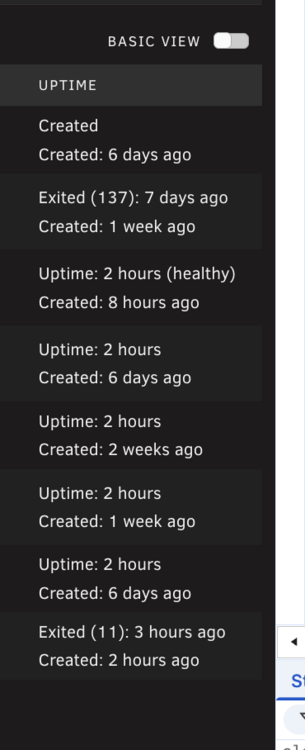
You have to bear in mind that running stuff via the plugin doesn't exactly run it in a shell. Rather it's all ultimately executed from within a PHP script, so there are slight differences including what you already noticed where not all the PATHS are definedCan't you just look at the uptime? If the container is actually starting over and over again, then the uptime will reflect that
 Check each of your docker containers. Odds are that one of them is referencing /mnt/user/data for it's container path of /config. That info isn't within diagnostics due to privacy concernsSep 9 16:24:37 Tower kernel: RTL8226B_RTL8221B 2.5Gbps PHY r8169-0-400:00: Downshift occurred from negotiated speed 1Gbps to actual speed 100Mbps, check cabling! Sep 9 16:24:37 Tower kernel: r8169 0000:04:00.0 eth0: Link is Up - 100Mbps/Full (downshifted) - flow control rx/tx This keeps happening and nginx is getting confused because of it (port already in use). Change the cabling or at least reseat it at both the server and switch / router (and power cycling is also a good idea for server and router/switch)Do you have Unassigned Devices Preclear installed? Try uninstalling that and see if it makes a difference.Also, by Does this mean that the dashboard was still actually visible on the screen, but you were on a different window for that time, or was it not visible at all? The dashboard itself, not the tab on the browser if that makes sense.This shouldn't fix it, but can you try deleting this file from the flash drive and then reloading all of the tabs open to the dashboard. /config/dashboard_settings.jsonand also from the command line, rm /var/tmp/charts_data.tmpIf they're showing as 3rd party, then its because the template within /config/plugins/dockerMan/templates-user doesn't exist. Was this ever deleted by you, or how did you install the container? Manually via the command line and a docker run command? 3rd Party means that management of the container (editing, autostarting etc) is handled by the 3rd party that created it. Even prior to 7.0, without the template you couldn't Edit the container even though the option showed up there.Quite likely that PR won't get merged due to the conflicts. Hopefully a new one will get issued at some point.If HA is trying to get smart status or temperature of the drives, then that does cause the drives to spin up. Maybe adjust HA and the integration to not query spun down drivesAll storage devices have extra sectors that they will use to automatically reallocate a sector that no longer works correctly. If it keeps increasing, or gets above your comfort level then replace it. But the threshold isn't even close to being hit yet.Not CA related. What OS version? TBH, I wouldn't expect a fix as I only republished as the author was MIA and it needed an update for 7.1, but 7.2+ its completely incompatible and will not be adjusted for that and somebody else will need to create something that will work -> I just don't have the time ;)Look like its something related to the nvidia driver. I'd try uninstalling the nvidia plugin and reinstalling. If it still fails, ask in the nvidia plugin support threadCan you also attach your diagnosticsWhy is Array Operations a snowflake?
 You need to submit the repository via this form: https://ca.unraid.net/submitIn a nutshell. Binhex's ru torrent container is no longer within Apps. Deprecated or not, it would still appear within installed / previously installed if there was a template on the system for it (this is outside of CA). Deprecation of a container if it's still within Apps only prevents new installations of it occurring (without going into CA's settings), not reinstalls of it. Since it's not within /config/plugins/dockerMan/templates-user, there's not much I can do about that since it's no longer present at all within the feed. There is another one listed, but you'd have to disable "Hide Deprecated Apps" within CA's settings as it's also deprecated.




