





Squid
Administrators
-
Joined
-
Last visited
Everything posted by Squid
-
Thats a feature not a bug :)
-
In a nutshell yes -> on the server itself (IP address of the container is the server's IP address). Differs from bridge in that while in both cases the IP is that of the server, bridge only allows access to the ports you specify and allows them to be mapped to different ports internal to the container ipvlan / macvlan - Basically the same as Host in that the container has access to every port except that the container is on it's own separate IP address instead of being the server's.
-
Its a side effect of how the browser renders the installation progress. Opening another browser (not another tab but another browser) will allow you access to the GUI while the original browser is still stuck downloading. This will certainly change after 7.2. FWIW, updating via Action Centre within Apps does not tie up the browser and prevent another tab on same browser from interacting with the UI. But, if this is only with specific containers as what it appeared to be from previous posts, the problem would be on dockerHub's end. But, you can always try rebooting the modem / router and the server to see if there's any change.
-
Thanks @bmartino1 Already replied in the bug report, and probably that is the best place to continue it
-
GitHubGitHub - unraid/fix.common.problemsContribute to unraid/fix.common.problems development by creating an account on GitHub. Because of how wordy it is it's never been revamped to be translation compliant within the OS. But, that'll probably happen post 7.2.0 in time for 7.3
-
Scroll over. The menu bar has a scroll bar underneath it
-
Probably, but not going to be on my priority todo list. Remind me in a couple months.
-
What all that shows is that after 30 seconds it stopped the download from the primary server, and switched to the secondary server with no timeout (and the download is still ongoing). FWIW, this is a 19M file. After 30 seconds, it managed to grab 2.8M. You're not on dial up are you?
-
What browser? CA's development is done entirely with Chrome, and off and on testing with Safari, Firefox, and if I think about it Brave.
-
This was fixed on the update the other day. Slipped through because it didn't happen unless the font size was set to something other than "normal" on 7.1 and earlier and didn't manifest itself at all on 7.2
-
Can you post your diagnostics
-
Hard to tell from the pics, but you need to use root as the username. But, can you boot into safe mode? If so, you really should get rid of NerdPack/NerdTools -> it's incompatible. Delete /config/plugins/NerdTools.plg and /config/extra/all the files in here from the flash drive
-
Have you set up the sharing in UD's settings? Without specifying a user for private, that message will appear.
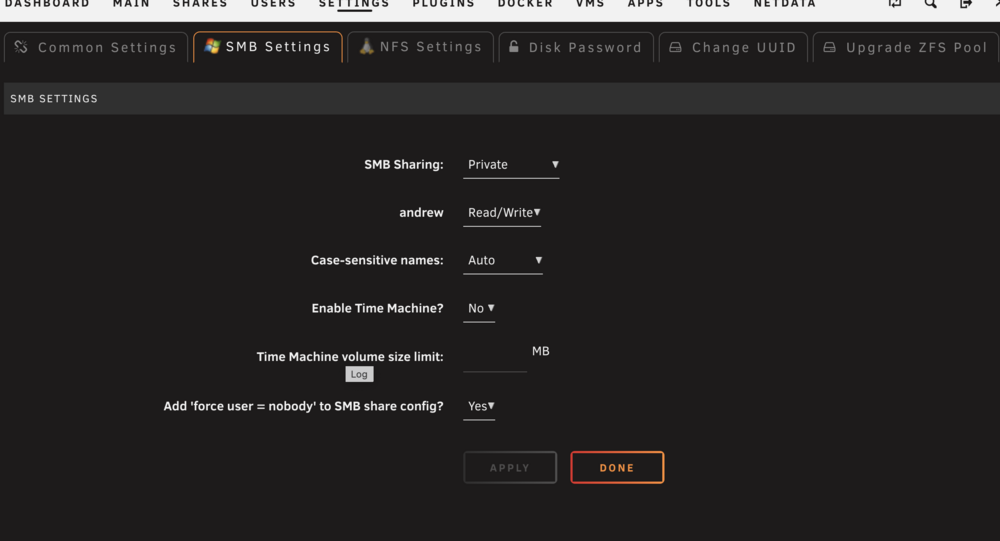
-
Do you have other containers installed? No ill effects on them? Basically zero reason why a container would ever "disappear" without somebody removing it (or a script or something like backup/restore plugin) is killing it, but I doubt that. If it happens again, reinstall from Apps - Previous Apps and don't change anything on the template. Does that come with an error?
-
You need to use the form. https://ca.unraid.net/submit
-
Can you update Unraid Connect. If doing that doesn't make a difference, do any other browsers work? Does it work if you go into incognito mode ?
-
From the console ( ) can you enter in /etc/rc.d/rc.nginx restart does that make a difference?

-
Can you post your diagnostics when this happens next. And a screenshot of the settings for the UPS / Nut
-
Language installations should be working now.
-
Thanks.. Actually, no language can be installed... I should be able to fix in the back end.
-
Can you also send the diagnostics from Tools - diagostics
-
Can you create a new thread in General Support and include your diagnostics if this is still an issue
-
Can you go to Tools, PHP Settings and set it to "All Categories". Do NOT check off display on screen. Then go back to Apps. If it fails, send a new set of CA's logging and also your diagnostics. Something is really weird on your system. CA's memory usage dropped from 79Meg (about the average) to 1.5Meg (basically impossible since the templates were there).
-
Give the server static addresses for DNS servers (Settings - Network Settings). Try 208.67.222.222 and 208.67.220.220 Most ISP's DNS servers suck (not the word I'd generally use, but decorum dictates its use)
-
Can you send me a PM with a link to where that is?



