Gremlin345
Members
-
Joined
-
Last visited
-
At the end the problem was the disk. As soon as I replaced it with a new disk everything run smoothly. Than you again for the help!!
-
Thanks for the help, I'll swap both cables with another disk tomorrow and I'll see what happens...
-
The disk had no data in it and what I want is just do have it back in the array. I've replaced the SATA cable and port but nothing changed. The disk was working fine til yesterday.
-
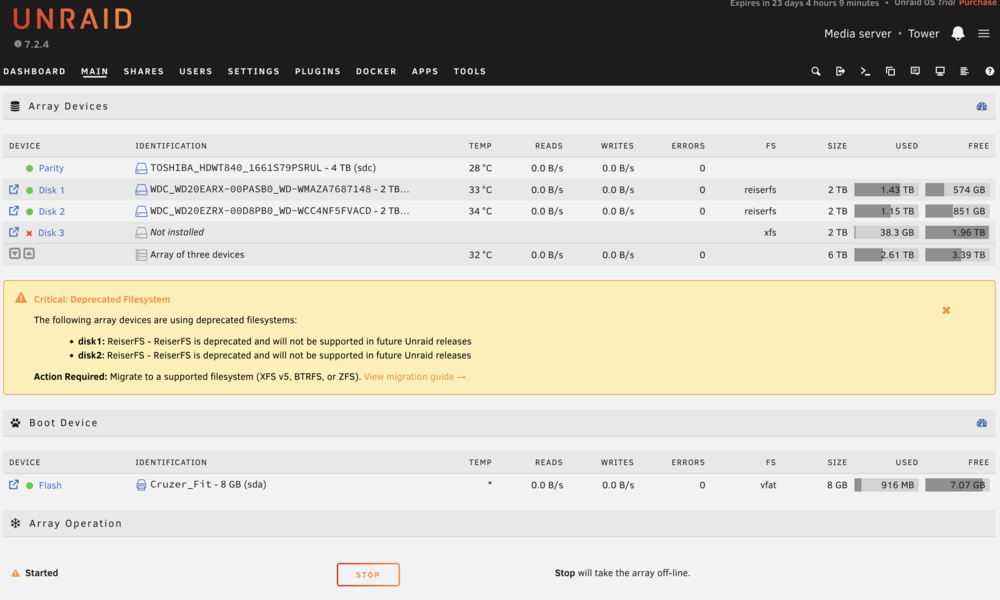
Good morning, After a reboot a previously assigned disk became unmounted. The disk was empty and the system was showing a "Format unmounted disc" button, that I used in order to mount the disk. After that the disk became "not installed" and it doesn't exist in the array nor in unassigned devices list. I've tried swapping SATA cables with no luck. Is there any way to make the disk available in the system again? Any help would be greatly appreciated! tower-syslog-20260331-0825.zip