





dglb99
Members
-
Joined
-
Last visited
-
I had a feeling. The errors did follow the drive when I swapped places with another disk. I’ll plan to replace the drive soon. First disk failure I’ve ever had and it feels a little underwhelming since there is no SMART errors haha.
-
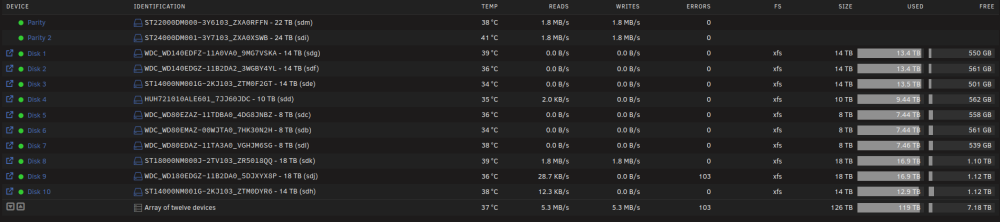
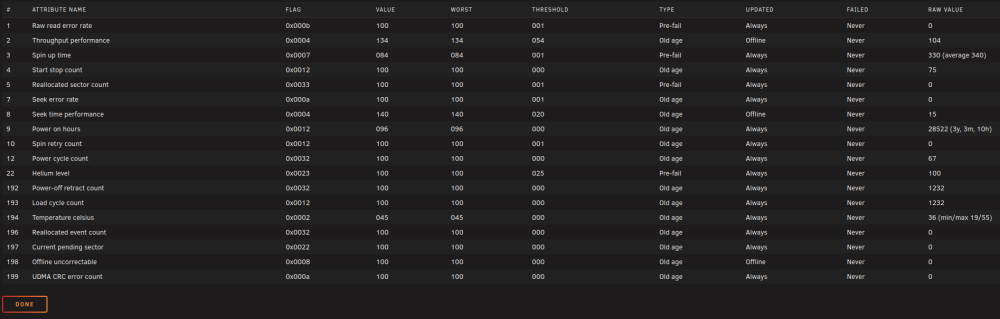
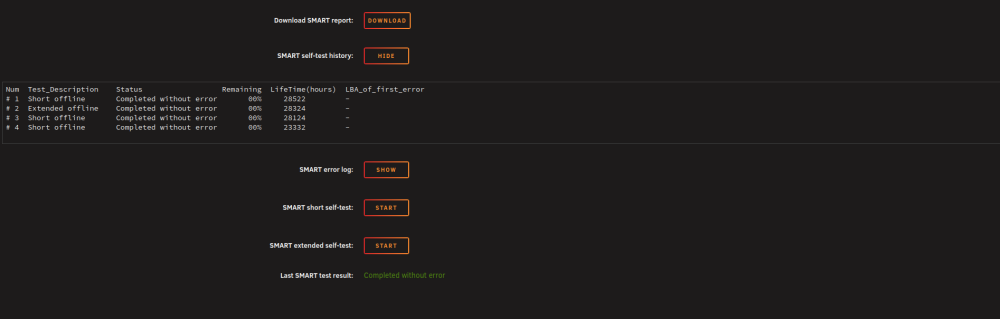
I have one disk on my server (disk 9) that keeps getting errors logged. The errors reset back to zero after a server restart but they come back after a few days. I've checked the SMART data (numerous times now) and there is nothing out of the ordinary. No reallocated sectors, pending sectors, or UDMA CRC error counts. I've swapped the disk position with another disk and the errors have stayed with the disk effectively ruling out any cabling issues. Included is my servers diagnostics. Is it possible for a disk to fail with zero SMART errors/indication of an issue? unraid-diagnostics-20260817-1150.zip
-
To be honest I wouldn’t know how to check, but I had no problems with the VM kernel on 7.3, just the gpu pass through
-
I downgraded to 7.2.5 and the VM booted right up with the b570 passed through. Was never able to figure out the problem unfortunately.
-
I finally figured out how to dump the vbios on the intel arc card. GPU-Z can't do it so it took some work in Linux. Attached the vbios to the GPU in the VM settings and the same thing happened. I did confirm my VM is still okay. I can remove the gpu and add the virtual VNC card and still boot the VM correctly. Posting my server diagnostics unraid-diagnostics-20260516-1005.zip
-
I don't really know how this is possible, but after upgrading to 7.3 my main linux VM won't show a gpu output. I get the splash screen during startup, and I can even enter the VMs bios settings, but as soon as it tries to boot the screen goes black and never changes. I'm passing through an Intel Arc B570. I've tried changing the frame buffer parameters and VFIO unsafe interrupts without success. Unfortunately I already converted to internal boot so I can't easily downgrade versions too. Anybody else experience something similar with their VMs? I haven't been able to attach the gpu vbios rom successfully, but I never needed it before so I don't see why I would need to now.
-
If it makes you feel any better someone opened an issue last week about requiring the memcached container and having to edit the seahub_settings.py file as well for it to start. https://github.com/chirmstream/unraid-templates/issues/12
-
@MowMdown, you're right about the template admin email not being respected. Looks like they changed the docker environment variables for the initial email and password. I've updated the template to the correct variables. This should fix the issue you've been having @tomkenobi. I wasn't having any issues with memcached on the fresh install I was testing with. My seahub_settings.py look like your first entry, as does my main server now running version 12. Both were not using memcached so I'm not sure what's going on there.
-
Can you confirm you're trying to login to the admin account? I've noticed, if I type the credentials incorrectly for the admin login it won't say "wrong username/password" or something to that affect and instead redirect me to a blank error page. Confirm you're using the correct login credentials and if it's still not working since this was a test install I'd nuke it all and start fresh. Since you're template(s) are setup correctly it should go quickly. Shutdown seafile and seafile-mariadb docker containers. Delete the appdata folder for mariadb (/mnt/user/appdata/seafile-mariadb for example). Delete the seafile data folder (/mnt/user/seafile for example). Delete the seafile template, and check 'yes' for removing the container image. This way we will pull a fresh container image that we know has not been changed. Restart your mariadb container. From the community app store, under previous apps reinstall seafile. It will still have all of the forms you filled out earlier (database root password, admin email, etc.) so you shouldn't need to touch anything.
-
I'm glad you found my note regarding the database setup. I've found its much easier to only define the container root password and pass that along to Seafile. Seafile is smart enough to setup all the database tables and everything on it's own. I've considered make a mariadb template just for Seafile so that people don't mistakenly fill that stuff out and then give up when it doesn't work, but I think it is 'iffy' on how well that would adhere to the community app store ethos. They don't want people making a bunch of templates that use the same container. When you search mariadb there are already a few options so I'm hesitant to add more. From your logs Seafile is working and configured correctly. What is your reverse proxy setup? Can you access seafile over LAN (192.168.xx.xx:8082)? Double check that your reverse proxy is pointing to the correct port for Seafile (8082 from your logs, template screenshot showed 8081). Once you get to the webui if If you're having problems uploading files you may need to change "SEAFILE_SERVER_PROTOCOL" to http. My Seafile server is behind NGINX Proxy Manager with Lets Encrypt SSL certificates generated by the proxy manager. I had issues uploading files until I set "SEAFILE_SERVER_PROTOCOL" to https. I made that the default setting for the template because I believe this is how most people will setup their server, but if yours is different you might have to change it.
-
v12 did change the environment variables. Only the "JWT_PRIVATE_KEY" variable should be the new required one. The way the error message was worded I thought (and I believe many overs did as well) that it was actually doing a filesystem check for the .ENV file. Turns out that is not the case though, and passing it through using the unraid template works fine. As far as removing the "beta" status, when I move my production server to version 12 and have no issues, or hear back from some other people that it is working fine for them I'll remove it. Even though the server started, I have not tested it behind my reverse proxy yet, mobile app access, etc. Hope that clears some questions up for you.
-
Not something I can add to the template for a variety of reasons unfortunately. Seafile will detect that you’ve pulled a different version docker image and run the update scripts automatically. It’s pretty good about that in my experience. If you pull the latest version 12 docker image without changing anything else in your template it won’t work. You need to pass through a JWT secret key. you can either add it to your existing template or use the new one and fill out type previously used variables (location, password, etc.) I’d recommend setting up a test environment to try it on first before updating your actual seafile server. I haven’t updated my primary server yet, but each time I’ve setup a new version 12 instance or updated a new 11 instance to 12 it seemed to start fine.
-
@explosionhole and @tomkenobi I was able to get seafile 12 running last night. You should see a new template in the app store now. I have it marked as Beta though since I have not upgraded my main seafile instance yet, and fully tested version 12 for myself. There may be config issues you have to resolve in your ``seafile.conf`` and ``seahub_settings.py`` but I'm not sure.
-
I have tried it. Seafile will fail to start. Logs will say something to the effect of, "cannot find .env file". If you ever go through the Seafile documentation, you'll see all their docker instructions are for docker compose only. I tried briefly, but was not able to pass through a .env file using an unRAID template, which utilizes docker run. In theory docker compose and docker run can do the same thing, but I don't have enough experience to know how to translate one from the other very well. Versions 11 and lower did not require a .env file. That change was introduced in version 12.
-
I have not tested if you can jump from the old docker image used on Fantucie's template to one of the newer images on my templates. I would recommend starting from a fresh install, but if you have a lot of data, manually changing the repository to go up one major version at a time is how I would do it. Here is where I try to keep all my Seafile notes/steps to install and maintain if you're having issues. Version 12 had a lot of changes made, and we cannot simply change the tag from ``11`` to ``12``. I have not had the time to figure out the best way to install version 12 and update the template yet. If anyone does get it running, let me know, I'm happy to update the template.


