





French-Guy
Members
-
Joined
-
Last visited
Everything posted by French-Guy
-
Hello I have a Ryzen 5 1600 CPU that I don't use anymore I was thinking to upgrade my very old Athlon XII 250 that I use on my Vanilla server (works just fine though) is there any specific AM4 motherboard I should look for, or at least a specific chipset I should avoid? Thanks
-
Quick question though: is a 6TB WD Elements (external drive) a decent deal for $80, even though it's most likely a SMR drive inside?
-
Well, it's most likely SMR, so I will pass.....
-
Well, I found someone selling a still sealed WD Elements 6TB external drive for $100....Opening the enclosure should not be an issue
-
Hello I would like to replace an old 1.5TB HDD in my array....My parity drive is 8TB, so ideally I would like to get a 8TB or 6TB drive But prices are crazy right now......Do you have any recommendations for places where to buy HDD for a "decent" price? Thanks
-
No RAID controllers..... I have an "old" Ryzen 5 1600 that I'm trying to sell. Maybe I should keep it and try to find a used AM4 motherboard (B450M?) and 8GB RAM.....
-
Hello I just realized that I'm running Unraid as a Vanilla server using a quite old config: Biostar A785GE with Ahtlon XII 250 and 2 x 2GB RAM It works fine, no specific issues But I were to upgrade to something more recent (used market ideally), what should I look for? Will it be as simple as swapping old by new, and that's it? Thanks
-
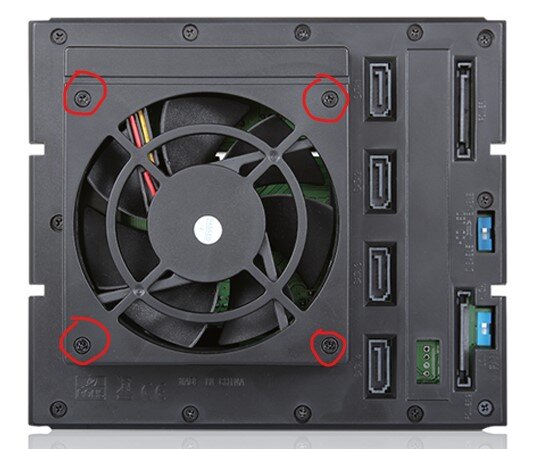
Hello all I'm using this drive cage from iStar: BPN-DE340SS I want to replace the 2 fans by something more quiet (Noctua) Can someone tell me the exact size of the screws used to attach the fan housing to the cage itself (highlighted in red)? Thanks
-
Hello My parity drive is 8TB I have a 1.5Tb data drive that needs to be replaced...what would be your recommendations for a decent 8TB drive at a fair price? Any good deal with Black Friday approaching? Thanks
-
I did a quick test, and it seems to work perfectly without having to install any plugins Thank you for your help
-
But how does the server know it's running on battery? But how does the server know it's running on battery?
-
Yesterday, we had a power outage around midnight, and my server was on I have a UPS to power my modem, router and switch as well as the server But the server drained it quite fast, and I realized I didn't have internet anymore because of that How do I configure the server (plugin?) to automatically shut down when it's powered by the UPS (CyberPower 1350VA from Costco) Thanks
-
Oh, OK.....thank you
-
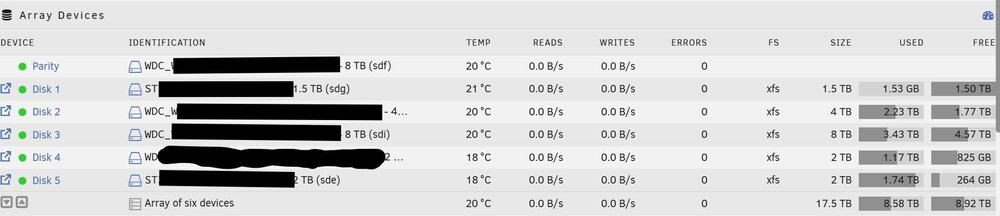
Hello I have an array of 5 drives (1,5TB / 2TB / 2TB / 4TB / 8TB) The 1,5TB drive remains empty, even though I changed the allocation method to Most free What should I be looking for?
-
Looks like it works.....I can't guarantee it shutdown at 1:00am, but it was off this morning What should I do with the go file? Keep it as is or completely delete it? Thank you
-
This is what I have But I think I forgot to click on "Apply" then "Done" yesterday, so will see tonight (tomorrow morning actually) how it works


-
Well, it didn't work. The server was still on this morning By the way, why the script in the go file doesn't work anymore after the update to the new version v7.1.0?
-
Looks like 0 1 * * * mean 01:00 every day of the week What's the difference between "run script" and "Run in background"? It seems Run script is shutting down the server immediately, then I assume Run in background will shutdown at the specified time ?
-
Sory for my ignorance, but I created the script and I see I can run it daily But how do I setup the time?
-
And what should be the script exactly?
-
Hello I've been using this in my go file for many years and it has always worked fine: #!/bin/bash # Start the Management Utility /usr/local/sbin/emhttp echo "/usr/local/sbin/powerdown" | at 1:00 am > /dev/null 2>&1 But after I updated to V7.1.0 yesterday, I realized my server was still on this morning Do you know what I should change to properly shut down my server at a specific time, every day?
-
Hello all I have a 1.5TB data drive in my array that is almost full and pretty old. I'm planning to replace it My parity drive is 8TB, so I was thinking to go with a 4, 6 or 8TB data drive What would be decent drives to look at, or at least drives to avoid? Thanks
-
Well, just did what you recommended......and it works Thanks
-
I will try that tonight and will let you know...
-
When you say "Looks like it should move from these shares"......I'm confused now When I installed the 2 SSDs as cache ("pool of 2 devices"), my understanding was files copied from my computer to the server will go to the cache first (with no parity check involved thus faster transfers), then be moved later on by the mover (schedule or manually forced) So I would have said "Looks like it should move TO (and not FROM) these shares"....what am I misunderstanding?


