





pieman16
Members
-
Joined
-
Last visited
-
Update. My server (unraid) is not going online. It says it’s connected to the switch but that isn’t true. My ubiquiti dream machine doesn’t see it. The dream machine isn’t passing the internet to my switch. So there is problem 1. I’m gunna delete the network.cfg file later tonight.
-
Okay got some good news. I found a monitor. But no keyboard. I’m getting a cheap one today. Anyway unraid says it’s at 192.168.100.105. But it’s not. I think it might be a switch issue. The switch is 102.168.1.1.
-
Got some good news. I got it to boot on my laptop. I reinstalled unraid then moved my backup over. But now I gotta find a monitor, keyboard and mouse. She isn’t coming on to the network :(.
-
I’ll give it a shot Thx
-
How would start removing plugins?
-
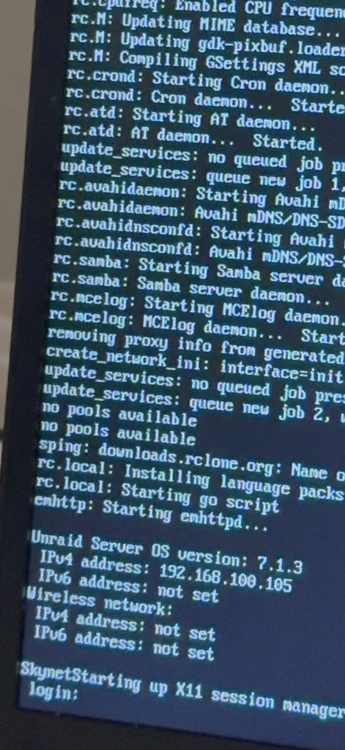
Here is the image it shows for 1/2 a second.
-
Just moved and got my network back up. Unraid doesn’t want to behave. I took the usb stick out and put it in my laptop. I selected gui os. It goes all the way to the login screen then shows it for 1/2 a sec then clears the screen and freezes. If I boot in gui os safe mode it has no issues. It boots fine in safe mode.
-
-
-
I changed them all to read/write to test it. Because honestly I don’t remember what user the laptop is signed in on and don’t know how to sign that user out. I looked in windows under credentials and deleted the server in there but no luck.
-
Nope no luck still says I need permission.
-
Hello, I am using ver 6.1.1.5 and the problem I'm running in to is none of my computers can add files or folders (inside shared folders), to the server I get from windows 11 that I'm pretty much not autherized. I made my 5 users have read/write access to every folder to test it but still no luck. Any suggestions?
-
I had a longer post but I think it’s best to say good bye. Not going to ask or say anything this guy. Good bye.
-
He's not responding and looking like this is a dead project
-
@Unmax Any new updates?
