





xyxyxyxy
Members
-
Joined
-
Last visited
-
Hey, i'm in the process of upgrading my current unraid server with a couple of used hardware i've got laying around. Currently i'm using an Intel Core i7 3770k (4C/8T @ 3,5GHz, 3,9GHz boost) with 16 GB DDR3 Memory. The Upgrade option would either be a Intel Core i7 4930k (6C/12T @ 3,4GHz, 3,9GHz boost) or a Intel Xeon E5-2697v2 (12C/24T @ 2,7GHz, 3,5GHz boost). Both of the, would be paired with reasonably fast 32GB DDR3 Memory. Which CPU would you choose and why? Power consumption is pretty much the same. I have both CPUs here on hand, both are working as i tested before, it's basically just which would make more sense in unraid. Thanks a lot!
-
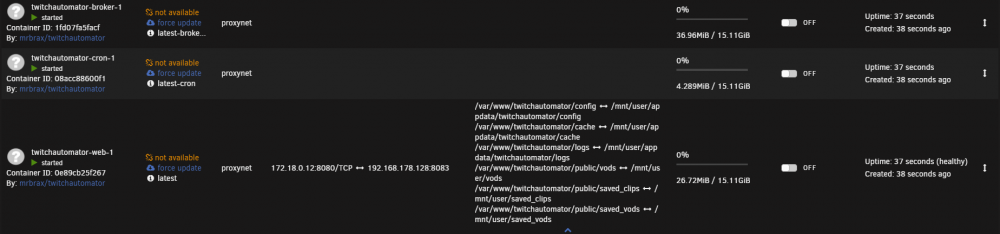
Hi, i'm trying to setup a container with Docker-Compose. It's my first time trying, so i dont have any experience with it. I want to install TwitchAutomator using this file. So far i've tried creating the containers with the cli as well as the docker compose manager plugin. Using the plugin i edited the compose file to match my configuration: version: "3.8" services: web: build: . image: mrbrax/twitchautomator depends_on: - "broker" ports: - "8083:8080" volumes: - /mnt/user/appdata/twitchautomator/config:/var/www/twitchautomator/config - /mnt/user/appdata/twitchautomator/cache:/var/www/twitchautomator/cache - /mnt/user/appdata/twitchautomator/logs:/var/www/twitchautomator/logs - /mnt/user/vods:/var/www/twitchautomator/public/vods - /mnt/user/saved_clips:/var/www/twitchautomator/public/saved_clips - /mnt/user/saved_vods:/var/www/twitchautomator/public/saved_vods cron: build: ./docker/cron-container/ image: mrbrax/twitchautomator:latest-cron broker: build: ./client-broker/ image: mrbrax/twitchautomator:latest-broker networks: default: name: proxynet I had to change the volume mapping, because it was setting the plugin folder at base. I needed to add my custom network, in order to get it runnnig with my swag instance. And i had to change the port, because the default one is already in use. The Containers do show up, but i can't get them to work. When trying to access the web gui i receiver an "ERR_SSL_PROTOCOL_ERROR" message in my browser. Guess it might has to do with twitchautomator enforcing https. I've got something in the log, but i'm not sure whats causing that. I think this might be a problem of my configuration rather than a problem of the container, but i can't tell for shure. I've heard people are using this container in unraid, so if someone could point me in the right direction, that would be gretaly appreciated!
-
I've got a weird problem with my owncloud docker. I use unraid 6.8.3 as well as the newest docker available of owncloud. I setup owncloud via letsencrypt, to let remote users download files, that i added as an external smb share. Access and everything works, downloads start as expected, only thing is, the download fails after a while (Using the Webbrowser). I can resume the download in the browser, so i get the download to finish. I dont understand why those aborts keep happening, but i noticed, that when i start a download, the docker image utilisation increases about 2gb, just 15-20s after starting the download. I did check the path mappings as recommended in this thread, as well as typos, upper/lower case etc. but i couldnt find anything which looks wrong. I would be very glad, if someone has an idea why this keeps happening
