




Skip to content
View in the app

A better way to browse. Learn more.

Unraid

A full-screen app on your home screen with push notifications, badges and more.

To install this app on iOS and iPadOS
  1. Tap the Share icon in Safari
  2. Scroll the menu and tap Add to Home Screen.
  3. Tap Add in the top-right corner.
To install this app on Android
  1. Tap the 3-dot menu (⋮) in the top-right corner of the browser.
  2. Tap Add to Home screen or Install app.
  3. Confirm by tapping Install.

Woutch

Members
  • Joined

  • Last visited

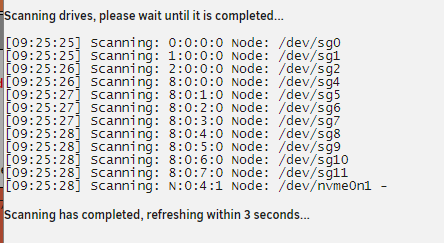
  1. Yes, Did a scan this is the output: maybe the minus sign after the nvme drive is causing something weird?
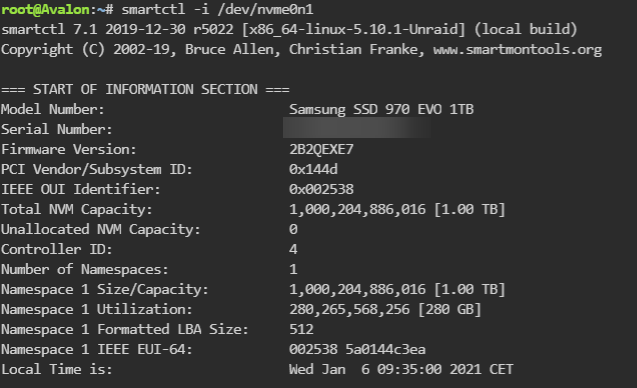
  2. Hi, Thanks for your responce, i ran this command: So it seems to be supprted. I will wait until the RC will become stable, and see if there will be a plugin update needed. Thanks for this usefull plugin btw!!!
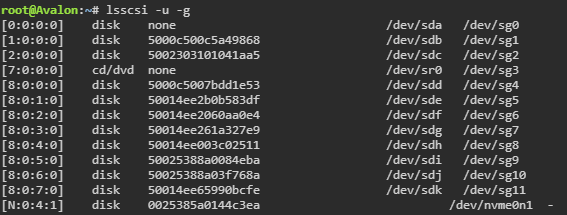
  3. Hi, My new nvme drive (Samsung_SSD_970_EVO_1TB_S5H9NS1NA43865L (nvme0n1)) is not found by the plugin. I'm running 6.9.0-rc2, so maybe it is some incompability with the new version? lsscsi shows the drive, but somehow the formatting is different, maybe that is the problem? Many thanks to check this!! Best regards, Wouter
Account

Navigation

Search

Search

Configure browser push notifications

Chrome (Android)
  1. Tap the lock icon next to the address bar.
  2. Tap Permissions → Notifications.
  3. Adjust your preference.
Chrome (Desktop)
  1. Click the padlock icon in the address bar.
  2. Select Site settings.
  3. Find Notifications and adjust your preference.
