





rwilkers
Members
-
Joined
-
Last visited
Everything posted by rwilkers
-
Yes, the problem still exists. This started when I upgraded to the latest version of Unraid. Have not heard anything at all from the community other than the proforma early stuff. I retry the issue every week or so but getting the same result.
-
Server is functional, had a rsync session going successfully dashboard indicated plenty of memory , gui responsive. Attached a diagnostic log. Have rebooted and tried again, can install other plugins without an issue. unraidtower-diagnostics-20250713-1208.zip
-
Install seems to fail, message indicated issue with downloading. Install Plugin plugin: installing: dynamix.unraid.net.plg Executing hook script: pre_plugin_checks plugin: downloading: dynamix.unraid.net.plg ... done Executing hook script: pre_plugin_checks plugin: downloading: dynamix.unraid.net-4.9.5-x86_64-1.txz ... plugin: dynamix.unraid.net-4.9.5-x86_64-1.txz download failure: Generic error Executing hook script: post_plugin_checks
-
As Frank1940 suggested, the best solution to this issue is to ensure any drives on my QNAP NAS that I am backing up to Unraid should be a smaller size. I tuned parameters in my disk imaging software to split at 500gb so that I would not run into this issue in the future. I chose not to increase the size of my unraid disks since I use Unraid for my repurposed hardware and one of the attractions of Unraid is the ability to mix and match disk sizes. The issue that I found is during an SMB tranfer, if Unraid does not have space for a file of that size, the entire transfer will fail at that point.
-
Thanks for the detailed response. I should have mentioned that I run iperf docker on my unraid and have a 10gb network. I tested that part prior to posting and the throughput is over 700mbs. I run automated periodic smart tests on all my drives, checked that but perhaps I missed something so I will look at it again. Can you expand a little on resource exhaustion you mention? I will look closer at the htop stats over a longer period of time. Appreciate your time and comments.
-
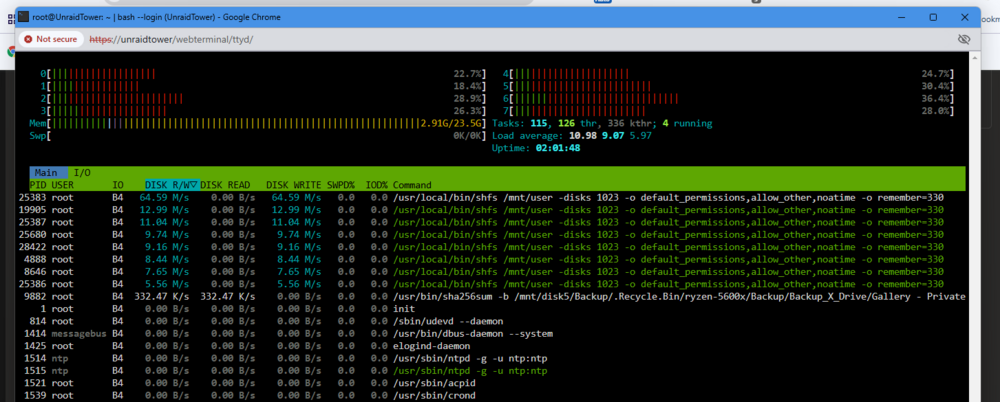
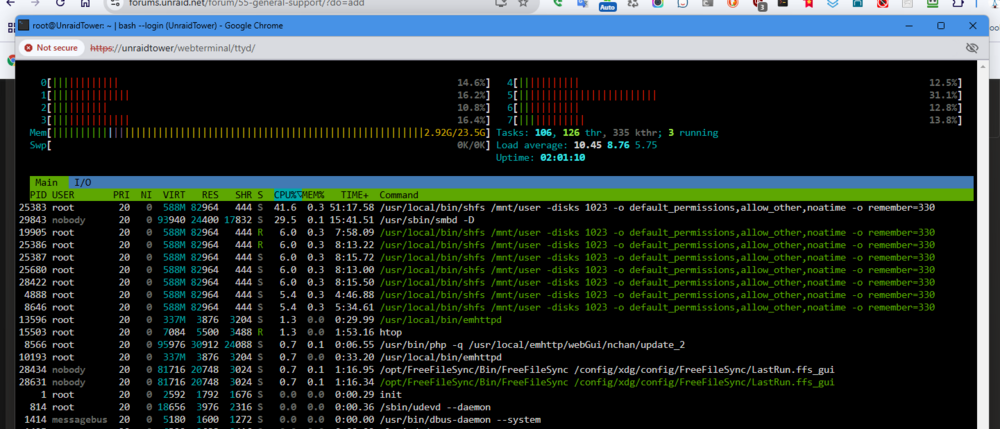
Would like to understand this SMB behavior in a file transfer using FreeFileSync on a Windows 11 PC to an Unraid Share. The share uses reconstruct write and writes directly to array, no cache is used. The file transfer (example is using larger files so that small file size does not skew the result) starts at 120Mbs and gradually drops to 0, climbs back up and repeats this behavior. Using htop, on both the main and io tabs, the behavior is also shown, logs do not seem to indicate any disk or network issues (though I may have missed something) I assume there is some type of cache or resource exhaustion issue but I do not understand it. Attached are clips of the htop screens, the file transfer screen on the Windows 11 PC, and a diagnostic with my logs. I attached clips so the drop and recover process could be shown dynamically You can see the drop to 0 at 1.20 mark on the FreeFileSync MP4 Any information or insight appreciated. FreeFileSync Recording 2024-11-17 122430.mp4 unraidtower-diagnostics-20241117-1241.zip
-
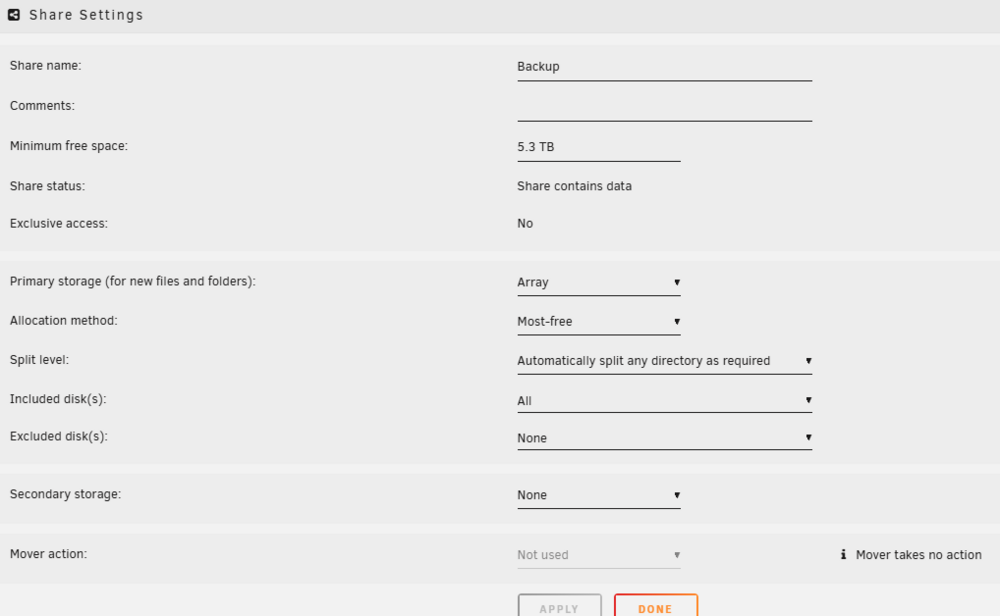
Thank you for the the information, I appreciate your courtesy in replying. I tested this and found what I *think* is an anomaly but I will do further checking and then reach out when I am sure of my facts. In the testing with 5.3Tb set for the "Minimum Free Space" value, the rsync job on the QNAP stopped when the following happened, the Unraid had NO disks with a full 5.2TB available and reported a error message reporting that not enough space was available. I would have expected that that file would not be transferred, but that the smaller files would be transferred. Assume that is an issue with QNAP HBS3 rsync handling but not sure. In any case, since Unraid is unable to split large files, I probably need to rethink this and perhaps find a way to have my image files split up into ie VMDK's into 500gb chunks if I wish to utilize Unraid. Thank you for the feedback.
-
I would like to backup a NAS that has image files some of which are 5tb in size to an Unraid share. Unraid capacity is 80tb and is a mix of 4, 6 and 8 tb drives. Plan on using reconstruct write and writing directly to array (not using cache drive), My question is what the "Minimum free space" setting should be? I think it has to be larger than the biggest file expected but wished to clarify. Feedback appreciated.
-
Upgraded yesterday from Version 6.10.3 2022-06-14 to Version 6.11.5 2022-11-20, after reboot, mounted my encrypted drives using the passphrase. Very shortly after that the system crashed. Tried safe mode but did not help. I manually reverted to 6.10.3 and it was stable again. Attaching the diagnostics and the flash syslog file. If anyone can shed any light on the issue it would be appreciated. If not, at least I am stable now and will wait a good long while before upgrading. ;> After Mount unraidtower-diagnostics-20230109-1326.zip syslog.txt
-
itimpi thanks for the correction, obviously that caused the cache disk to fill up. I will know better in the future. Trurl, a reboot has solved the issue, thanks for the help.
-
unraidtower-diagnostics-20220213-1159.zip I am doing a backup using a FreeSync running on Win10 VM that resides on the Unraid server that I am backing up to. As is my normal practice, when doing a large backup, I set the cache disk parameter of that share to NO while doing the backup. After the backup had run quite a while I noticed that the backup was almost completed but transfer rate had dropped to 1-2 Mbs and assume the issue may be a large number of small files, although I did not really investigate the issue. To help, I paused the FreeSync backup, changed the cache disk of that share to Prefer, initiated the mover to clear the cache with the intent of restarting the backup in a few hours after the mover finished. I waited a day, logged back in and noticed log messages say that cache disk was full and the mover button was still grayed out on the Main Tab. Not really how to recover from this, I changed the Share cache disk option to NO and applied. Immediately got a message saying ALL of my shares had been deleted. At this point I pulled a diagnostic which is attached, did nothing else and asking for help, since I obviously have moved past my level of ability. I would prefer not to lose all my backups, any advice is appreciated.


