Tolete
Members
-
Joined
-
Last visited
Everything posted by Tolete
-
To create a MariaDB for Etherpad, you need to follow the steps below: -edit container and add the following variables to etherpad: DB_TYPE=mysql DB_HOST=SERVER_IP DB_PORT=3306 DB_NAME=etherpad DB_USER=dbusername DB_PASS=mypassword If you encounter the error message Cannot find module './databases/maria_db' it means that the Etherpad application is unable to find the required MariaDB module. To resolve this issue, for some reason you need to change the 'DB_TYPE' to 'mysql' instead, when using mariadb. I hope this helps someone in resolving the issue and creating a successful MariaDB setup for Etherpad.
-
change filename on the commands to correspond to your respective firmware files you are downloading. follow directions carefully. You are welcome.
-
i switched from NPM and yeah its EZ. stop Swag/NPM install the cloudflare connector 'docker' -you can use the cloudflare generated one or one from the appstore and just add your token to it. 'figro/unraid-cloudflared-tunnel' then once thats all done. add the app to the tunnel on cloudflare -check out DB Tech video. no ports open needed.
-
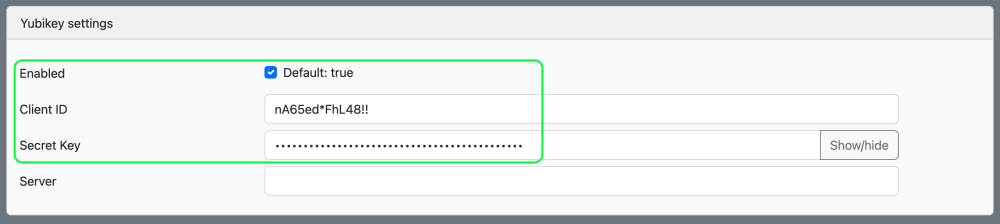
you need to access your admin panel and turn it ON. In the admin panel under 'Yubikey settings'. You also need to generate the environment variables `YUBICO_CLIENT_ID` and `YUBICO_SECRET_KEY` Save. Then just log into your Vault and go to (top right) Account Settings > Security > Two-step Login > Yubikey Manage.
-
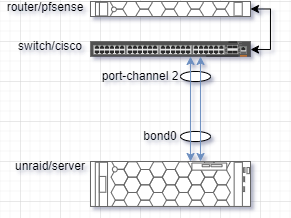
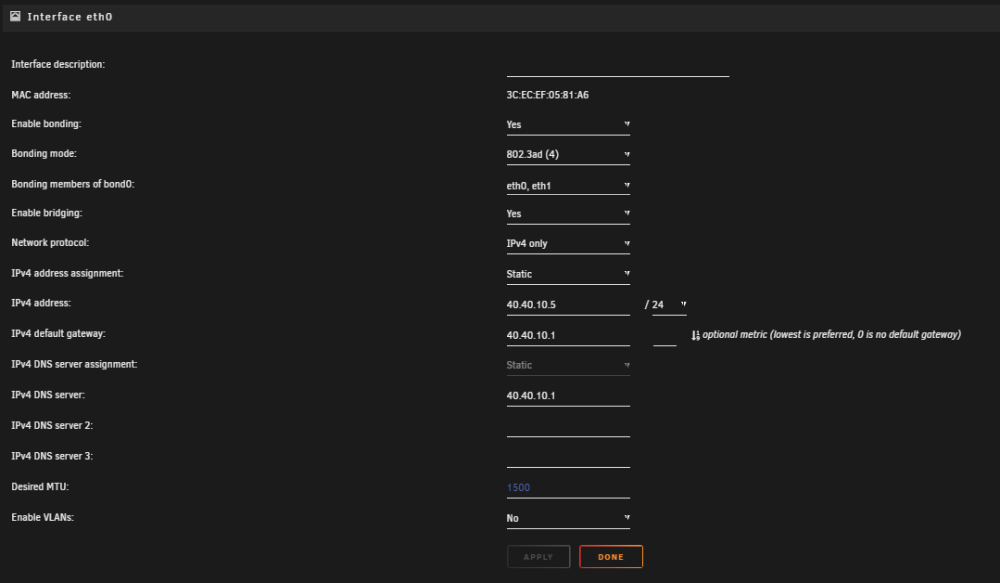
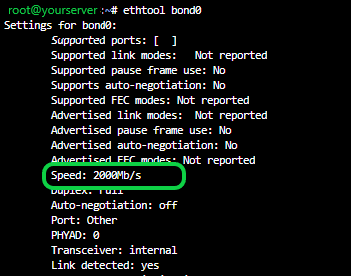
if you have multiple ports on your server and have a switch that supports NIC teaming/LACP you can put them to work. The environment/equipment will vary. I use Cisco, but if you have a switch the supports NIC teaming/LACP the concept should be the similar. -environment diagram - - router = pfsense switch = Cisco server = Unraid 1. switch configuration - - -configure interfaces you want to use on your switch with LACP. MAINSWITCH#en MAINSWITCH#enable MAINSWITCH#conf t Enter configuration commands, one per line. End with CNTL/Z. MAINSWITCH(config)# MAINSWITCH(config)# MAINSWITCH(config)#inter MAINSWITCH(config)#interface ra MAINSWITCH(config)#interface range gig MAINSWITCH(config)#interface range gigabitEthernet 0/37-38 MAINSWITCH(config-if-range)#cha MAINSWITCH(config-if-range)#channel-g MAINSWITCH(config-if-range)#channel-group 2 mode MAINSWITCH(config-if-range)#channel-group 2 mode acc MAINSWITCH(config-if-range)#channel-group 2 mode ac MAINSWITCH(config-if-range)#channel-group 2 mode active Creating a port-channel interface Port-channel 2 MAINSWITCH(config-if-range)#shu MAINSWITCH(config-if-range)#shutdown MAINSWITCH(config-if-range)# -This also creates the logical interface on the switch as a 'port-channel #' and shuts it down. 2. Next, configure the newly created logical interface 'port-channel #' to mode access -Also what VLAN the interface has access to (optional). MAINSWITCH# MAINSWITCH#en MAINSWITCH#enable MAINSWITCH#conf t Enter configuration commands, one per line. End with CNTL/Z. MAINSWITCH(config)#inter MAINSWITCH(config)#interface port MAINSWITCH(config)#interface port-c MAINSWITCH(config)#interface port-channel 2 MAINSWITCH(config-if)#swi MAINSWITCH(config-if)#switchport mode acc MAINSWITCH(config-if)#switchport mode access MAINSWITCH(config-if)#swi MAINSWITCH(config-if)#switchport acc MAINSWITCH(config-if)#switchport access vl MAINSWITCH(config-if)#switchport access vlan 40 MAINSWITCH(config-if)# 3. Next, bring all interfaces back online. MAINSWITCH#en MAINSWITCH#enable MAINSWITCH#conf t Enter configuration commands, one per line. End with CNTL/Z. MAINSWITCH(config)#inter MAINSWITCH(config)#interface ra MAINSWITCH(config)#interface range gig MAINSWITCH(config)#interface range gigabitEthernet 0/37-38 MAINSWITCH(config-if-range)#no shut MAINSWITCH(config-if-range)#no shutdown MAINSWITCH(config-if-range)# 4. check running configuration MAINSWITCH#show running-config ! interface Port-channel2 switchport access vlan 40 switchport mode access ! interface GigabitEthernet0/37 switchport access vlan 40 switchport mode access channel-group 2 mode active ! interface GigabitEthernet0/38 switchport access vlan 40 switchport mode access channel-group 2 mode active ! once your switch is configured, over on your server. Stop the Docker service. Head over to Settings > Network Settings. Configure the interfaces on your server you would like to bond together. -if you are not able to select the interface under 'bonding members' ensure they are disabled. -mode, should be 4 Apply/Done. over on terminal you can and get some information on link status, protocol and bandwidth. cat /proc/net/bonding/bond0 /sbin/ip link ethtool bond0 🖖
-
anyone try the bitwarden script to backup and encrypt vault from CLI? -bitwarden blog post -IThe Interactive script #!/usr/bin/env bash export LC_CTYPE=C export LC_ALL=C read -p "Bitwarden account email: " BW_ACCOUNT read -p "Master Password (hidden): " -s BW_PASS EXPORT_OUTPUT_BASE="bw_export_" TIMESTAMP=$(date "+%Y%m%d%H%M%S") ENC_OUTPUT_FILE=$EXPORT_OUTPUT_BASE$TIMESTAMP.enc export BW_SESSION=$(bw login $BW_ACCOUNT $BW_PASS --raw) bw export --raw --session $BW_SESSION --format json | openssl enc -aes-256-cbc -pbkdf2 -iter 100000 -k $BW_PASS -out $ENC_OUTPUT_FILE bw logout > /dev/null unset BW_SESSION unset BW_PASS unset BW_ACCOUNT -The Non-Interactive script #!/usr/bin/env bash export LC_CTYPE=C export LC_ALL=C export BW_ACCOUNT=EMAIL export BW_PASS=PASSWORD export BW_SESSION=$(bw login $BW_ACCOUNT $BW_PASS --raw) EXPORT_OUTPUT_BASE="bw_export_" TIMESTAMP=$(date "+%Y%m%d%H%M%S") ENC_OUTPUT_FILE=$EXPORT_OUTPUT_BASE$TIMESTAMP.enc bw --raw --session $BW_SESSION export --format json | openssl enc -aes-256-cbc -pbkdf2 -iter 100000 -k $BW_PASS -out $ENC_OUTPUT_FILE bw logout > /dev/null unset BW_SESSION unset BW_PASS unset BW_ACCOUNT
-
Cloudflare 'bot fighting mode' blocking some of the monitors. ------------------------------------------- Matched service:Export event JSON Service:Bot fight mode Action taken:JS Challenge ------------------------------------------- Request details Ray ID: IP address: ASN:AS701 UUNET Country:United States User agent:Uptime-Kuma/1.18.5 HTTP Version:HTTP/1.1 Method:GET Host:sub.mydomain.com Path:/ Query string:Empty query string ------------------------------------------- -any any suggestions? -firewall rules don't seem to help as Cloudflare 'bot fighting mode' overrides firewall rules.
-
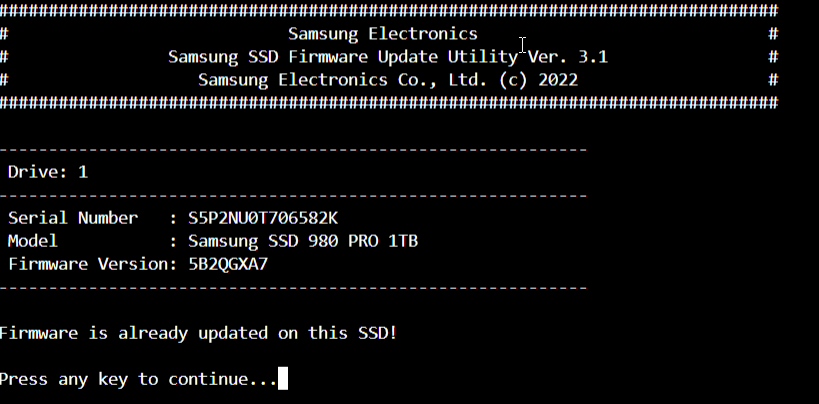
most likely your firmware is already up to date as the screenshot provided. 'firmware is already updated on this SSD' 'press any key to continue' should exit you out.
-
email out was not working for some reason, checking the .env file i was able to see there was a discrepancy on the smtp port on the docker environment variables and the .env file. I made them both the same and email was back online. If anyone looking for the .env file. -console into the container. cd app/www/ && ls -al you should see a .env and a .env.example to view/edit those file you can. nano .env nano .env.example 🖖
-
hello, What version of the container are running?
-
double check your config file. I have seen this when there are more then one ingress rule/hosts. make your your config file looks like this. tunnel: UUID credentials-file: /home/nonroot/.cloudflared/UUID.json # NOTE: You should only have one ingress tag, so if you uncomment one block comment the others # forward all traffic to Reverse Proxy w/ SSL ingress: - service: https://REVERSEPROXYIP:PORT originRequest: originServerName: sub.yourdomain.com #forward all traffic to Reverse Proxy w/ SSL and no TLS Verify #ingress: # - service: https://REVERSEPROXYIP:PORT # originRequest: # noTLSVerify: true # forward all traffic to reverse proxy over http #ingress: # - service: http://REVERSEPROXYIP:PORT
-
yes, no issues updating here.
-
hello, -stop the docker -open up terminal and run /sbin/modprobe iptable_mangle -start container -wait a bit then access the webGUI.
-
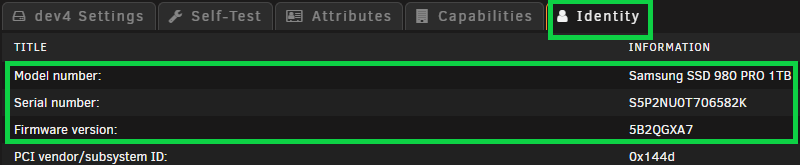
Upgraded some NVMe/SSD firmware today, the process is fairly simple. Running the Utility does not required you to shutdown/stop the array. Upgrades can/were done 'on-the-fly'. -Note your NVMe/SSD model and firmware version you have. -Go to the downloads page, firmware section and locate your drive model and firmware. -Copy link address. -Download firmware files to share/location of choice. wget https://semiconductor.samsung.com/resources/software-resources/Samsung_SSD_980_PRO_5B2QGXA7.iso -P /mnt/user/downloads/temp/ -Firmware files are a .iso and need to be extracted. -I just used 7z, if you don't have it, you can install it from the NerdTools plugin. --Once you have 7z installed. -Change directory to downloaded firmware file location and extract files. cd /mnt/user/downloads/temp/ 7z x Samsung_SSD_980_PRO_5B2QGXA7.iso -aoa && 7z x initrd -aoa && 7z x initrd~ -aoa -Once files are extracted, change directory to firmware file, change permissions and Run. cd /mnt/user/downloads/temp/root/fumagician/ && chmod +x fumagician && ./fumagician -Follow the prompts until completion. -Repeat the steps for each NVMe/SSD model you have downloading the respective firmware for each model. 🖖

-
firewall rules 'this is the way'
-
noticed i no longer can add large torrents manually?
-
3 days and counting, still importing yay! 💀smh
-
@binhextrying to import everything locally or over the reverse proxy the import page process crashes. Anything I can add to the reverse proxy to prevent page from crashing?
-
after update (latest), log shows epic fail, disk image malformed, database malformed? at Microsoft.AspNetCore.Hosting.ConfigureBuilder.<>c__DisplayClass4_0.<Build>b__0(IApplicationBuilder builder) at Microsoft.AspNetCore.Hosting.GenericWebHostBuilder.<>c__DisplayClass15_0.<UseStartup>b__1(IApplicationBuilder app) at Microsoft.AspNetCore.Mvc.Filters.MiddlewareFilterBuilderStartupFilter.<>c__DisplayClass0_0.<Configure>g__MiddlewareFilterBuilder|0(IApplicationBuilder builder) at Microsoft.AspNetCore.Hosting.GenericWebHostService.StartAsync(CancellationToken cancellationToken) 2022-09-25 18:48:28,667 DEBG 'radarr' stdout output: 2022-09-25 18:48:28,669 DEBG 'radarr' stdout output: [Fatal] ConsoleApp: EPIC FAIL! [v4.2.4.6635] NzbDrone.Common.Exceptions.RadarrStartupException: Radarr failed to start: Error creating log database ---> System.Exception: database disk image is malformed database disk image is malformed While Processing: "INSERT INTO "Logs_temp" ("Id", "Message", "Time", "Logger", "Exception", "ExceptionType", "Level") SELECT "Id", "Message", "Time", "Logger", "Exception", "ExceptionType", "Level" FROM "Logs"" ---> code = Corrupt (11), message = System.Data.SQLite.SQLiteException (0x800007EF): database disk image is malformed database disk image is malformed at System.Data.SQLite.SQLite3.Reset(SQLiteStatement stmt) at System.Data.SQLite.SQLite3.Step(SQLiteStatement stmt) at System.Data.SQLite.SQLiteDataReader.NextResult() at System.Data.SQLite.SQLiteDataReader..ctor(SQLiteCommand cmd, CommandBehavior behave) at System.Data.SQLite.SQLiteCommand.ExecuteReader(CommandBehavior behavior) at System.Data.SQLite.SQLiteCommand.ExecuteNonQuery(CommandBehavior behavior) at System.Data.SQLite.SQLiteCommand.ExecuteNonQuery() at FluentMigrator.Runner.Processors.SQLite.SQLiteProcessor.ExecuteNonQuery(String sql) --- End of inner exception stack trace --- 2022-09-25 18:48:28,669 DEBG 'radarr' stdout output: at FluentMigrator.Runner.Processors.SQLite.SQLiteProcessor.ExecuteNonQuery(String sql) at FluentMigrator.Runner.Processors.SQLite.SQLiteProcessor.Process(String sql) at NzbDrone.Core.Datastore.Migration.Framework.NzbDroneSQLiteProcessor.ProcessAlterTable(TableDefinition tableDefinition, List`1 oldColumnDefinitions) in D:\a\1\s\src\NzbDrone.Core\Datastore\Migration\Framework\NzbDroneSQLiteProcessor.cs:line 137 at NzbDrone.Core.Datastore.Migration.Framework.NzbDroneSQLiteProcessor.Process(AlterColumnExpression expression) in D:\a\1\s\src\NzbDrone.Core\Datastore\Migration\Framework\NzbDroneSQLiteProcessor.cs:line 45 at FluentMigrator.Expressions.AlterColumnExpression.ExecuteWith(IMigrationProcessor processor) at FluentMigrator.Runner.MigrationRunner.<>c__DisplayClass80_0.<ExecuteExpressions>b__1() at FluentMigrator.Runner.StopWatch.Time(Action action) at FluentMigrator.Runner.MigrationRunner.ExecuteExpressions(ICollection`1 expressions) at FluentMigrator.Runner.MigrationRunner.ExecuteMigration(IMigration migration, Action`2 getExpressions) at FluentMigrator.Runner.MigrationRunner.ApplyMigrationUp(IMigrationInfo migrationInfo, Boolean useTransaction) at FluentMigrator.Runner.MigrationRunner.MigrateUp(Int64 targetVersion, Boolean useAutomaticTransactionManagement) at FluentMigrator.Runner.MigrationRunner.MigrateUp(Boolean useAutomaticTransactionManagement) at FluentMigrator.Runner.MigrationRunner.MigrateUp() at NzbDrone.Core.Datastore.Migration.Framework.MigrationController.Migrate(String connectionString, MigrationContext migrationContext) in D:\a\1\s\src\NzbDrone.Core\Datastore\Migration\Framework\MigrationController.cs:line 79 at NzbDrone.Core.Datastore.DbFactory.CreateLog(String connectionString, MigrationContext migrationContext) in D:\a\1\s\src\NzbDrone.Core\Datastore\DbFactory.cs:line 137 --- End of inner exception stack trace --- at NzbDrone.Core.Datastore.DbFactory.CreateLog(String connectionString, MigrationContext migrationContext) in D:\a\1\s\src\NzbDrone.Core\Datastore\DbFactory.cs:line 161 at NzbDrone.Core.Datastore.DbFactory.Create(MigrationContext migrationContext) in D:\a\1\s\src\NzbDrone.Core\Datastore\DbFactory.cs:line 77 at NzbDrone.Core.Datastore.DbFactory.Create(MigrationType migrationType) in D:\a\1\s\src\NzbDrone.Core\Datastore\DbFactory.cs:line 57 at NzbDrone.Core.Datastore.Extensions.CompositionExtensions.<>c.<AddDatabase>b__0_1(IDbFactory f) in D:\a\1\s\src\NzbDrone.Core\Datastore\Extensions\CompositionExtensions.cs:line 11 at DryIoc.Interpreter.TryInterpretAndUnwrapContainerException(IResolverContext r, Expression expr, Boolean useFec, Object& result) in /_/src/DryIoc/Container.cs:line 2953 at DryIoc.Factory.ApplyReuse(Expression serviceExpr, Request request) in /_/src/DryIoc/Container.cs:line 10633 at DryIoc.Factory.GetExpressionOrDefault(Request request) in /_/src/DryIoc/Container.cs:line 10535 at DryIoc.Container.ResolveAndCacheKeyed(Int32 serviceTypeHash, Type serviceType, Object serviceKey, IfUnresolved ifUnresolved, Object scopeName, Type requiredServiceType, Request preResolveParent, Object[] args) in /_/src/DryIoc/Container.cs:line 513 at DryIoc.Container.DryIoc.IResolver.Resolve(Type serviceType, Object serviceKey, IfUnresolved ifUnresolved, Type requiredServiceType, Request preResolveParent, Object[] args) in /_/src/DryIoc/Container.cs:line 441 at DryIoc.Interpreter.InterpretResolveMethod(IResolverContext resolver, IList`1 callArgs, Object paramExprs, Object paramValues, ParentLambdaArgs parentArgs, Boolean useFec, Object& result) in /_/src/DryIoc/Container.cs:line 3716 at DryIoc.Interpreter.TryInterpretMethodCall(IResolverContext r, Expression expr, Object paramExprs, Object paramValues, ParentLambdaArgs parentArgs, Boolean useFec, Object& result) in /_/src/DryIoc/Container.cs:line 3594 at DryIoc.Interpreter.TryInterpret(IResolverContext r, Expression expr, Object paramExprs, Object paramValues, ParentLambdaArgs parentArgs, Boolean useFec, Object& result) in /_/src/DryIoc/Container.cs:line 3108 at DryIoc.Interpreter.TryInterpretNestedLambdaBodyAndUnwrapException(IResolverContext r, Expression bodyExpr, Object paramExprs, Object paramValues, ParentLambdaArgs parentArgs, Boolean useFec) in /_/src/DryIoc/Container.cs:line 3412 at DryIoc.Interpreter.<>c__DisplayClass3_0.<TryInterpretNestedLambda>b__0() in /_/src/DryIoc/Container.cs:line 3301 at DryIoc.Interpreter.<>c__DisplayClass5_0`1.<ConvertFunc>b__0() in /_/src/DryIoc/Container.cs:line 3422 at System.Lazy`1.ViaFactory(LazyThreadSafetyMode mode) at System.Lazy`1.ExecutionAndPublication(LazyHelper executionAndPublication, Boolean useDefaultConstructor) at System.Lazy`1.CreateValue() at System.Lazy`1.get_Value() at NzbDrone.Host.Startup.Configure(IApplicationBuilder app, IStartupContext startupContext, Lazy`1 mainDatabaseFactory, Lazy`1 logDatabaseFactory, DatabaseTarget dbTarget, ISingleInstancePolicy singleInstancePolicy, InitializeLogger initializeLogger, ReconfigureLogging reconfigureLogging, IAppFolderFactory appFolderFactory, IProvidePidFile pidFileProvider, IConfigFileProvider configFileProvider, IRuntimeInfo runtimeInfo, IFirewallAdapter firewallAdapter, RadarrErrorPipeline errorHandler) in D:\a\1\s\src\NzbDrone.Host\Startup.cs:line 231 at System.RuntimeMethodHandle.InvokeMethod(Object target, Span`1& arguments, Signature sig, Boolean constructor, Boolean wrapExceptions) at System.Reflection.RuntimeMethodInfo.Invoke(Object obj, BindingFlags invokeAttr, Binder binder, Object[] parameters, CultureInfo culture) at Microsoft.AspNetCore.Hosting.ConfigureBuilder.Invoke(Object instance, IApplicationBuilder builder) at Microsoft.AspNetCore.Hosting.ConfigureBuilder.<>c__DisplayClass4_0.<Build>b__0(IApplicationBuilder builder) at Microsoft.AspNetCore.Hosting.GenericWebHostBuilder.<>c__DisplayClass15_0.<UseStartup>b__1(IApplicationBuilder app) at Microsoft.AspNetCore.Mvc.Filters.MiddlewareFilterBuilderStartupFilter.<>c__DisplayClass0_0.<Configure>g__MiddlewareFilterBuilder|0(IApplicationBuilder builder) at Microsoft.AspNetCore.Hosting.GenericWebHostService.StartAsync(CancellationToken cancellationToken) at Microsoft.Extensions.Hosting.Internal.Host.StartAsync(CancellationToken cancellationToken) at Microsoft.Extensions.Hosting.HostingAbstractionsHostExtensions.RunAsync(IHost host, CancellationToken token) at Microsoft.Extensions.Hosting.HostingAbstractionsHostExtensions.RunAsync(IHost host, CancellationToken token) at Microsoft.Extensions.Hosting.HostingAbstractionsHostExtensions.Run(IHost host) at Radarr.Host.Bootstrap.Start(String[] args, Action`1 trayCallback) in D:\a\1\s\src\NzbDrone.Host\Bootstrap.cs:line 78 at NzbDrone.Console.ConsoleApp.Main(String[] args) in D:\a\1\s\src\NzbDrone.Console\ConsoleApp.cs:line 45 2022-09-25 18:48:28,683 DEBG 'radarr' stdout output: Press enter to exit... 2022-09-25 18:48:29,683 DEBG 'radarr' stdout output: Non-recoverable failure, waiting for user intervention...
-
/etc/rc.d/rc.nginx reload worked, thank you.
-
anyone else getting an expired cert ? I'm getting 'NET::ERR_CERT_DATE_INVALID'
-
does live preview only work on LAN and not over proxy?
-
Anyone using Jekyll? -I'm looking for a Jekyll docker container i can load on unraid. To generate static website/blog with. -Techno Tim, recently posted a video of the software/website and how website could be used, looking to do the same. -I then looked for a docker container i could use on unraid and came across this one. But points out not to be use in 'production' and had and issue for some reason the site would not update any new post created.
-
upgraded '6.10.1 > 6.10.2' REMOTELY, without problems. 🖖
-
-The docker-compose and the jitsi docker image stack needed updating. -Also noticed the official Jitsi self host guide points out NOT to clone github instead to download from stable release. -So i just blew it away. I recommend doing the same.