





Tolete
Members
-
Joined
-
Last visited
Everything posted by Tolete
-
Thank you for your work. I did add the following as variables for basic login. - BASIC_AUTH=False #optional - BASIC_AUTH_USERNAME=user #optional - BASIC_AUTH_PASSWORD=pass #optional logout option missing?
-
looks like the issue has been resolved. -if your are not able to remote access your server this resolved it for me. Settings > Management Access > Update DNS allow remote access: back to Yes, Apply. -Resolved.
-
same issue. status pages are showing 'unraid.net' not responding.
-
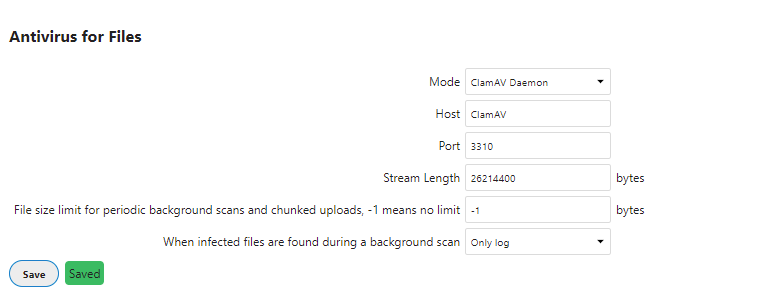
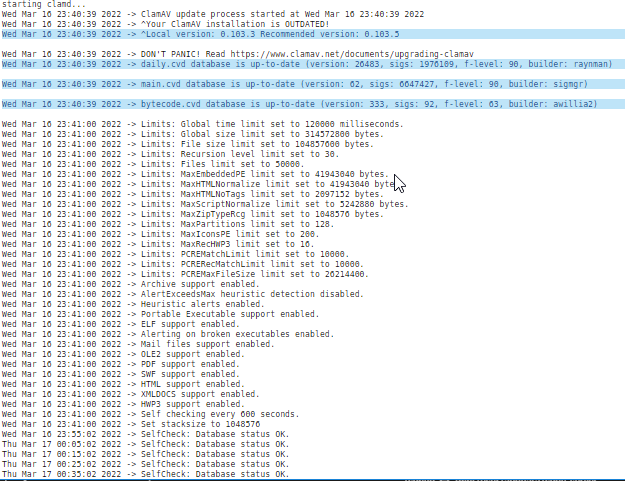
Need a hand, trying to confirm whether or not Nextcloud and ClamAV are playing nicely together. Nextcloud + 'Antivirus for files' app ClamAV; I went with 'mkodockx/docker-clamav:alpine' repository next I went to the Nextcloud container and used the --link flag under 'Extra Parameters:' -not sure if this is required still or deprecated. --link ClamAV:ClamAV I guess I'm expecting ClamAV to scan any file uploaded. I tested by simply uploading both non-infected and EICAR test files. I guess i can check the ClamAV logs, but will or is there a visual indication that the file is getting scan by ClamAV?
-
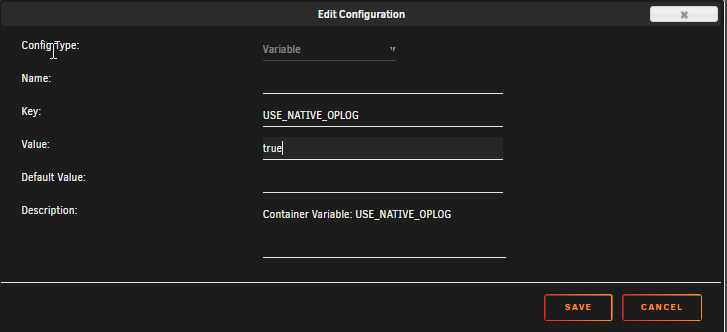
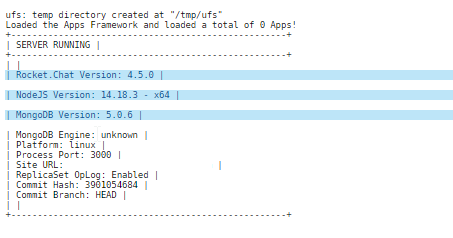
if you are seen in the log Change Stream is available for your installation, give admin permissions to your database user to use this improved version. -Stop the Rocket.Chat Container -Edit Container -Add another Path, Port, Variable, Label or Device -Key:USE_NATIVE_OPLOG -Value:true -Save/Apply -Start Rocket.Chat Container -Resolved.
-
any way to get this to line up with NYT ?
-
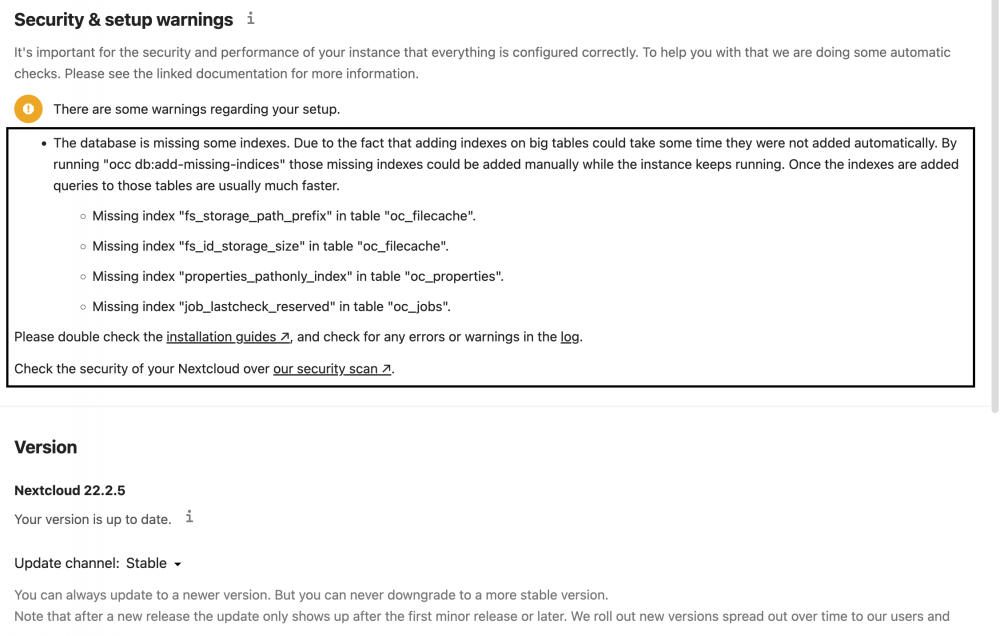
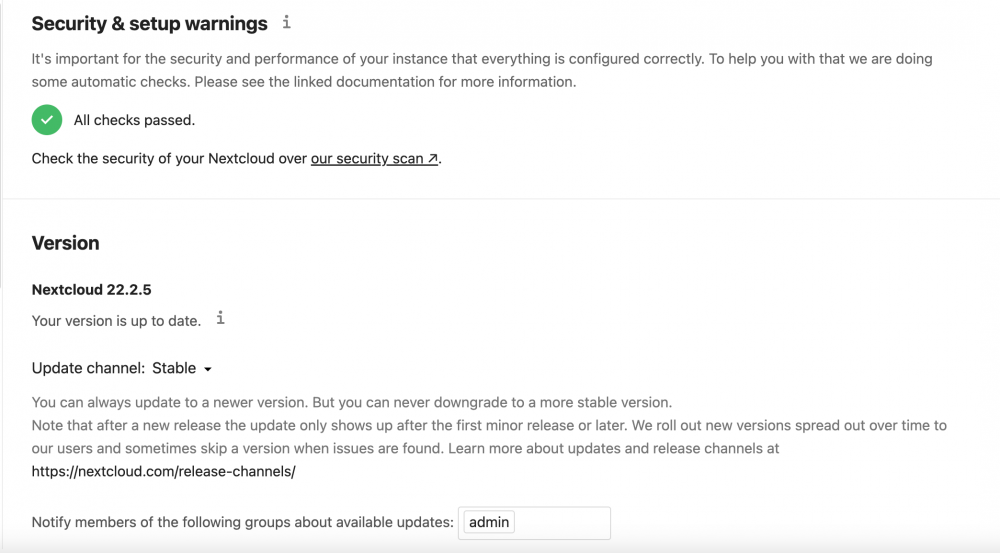
Just upgraded to 22.2.5 no real issues except some "missing indices". console into nextcloud and cd to cd /config/www/nextcloud than run chmod 777 occ sudo -u abc ./occ db:add-missing-indices restarted tha container Resolved. -hope it helps.
-
any advantages vs Wordle over Wordle2?
-
127.0.0.1 - - [12/Feb/2022:20:48:42 -0500] "GET /healthz HTTP/1.1" 200 0 "-" "curl/7.80.0" "-" 127.0.0.1 - - [12/Feb/2022:20:49:12 -0500] "GET /healthz HTTP/1.1" 200 0 "-" "curl/7.80.0" "-" 127.0.0.1 - - [12/Feb/2022:20:49:42 -0500] "GET /healthz HTTP/1.1" 200 0 "-" "curl/7.80.0" "-" 127.0.0.1 - - [12/Feb/2022:20:50:13 -0500] "GET /healthz HTTP/1.1" 200 0 "-" "curl/7.80.0" "-" 127.0.0.1 - - [12/Feb/2022:20:50:43 -0500] "GET /healthz HTTP/1.1" 200 0 "-" "curl/7.80.0" "-" 127.0.0.1 - - [12/Feb/2022:20:51:13 -0500] "GET /healthz HTTP/1.1" 200 0 "-" "curl/7.80.0" "-" 127.0.0.1 - - [12/Feb/2022:20:51:43 -0500] "GET /healthz HTTP/1.1" 200 0 "-" "curl/7.80.0" "-" 127.0.0.1 - - [12/Feb/2022:20:52:13 -0500] "GET /healthz HTTP/1.1" 200 0 "-" "curl/7.80.0" "-" 127.0.0.1 - - [12/Feb/2022:20:52:43 -0500] "GET /healthz HTTP/1.1" 200 0 "-" "curl/7.80.0" "-" 127.0.0.1 - - [12/Feb/2022:20:53:13 -0500] "GET /healthz HTTP/1.1" 200 0 "-" "curl/7.80.0" "-" 127.0.0.1 - - [12/Feb/2022:20:53:43 -0500] "GET /healthz HTTP/1.1" 200 0 "-" "curl/7.80.0" "-" 127.0.0.1 - - [12/Feb/2022:20:54:13 -0500] "GET /healthz HTTP/1.1" 200 0 "-" "curl/7.80.0" "-" 127.0.0.1 - - [12/Feb/2022:20:54:43 -0500] "GET /healthz HTTP/1.1" 200 0 "-" "curl/7.80.0" "-" 127.0.0.1 - - [12/Feb/2022:20:55:13 -0500] "GET /healthz HTTP/1.1" 200 0 "-" "curl/7.80.0" "-" 127.0.0.1 - - [12/Feb/2022:20:55:43 -0500] "GET /healthz HTTP/1.1" 200 0 "-" "curl/7.80.0" "-" 127.0.0.1 - - [12/Feb/2022:20:56:14 -0500] "GET /healthz HTTP/1.1" 200 0 "-" "curl/7.80.0" "-" 127.0.0.1 - - [12/Feb/2022:20:56:44 -0500] "GET /healthz HTTP/1.1" 200 0 "-" "curl/7.80.0" "-" 127.0.0.1 - - [12/Feb/2022:20:57:14 -0500] "GET /healthz HTTP/1.1" 200 0 "-" "curl/7.80.0" "-" 127.0.0.1 - - [12/Feb/2022:20:57:44 -0500] "GET /healthz HTTP/1.1" 200 0 "-" "curl/7.80.0" "-" 127.0.0.1 - - [12/Feb/2022:20:58:14 -0500] "GET /healthz HTTP/1.1" 200 0 "-" "curl/7.80.0" "-" 127.0.0.1 - - [12/Feb/2022:20:58:44 -0500] "GET /healthz HTTP/1.1" 200 0 "-" "curl/7.80.0" "-" 127.0.0.1 - - [12/Feb/2022:20:59:14 -0500] "GET /healthz HTTP/1.1" 200 0 "-" "curl/7.80.0" "-" 127.0.0.1 - - [12/Feb/2022:20:59:44 -0500] "GET /healthz HTTP/1.1" 200 0 "-" "curl/7.80.0" "-" 127.0.0.1 - - [12/Feb/2022:21:00:14 -0500] "GET /healthz HTTP/1.1" 200 0 "-" "curl/7.80.0" "-" 127.0.0.1 - - [12/Feb/2022:21:00:44 -0500] "GET /healthz HTTP/1.1" 200 0 "-" "curl/7.80.0" "-" 127.0.0.1 - - [12/Feb/2022:21:01:14 -0500] "GET /healthz HTTP/1.1" 200 0 "-" "curl/7.80.0" "-" 127.0.0.1 - - [12/Feb/2022:21:01:44 -0500] "GET /healthz HTTP/1.1" 200 0 "-" "curl/7.80.0" "-" 127.0.0.1 - - [12/Feb/2022:21:02:15 -0500] "GET /healthz HTTP/1.1" 200 0 "-" "curl/7.80.0" "-" 127.0.0.1 - - [12/Feb/2022:21:02:45 -0500] "GET /healthz HTTP/1.1" 200 0 "-" "curl/7.80.0" "-" 127.0.0.1 - - [12/Feb/2022:21:03:15 -0500] "GET /healthz HTTP/1.1" 200 0 "-" "curl/7.80.0" "-" 127.0.0.1 - - [12/Feb/2022:21:03:45 -0500] "GET /healthz HTTP/1.1" 200 0 "-" "curl/7.80.0" "-" 127.0.0.1 - - [12/Feb/2022:21:04:15 -0500] "GET /healthz HTTP/1.1" 200 0 "-" "curl/7.80.0" "-" 127.0.0.1 - - [12/Feb/2022:21:04:45 -0500] "GET /healthz HTTP/1.1" 200 0 "-" "curl/7.80.0" "-" 127.0.0.1 - - [12/Feb/2022:21:05:15 -0500] "GET /healthz HTTP/1.1" 200 0 "-" "curl/7.80.0" "-" 127.0.0.1 - - [12/Feb/2022:21:05:45 -0500] "GET /healthz HTTP/1.1" 200 0 "-" "curl/7.80.0" "-" 127.0.0.1 - - [12/Feb/2022:21:06:15 -0500] "GET /healthz HTTP/1.1" 200 0 "-" "curl/7.80.0" "-" 127.0.0.1 - - [12/Feb/2022:21:06:45 -0500] "GET /healthz HTTP/1.1" 200 0 "-" "curl/7.80.0" "-" 127.0.0.1 - - [12/Feb/2022:21:07:15 -0500] "GET /healthz HTTP/1.1" 200 0 "-" "curl/7.80.0" "-" 127.0.0.1 - - [12/Feb/2022:21:07:45 -0500] "GET /healthz HTTP/1.1" 200 0 "-" "curl/7.80.0" "-" 127.0.0.1 - - [12/Feb/2022:21:08:16 -0500] "GET /healthz HTTP/1.1" 200 0 "-" "curl/7.80.0" "-" 127.0.0.1 - - [12/Feb/2022:21:08:46 -0500] "GET /healthz HTTP/1.1" 200 0 "-" "curl/7.80.0" "-" 127.0.0.1 - - [12/Feb/2022:21:09:16 -0500] "GET /healthz HTTP/1.1" 200 0 "-" "curl/7.80.0" "-" 127.0.0.1 - - [12/Feb/2022:21:09:46 -0500] "GET /healthz HTTP/1.1" 200 0 "-" "curl/7.80.0" "-" 127.0.0.1 - - [12/Feb/2022:21:10:16 -0500] "GET /healthz HTTP/1.1" 200 0 "-" "curl/7.80.0" "-" 127.0.0.1 - - [12/Feb/2022:21:10:46 -0500] "GET /healthz HTTP/1.1" 200 0 "-" "curl/7.80.0" "-" 127.0.0.1 - - [12/Feb/2022:21:11:16 -0500] "GET /healthz HTTP/1.1" 200 0 "-" "curl/7.80.0" "-" 127.0.0.1 - - [12/Feb/2022:21:11:46 -0500] "GET /healthz HTTP/1.1" 200 0 "-" "curl/7.80.0" "-" 127.0.0.1 - - [12/Feb/2022:21:12:16 -0500] "GET /healthz HTTP/1.1" 200 0 "-" "curl/7.80.0" "-" 127.0.0.1 - - [12/Feb/2022:21:12:46 -0500] "GET /healthz HTTP/1.1" 200 0 "-" "curl/7.80.0" "-" 127.0.0.1 - - [12/Feb/2022:21:13:16 -0500] "GET /healthz HTTP/1.1" 200 0 "-" "curl/7.80.0" "-" 127.0.0.1 - - [12/Feb/2022:21:13:46 -0500] "GET /healthz HTTP/1.1" 200 0 "-" "curl/7.80.0" "-" 127.0.0.1 - - [12/Feb/2022:21:14:17 -0500] "GET /healthz HTTP/1.1" 200 0 "-" "curl/7.80.0" "-" 127.0.0.1 - - [12/Feb/2022:21:14:47 -0500] "GET /healthz HTTP/1.1" 200 0 "-" "curl/7.80.0" "-" 127.0.0.1 - - [12/Feb/2022:21:15:17 -0500] "GET /healthz HTTP/1.1" 200 0 "-" "curl/7.80.0" "-" 127.0.0.1 - - [12/Feb/2022:21:15:47 -0500] "GET /healthz HTTP/1.1" 200 0 "-" "curl/7.80.0" "-" 127.0.0.1 - - [12/Feb/2022:21:16:17 -0500] "GET /healthz HTTP/1.1" 200 0 "-" "curl/7.80.0" "-" 127.0.0.1 - - [12/Feb/2022:21:16:47 -0500] "GET /healthz HTTP/1.1" 200 0 "-" "curl/7.80.0" "-" 127.0.0.1 - - [12/Feb/2022:21:17:17 -0500] "GET /healthz HTTP/1.1" 200 0 "-" "curl/7.80.0" "-" anyway to lower or disable health checks?
-
Understood, thank you. Looking to cut down on the constant writes. Wondering if the heartbeat interval for each of the 'monitor' is the culprit in this case? causing the modification to the kuma.db-wal
-
Hello, Been running UptimeKuma for a bit now, looking at the catch drive with inotifywait -e create,modify,attrib,moved_from,moved_to --timefmt %c --format '%T %_e %w %f' -mr /mnt/cache/ and I'm seen a bunch of kuma.db-wal Wed Feb 9 11:32:15 2022 MODIFY /mnt/cache/appdata/uptimekuma/ kuma.db-wal Wed Feb 9 11:32:15 2022 MODIFY /mnt/cache/appdata/uptimekuma/ kuma.db-wal Wed Feb 9 11:32:15 2022 MODIFY /mnt/cache/appdata/uptimekuma/ kuma.db-wal Wed Feb 9 11:32:15 2022 MODIFY /mnt/cache/appdata/uptimekuma/ kuma.db-wal Wed Feb 9 11:32:15 2022 MODIFY /mnt/cache/appdata/uptimekuma/ kuma.db-wal Wed Feb 9 11:32:15 2022 MODIFY /mnt/cache/appdata/uptimekuma/ kuma.db-wal Wed Feb 9 11:32:15 2022 MODIFY /mnt/cache/appdata/uptimekuma/ kuma.db-wal anyone know what this kuma.db.-wal is?
-
so for wiping db just rm -R /mnt/user/appdata/binhex-radarr/radarr.db repull latest and reimport media?
-
Checking logs today and I came across Warning: World-writable config file '/etc/my.cnf.d/custom.cnf' is ignored Warning: World-writable config file '/etc/my.cnf.d/custom.cnf' is ignored Was able to solve it by doing a cd /mnt/user/appdata/mariadb chmod 0444 custom.cnf Restart the container and warning was gone. -Hope it helps someone.
-
after reverting back to binhex/arch-radarr:3.2.2.5080-1-01 now im seen this on home page Error parsing column 42 (MediaInfo={ "containerFormat": "MPEG-4", "videoFormat": "h264", "videoCodecID": "x264", "videoProfile": "[email protected]", "videoBitrate": 2500000, "videoBitDepth": 8, "videoMultiViewCount": 0, "videoColourPrimaries": "", "videoTransferCharacteristics": "bt709", "videoHdrFormat": "none", "height": 816, "width": 1920, "audioFormat": "aac", "audioBitrate": 224000, "runTime": "01:44:04.2860000", "audioStreamCount": 1, "audioChannels": 6, "audioChannelPositions": "5.1", "videoFps": 23.976, "audioLanguages": [], "subtitles": [], "scanType": "Progressive", "schemaRevision": 5 } - String)
-
I'm using an origin cert. on NPM not a lets encrypt so renew the origin cert? -i renew the cloudflare origin cert. and updated NPM and all subdomains to newly created cert. still getting spammed errors.? -i was able to resolve this spamming error by removing any down or unused cnames from CF.
-
cloudflare "bot fighting mode" is blocking my documentserver i tried adding a firewall rule on cloudflare (http.host eq "documentserver.mydomain.com") then allow. does not seem to be working, eventually DS gets blocked. any help be appreciated.
-
Hello All, looks like its running, im able to see the dashboard http://[IP]:8087 Module ssl disabled. To activate the new configuration, you need to run: service apache2 restart /startup.sh: line 57: [: =: unary operator expected Nothing to migrate. Configuration cache cleared! Configuration cache cleared! Configuration cached successfully! 2021-05-29 19:40:10,276 CRIT Supervisor running as root (no user in config file) 2021-05-29 19:40:10,279 INFO supervisord started with pid 1 2021-05-29 19:40:11,283 INFO spawned: 'exit_on_any_fatal' with pid 42 2021-05-29 19:40:11,285 INFO spawned: 'apache' with pid 43 2021-05-29 19:40:11,287 INFO spawned: 'run_schedule' with pid 44 AH00558: apache2: Could not reliably determine the server's fully qualified domain name, using 172.18.0.14. Set the 'ServerName' directive globally to suppress this message No scheduled commands are ready to run. 2021-05-29 19:40:12,549 INFO success: exit_on_any_fatal entered RUNNING state, process has stayed up for > than 1 seconds (startsecs) 2021-05-29 19:40:12,549 INFO success: apache entered RUNNING state, process has stayed up for > than 1 seconds (startsecs) 2021-05-29 19:40:12,550 INFO success: run_schedule entered RUNNING state, process has stayed up for > than 1 seconds (startsecs) No scheduled commands are ready to run. -service apache2 restart = fail -trying to reverse proxy using NginxProxyManager -added all the variables per documentation to the .env file some help be greatly appreciated.
-
looks like we are up and running here (local). I was able to reverse proxy snipe-it, im using NginxProxyManager. Just add server_name HOSTIP:CONTAINERPORT#; TO snipe-it/nginx/site-confs/default file. server { listen 80; listen 443 ssl http2; server_name HOSTIP:PORT; root /var/www/html/public; index index.html index.htm index.php; ssl_certificate /config/keys/cert.crt; ssl_certificate_key /config/keys/cert.key; client_max_body_size 0; location / { try_files $uri $uri/ /index.php$is_args$args; } location ~ \.php$ { fastcgi_split_path_info ^(.+\.php)(/.+)$; fastcgi_pass 127.0.0.1:9000; fastcgi_index index.php; include /etc/nginx/fastcgi_params; } location /.env { return 404; } } In NPM add your Scheme | Forward Hostname / IP | Forward Port http HOSTIP CONTAINERPORT
-
does anyone have OnlyOffice Document Server running on 21.0.2? OnlyOfficeDocumentServer... https://documentserver.mydomain.com/healthcheck = true Nextcloud... Error when trying to connect (Server error: `GET https://documentserver.mydomain.com/healthcheck` resulted in a `503 Service Temporarily Unavailable` response: please send help!
-
@Siwat2545 can you give me a hand here, running in circles here all with same results.
-
anyone interested, for NPM just add under advanced. ✔️✔️✔️
.png.0504ce7d5faaced974259e7f1129841a.png)
-
NextCloud/OnlyOfficeDocumentServer pissing contest again... -OnlyOfficeDocumentServer... https://documentserver.mydomain.com/healthcheck =true -NextCloud... Error when trying to connect (Server error: `GET https://documentserver.mydomain.com/healthcheck` resulted in a `503 Service Temporarily Unavailable` response: any help be greatly appreciated.
-
try this.... stop DS, cp /mnt/user/appdata/NginxProxyManager/custom_ssl/npm-12/fullchain.pem /mnt/user/appdata/onlyofficeds/Data/certs/onlyoffice.crt cp /mnt/user/appdata/NginxProxyManager/custom_ssl/npm-12/privkey.pem /mnt/user/appdata/onlyofficeds/Data/certs/onlyoffice.key start DS. joy?
-
anyone know how to add scrips to NPM? -looking to map all connections
-
EZ fix... FYI, dont delete "base64:" when entering one.



.png.0504ce7d5faaced974259e7f1129841a.png)
