





strykn
Members
-
Joined
-
Last visited
Everything posted by strykn
-
Isn't the "1" on the end correct? nvmeOn1 if not, how do i find out?
-
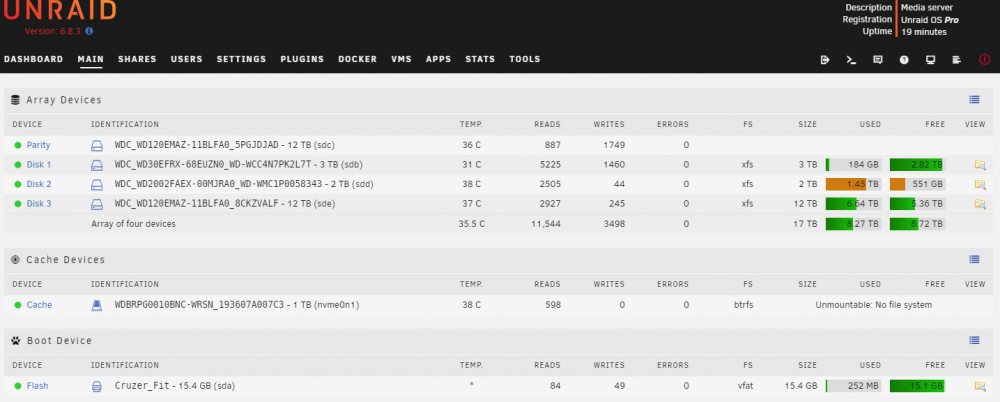
i'm attempting to recover the cache data, ahead of reformatting i believe i was able to create the directory "x" however, i was unable to mount i entered mount -o usebackuproot,ro /dev/nvmeOn1 /x but got "does not exist" i've attached screen shot, and was assuming for nvme, that was correct >>>See Below, from Terminal<<< Linux 4.19.107-Unraid. Last login: Sun Oct 18 10:03:30 -0500 2020 on /dev/tty1. root@Titan:~# mkdir /x mkdir: cannot create directory ‘/x’: File exists root@Titan:~# mount -o usebackuproot,ro /dev/nvmeOn1 /x mount: /x: special device /dev/nvmeOn1 does not exist. root@Titan:~#
-
so something that is strange to me, is that is has been asking to "format" the Cache drive, which is an nvme. It shows as "unmountable disk present" > Cache ...(nvmeOn1) This problem was concurrent with the message about disk 1 being disabled. i followed steps to unassign the "disk 1" that had come up as disabled, and have now started the data rebuild process. i'm worried about formatting the cache, as it does not have a parity. i think everything is backed up, but i'm not certain i could rebuild it effectively attached is the SMART zip for the nvme i'll let the data rebuild process for now, and maybe it will fix the Cache error. but not certain just trying to be careful, so thanks for any input titan-smart-20201017-2059.zip
-
Thanks for confirming attached is the diagnostic From what i could tell, i started the VM for my son to have some PC time. (then hopped in shower). Apparently VM never started and when i came to check one of the drives had been disabled. Note, the VM is on the cache. Anyway, don't know if these events are related and i haven't tried relaunching the VM. It was stuck and i had to force quit. Again, thanks for input!!
-
disk 1 showing disabled attached is SMART report not sure what to do? do i need to replace, or should i re-enable the disk? all indications from the report seem OK, but also over my head thanks titan-smart-20201017-0842.zip
