





Figro
Members
-
Joined
-
Last visited
Everything posted by Figro
-
Restarting the container should download the latest release of cloudflared.
-
Hello, Can you try to remove the appdata directory completley and try again. Make sure you are on not using the :dev tag for the repository line. String should be "figro/leon-ai". Try spinning up the container after doing that and see if the same error occurs. If it does try giving your user rwx permission to the appdata folder for leon. I didn't need to explicitly give my user permission to get it to work. But I did just test on a fresh install and was able to get it up and running. I have attached the logs from my run for reference. Would be interested to know if anyone else is still running into issues. If you discover something new feel free to update logs.txt
-
I just updated the container with an update that addressed the issues you guys were facing with leon-AI. sorry for the delay in response. I have been busy with other things. Please try removing the current appdata for leon and starting the container with the latest docker build and let me know if you run into any issues
-
I don't have much experience with hosting game servers through cloudflared tunnels as I usually just use a ddns service such as duckdns for my own servers that I share with a couple of friends. I do know that there are limitations in terms of upload limits on the free tier which im guessing you are on (as am I). I tried putting nextcloud behind my cloudflared tunnel and it would rate limit me or tell me The entity I was uploading was too large (HTTP 413). Thats what I would guess would be causing the packet loss issues in your game server. I would just avoid using cf tunnels for certain things such as this. Here are some things you can try to diagnose the cause if you are interested. You can add a port to the unraid template and use the console for the container to launch the metrics server on that port to get further information from the tunnel. I will plan to add this as an addition env port that can be setup for this type of thing. I have some related screenshots below for this. Open cosole for the container and run: ./cloudflared tunnel --metrics 0.0.0.0:4321 run --token $token these metrics can also be put into grafana to make a more friendly looking UI with graphs that is easier to read. more information on the cloudflare docs here: https://developers.cloudflare.com/cloudflare-one/connections/connect-apps/do-more-with-tunnels/grafana/
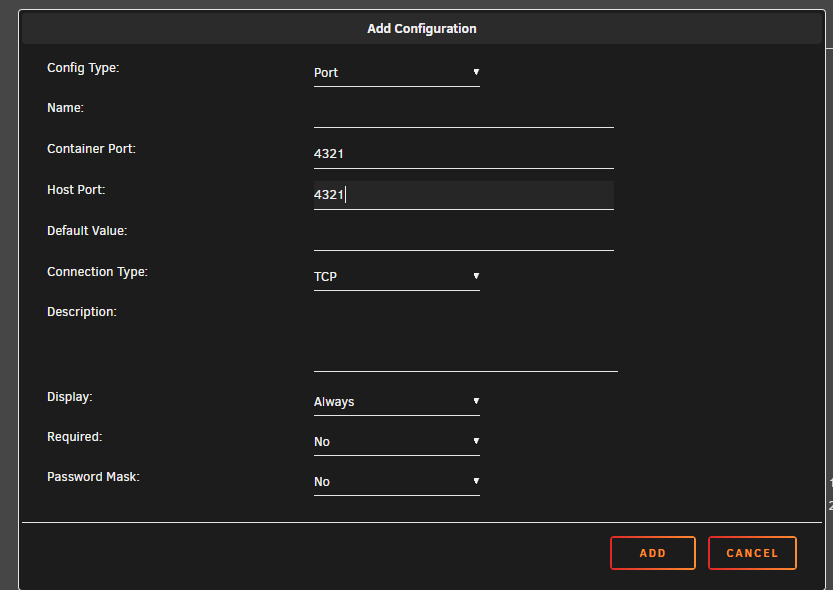
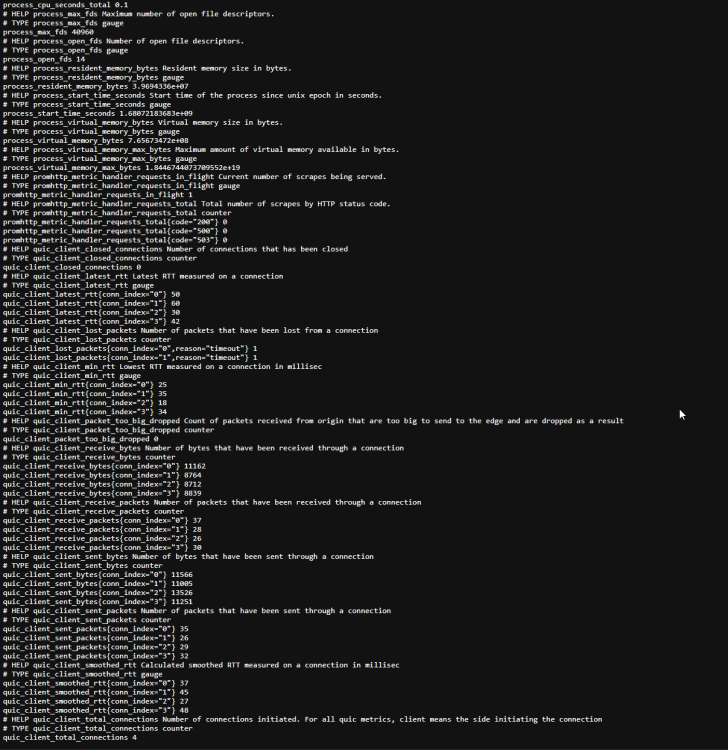
-
Is there more to those logs? from what I can see those are just warnings and there should be more stuff under the block you posted. Let me know I will be happy to help
-
Hello, I have changed the application to use the release on the :latest branch if you would like to go back to how it used to be please change the docker repo to be figro/flood-ui:dev as stated in my last post there seems to be an issue in the latest release of flood that is not compatible with the latest version of qbittorent. They have the issue fixed in the development branch and you can build it and use that just fine but it does not seem that they have released a built binary with that fix yet. I had a couple of errors building it however making some small changes to the source code fixed that. If you run into that let me know and I can tell you what to change to fix that. Thanks
-
So I have addressed that update for flood-ui. Updating the container should download the release and launch that instead. You can also free up some storage space by wiping appdata files before updating as all those files are no longer needed. If you want to stay on the dev version there is a :dev tag that has not changed. Keep in mind there seems to be bug for qbittorent in the latest release and doesnt allow you to connect if you are using the latest qbittorent version. The dev branch seems to fix this for me however I have to fix some files to fix some building errors on that. Hopefully they release the fix for that soon in the next release so that is not required. If anyone needs helping getting this to work with qbitorrent let me know and I will try and help. I will address the update for leon-ai tomorrow with the same approach. Please let me know if there are other issues since this update and I will do my best to address those. Thanks!
-
Sorry for such a late reply. Been busy with work and other projects. While I haven't touched the Leon-AI container in a while but I do use the flood-ui container daily however the way they are deployed in the container are similar and from the provided logs looks like its being caused by changes in the github project which the container will clone. I did this so that development on those projects were possible however it looks like this leads to alot more dynamic issues as each person may have a different pulled version of those projects. I will most likely release an update that does not pull the source from github and instead will just execute a prebuilt binary. This will prob mean that development is not possible anymore although i may address this issue with different tags you can pull from dockerhub. Sorry for the issues you have been facing. Until that update is addressed if you are able to get the container working I would recommend not deleting it's appdata so that it will not repull from github. Thanks,
-
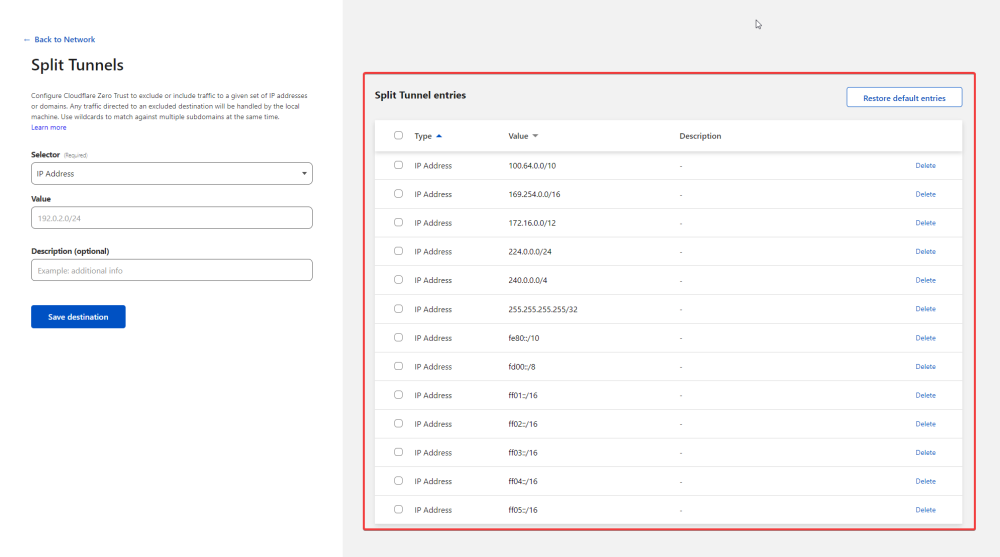
This here is the only thing I added under the tunnel in cloudflare's zero trust dashboard. Then under zero trust settings (not under the tunnel) in settings > network, under firewall you will see split tunnels in the manage page make sure the CIDR of your network that you added to the tunnel before is not in this list if you have "Exclude IPs and domains" selected. If you have Include selected make sure it is in the list. After this I just connected to the warp client (make sure you are authenticated with your zero trust login) and you should be able to access local IPs from outside your network via Warp. Hope this helps
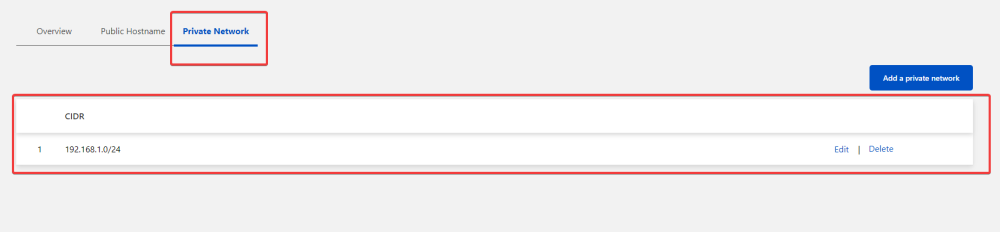
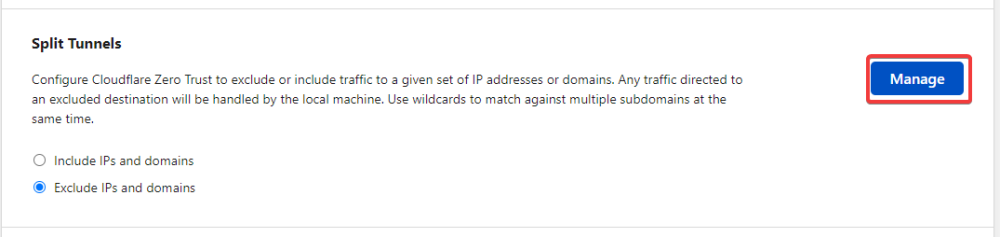
-
Just tried this. Took a couple mins to propagate but it is working for me as well. Very cool. Thanks for sharing this
-
If the dashboard doesnt have what you are looking for I would recommend using the offical cloudflared docker container where you would be able to attach to the container and run the configuration commands you are looking to run. https://hub.docker.com/r/cloudflare/cloudflared
-
Yea I can add this to the container. Look for an update in an hour or so
-
I believe you would want to look into the cloudflare dashboard for what you are looking for. Under the tunnel you should be able to configure public hostnames and point them to an IP. I've never tried with another domain but I think that will work as well. There is alot of options under the cloudflare dashboard. Check above at @ryry's post for a little explination on that
-
This shouldn't happen unless cloudflared itself updates itself when theres a new version available while running. The container only checks for a new version at startup. If you are able to find anything regarding the cloudflared software updates itself while running I'll take a look into that and release an update. I have not run into this myself but if there is a pattern of this please feel free to update here
-
Hello, Thanks for updating your post and sharing. Did the third edit fix your issue?
-
I wasn't aware this was something that could be achieved with the WARP client. As such I do not know much about this however I found this documentation explaining that you have to change a setting under split tunnels to include instead of exclude and configure your IP's. Not sure this helps or not but I will leave the link for that below. Feel free to update with any information and progress made as I find this feature quite interesting. Currently I use Unraid's Wireguard VPN to achieve that. I wish you luck and hope there are others that may be able to better answer this. Documentation: https://developers.cloudflare.com/cloudflare-one/tutorials/warp-to-tunnel/#route-private-ip-ranges-through-warp
-
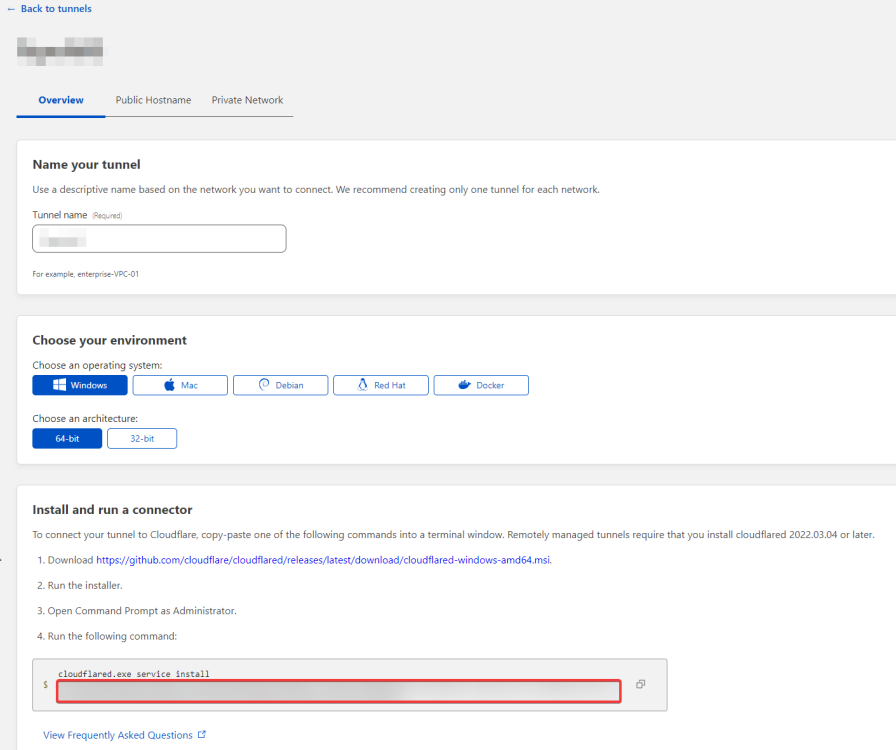
Glad you got it working just going to leave this here for other having issues finding their tokens. The token can be found in the blurred out portion in the second screenshot. You will need to get rid of the other text and make sure to only copy your token. It looks similar to the text in the first forum post here.

-
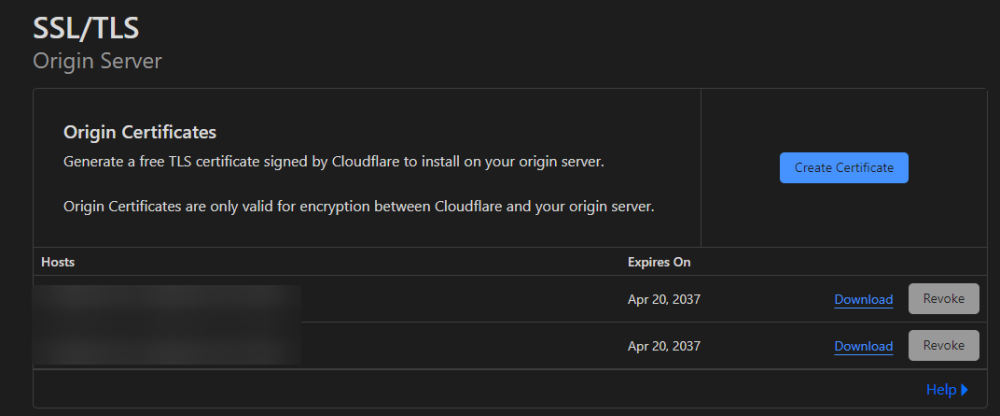
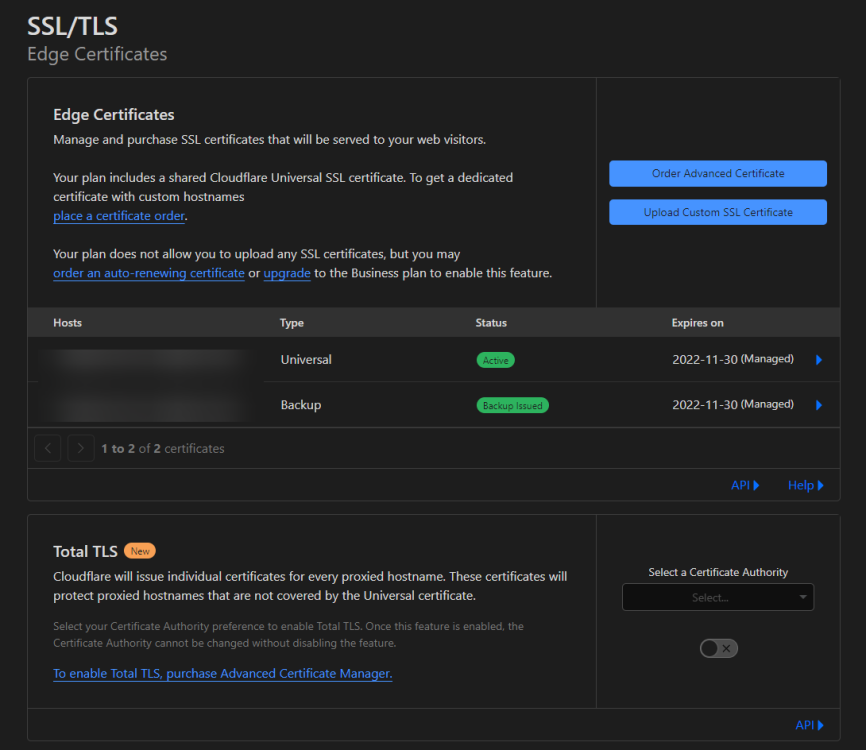
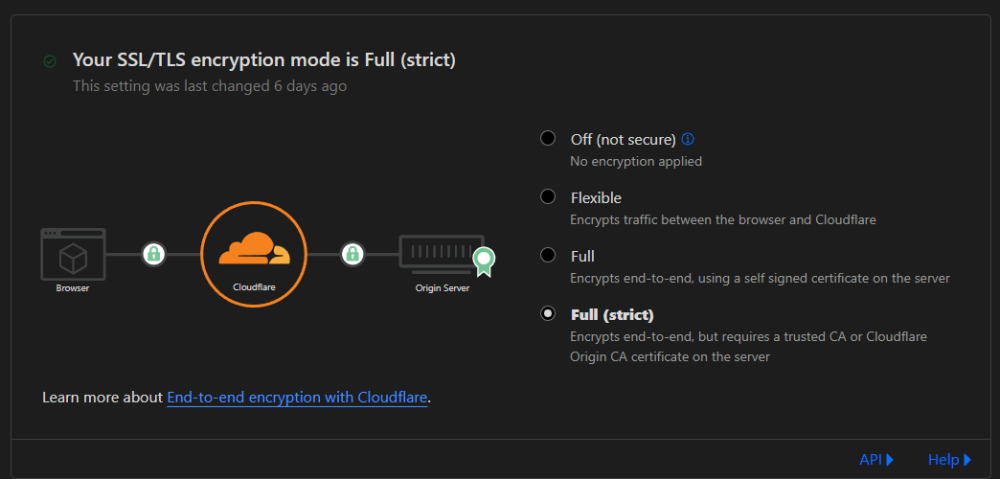
Hello, While I have not done this myself, I belive this can be done a couple of ways through cloudflares domain managment dashboard. You can create or download existing certs as shown in the screenshot below and you can use these instead of the lets encrypt certs. If you prefer to use the letsencrypt certs I believe you can also upload them to cloudflare, however it looks like this is a paid feature under cloudflare. (screenshot below) You can also turn off SSL completly from cloudflare's side and only use letsencrpt however this will be globally across all subdomains (Not sure if thats what you are looking for) The way I use the tunnel is by adding them without SSL with a HTTP connection and once you access through the subdomain cloudflare will encrpyt the connection via HTTPS with their certs. Hope this was helpful and if you have any more questions or need to clear anything up let me know
-
No problem, Glad it was useful to other people
-
I have created a discord server for those interested in getting support that way: https://discord.gg/q32QQFf5gs Unraid-Cloudflared-Tunnel The only thing needed to get the container up and running is the token from Coudflare's zero trust dashboard under Acess > Tunnels. Once you create a tunnel you will be given your token. The token will look similar to the string of text seen below. eyJhIjoiNjAwNGU3OTkxMDUzZjc1ZDNkY2e5MWMyZmI5MTViNDMiLCJ0IjoiZDgwZZZmZGUtOTQ3ZS00MWRhLWJmYzgtZmQzZGJmMmNmOTg1IiwiCyI6Ik1TWm1NR1JtWWpBdFlqSXlaQzAWWVRVNExUbGhaV1F0WXpsallqZzNOEEEzTmpoaiJ9 Leave a message on this thread or send a message on Discord and I will support you as well as I can when I get the chance. Cloudflared Docs: https://developers.cloudflare.com/cloudflare-one/connections/connect-apps/ https://hub.docker.com/r/cloudflare/cloudflared https://github.com/cloudflare/cloudflared Github: https://github.com/AriaGomes/Unraid-Cloudflared-Tunnel DockerHub: https://hub.docker.com/r/figro/unraid-cloudflared-tunnel Discord: https://discord.gg/q32QQFf5gs Flood-UI Dont use `:dev` for regular use. Installing the `:latest` container and setting a port should be all you need to do. You should be able to then link an instance using the webUI on the port you are using with the container. Source code building is available with the :dev branch: Setup the appdata path and change the port (if needed). Will take a couple minutes to spin up. Check the logs and you should see when its up and running. You can mess around with the files for the app in the configured path as you can with Leon-AI. Check the bolded portion in Leon-AI above. Those instructions can be replicated to do development work on this container as well. The entire configuration is done once the server is up and running and you can add your torrent client instance and view and manipulate your client using flood-ui. Please let me know if you run into any issues and I will do my best to assist Flood Docs: https://github.com/jesec/flood/wiki Github: https://github.com/AriaGomes/Flood-UI DockerHub: https://hub.docker.com/r/figro/flood-ui Discord: https://discord.gg/q32QQFf5gs





