CafeNevosa
Members
-
Joined
-
Last visited
-
@IMACRAB did you solve that issue of the webUI showing error: "Method not allowed." status_code: 405? @binhex My FlareSolverr API URL inside of jackett: http://192.168.0.9:8191/ Thanks docker run -d --name='binhex-flaresolverr' -e TZ="Australia/Brisbane" -e HOST_OS="Unraid" -e HOST_HOSTNAME="Delaware" -e HOST_CONTAINERNAME="binhex-flaresolverr" -e 'SHARED_NETWORK'='no' -e 'PUID'='99' -e 'PGID'='100' -e 'UMASK'='000' -l net.unraid.docker.managed=dockerman -l net.unraid.docker.webui='http://[IP]:[PORT:8191]/v1' -l net.unraid.docker.icon='https://raw.githubusercontent.com/binhex/docker-templates/master/binhex/images/flaresolverr-icon.png' -v '/mnt/user/appdata/binhex-flaresolverr':'/config':'rw' -v 'binhex-shared':'/shared':'rw' --net=container:binhex-qbittorrentvpn 'binhex/arch-flaresolverr' f9f7b384700ce2814b194a54f947e63ffca50a5474ba3b955b922b5fb82ac201 docker run -d --name='binhex-jackett' -e TZ="Australia/Brisbane" -e HOST_OS="Unraid" -e HOST_HOSTNAME="Delaware" -e HOST_CONTAINERNAME="binhex-jackett" -e 'UMASK'='000' -e 'PUID'='99' -e 'PGID'='100 ' -l net.unraid.docker.managed=dockerman -l net.unraid.docker.webui='http://[IP]:[PORT:9117]/' -l net.unraid.docker.icon='https://raw.githubusercontent.com/binhex/docker-templates/master/binhex/images/jackett-icon.png' -v '/mnt/user/appdata/data':'/data':'rw' -v '/mnt/user/appdata/binhex-jackett':'/config':'rw' --net=container:binhex-qbittorrentvpn 'binhex/arch-jackett' 12518b4916c7ceedbe58eaf73ad7964aa42d6fb1915203d1438e54c93852e9c4 I’m getting this error inside of jackett An error occurred while testing this indexer Exception (torrentleech): Exception: System.Threading.Tasks.TaskCanceledException: The request was canceled due to the configured HttpClient.Timeout of 60 seconds elapsing. ---> System.TimeoutException: A task was canceled. ---> System.Threading.Tasks.TaskCanceledException: A task was canceled. at System.Threading.Tasks.TaskCompletionSourceWithCancellation`1.WaitWithCancellationAsync(CancellationToken cancellationToken) at System.Net.Http.HttpConnectionPool.SendWithVersionDetectionAndRetryAsync(HttpRequestMessage request, Boolean async, Boolean doRequestAuth, CancellationToken cancellationToken) at System.Net.Http.DiagnosticsHandler.SendAsyncCore(HttpRequestMessage request, Boolean async, CancellationToken cancellationToken) at System.Net.Http.RedirectHandler.SendAsync(HttpRequestMessage request, Boolean async, CancellationToken cancellationToken) at System.Net.Http.HttpClient.<SendAsync>g__Core|83_0(HttpRequestMessage request, HttpCompletionOption completionOption, CancellationTokenSource cts, Boolean disposeCts, CancellationTokenSource pendingRequestsCts, CancellationToken originalCancellationToken) --- End of inner exception stack trace --- --- End of inner exception stack trace --- at System.Net.Http.HttpClient.HandleFailure(Exception e, Boolean telemetryStarted, HttpResponseMessage response, CancellationTokenSource cts, CancellationToken cancellationToken, CancellationTokenSource pendingRequestsCts) at System.Net.Http.HttpClient.<SendAsync>g__Core|83_0(HttpRequestMessage request, HttpCompletionOption completionOption, CancellationTokenSource cts, Boolean disposeCts, CancellationTokenSource pendingRequestsCts, CancellationToken originalCancellationToken) at FlareSolverrSharp.Solvers.FlareSolverr.<>c__DisplayClass12_0.<<SendFlareSolverrRequest>b__0>d.MoveNext(): Exception: System.Threading.Tasks.TaskCanceledException: The r
-
To share for others, that took me 10 minutes before finding 😅. As I was looking inside the Unraid Docker container tab. Instead of inside backup plugin itself and clicking on the container at bottom, naming the container group and clicking save confirm the group name. Thanks! Hopefully updating works without errors after backup. If I group everything appropriately.
-
How do you group containers together? I couldn’t find anything when searching this backup topic or Unraid generally. I’m getting the “File change as we read it” for Plex media server. Which has writing interactions with tautulli and Ombi containers. I have my backup type set to: Stop all containers, backup, start all. Debug Log ID: 4879c939-ebf7-419d-98ed-b8a7942b0527
-
I’m having an issue where my Qbittorrent folder is being deleted under /Downloads share. This is the second time it’s been deleted. I think since I upgraded to Unraid 6.12.6 Then I’m getting an error showing up in sonarr and radarr. You are using docker; download client qBittorent places downloads in /data/qBittorrent/downloads but this directory does not appear to exist inside the container. Review your remote path mappings and container volume settings. It’s not a mapping issue. The folder is gone. I had this happen a week or two ago, I recreated the /data/qBittorrent/downloads Directory as it was completely gone. Now it’s gone again. the only scheduled tasks I’ve seen happen in the last 24 hrs duplicacy backup. But it’s not mapped to that directory to backup anything. Docker updates and backup happen on a Saturday and Sunday. It’s Wednesday 07/02 12:58pm as I’m posting this. the BINHEX - QBITTORRENTVPN superviscord.log doesn’t show anything but IP address refreshes for the VPN. any suggests on leads would be really appreciated. 🙂
-
Here’s a follow up on two months ago when I had files deleting in destination folder, and showing up in qbittorrent as ‘files missing’ See log here from /appdata/qbittorent/data/logs the two errors I’m getting are 1. File sizes mismatch for torrent ‘’ Cannot proceed further 2. was removed from the transfer list and hard disk. (C) 2021-07-16T21:04:31 - File sizes mismatch for torrent 'Lego.Masters.US.S02E02.1080p'. Cannot proceed further. (C) 2021-07-16T21:04:31 - File sizes mismatch for torrent 'Luca.2021.1080p'. Cannot proceed further. (C) 2021-07-16T21:04:31 - File sizes mismatch for torrent 'You.Cant.Ask.That.S06E06.Lesbians.1080p'. Cannot proceed further. (N) 2021-07-16T21:05:49 - 'Lego.Masters.US.S02E02.1080p' was removed from the transfer list and hard disk. (N) 2021-07-16T21:05:49 - 'Luca.2021.1080p' was removed from the transfer list and hard disk. (N) 2021-07-16T21:05:49 - 'You.Cant.Ask.That.S06E06.Lesbians.1080p' was removed from the transfer list and hard disk. Any reason why that might be? I actually attempted using Binhex-rtorrentvpn as this was really annoying, causing me to have hit and runs on my torrent index trackers. Binhex-rtorrentvpn Had the same issue delete and remove issue, but I couldn’t find the log like here in qbittorent. The dockers I’m running are: binhex-plexpass, Home-Assistant-Core, binhex-sonarr, binhex-radarr, binhex-jackett, unifi-controller, Monitorr, OpenSpeedTest-Server, Duplicacy, krusader, swag, tautulli, Firefox I’m running Unraid Version 6.9.0 2021-02-27, and my parity checks have been working fine. @binhex
-
Similar Issue to DZMM for me Frequently when my container restarts, files are often disappearing/being deleted from my destination folder /data. Attached is my supervisord log with debug on. I tried starting a new docker config and renaming the old one, but the issue persists. When I restarted for the supervisord right now I lost 10 of 33 files in the destination folder. I’m a bit of a Docker noob, so details with explanations would be appreciated 🙂 supervisord.log
-
Oh thanks. I’ve corrected it by removing that step. I confused network type with host. Thanks for updating the container to maintain security 👍
-
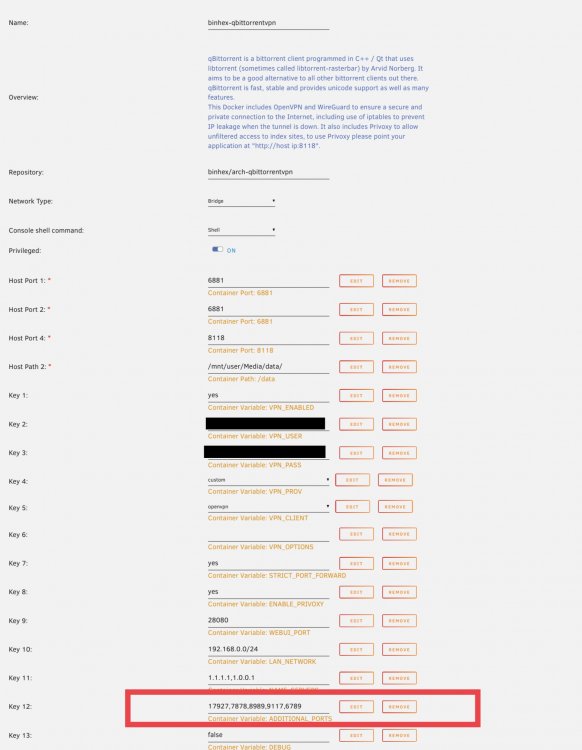
If your a noob like me after following @SpaceInvaderOne video titled ‘How to use Privoxy with VPN for Ultimate Privacy when using Media Collection Apps’ here’s a step by step guide with screenshots. I’m sure SpaceInvaderone will provide guidance at some point. But it isn’t always convenient to do so if their life is busy. Here is a noob version with screen shots for Unraid on what to do to access the web UI’s behind the VPN/Prixoxy after they stopped working in the latest security update from @binhex. As ADDITIONAL_PORTS' env var value for the VPN container took me 15 minutes to work out 😅 Steps 1. Edit Docker configuration file for client DelugeVPN/PrivoxyVPN/SABnzbdVPN/qBittorrentVPN 2. Find Container Variable with Additional ports, Key 12 for me. 3. Insert port number(s) for containers you have routing through VPN/Prixoxy. In my case Radarr 7878, Sonarr 8989, Jackett 9117 and NZBGet 6789 with a comma between each port 4. Click apply to Docker Configuration I was then able to access my web UI’s for all the container routed through binhex-qbittorentVPN. There’s also a Q26 for issues accessing the webUI of the the 'Download Client' (e.g. Deluge, rTorrent, qBittorrent, SABnzbd) https://github.com/binhex/documentation/blob/master/docker/faq/vpn.md
-
Thanks for the response skois I’m quite a noob when it comes to the console, I did though attempt cd inside the console and couldn’t copy the .mp4 to another folder after creating a test folder inside of /data/test. Plus other combinations for the last 30 minutes lol. It came up permission denied, even when I created the folder in SMB I’m guessing it not relevant, but I copied the 514mb mp4 file In side the krusader file GUI. It did the transfer in less than 10 seconds. So very fast. Good to know it’s not the database, I’m not that familiar with databases, but makes sense it that keeps a record of the directories. Can you tell me or link me to how I would test rsync?
-
Hi, I'm wondering if anyone can help me with improving my nextcloud speeds. I've having considerably slower speeds writing to my cache drive using nextcloud, using a LAN connection and SMB into the cache drive I'm averaging 8-10 mb/s, when uploading using the nextcloud web gui using the same LAN I'm having 2.1 mb/s, I'd like to get near that 8 - 10 mb/s. When writing to the array using SMB my 514mb mp4 test file I averaged 3.2 mb/s, although I don't think it's writing to the array as the share I'm writing to is set to cache: yes (mover transfers files from cache to array). The mariadb app data is also in the nextcloud share not appdata, so should be on my raid 1 1TB Samsung SSD's. I followed SpaceInvador One's youtube tutorial installing mariadb and using the swag reverse proxy. I disabled encryption using maintenance mode as it mentions a performance penalty, but I found it performed basically the same, maybe a 5% quicker. I'm also noticing performance quite slow downloading that same 514mb mp4 file (around 2 mb/s), so maybe it's the database or swag. Any suggestions would be appreciated.
-
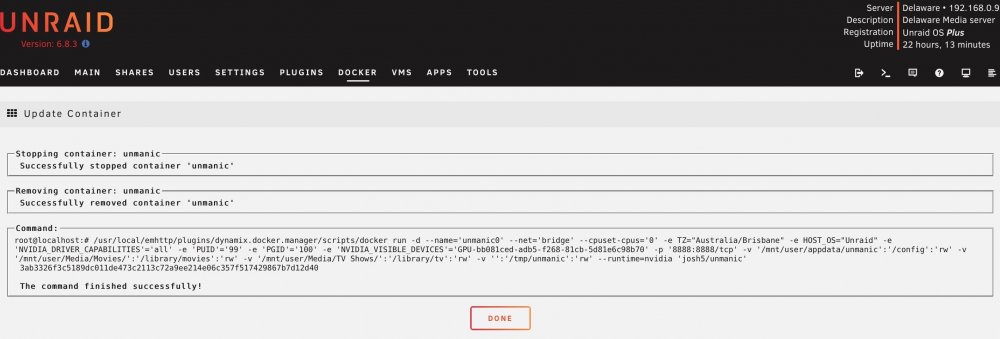
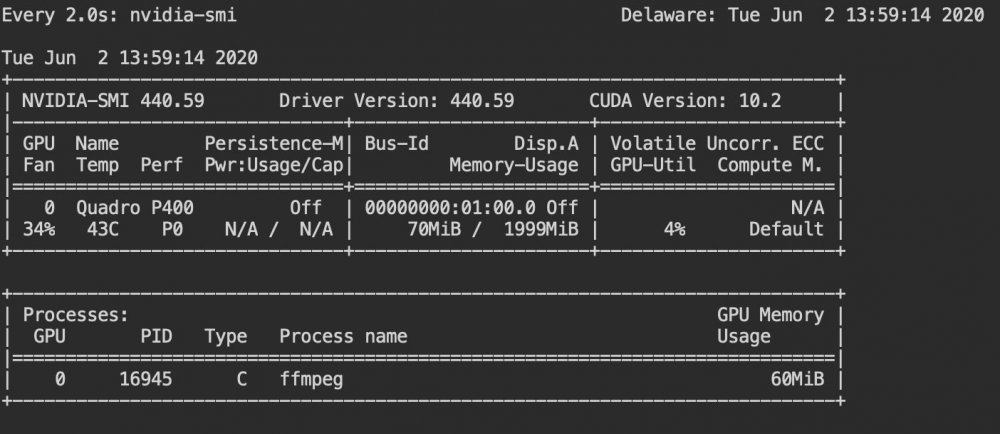
I can't get the nvidia transcoding working despite adding the NVIDIA_DRIVER_CAPABILITIES variable. Plus I've got the video encoder set to hevc_ncenc and 1 worker. It does however show up for ffmpeg. I'm not sure how significant that is. I do have it set to one of my 4 CPU cores otherwise it's maxing out my system and assuming will affect plex performance. I did try without the CPU set and had not luck.
-
Although getting stuck now on one item for automation with Deluge - Sonarr and Plex. Any tips on Unrar'ing files in Deluge to be picked up by sonarr? I've got the extrator plugin working, it's done multiple already. Following SpaceInvader One's video I made a completed, incomplete and unzipped_torrents. I set the extractor to /data/complete/ as that's where sonarr's looking, but I don't know how to get extractor to looking in the folder for that download /data/complete/XXXXX individual download folder.
-
Thanks binhex. That was it. Looks to be all good now. I sent you a small thank you on paypal 👍🏻
-
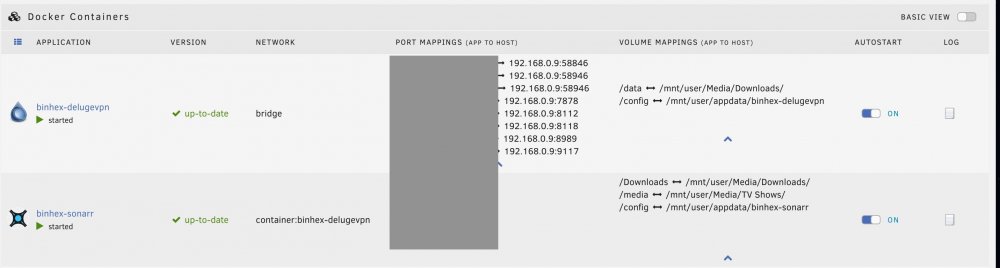
I've got the common problem of Sonarr not moving files across from data/downloads to Media/Tv Shows. I've done lots of reading and searching and saw the common problem where the Container Path and Host path not matching for the Sonarr container. So I did match them to Downloads as you can see in the picture. Here's the command version of Sonarr Despite that it comes up with the log error |Error|DownloadedEpisodesImportService|Import failed, path does not exist or is not accessible by Sonarr: /data/completed/Last.Week.Tonight.With.John.Oliver.S07E10.720p.HDTV.x264-aAF I see it's looking for /data/ in this log above in my /Downloads/ directory. So I did add a Remote Path Mapping and that still didn't fix the issue. As a related note. When I matched the Container Path and Host path in Binhex-DelugeVPN to /Downloads/ instead of /data/ sonarr's alerts go from yellow to blue like they see the files. However Binhex-delugeVPN goes all haywire and won't download any files, despite changing the download preferences. Your help would be very much appreciated as I'm about 5-8 hours into fiddling with this 😅🙂.