





N47H4N
Members
-
Joined
-
Last visited
-
root@NAS01:~# lspci -d 1000: -vv 01:00.0 Serial Attached SCSI controller: Broadcom / LSI SAS3224 PCI-Express Fusion-MPT SAS-3 (rev 01) Subsystem: Broadcom / LSI SAS9305-24i Control: I/O+ Mem+ BusMaster+ SpecCycle- MemWINV- VGASnoop- ParErr- Stepping- SERR- FastB2B- DisINTx+ Status: Cap+ 66MHz- UDF- FastB2B- ParErr- DEVSEL=fast >TAbort- <TAbort- <MAbort- >SERR- <PERR- INTx- Latency: 0, Cache Line Size: 64 bytes Interrupt: pin A routed to IRQ 16 IOMMU group: 15 Region 0: I/O ports at 4000 [size=256] Region 1: Memory at a9100000 (64-bit, non-prefetchable) [size=64K] Expansion ROM at a9000000 [disabled] [size=1M] Capabilities: [50] Power Management version 3 Flags: PMEClk- DSI- D1+ D2+ AuxCurrent=0mA PME(D0-,D1-,D2-,D3hot-,D3cold-) Status: D0 NoSoftRst+ PME-Enable- DSel=0 DScale=0 PME- Capabilities: [68] Express (v2) Endpoint, MSI 00 DevCap: MaxPayload 4096 bytes, PhantFunc 0, Latency L0s <64ns, L1 <1us ExtTag+ AttnBtn- AttnInd- PwrInd- RBE+ FLReset+ SlotPowerLimit 75W DevCtl: CorrErr- NonFatalErr- FatalErr- UnsupReq- RlxdOrd+ ExtTag+ PhantFunc- AuxPwr- NoSnoop+ FLReset- MaxPayload 256 bytes, MaxReadReq 512 bytes DevSta: CorrErr+ NonFatalErr- FatalErr- UnsupReq+ AuxPwr- TransPend- LnkCap: Port #0, Speed 8GT/s, Width x8, ASPM not supported ClockPM- Surprise- LLActRep- BwNot- ASPMOptComp+ LnkCtl: ASPM Disabled; RCB 64 bytes, Disabled- CommClk+ ExtSynch- ClockPM- AutWidDis- BWInt- AutBWInt- LnkSta: Speed 8GT/s, Width x8 TrErr- Train- SlotClk+ DLActive- BWMgmt- ABWMgmt- DevCap2: Completion Timeout: Range BC, TimeoutDis+ NROPrPrP- LTR- 10BitTagComp- 10BitTagReq- OBFF Not Supported, ExtFmt- EETLPPrefix- EmergencyPowerReduction Not Supported, EmergencyPowerReductionInit- FRS- TPHComp- ExtTPHComp- AtomicOpsCap: 32bit- 64bit- 128bitCAS- DevCtl2: Completion Timeout: 50us to 50ms, TimeoutDis- LTR- 10BitTagReq- OBFF Disabled, AtomicOpsCtl: ReqEn- LnkCap2: Supported Link Speeds: 2.5-8GT/s, Crosslink- Retimer- 2Retimers- DRS- LnkCtl2: Target Link Speed: 8GT/s, EnterCompliance- SpeedDis- Transmit Margin: Normal Operating Range, EnterModifiedCompliance- ComplianceSOS- Compliance Preset/De-emphasis: -6dB de-emphasis, 0dB preshoot LnkSta2: Current De-emphasis Level: -6dB, EqualizationComplete+ EqualizationPhase1+ EqualizationPhase2+ EqualizationPhase3+ LinkEqualizationRequest- Retimer- 2Retimers- CrosslinkRes: unsupported Capabilities: [a8] MSI: Enable- Count=1/1 Maskable+ 64bit+ Address: 0000000000000000 Data: 0000 Masking: 00000000 Pending: 00000000 Capabilities: [c0] MSI-X: Enable+ Count=96 Masked- Vector table: BAR=1 offset=0000e000 PBA: BAR=1 offset=0000f000 Capabilities: [100 v2] Advanced Error Reporting UESta: DLP- SDES- TLP- FCP- CmpltTO- CmpltAbrt- UnxCmplt- RxOF- MalfTLP- ECRC- UnsupReq- ACSViol- UEMsk: DLP- SDES- TLP- FCP- CmpltTO- CmpltAbrt- UnxCmplt- RxOF- MalfTLP- ECRC- UnsupReq- ACSViol- UESvrt: DLP+ SDES+ TLP- FCP+ CmpltTO- CmpltAbrt- UnxCmplt- RxOF+ MalfTLP+ ECRC- UnsupReq- ACSViol- CESta: RxErr- BadTLP- BadDLLP- Rollover- Timeout- AdvNonFatalErr+ CEMsk: RxErr- BadTLP- BadDLLP- Rollover- Timeout- AdvNonFatalErr+ AERCap: First Error Pointer: 00, ECRCGenCap- ECRCGenEn- ECRCChkCap- ECRCChkEn- MultHdrRecCap- MultHdrRecEn- TLPPfxPres- HdrLogCap- HeaderLog: 04000001 0000000c 01080008 c61e2ad2 Capabilities: [1e0 v1] Secondary PCI Express LnkCtl3: LnkEquIntrruptEn- PerformEqu- LaneErrStat: 0 Capabilities: [1c0 v1] Power Budgeting <?> Capabilities: [190 v1] Dynamic Power Allocation <?> Capabilities: [148 v1] Alternative Routing-ID Interpretation (ARI) ARICap: MFVC- ACS-, Next Function: 0 ARICtl: MFVC- ACS-, Function Group: 0 Kernel driver in use: mpt3sas Kernel modules: mpt3sas
-
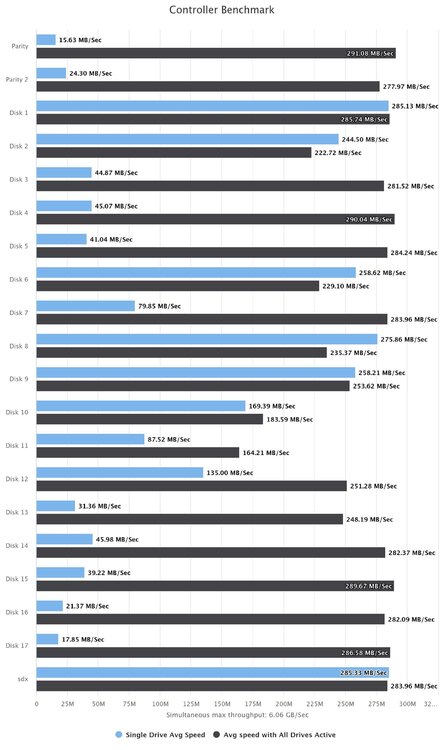
sure here is the benchmark of the controller
-
@JorgeB here is the result of the benchmark @_cjd_ both my MVs and Containers are running on my nvme SSD but they are reading/writing stuff on my array of hard drives
-
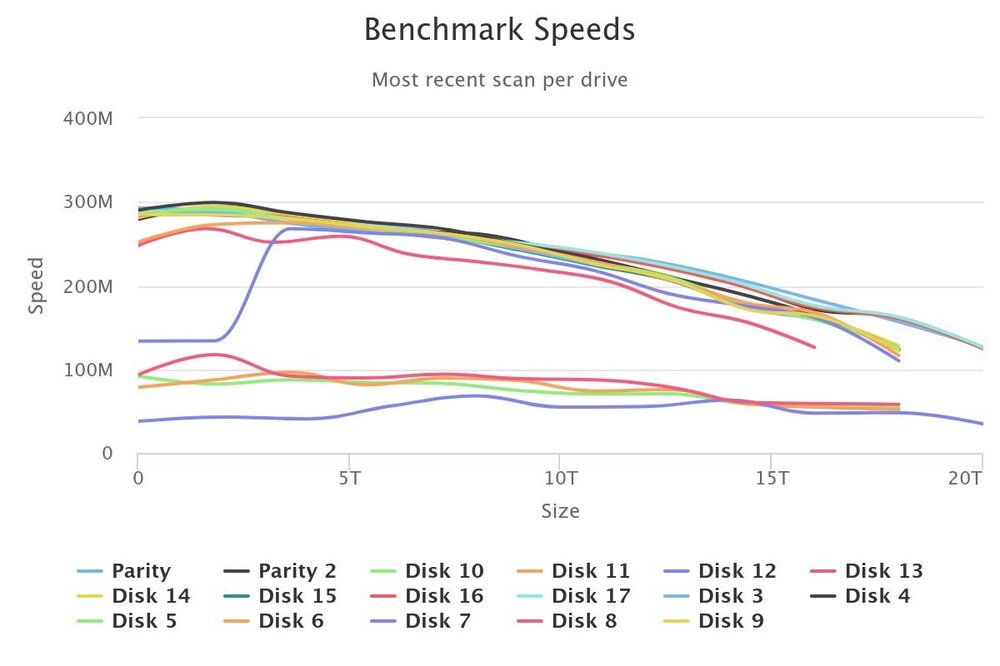
@JorgeB sure, here is my diagnostics file
-
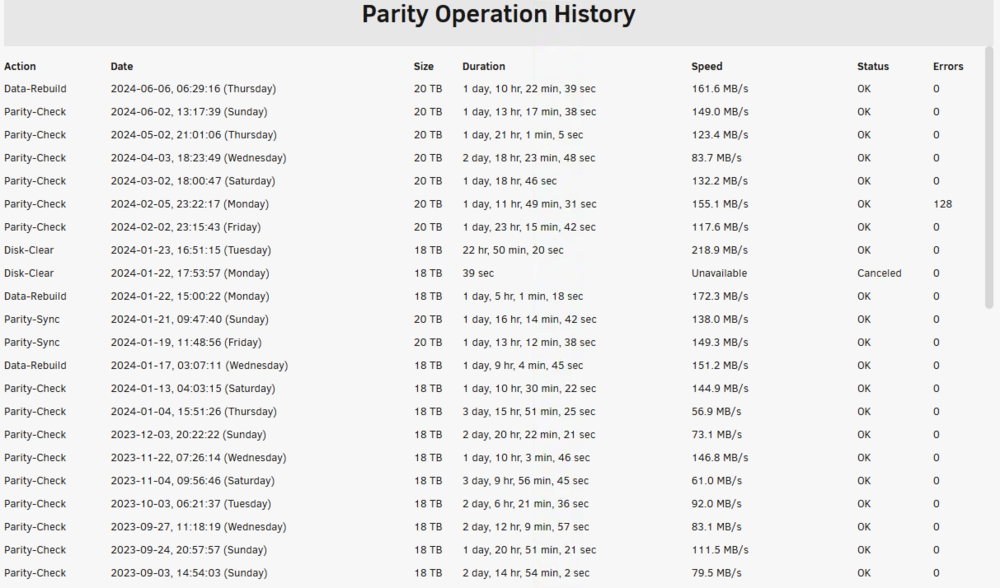
Hi @_cjd_, You will probably say that my parity check time is fine and it's on average. but the reality is that I have to stop all my VMs and all my Docker containers during parity check or rebuild to reach that average speed. and even with everything stopped, my unraid server is useless 2days per month I'm just checking if I can optimize something
-
My HBA is in PCIe v3 but my moterboard is PCIe v4. If I change my HBA for the version eHBA 9600-24i for example, will I have a significant performance improvement ?
-
ok thx @JorgeB, so no benefits to move my parity disk. Do you know if moving my HBA from pci-e 3 to pci-e 4 can improve the performance ?
-
Hi everyone, I've a question regarding my setup. You can see my full setup here: My question will be related to my motherboard (Asus P12R-E/10G-2T) and my HBA (Lsi Sas 9305-24i) For the moment, all my disks are connected on my HBA though my PCI-E x8. Do you think I can improve my performance (data rebuild / parity check) if I connect my 2 parity disks directly on my motherboard ? Or the opposite, my perfs will decrease. I would appreciate any advice here thx
-
Wow, you bring back to life all my windows VMs ! Thx ! I guess it's something that was enforce by Microsoft few weeks ago because it was working for a year at least for me. Can you please send me your paypal in MP ! I've to buy you a coffee !
-
@showstopper I hope your problem is different than mine. Let me know if it's fix your issue
-
@SimonF I've deleted the plugin for testing purpose, no changment @showstopper my VMs are running on NVME, but they are unusable. I don't think the problem is related to the storage
-
Still nobody ? @SimonF ? I would love to be able to reuse my VMs.
-
here is my diagnose after a reboot, and yes, I'm using the nvidia plugin nas01-diagnostics-20231129-2226.zip
-
it would be awesome, thx ! I've already posted my diagnostics file in the first post, do you want/need a more recent one ?
-
I just did, no difference. it has been working for months without any problem.


