






Everything posted by GeekyGecko
-
Here's the final build list: CPU: Intel Core i5-14500 2.6 GHz 14-Core Processor CPU Cooler: BeQuiet! Dark Rock Elite Motherboard: ASUS Pro WS W680-ACE Memory: 4 x Kingston KSM48E40BD8KI-32HA 32 GB (2 x 32 GB) DDR5-4800 CL40 ECC Memory Cache Storage: 2 x Samsung 990 Pro 4 TB M.2-2280 PCIe 4.0 X4 NVME Solid State Drive Case: Fractal Design Meshify 2 XL ATX Full Tower Case + 5 x HDD Tray Kits Power Supply: Seasonic Vertex PX-750 80+ Platinum Power Supply Case Fan: 5 x Noctua A14 PWM chromax.black.swap 82.52 CFM 140 mm Fan HBA: LSI 9201-8i Network Card: Intel X710-DA2 Dual 10Gbps SFP+ +Custom CableMod SATA cables (details in my post above) And some photos: Things have probably changed by now, but I went with this specific i5 CPU because it is a re-badged Alder Lake and doesn't suffer from the microcode issues that Raptor Lake does (did?). I imagine they've got all that ironed out by now with their current gens.
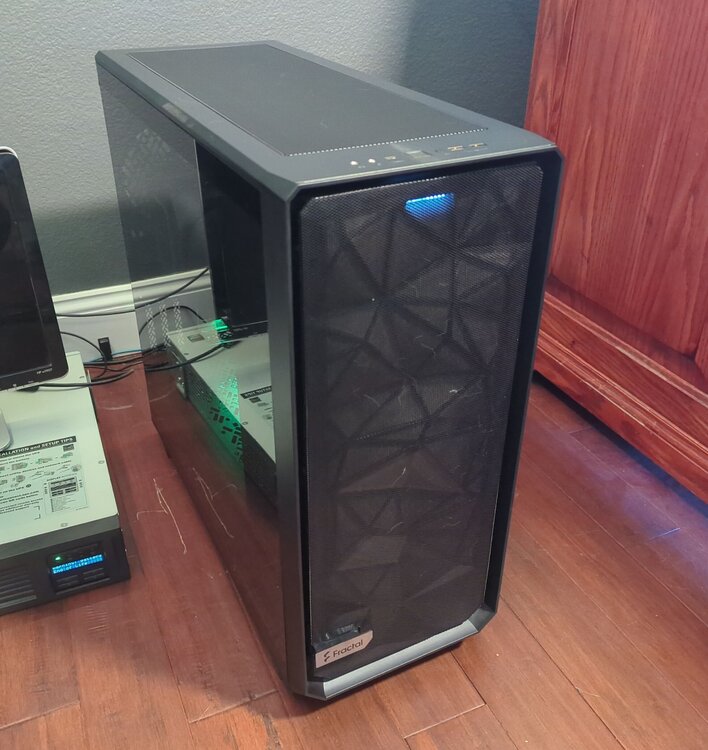
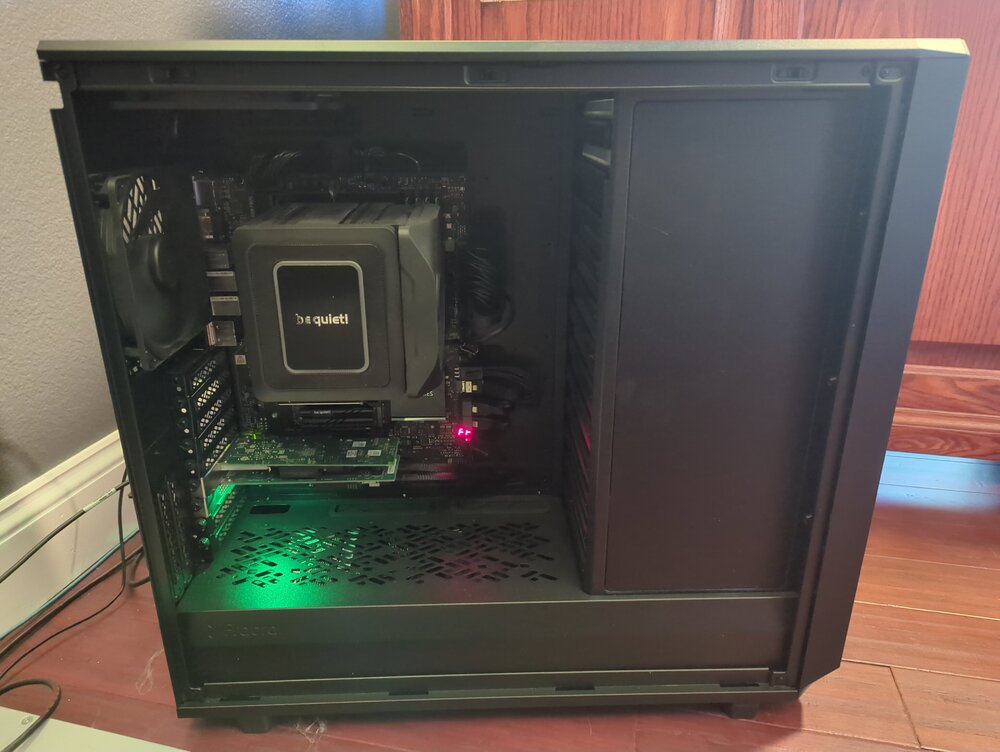
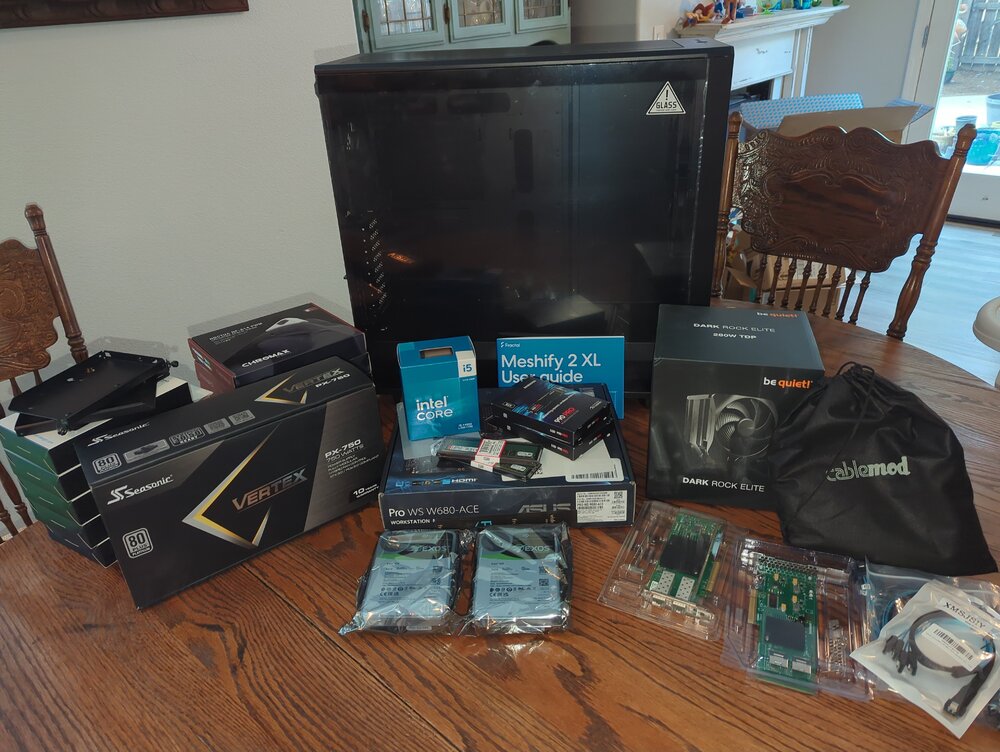
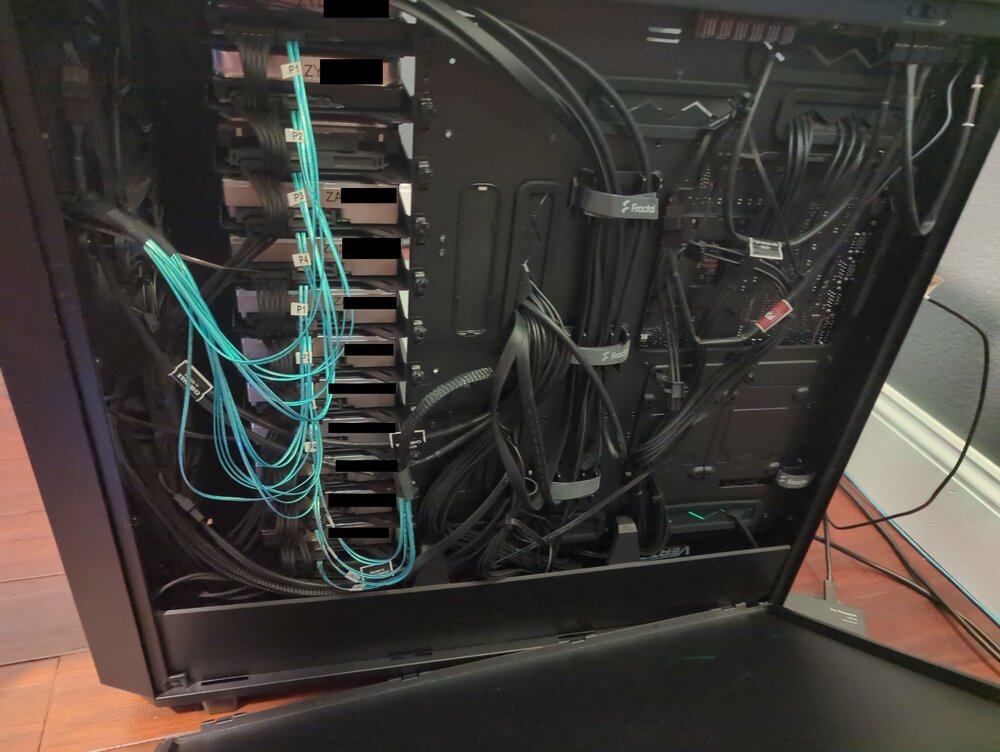
-
Alright so things aren't completely fixed after all. I'm still running into weird issues all over the place. This morning I noticed my linuxserver/unifi-network-application container was down because it couldn't see the MongoDB container. After a bunch of messing around I finally tried changing the MongoDB network type from "Bridge" to "bond0" and gave it its own IP address. That fixed that issue.... but I don't know why. Later I realized my UniFi Network integration in HomeAssistant was down, and could not reach the unifi-network-application docker container either. I've screwed around with NAT > Outbound settings, my Port Forward Settings, my NAT reflection...... all I do is break more things. Does anyone else here use OPNsense? I can't be the only one running into this.
-
Figured it out. The problem was on OPNSense's end after all. After going through a bunch of things with ChatGPT it eventually suggested running the command pfctl -F all -f /tmp/rules.debug on the router - and that did the trick! Called it a "hard reset and manual reload of the packet filter (PF) ruleset". Apparently the issue caused by one of the following: it meant PF had either: A stale or corrupted in-memory ruleset, often caused by interface state desyncs after reboot, NIC driver reloads, or manual changes in Interface Assignments. Rules applied before the LAN interface was ready, which can happen if PF starts before ix or ixl NICs are fully initialized — especially on systems using Intel X520/X710 cards or virtual NICs under Unraid/Proxmox. Temporary rules override stuck active, e.g. “quick” rules from dynamic updates, floating rules, or auto-generated DNS rules that didn’t clear properly. By flushing and reloading from /tmp/rules.debug, you forced PF to: Drop all previous state tables, NAT mappings, and stale interface bindings. Rebind the filter engine to the current ix0 (LAN) and ix1 (WAN) devices. Reapply your GUI-defined firewall rules correctly. After this reload, packets were once again being matched against your “allow LAN to any” rule, not a broken placeholder or orphaned rule that denied local traffic. ----- No idea if any of that is accurate, but it makes sense to me.
-
This is the 4th time this has happened now. In the past it's resolved itself after like 8-24 hours automatically, but I'm not sure why (why it happens or why it resolves itself). It could be an OPNsense issue I suppose, since it's been happening consistently after I restart my router with their recent updates. But I don't see how, everything else on my network is fine. I've also been experiencing some other odd issues in Unraid that might be related: • Duplicati docker container failed to stop (cli or gui) and my Docker tab wouldn't load at all. Couldn't stop the Docker service itself either, had to reboot. • WebUI is crazy slow. Takes like 30 seconds for the terminal or log popups to populate. • Last restart it was stuck on "Starting Recycle Bin" (presumably related to the plugin) and had to be hard reset. At first I thought it was an issue with swag or the docker service, but when I try a ping command from the console itself it times out: The fact that the issue usually "fixes" itself leads me to believe this isn't an issue with my settings (haven't touched em in years) or with OPNsense's settings (also haven't changed in years). All of my externally accessible services are down, and even if it resolves itself again overnight (fingers crossed) I'd really appreciate help getting to the root cause of this. (edit:) I'm on version 7.1.2

-
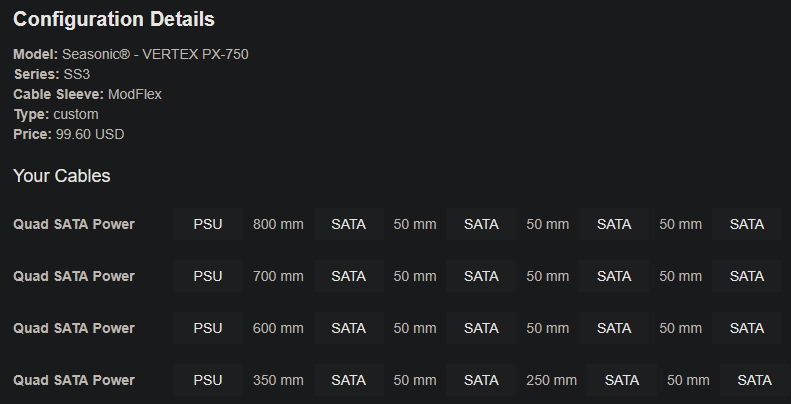
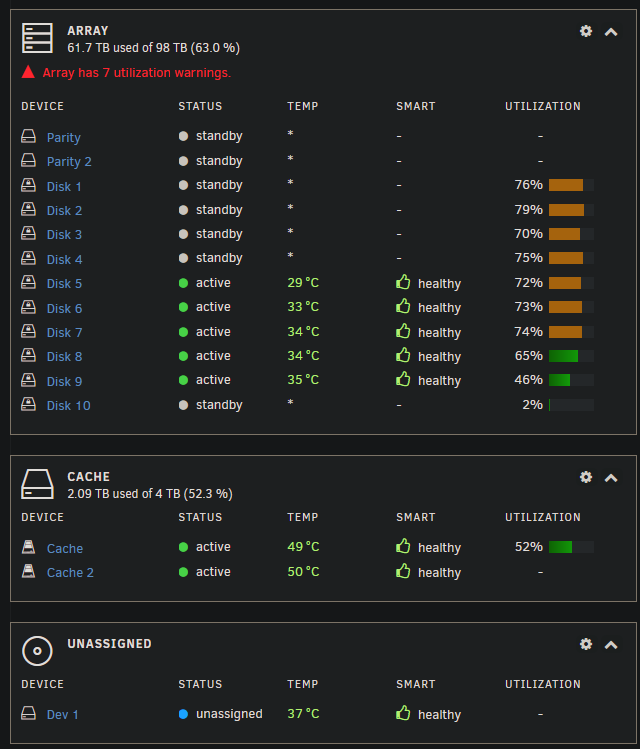
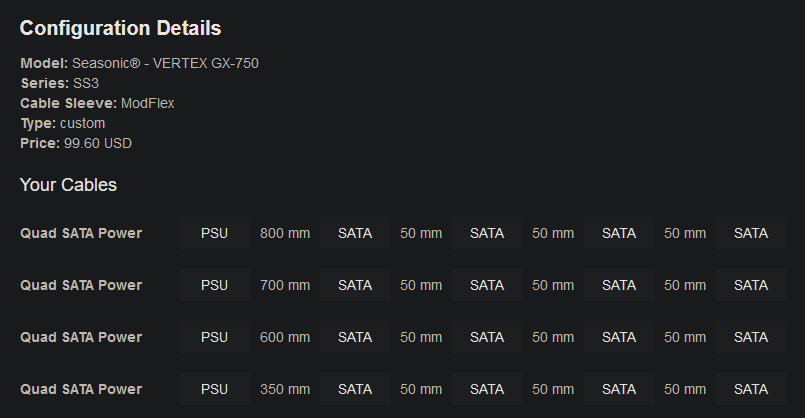
Not really. I ended up going with Samsung 990 Pro SSDs because of price/availability issues with the Crucial T700 at the time. Decided on 128GB of RAM because I was worried it wouldn't be available years from now if I wanted more. I also sprung for custom SATA power cables from cablemod (specs attached) so I could comfortably reach all of the drives without a bunch of cable slack wasting space. Otherwise I built exactly what I have listed here and it's been great! Dead silent (the HDDs are the only noise), cool temps (screenshot attached), less than half of the power usage of the server it replaced, and about twice as powerful. Plus it has room to add a GPU eventually if I want to self-host a LLM in the future. All-in-all I'm happy with the build. The only thing I might have done differently is pick a 1000W PSU, because if I get to 15 HDDs and add a beefy GPU someday I'm a little worried that my 750W PSU won't cut it.
-
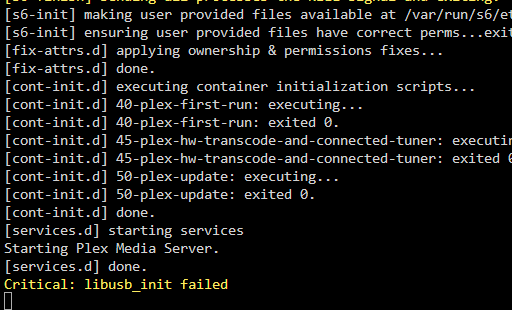
Funny you should mention that. When I made this thread I noticed Plex was backing up the database. I just went to check on it and noticed it crashed again. I don't see anything in the logs: And the docker still shows as running... ...but it doesn't load when I try to open the WebUI or from the app. Restarting the docker fixes it but this is becoming increasingly annoying. Is there some way to easily backup my watch history, collections, posters, etc - burn the whole thing down - and then start fresh and import that data? I feel like my 12 year old Plex database has been corrupted or something and I just need to redo it. I tried running "Optimize database" recently and it crashed the docker, after running for hours.

-
I get Pushover notifications on my phone when it happens, so I should be able to catch it and try that. Thanks. Sorry, I don't know what you mean here. Docker Image mode vs folder mode? I guess whatever the default is.
-
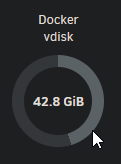
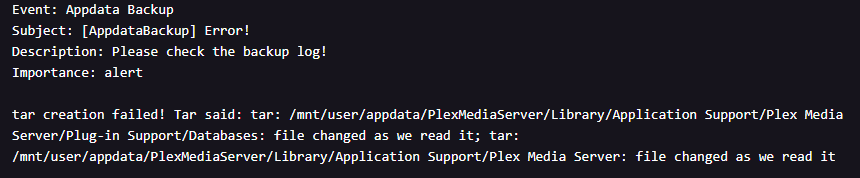
No I'm not running any unusually large containers. No AI stuff. Just Plex, Immich, Arr stack, etc. Haven't added any new containers recently. As for the backup, I've never had to manually mess with it one way or the other. The AppData backup plugin usually auto-stops each docker before backing up. Apparently this time it had trouble stopping the Plex container. I've been running the same stuff for years and never had any issues with it. I haven't changed any of the settings recently. The next time I get notifications about my vdisk usage going crazy how can I go about determining which Docker is the culprit?
-
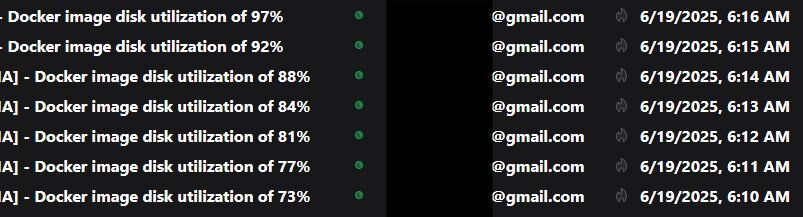
Recently I'm having a recurring issue where, a few times a week, I'm flooded with emails about my Docker image utilization exploding out of the blue: I have a 100GB vdisk, so whatever's going on uses up over 60GB very quickly. Then once it reaches 100% it eventually resets back to 45% where it normally sits. I suspect it's related to Plex, because I've been having odd issues with it the past couple months. It crashes and requires a docker restart almost every day, and last night during the appdata backup I got this new error: I'm hoping someone here will recognize these symptoms and can shed some light on what's happening. Or at least give some pointers on how to go about troubleshooting this.
-
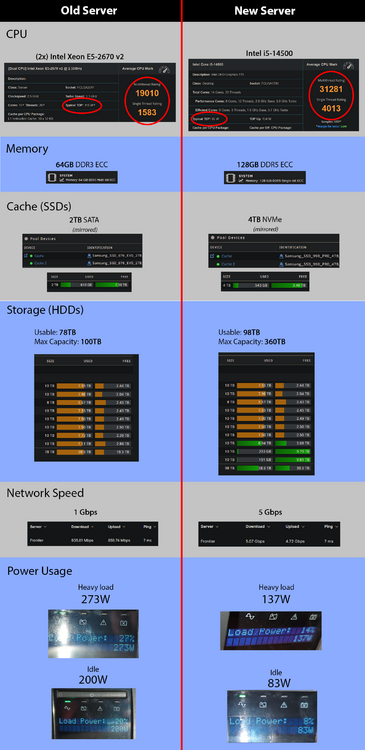
Yes I did end up getting this build finished. Turns out my CPU had a bad memory controller. After swapping the memory, and then the motherboard, I finally tried swapping the CPU and that resolved the issue. Then I hit some trouble with the BIOS because I couldn't get it to boot the USB in legacy mode, and I didn't realize I had to remove a "-" from the end of the EFI folder name on my Unraid USB to get it to boot via UEFI. Anyway, despite the struggles it was all worth it in the end. I whipped up a before/after comparison chart to illustrate the upgrade to my family and justify the Plex downtime: Almost doubles my compute power, triples my potential storage capacity, halves my power usage, and most importantly (even though I can't show it above) it is completely silent. My wife and I are very happy that we don't have to listen to the old Supermicro anymore.
-
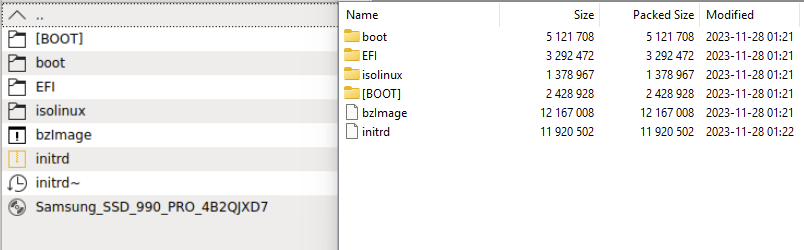
I'm having the same problem as him with the Samsung 990 Pro and I cannot figure out what I'm doing wrong. I've downloaded & extracted multiple times on Unraid and Windows and I do not see a root folder: The left was unzipped using the exact commands in the guide, and the right was a separate download extracted to a share via 7zip on Windows. I don't see a root folder or anything named fumagician in any of these folders.
-
You are my hero! I just built a new rig with this same motherboard and I've been struggling with this issue for HOURS. Finally found this thread, removed the "-" from the EFI folder name, and BAM it works. Thank you so much my friend!
-
Thank you, that is reassuring to hear. Guess I just got unlucky with a faulty motherboard, hopefully swapping it out resolves everything.
-
Update: I bought a stick of non-ECC Crucial RAM to test since the Kingston ECC RAM got stuck on error 55 every time. With the Crucial RAM it successfully boots about 50% of the time, but the other half of the time it gets stuck on one of the following error codes: 7F, 4F, B6, or 33. I tried clearing the CMOS and updating the mobo BIOS to the latest version but that made no difference. Those error codes all seem to be memory related, so on one of the successful boots I ran memtest86+ for 8 hours, but it passed with 0 errors. Next I tried booting to Linux Mint and running stress-ng for about 10 minutes to stress test the CPU. Again, passed with 0 errors. In summary: half the time it doesn't boot and gets stuck on a memory-related error - but the other half of the time where it makes it past the boot then everything seems nice and stable. My best guess is that I have a faulty motherboard so I just ordered a replacement. Not looking forward to redoing half the damn build to swap the motherboard, so hopefully my effort isn't in vain. If the issue persists after swapping the motherboard I think I'll cry.
-
Same question for you. Are you using this memory with the Asus Pro WS W680-Ace? As mentioned above I'm having trouble and I have no idea if it's because of a compatibility issue or a bad component. On the Memory compatibility page for this board I see the KSM48E40BD8KM-32HM memory that I originally had on my build list, but not the newer KSM48E40BD8KI-32HA that I got instead at your recommendation. I'm trying to determine if there's any chance this newer RAM just isn't compatible with the board for some reason.
-
@Tineen Did you use the Asus motherboard and Kingston ECC Memory on the build list (ASUS Pro WS W680-ACE and KSM48E40BD8KI-32HA)? I finished the build today but unfortunately I couldn't even get to a boot screen. There was no video output at all and I was getting a code 55 on the motherboard, which apparently indicates a memory issue. I tried alternating 1 stick at a time and tried different RAM slots but still no luck. Code 55 every time. So I'm guessing I've either got a bad motherboard, incompatible RAM, or I got incredibly unlucky and got 2 bad sticks of this RAM. From everything I read this RAM should be compatible, but it's niche enough that I can't find an example of anyone using it on this board. It would be very helpful to know if someone else has gotten this combination of parts working.
-
@Tineen Thanks for your comment! It's really nice to know that someone has already gotten this combination of parts working well with Unraid. Did you end up going with a 750W PSU? That's my one remaining hesitation. I'm almost definitely going to add a GPU to self-host a LLM at some point, and I'm a tad worried that my 750W PSU won't cut it if I add something like a 4090.
-
@grumpy I really screwed up by not ordering every part before I went on vacation. I returned to find several of the components on my list backordered. Currently I have most of the components standing by, but I'm still waiting for the PSU, CPU cooler, and custom CableMod quad-SATA power cables to come in. I can't believe how many things disappeared off of Newegg/Amazon in the span of a few weeks. Luckily I've been able to find alternate vendors for everything, its just taking a lot longer than I expected. The remaining components should deliver over the next couple weeks, and I should have the build complete before the end of March. I'll post an update at that point.
-
@hovee Actually I just started buying the parts (mobo arrived yesterday). I'm going on vacation soon and I'm planning to build it when I get back.
-
This has crossed my mind, something like the MS-01 is certainly powerful enough for my needs. But I decided against it for a few reasons: • 12-16 bay DAS hardware seems to geared for enterprise, and doesn't look like it would be be quiet (or afforadable). • Any energy gains I make with a mini-PC would probably be lost on the 12+ bay DAS anyway. • My expansion options are severely limited with a mini-PC. I might want to do something like add a GPU and host my own LLM for Home Assistant in the future. • I'm more comfortable upgrading/replacing components in a full-tower. If something took out my PSU I'd much rather swap out a regular ATX unit than whatever I'd have to do with a MS-01.
-
@enect Thank you for your comment. I didn't catch that note about the SlimSAS stuff. You've convinced me, I changed my mobo pick back to the W680-ACE.
-
Ooooh, thanks for the suggestion! I like those extra SATA ports; with 8 on-board I could get away with a 9201-8i instead of a -16i. And I definitely trust Supermicro's build quality more than Asus. Looks like I'd have to pick out different memory though, I have this 4800 MHz DRAM on the build list but the specs of the X13SAE-F only show 4400/4000/3600 as supported speeds. This is definitely my new top contender for the mobo though. Appreciate you bringing it to my attention!
-
Ok the consensus here and on level1techs seems to be the following: • Losing Intel's superior transcoding isn’t worth the trade up in overall performance with AMD • The 14500 should be plenty good for my needs. • 1000W PSU is overkill. • Probably won’t need all 6 case fans. I went ahead and changed the CPU back to the i5-14500, and the mobo back to the ASUS Pro WS W680-ACE (I want ECC). I also changed the PSU to a Seasonic Vertex PX-750 since I can’t find any good Platinum/Titanium options around 600W. I’m willing to splurge a bit on the PSU for top-notch build quality and efficiency. The Seasonic Vertex PX-750 has 4 SATA power outputs - so I imagine with 4 of these CableMod cables I’ll be all good:
-
It was recommended to me over on level1tech forums. I've never heard of FSP either but it gets really good reviews. It's expensive (Titanium PSUs perform 3%-5% better in the 20W-80W range. So between a 0.6W - 1.6W difference. At best this would save about $5 a year vs any other 80+ Platinum) but I don’t mind paying a premium for good stuff. I’m hoping to get at least a decade of use out of this server - and I’m willing to splurge a bit for better build-quality/warranty/efficiency.
-
My peak rate is $0.13 per kWh, so the difference between an idle 50W system and a 100W system is only about $5/mo for me. I guess then the question becomes ‘is the extra performance of the AMD worth $60/year to me?’ This is assuming the system is idling 100% of the time (which it won’t) and the R9-7900 does seem very efficient under load compared to Intel. Depending on how hard I’m using it there’s theoretically some point where it becomes more power efficient than an i5-14500 (although I doubt I’ll be using it hard enough to hit that point) I also just noticed that the ASUS ProArt X670E-CREATOR has onboard 10Gb ethernet. Which means I could potentially go without the SFP+ NIC, except my switch only has SFP+ 10G ports and those 10GBase-T transceivers run HOT and presumably aren’t power efficient. So maybe I’d want to get the SFP+ NIC regardless so i can use a DAC.




