Lucky3058
Members
-
Joined
-
Last visited
-
Thanks @JorgeB and @trurl !!!
-
I turned off the NFS client and tool packages in Windows and restarted NFS in UNRAID, will monitor logs to see if that maybe did the trick.
-
@JorgeB that seemed to have fix the errors in the logs, but how do I keep NFS running for other devices I have but keep the logs from filling up with those errors? Is it something on my Windows desktop I have to change, or a setting on the UNRAID server? Thanks for both of your assistance with this.
-
Done, will let you know if it fixes the log issue.
-
The TDARR node is not a docker, I have it running on Windows desktop for the GPU power. I can try to run SONARR on UNRAID to see if that clears up the issue.
-
@JorgeB Just to note I do have my drives mapped as NTFS on that Windows desktop. @trurl Only ones I have on there is Sonarr, and TDARR node (TDARR Server is on UNRAID)
-
@JorgeB what is NDS?
-
@trurl I do not know, I am not very networking savy. I dont know if its from one of the ARR dockers I use, maybe TDARR node on that specific device. Thats why I came here to try and figure it out.
-
Thats my Windows desktop IP that I have my shares mapped to.
-
Please see attached diagnostics/logs. But I keep seeing two specific types of things spamming the logs: Feb 4 04:24:34 UNRAID1 rpc.mountd[20962]: refused mount request from 192.168.1.220 for /Media/tvshows (/): not exported Feb 4 04:24:34 UNRAID1 rpc.mountd[20962]: refused mount request from 192.168.1.220 for /Media (/): not exported I also am getting these as well: Feb 4 04:24:43 UNRAID1 rpc.mountd[20962]: refused mount Feb 4 11:38:08 UNRAID1 rpc.mountd[20962]: authenticated mount request from 192.168.1.220:986 for /mnt/user/Media (/mnt/user/Media) Feb 4 11:38:08 UNRAID1 rpc.mountd[20962]: authenticated mount request from 192.168.1.220:915 for /mnt/user/isos (/mnt/user/isos) Feb 4 11:38:08 UNRAID1 rpc.mountd[20962]: authenticated mount request from 192.168.1.220:977 for /mnt/user/Media (/mnt/user/Media) Feb 4 11:38:08 UNRAID1 rpc.mountd[20962]: authenticated mount request from 192.168.1.220:987 for /mnt/user/Miscellaneous (/mnt/user/Miscellaneous) Feb 4 11:38:08 UNRAID1 rpc.mountd[20962]: authenticated mount request from 192.168.1.220:955 for /mnt/user/NextCloud (/mnt/user/NextCloud) Feb 4 11:38:08 UNRAID1 rpc.mountd[20962]: authenticated mount request from 192.168.1.220:934 for /mnt/user/system (/mnt/user/system) Feb 4 11:38:08 UNRAID1 rpc.mountd[20962]: authenticated mount request from 192.168.1.220:925 for /mnt/user/TDARRCache (/mnt/user/TDARRCache) Feb 4 11:38:19 UNRAID1 rpc.mountd[20962]: authenticated unmount request from 192.168.1.220:955 for /mnt/user/Media (/mnt/user/Media) Feb 4 11:38:19 UNRAID1 rpc.mountd[20962]: can't get hostname of 192.168.1.220 unraid1-diagnostics-20260204-1139.zip
-
Dont know why but I just tried deleting that network drive off, and re-added it and now its working fine again....so dont know what the issue is/was.
-
root@UNRAID1:~# ls -al /mnt total 16 drwxr-xr-x 17 root root 340 Aug 29 13:04 ./ drwxr-xr-x 21 root root 460 Oct 22 11:55 ../ drwxrwxrwt 2 nobody users 40 Aug 29 13:02 addons/ drwxrwxrwx 1 nobody users 86 Oct 22 11:55 cache/ drwxrwxrwx 7 nobody users 111 Oct 22 11:55 disk1/ drwxrwxrwx 7 nobody users 111 Oct 22 11:55 disk2/ drwxrwxrwx 7 nobody users 113 Oct 22 11:55 disk3/ drwxrwxrwx 6 nobody users 95 Oct 22 11:55 disk4/ drwxrwxrwx 7 nobody users 111 Oct 22 11:55 disk5/ drwxrwxrwx 7 nobody users 111 Oct 22 11:55 disk6/ drwxrwxrwx 6 nobody users 95 Oct 22 11:55 disk7/ drwxrwxrwx 5 nobody users 74 Oct 22 11:55 disk8/ drwxrwxrwt 2 nobody users 40 Aug 29 13:02 disks/ drwxrwxrwt 2 nobody users 40 Aug 29 13:02 remotes/ drwxrwxrwt 2 nobody users 40 Aug 29 13:02 rootshare/ drwxrwxrwx 1 nobody users 111 Oct 22 11:55 user/ drwxrwxrwx 1 nobody users 111 Oct 22 11:55 user0/ root@UNRAID1:~# ls -al /mnt/user total 0 drwxrwxrwx 1 nobody users 111 Oct 22 11:55 ./ drwxr-xr-x 17 root root 340 Aug 29 13:04 ../ drwxrwxrwx+ 1 nobody users 86 Oct 22 11:44 Media/ drwxrwxrwx+ 1 nobody users 105 Oct 22 12:32 Miscellaneous/ drwxrwx--- 1 nobody users 129 Sep 30 08:09 NextCloud/ drwxrwxrwx+ 1 nobody users 6 Oct 23 10:24 TDARRCache/ drwxrwxrwx 1 nobody users 190 Jun 18 10:44 appdata/ drwxrwxrwx 1 nobody users 0 Oct 15 14:45 domains/ drwxrwxrwx 1 nobody users 6 Oct 22 11:46 isos/ drwxrwxrwx 1 nobody users 26 May 22 2020 system/ root@UNRAID1:~#
-
Recently just tried creating a new folder in one of my shares, and now it is saying I dont have permission. Nothing has changed in last couple of weeks. I tried the new permissions thing 3x with no effect and verified my SMB settings on both ends. Windows machine is Win 11 Pro 23H2. Unraid is on 6.12.13. Diagnostic logs attached. unraid1-diagnostics-20241022-1155.zip
-
So found this previous forum entry.... Followed everything in top post and the PDF for it, until page 9. There I noticed is when everything is back to normal now for my SMB shares. YMMV. Shout out to @Frank1940 that post was a freaking lifesaver today!!
-
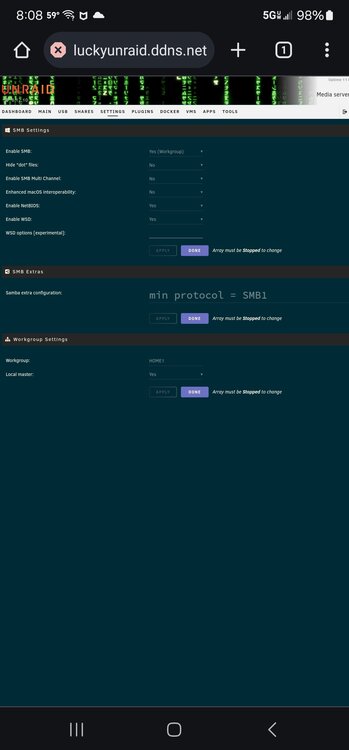
Looks like those are set to on for both. I didn't change anything over the weekend so don't know why this got dropped yesterday. Attached is a screenshot of SMB configuration and logs are also attached. unraid1-syslog-20240611-1215.zip unraid1-diagnostics-20240611-0810.zip