




Skip to content
View in the app

A better way to browse. Learn more.

Unraid

A full-screen app on your home screen with push notifications, badges and more.

To install this app on iOS and iPadOS
  1. Tap the Share icon in Safari
  2. Scroll the menu and tap Add to Home Screen.
  3. Tap Add in the top-right corner.
To install this app on Android
  1. Tap the 3-dot menu (⋮) in the top-right corner of the browser.
  2. Tap Add to Home screen or Install app.
  3. Confirm by tapping Install.

tyler_staut

Members
  • Joined

  • Last visited

  1. Yeah I enabled resizable BAR as well as disabled DMA Control Guarantee in the bios but no change. I noticed the power state not changing as well but I am using a Thunderbolt dock so that's probably where the issue is. I might dig a bit deeper into this as I was able to get it working with Debian. Thanks for taking a look!
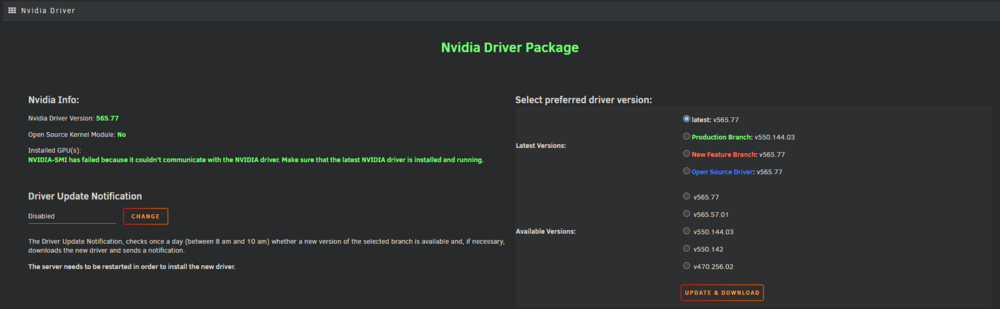
  2. I am having some trouble with getting my gpu working on 7.0 with my setup. I had it working with a debian setup so maybe there is something I am missing with my configuration. Currently running a Minisforum MS-01 with a 1080ti in a Razer Core X eGPU enclosure. In the bios I have enabled 4G Decoding. I have also included my diagnostics and I think the issue is with it falling off the bus, any help is greatly appreciated! diagnostics-20250119-1645.zip
Account

Navigation

Search

Search

Configure browser push notifications

Chrome (Android)
  1. Tap the lock icon next to the address bar.
  2. Tap Permissions → Notifications.
  3. Adjust your preference.
Chrome (Desktop)
  1. Click the padlock icon in the address bar.
  2. Select Site settings.
  3. Find Notifications and adjust your preference.