N¿¿B
Members
-
Joined
-
Last visited
Everything posted by N¿¿B
-
It looks like ChuckPa's DBRepair has now been updated for the newer versions unless I have read it incorrectly?
-
How do I access the configuration files for this app? When I try to bash into or open the console from Unraid, it doesn't allow me too. It also appears the app is not saved in the appdata folder. Also, how do I disable someone from signing in if they land on my page? It appears that anyone can send themselves an e-mail or authenticate themselves and start using the instance. Is there an admin level page for this app that allows you to see who all has signed up and revoke access if needed?
-
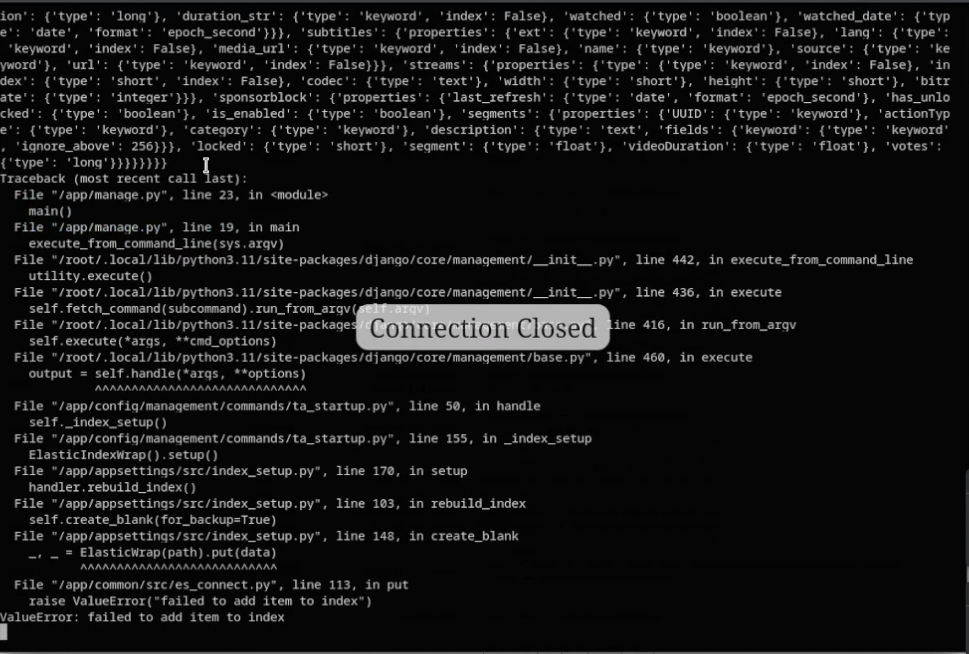
Was able to update to v.0.5.0 with no problem, but updating to later versions causes my TubeArchivist app to crash on startup. Has anyone else dealt with this? Even when I try to view the logs, the window closes out on me. I changed permissions, increased the ES memory, deleted the dump.rdb and the db.sqlite3, and I'm left scratching my head. TubeArchivist-Redis and TubeArchivist-ES startup and stay running.But when I run TubeArchivist and I open the logs to check out what's going on, it runs until it just randomly closes out and the docker container stops. Obviously, I'm missing something. I was able to screen record and then catch a screenshot of what the logs looked like before it closed out and I've posted the picture here. If anyone can help, I'd much appreciate it.
-
That seems to have fixed my issue. Thank you! Just out of curiosity, how did you figure that out? I feel like I scoured the internet and forums and I never saw anything mentioning capitalization in the flash drive, of all places, affecting the Mover. How did you know that was the issue?
-
I'm sorry. I thought I added them. I've attached the diagnostics.
-
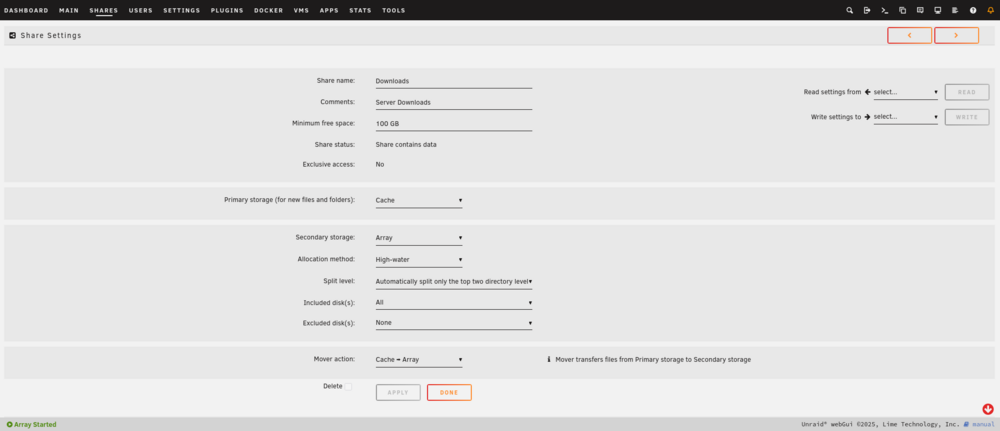
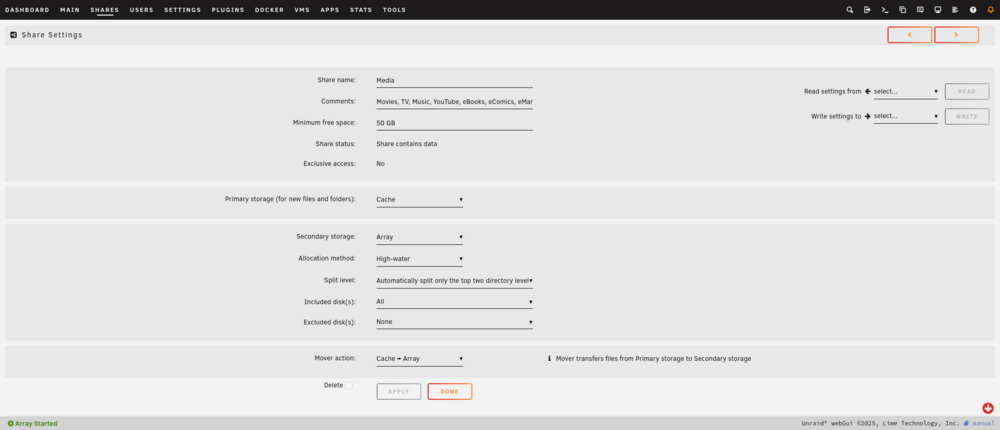
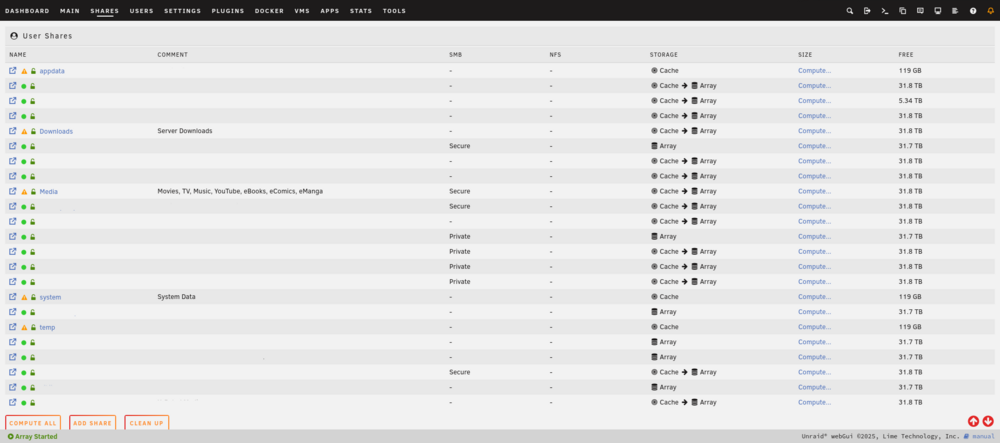
Using Unraid 7.1.4. Essentially what the title has said. I have two shares, Downloads and Media, that have files on the cache. The shares are set up to move the files from the cache to the array. The Mover is scheduled to move the files when the server is idle at 04:00 every day. However, it has not been doing that. Even when I manually invoke the Mover, nothing happens. It just starts and stops. I am not using the Mover Tuning plug-in, just the default in-built Mover on Unraid. The diagnostics show no errors that I'm familiar with. Oct 22 03:20:26 SERVER move: mover: started Oct 22 03:20:26 SERVER move: mover: finished Oct 22 03:23:39 SERVER emhttpd: Starting services... Oct 22 03:23:40 SERVER emhttpd: shcmd (390): /etc/rc.d/rc.samba reload Oct 22 03:23:40 SERVER emhttpd: shcmd (394): /etc/rc.d/rc.avahidaemon reload Oct 22 03:23:40 SERVER avahi-daemon[3138]: Got SIGHUP, reloading. Oct 22 03:23:41 SERVER unassigned.devices: Updating share settings... Oct 22 03:23:41 SERVER unassigned.devices: Share settings updated. Oct 22 03:23:53 SERVER emhttpd: shcmd (399): /usr/local/sbin/mover start |& logger -t move & Oct 22 03:23:53 SERVER move: mover: started Oct 22 03:23:53 SERVER move: mover: finished Oct 22 03:32:32 SERVER emhttpd: Starting services... Oct 22 03:32:32 SERVER emhttpd: shcmd (402): /etc/rc.d/rc.samba reload Oct 22 03:32:33 SERVER emhttpd: shcmd (406): /etc/rc.d/rc.avahidaemon reload Oct 22 03:32:33 SERVER avahi-daemon[3138]: Got SIGHUP, reloading. Oct 22 03:32:33 SERVER unassigned.devices: Updating share settings... Oct 22 03:32:33 SERVER unassigned.devices: Share settings updated. Oct 22 03:32:41 SERVER emhttpd: shcmd (411): /usr/local/sbin/mover start |& logger -t move & Oct 22 03:32:41 SERVER move: mover: started Oct 22 03:32:41 SERVER move: mover: finished Oct 22 03:33:56 SERVER emhttpd: Starting services... Oct 22 03:33:57 SERVER emhttpd: shcmd (414): /etc/rc.d/rc.samba reload Oct 22 03:33:57 SERVER emhttpd: shcmd (418): /etc/rc.d/rc.avahidaemon reload Oct 22 03:33:57 SERVER avahi-daemon[3138]: Got SIGHUP, reloading. Oct 22 03:33:57 SERVER unassigned.devices: Updating share settings... Oct 22 03:33:57 SERVER unassigned.devices: Share settings updated. Oct 22 03:35:29 SERVER emhttpd: Starting services... Oct 22 03:35:29 SERVER emhttpd: shcmd (425): /etc/rc.d/rc.samba reload Oct 22 03:35:30 SERVER emhttpd: shcmd (429): /etc/rc.d/rc.avahidaemon reload Oct 22 03:35:30 SERVER avahi-daemon[3138]: Got SIGHUP, reloading. Oct 22 03:35:30 SERVER unassigned.devices: Updating share settings... Oct 22 03:35:30 SERVER unassigned.devices: Share settings updated. Oct 22 03:36:06 SERVER emhttpd: Starting services... Oct 22 03:36:06 SERVER emhttpd: shcmd (436): /etc/rc.d/rc.samba reload Oct 22 03:36:07 SERVER emhttpd: shcmd (440): /etc/rc.d/rc.avahidaemon reload Oct 22 03:36:07 SERVER avahi-daemon[3138]: Got SIGHUP, reloading. Oct 22 03:36:07 SERVER unassigned.devices: Updating share settings... Oct 22 03:36:07 SERVER unassigned.devices: Share settings updated. Oct 22 03:37:03 SERVER kernel: nvidia_uvm: module uses symbols nvUvmInterfaceDisableAccessCntr from proprietary module nvidia, inheriting taint. Oct 22 03:37:10 SERVER emhttpd: shcmd (445): /usr/local/sbin/mover start |& logger -t move & Oct 22 03:37:10 SERVER move: mover: started Oct 22 03:37:10 SERVER move: mover: finished I tried changing a few settings and running it manually a few times, but to no avail. I have noted that the mover will still move files from other shares on the server, but just not these two shares for whatever reason. It was working before so I'm not sure what has changed. Any help would be much appreciated.
-
Would you please share specific permissions did you grant the user? I used the GRANT ALL PRIVILEGES command and am still running into this issue. EDIT: You need to give the user that you create SUPERUSER and CREATEDB privileges. This can be done with the ALTER USER command.
-
Would it be possible for you to create an icon for Finances, Jitsi, and Matrix/Element?
-
Has there been a fix to this that isn't reverting back to previous version? I'd like to be able to use the `latest` tag. This does work though.
-
Here is the solution for those of you who don't want to read through the thread.
-
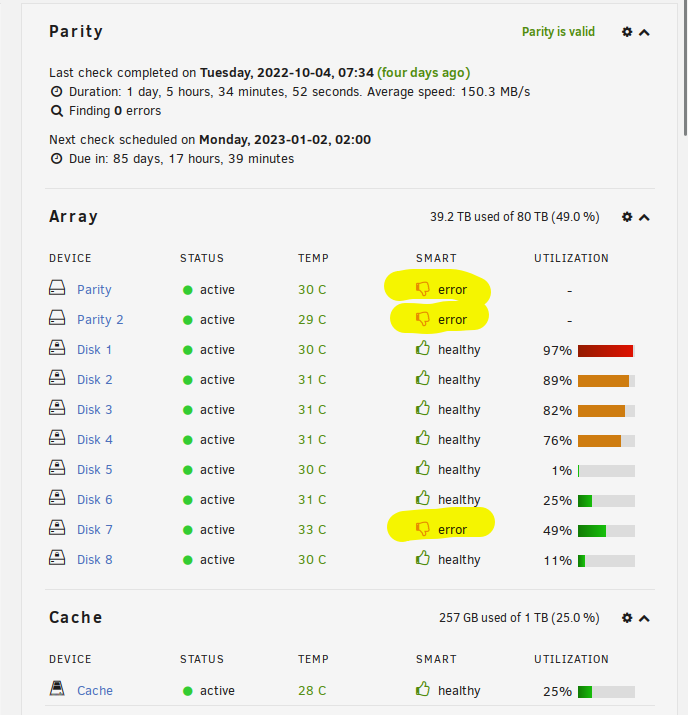
So I just ran another parity check with "Write corrections to parity" unchecked and it came back with zero errors. So it appears that the parity is valid. However the parity drives and drive 7 still have a thumbs down sign. Why is this and what should I do?
-
Hello! As the title of the post states, I'm having issues with USB passthrough with the Asus BT-500 into my VM. UnRaid detects the bluetooth module and it shows up in my VM template, but when I boot up my VM it does not appear to be detected in the VM. I don't notice any errors either. The VM boots up fine, and the bluetooth module has "select" and "optional" checked off, but it doesn't get passed through. Any help would be appreciated. Posted below is my VM template. <?xml version='1.0' encoding='UTF-8'?> <domain type='kvm'> <name>Windows 10</name> <uuid>8a37fa28-acb4-612b-f280-8319e027935b</uuid> <description>Windows 10</description> <metadata> <vmtemplate xmlns="unraid" name="Windows 10" icon="windows.png" os="windows10"/> </metadata> <memory unit='KiB'>8388608</memory> <currentMemory unit='KiB'>8388608</currentMemory> <memoryBacking> <nosharepages/> </memoryBacking> <vcpu placement='static'>16</vcpu> <cputune> <vcpupin vcpu='0' cpuset='8'/> <vcpupin vcpu='1' cpuset='32'/> <vcpupin vcpu='2' cpuset='10'/> <vcpupin vcpu='3' cpuset='34'/> <vcpupin vcpu='4' cpuset='12'/> <vcpupin vcpu='5' cpuset='36'/> <vcpupin vcpu='6' cpuset='14'/> <vcpupin vcpu='7' cpuset='38'/> <vcpupin vcpu='8' cpuset='16'/> <vcpupin vcpu='9' cpuset='40'/> <vcpupin vcpu='10' cpuset='18'/> <vcpupin vcpu='11' cpuset='42'/> <vcpupin vcpu='12' cpuset='20'/> <vcpupin vcpu='13' cpuset='44'/> <vcpupin vcpu='14' cpuset='22'/> <vcpupin vcpu='15' cpuset='46'/> </cputune> <os> <type arch='x86_64' machine='pc-i440fx-6.2'>hvm</type> <loader readonly='yes' type='pflash'>/usr/share/qemu/ovmf-x64/OVMF_CODE-pure-efi.fd</loader> <nvram>/etc/libvirt/qemu/nvram/8a37fa28-acb4-612b-f280-8319e027935b_VARS-pure-efi.fd</nvram> </os> <features> <acpi/> <apic/> <hyperv mode='custom'> <relaxed state='on'/> <vapic state='on'/> <spinlocks state='on' retries='8191'/> <vendor_id state='on' value='none'/> </hyperv> </features> <cpu mode='host-passthrough' check='none' migratable='on'> <topology sockets='1' dies='1' cores='8' threads='2'/> <cache mode='passthrough'/> </cpu> <clock offset='localtime'> <timer name='hypervclock' present='yes'/> <timer name='hpet' present='no'/> </clock> <on_poweroff>destroy</on_poweroff> <on_reboot>restart</on_reboot> <on_crash>restart</on_crash> <devices> <emulator>/usr/local/sbin/qemu</emulator> <disk type='file' device='disk'> <driver name='qemu' type='raw' cache='writeback'/> <source file='/mnt/disks/vm/Windows 10/vdisk1.img'/> <target dev='hdc' bus='virtio'/> <boot order='1'/> <address type='pci' domain='0x0000' bus='0x00' slot='0x04' function='0x0'/> </disk> <disk type='file' device='cdrom'> <driver name='qemu' type='raw'/> <source file='/mnt/user/isos/virtio/virtio-win-0.1.221-1.iso'/> <target dev='hdb' bus='ide'/> <readonly/> <address type='drive' controller='0' bus='0' target='0' unit='1'/> </disk> <controller type='pci' index='0' model='pci-root'/> <controller type='ide' index='0'> <address type='pci' domain='0x0000' bus='0x00' slot='0x01' function='0x1'/> </controller> <controller type='virtio-serial' index='0'> <address type='pci' domain='0x0000' bus='0x00' slot='0x03' function='0x0'/> </controller> <controller type='usb' index='0' model='ich9-ehci1'> <address type='pci' domain='0x0000' bus='0x00' slot='0x07' function='0x7'/> </controller> <controller type='usb' index='0' model='ich9-uhci1'> <master startport='0'/> <address type='pci' domain='0x0000' bus='0x00' slot='0x07' function='0x0' multifunction='on'/> </controller> <controller type='usb' index='0' model='ich9-uhci2'> <master startport='2'/> <address type='pci' domain='0x0000' bus='0x00' slot='0x07' function='0x1'/> </controller> <controller type='usb' index='0' model='ich9-uhci3'> <master startport='4'/> <address type='pci' domain='0x0000' bus='0x00' slot='0x07' function='0x2'/> </controller> <interface type='bridge'> <mac address='52:54:00:74:ff:47'/> <source bridge='br0'/> <model type='virtio-net'/> <address type='pci' domain='0x0000' bus='0x00' slot='0x02' function='0x0'/> </interface> <serial type='pty'> <target type='isa-serial' port='0'> <model name='isa-serial'/> </target> </serial> <console type='pty'> <target type='serial' port='0'/> </console> <channel type='unix'> <target type='virtio' name='org.qemu.guest_agent.0'/> <address type='virtio-serial' controller='0' bus='0' port='1'/> </channel> <input type='tablet' bus='usb'> <address type='usb' bus='0' port='1'/> </input> <input type='mouse' bus='ps2'/> <input type='keyboard' bus='ps2'/> <sound model='ich9'> <address type='pci' domain='0x0000' bus='0x00' slot='0x08' function='0x0'/> </sound> <audio id='1' type='none'/> <hostdev mode='subsystem' type='pci' managed='yes'> <driver name='vfio'/> <source> <address domain='0x0000' bus='0x04' slot='0x00' function='0x0'/> </source> <address type='pci' domain='0x0000' bus='0x00' slot='0x05' function='0x0' multifunction='on'/> </hostdev> <hostdev mode='subsystem' type='pci' managed='yes'> <driver name='vfio'/> <source> <address domain='0x0000' bus='0x04' slot='0x00' function='0x1'/> </source> <address type='pci' domain='0x0000' bus='0x00' slot='0x05' function='0x1'/> </hostdev> <hostdev mode='subsystem' type='usb' managed='no'> <source startupPolicy='optional'> <vendor id='0x0b05'/> <product id='0x190e'/> </source> <address type='usb' bus='0' port='2'/> </hostdev> <memballoon model='none'/> </devices> </domain>
-
So, in other words, as long as the packages are from the NerdTools Plugin, I can ignore the warning?
-
Hello! In the wake of NerdPack not working, there was a post about a successor called NerdTools. However once I installed it, and installed a few packaged within the plugin, I noticed this warning in Fix Common Problems: Upon inspection, it looks like NerdTools is putting the packages I installed into this folder. Please advise on what to do. Thank you!
-
Hello! Ever since updating to 6.11.X, I've noticed that when I click "Update All", it will update all my containers and then after it reaches the last one, it will start back over and just continue to update from the top. This keeps repeating until I refresh the page. There is no longer any "Done" button once the updates have all taken place. The containers look like they updated, so it doesn't look like anything is really broken, but I'm not sure. Everything seems to be working fine. I thought by updating to 6.11.1 this would be fixed, but the issue is still there. Thanks for all your help!
-
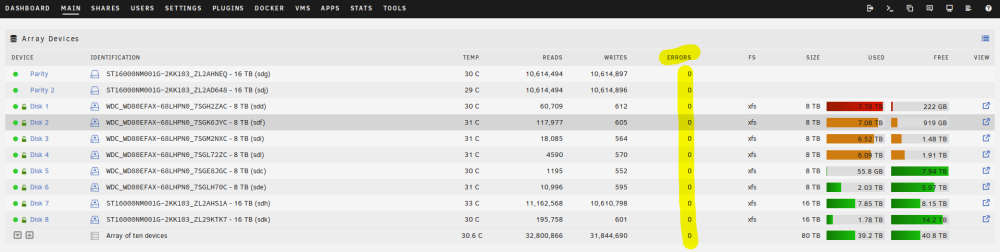
Hello! I recently (2022.10.04) completed a parity check that found 0 errors. Since then, I've rebooted the server a few times to change settings in the BIOS, each time was a clean power down/restart. Since booting back up, it has been running a few days with no warnings. I have not been noticing any issues, and from what I can see there are no errors on the *MAIN* tab. However, it looks like something happened because when I checked this morning (2022.10.08) I have an errors on both parity drives and disk 7. Looking into the drives, all both parity drives and disk 7 say "UDMA CRC error count:4" I've included my diagnostics and attached some pictures to the post. I've never encountered something like this before and don't want to do anything to make it worse. Please advise on what to do. Thank you! server-diagnostics-20221008-0852.zip
-
Upgraded to 6.9.0 and then to 6.9.1. The issues I have were present from 6.9.0 and I thought would be resolved with the 6.9.1 fix. Accessing Plugins or Apps tab takes at best 30 seconds and at worst several minutes. I used to be able to click through tabs instantaneously. Update: Accessing Plugins takes considerably longer than previously stated. It is now a few minutes to not loading at all sometimes. Updating Docker Applications is met with a command failed. Tested to make sure that I had internet and then verified by updating some Plugins, but Docker updates are failing. Maybe Community Applications is broken? Update: Trying to download a Plugin via Community Applications is also met with a failure. Here is the error: plugin: installing: https://raw.githubusercontent.com/b3rs3rk/gpustat-unraid/master/gpustat.plg plugin: downloading https://raw.githubusercontent.com/b3rs3rk/gpustat-unraid/master/gpustat.plg plugin: downloading: https://raw.githubusercontent.com/b3rs3rk/gpustat-unraid/master/gpustat.plg ... done ******************************************************************** No vendor utilities found. Plugin install terminated due to failed prerequisites. ******************************************************************** plugin: run failed: /bin/bash retval: 1 Clicking Check For Updates in the Apps tab just leaves the process running continuously. Doesn't provide any results. Firefox will sometimes post a warning about the "Page Taking Too Much Time to Load". I have to close the tab and open up the Unraid GUI again. I have never encountered that error before in any of the previous versions. Here's the error I'm receiving when trying to download something from Community Applications: Mar 31 20:11:37 SERVER nginx: 2021/03/31 20:11:37 [error] 12122#12122: *12517 upstream timed out (110: Connection timed out) while reading response header from upstream, client: 10.XX.XX.121, server: , request: "POST /plugins/dynamix.docker.manager/include/DockerUpdate.php HTTP/2.0", upstream: "fastcgi://unix:/var/run/php5-fpm.sock", host: "8a4bf81b3bby354a2d8b1addf54f2c076d99278c.unraid.net", referrer: "https://8a4bf81b3bby354a2d8b1addf54f2c076d99278c.unraid.net/Docker"
-
So I just set up WireGuard and used Remote Tunneled Access instead of Remote Access to LAN as my Peer Type of Access. I added the DNS.WATCH DNS Server to the Peer DNS Server option and I'm able to browse the internet, but I'm not able to access my Unraid server. Am I right to assume that Remote Tunneled Access does NOT allow you to access your Unraid server? Does that mean I should create another Peer that has Remote Access to LAN to access Unraid?
-
Hey! Thanks so much for this post! I recently had to rebuild some stuff from scratch and this helped get my Jitsi service back online!
-
Same here. I'm running into the same issue.
-
Can't log in via Web GUI or anything anymore. No idea what's going on.
-
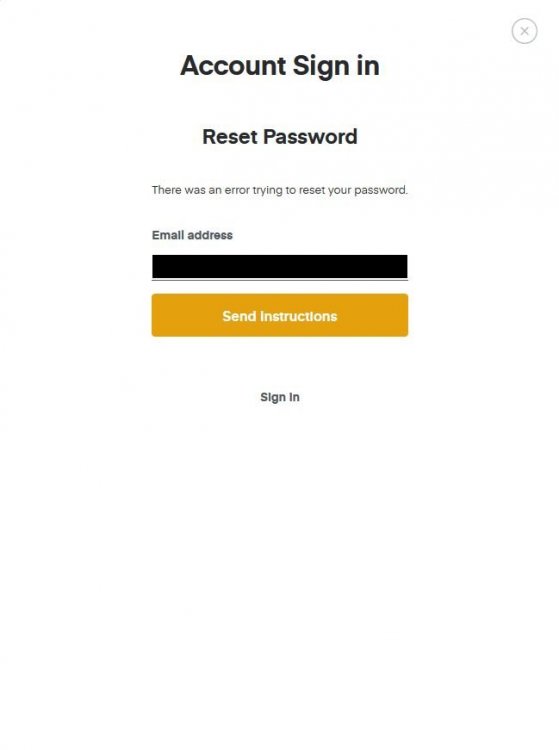
Just tried to reset my password and now this.
-
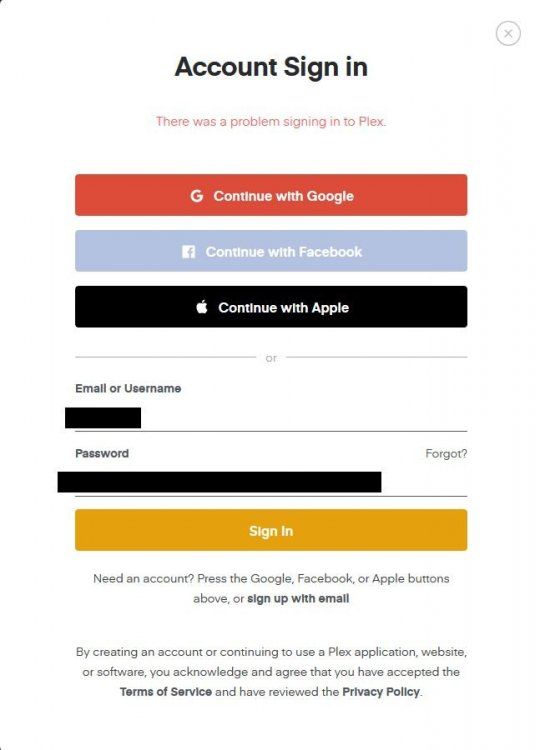
I'm having an issue with Plex. To be honest, I don't really think it has anything to do with the linuxserver's docker container of Plex, but I'm not sure where else to ask. I was running the deprecated version of Plex's official docker container when I started noticing that I couldn't play my media, even if I was local. It looked like I needed to claim my server again, so I tried to do that. However, even though I clicked claim, nothing happened (screenshot attached below). I tried different browsers, incognito, and all of that. Couldn't do it. So I decided to uninstall the docker container (since it was deprecated) and reinstall Plex again. I also removed my appdata folder for good measure. I reinstalled linuxserver's version of Plex. But upon starting it, it tried to sign back into my account, which I thought was odd since I removed the appdata folder and reinstalled Plex. It should have been a clean set up (obviously my understanding is wrong since it wasn't a clean set up). Anyway, same issue. Can't claim the server. Go to the website and try to login and I'm met with this error (attached below as well). It's the right sign in information and everything. Honestly, I don't know what's going on. I tried Googling it, and it seems like some other people have had my issue, but no solutions. I'm hoping someone could shed some light on what's going on or how to fix it. Even if it's starting over from scratch, that's fine, just tell me how to do it because apparently uninstalling the docker container and removing the appdata folder isn't enough. Logs look okay too. No errors.

-
Wow, you're right. That is a pretty overwhelming interface. Want to try it because it seems like it has good features, but that screenshot is definitely giving me some pause.
-
Try this!