jmbailey2000
Members
-
Joined
-
Last visited
Everything posted by jmbailey2000
-
No. Didn't see anything that I needed to. Google is my friend. DB and user created and Booklore now running. Thanks!!!
-
Care to share some details, because at this point, nothing I've tried has worked. In fact, in the log file for Booklore, it says "Access denied for user 'booklore'@'172.17.0.1'" which isn't even a valid IP address anywhere in my system.
-
Same here. Tried all the above and can't get Booklore to work at all.
-
Is anyone having trouble manually firing off a script? I hit the Run in Background button and it acts normally however, the script never runs. BUT, the cron schedule for the script DOES run properly at its allotted time. No idea how long this has been going on since it has probably been 2 months since I manually ran some scripts. And my server has been powered cycled since then, but again, no idea when manual script firing stopped, maybe it was after the power cycle and I need to do it again. Just curious. Thanks!
-
THANKS!!!!!
-
No gui accessible, so was looking for the command line options.
-
I was hoping to shut down the array before doing that so didn't have to rebuild parity. I had tried a command line I found /usr/local/sbin/emcmd cmdStop=stop and that just hung. I then tried powerdown but Unraid said that was deprecated. Was going to try shutdown but when I wen to try that, I could SSH in to the box anymore. It apparently had stopped the array and powered off. No clue what command did it. Powered it back on and all is right with the world again. Really weird. For future reference, does the shutdown command truly cleanly stop the array and shut down the box or is there something else that has to be done prior to a reboot/shutdown to protect the array? Thanks!
-
For an update, I happen to get home and refresh the web gui and the main screen flashes constantly and was able to try and stop the array, but eventually it comes back and says Array Undefined. Any idea what this means?
-
First, I would try and post diags, but they all came back 0 length files when run from command line. GUI is completely toast. Restarted nginx and solved nothing. Get login screen but once logging in web page spits back a 500 error. Want to try and gracefully shutdown the array but have seen the command for Unraid 7 is different from Unraid 6? Haven't found anything definitive yet, can someone confirm best way to shutdown the array via command line? Is it still powerdown? And how do I check is the array actually shutdown? Thanks!
-
For background scripts, I don't think I've ever been able to see the logs unless I bring up a session and tail the log file (which I do a lot these days when testing out a script). You can use something like Putty or the built in terminal in Unraid, navigate to the directory where your log file is and then "tail -f this-is-my-log-file.log" to see the output as it runs.
-
Spin is found under Settings > Disk Settings. It is second or third option down. My issues were under 6.x. My second server is running 7.x but I haven't turned on spin because of issues under 6.x and the controller. Was going to test it out on 7.x with the new controller at some point.
-
Don't know if this will help, but......I have had issues with my 730XD dropping a drive or 2 when I had spin down/spin up turned on. Never had issues until I turned it on. In my case, it was randomly a drive in my system, not specific to unassigned devices. Apparently it is the drive controller (H730p) causing it. I turned off spin up/down and haven't had any issues since. I have new controllers (HBA330s) for my 730XDs, but haven't had a chance to drop them in yet.
-
I've noticed this too. If Array shows speeds, UD shows counts and vice versa. Doesn't matter which panel you make the changes. Seeing it in 6.12.15 and 7.0.0.
-
I'm guessing I'm missing something......but once starting the File Activity plugin, should something display on the screen or does all the activity write to a log. I've let the service run for long periods of time and never seen anything written to screen for disk or share activity. I have all 3 options set to yes for tracking. Thanks! Edit: I'm only seeing this issue on 6.12.15. My 7.0 server works just fine.
-
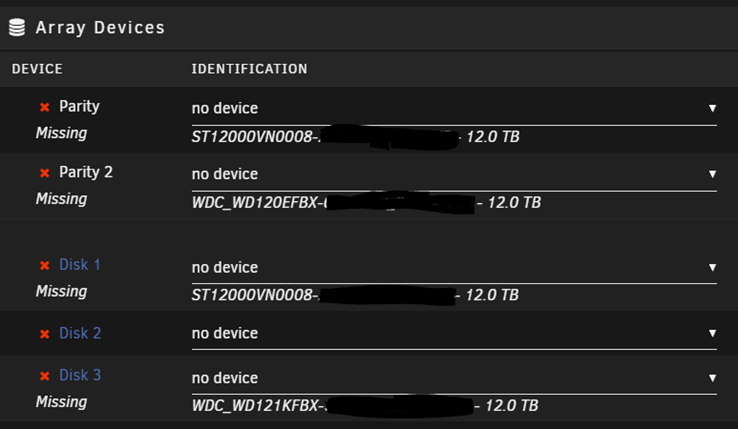
Good read on the controllers. Thanks! Any thoughts on how to handle the fact all the drives got removed from the array? Put them back under a New Config or do a New Config and have them come up as unassigned? Just trying to find out what might happen/what top expect if I reboot or I should do a New Config before rebooting and reset up the array.
-
Well, ouch. Any suggestions on a replacement? Scouring a ton of messages in different places, guessing the H330 Mini would be better?
-
It is the standard Perc H730p controller for a Dell R730XD but running in HBA mode, not raid mode. It is mounted to the motherboard and not inserted in to a slot. Are you saying that is a problem because I see hundreds of people doing that with raid cards flashed to HBA mode. My old disk self was the same way with an LSI card flashed to HBA mode.
-
Any thoughts on how to handle the fact all the drives got removed from the array? Put them back under a New Config or do a New Config and have them come up as unassigned? After some digging, I'm wondering if there is an issue with spinning up/down disks and the Perc controller. Seems both times I've had this issue, the spin up/down had just been turned on. The syslog did show some megaraid_sas errors about the time some spin up/down was occurring. Wondering if the "failed" array drive has actually failed or it was purely the controller. I just checked the drive from the previous issue a couple of weeks ago and the data appeared in tact. Feb 2 13:32:26 SOL emhttpd: spinning down /dev/sdj Feb 2 13:33:03 SOL emhttpd: read SMART /dev/sdj Feb 2 13:33:04 SOL emhttpd: spinning down /dev/sdm Feb 2 13:33:04 SOL emhttpd: spinning down /dev/sdd Feb 2 13:33:04 SOL emhttpd: spinning down /dev/sdi Feb 2 13:33:43 SOL emhttpd: spinning down /dev/sdl Feb 2 13:33:46 SOL emhttpd: spinning down /dev/sdf Feb 2 13:34:13 SOL emhttpd: read SMART /dev/sdd Feb 2 13:34:26 SOL emhttpd: read SMART /dev/sdf Feb 2 13:34:49 SOL emhttpd: read SMART /dev/sdi Feb 2 13:34:50 SOL kernel: megaraid_sas 0000:02:00.0: 4790 (791836486s/0x0020/DEAD) - Fatal firmware error: Line 977 in ../../dm/src/dm.c Feb 2 13:34:50 SOL kernel: Feb 2 13:34:50 SOL kernel: megaraid_sas 0000:02:00.0: megasas_disable_intr_fusion is called outbound_intr_mask:0x40000009 Feb 2 13:34:50 SOL kernel: megaraid_sas 0000:02:00.0: FW in FAULT state Fault code:0x10000 subcode:0x0 func:megasas_wait_for_outstanding_fusion Feb 2 13:34:50 SOL kernel: megaraid_sas 0000:02:00.0: resetting fusion adapter scsi1. Feb 2 13:34:50 SOL kernel: megaraid_sas 0000:02:00.0: Outstanding fastpath IOs: 3 Feb 2 13:34:50 SOL kernel: megaraid_sas 0000:02:00.0: Reset not supported, killing adapter scsi1. Feb 2 13:34:50 SOL kernel: sd 1:0:7:0: [sdi] tag#721 UNKNOWN(0x2003) Result: hostbyte=0x01 driverbyte=DRIVER_OK cmd_age=0s Feb 2 13:34:50 SOL kernel: sd 1:0:7:0: [sdi] tag#721 CDB: opcode=0x85 85 06 2c 00 00 00 00 00 00 00 00 00 00 00 e5 00 Feb 2 13:34:50 SOL kernel: sd 1:0:7:0: [sdi] tag#654 UNKNOWN(0x2003) Result: hostbyte=0x01 driverbyte=DRIVER_OK cmd_age=0s
-
That is the plan. It is a new server still in pieces and being tested with 7 to determine if I go that route along with xfs, zfs potential decisions. Also upgraded to 10g network recently.
-
This server isn't connected to Unraid Connect. I've tried linking it multiple times but the web site doesn't like whatever I'm trying to give it. My new 7.0 server is linked just fine, but that license was purchased after Unraid Connect came in to existence. My older license was purchased quite sometime ago.
-
Not accessible. It is residing on the array that is down.
-
New Diags sol-diagnostics-20250202-2221.zip
-
Tool > Diagnostics before I reboot or do anything else. I believe diags were pulled after I shutdown the array though, but not 100% sure.
-
That what the diag gave me. Everything is dated 2/2 and the syslog starts 1/25 but ends 2/2.
-
So I've got drives that failed again on Unraid. This is the second time in 30 days. This time I will be losing data I'm guessing since I lost both parity drives and a data drive that had about 8TB of stuff on it. What is weird this time is that unlike previous times, where all the drives stayed in their respective slots and seemed fine with an emulated drive, this time, when I shut down the array, all the drives have been removed from their slots and a totally different array drive that no errors were thrown against doesn't even show as having ever been populated in the array. All drives (except cache) are showing this way (2 parity and 10 array). I've never seen this happen before and curious what next steps would be. Start array and see what happens (after putting all the drives back where they belong) or what. Just curious why all the drives would disappear from their slots like this. Also attached the diags. I can only imagine this is an ongoing hardware issue but honestly don't know. The only other change in the environment is going from 6.9.x to 6.12.13 over the last few weeks and then to 6.12.15 last week. On another note, I do think I had turn on the spin down of drives after 2 hours before both instances occurring. But, this last time, spin down was on for 2-3 days before failure. Any thoughts greatly appreciated. sol-diagnostics-20250202-1348.zip