





jmbailey2000
Members
-
Joined
-
Last visited
Everything posted by jmbailey2000
-
Anyone know why NZBHydra2 would stop working (reaching the outside world) when the Unraid Wireguard is active? It works fine if I turn off the Wiregurad in Unraid, but times out and cannot talk to anything when Wireguard is turned on. Thanks!
-
Glad to see I'm not the only one that has little things get stuck in my brain and drive me nuts!! I did try something else (no difference in the end result) where I actually shutdown all dockers and the docker service itself. Now, maybe it was doing this before, but this time when I tried it, I did notice that disk 2's free space of 3.5TB was not highlighted blue like the others. But, it sometimes is highlighted blue like the others so assuming it is a cosmetic thing.
-
No worries. Thanks for checking in to it and let me know if you need anything else. Thanks!!
-
Looks correct. (I have no drive 3 at the moment) root@SOL:~# stat -f /mnt/disk1 File: "/mnt/disk1" ID: 90100000000 Namelen: 255 Type: xfs Block size: 4096 Fundamental block size: 4096 Blocks: Total: 1952984905 Free: 588132960 Available: 588132960 Inodes: Total: 781402624 Free: 781059886 root@SOL:~# root@SOL:~# stat -f /mnt/disk2 File: "/mnt/disk2" ID: 90200000000 Namelen: 255 Type: xfs Block size: 4096 Fundamental block size: 4096 Blocks: Total: 1952984905 Free: 854124105 Available: 854124105 Inodes: Total: 781402624 Free: 781174211 root@SOL:~# root@SOL:~# stat -f /mnt/disk3 stat: cannot read file system information for '/mnt/disk3': No such file or directory root@SOL:~# root@SOL:~# stat -f /mnt/disk4 File: "/mnt/disk4" ID: 90400000000 Namelen: 255 Type: xfs Block size: 4096 Fundamental block size: 4096 Blocks: Total: 1952984905 Free: 854140697 Available: 854140697 Inodes: Total: 781402624 Free: 781115618 root@SOL:~#
-
Not seeing anything in the log to indicate an issue. The log even shows 3.5TB available on each target disk, yet says it can't copy a 900MB file. And for this run I actually stopped every single docker, VM, script, etc. unbalance.log
-
So, something weird is going on with UnBalance. Used it many times before and never had an issue. Running Unraid 6.8.3 and latest UnBalance (uninstalled and reinstalled to be sure). I want to move 3 ISO files (about 6GB) from my ISO folder that for has everything on a single drive. Use UnBalance to select the 3 files then select the 2 drives the files can be moved to. Run Plan just fine, but Plan says only 1 file (sometimes 2) won't be moved because there isn't enough space. UnBalance sees the available space on the target drives at 3.5TB for each drive, yet says it can't move 2GB worth of files to either drive. Been driving me crazy the last couple of days. Any thoughts as to why UnBlance doesn't think there is enough space?
-
Question....any idea why speedtest stops working when wireguard is active? I just have wireguard set up as a client so the whole Unraid server passing through wireguard (in fact it breaks my accessing Unraid apps too, so guess the issues are related). Thanks!
-
I would doubt it is my VPN provider as the exact same files work fine on my Windows box. But on Unraid, not so much. The only thing that has changed on my Unraid box was the docker (and maybe a few plugins were updated, can't remember). I know I saw references to tightening up iptables and such. Did that have any bearing on anything? I also didn't install the docker from scratch (because it is loaded with torrents) so did anything maybe get added in the way of options, keys, etc. that might need to be added to the template that could cause this? I did try it in a clean binhex-deluge container and it didn't work there either. Same error. Going to try and spin up a OpenVPN client docker and see what happens, but I've actually never been able to get one to work, which is how I wound up using the xxxxxxxvpn dockers instead of just the plain program docker. I'll let you know what happens. Just really weird.
-
I'm having the exact same problem, but with TrustZone VPN. Reset all my credentials at the site and pulled down all new files including certs, and I get cert expired or unable to get local issuer certificate (depending on how the settings for the container are set. The files work fine on my Windows box, but not Unraid 6.8.3/qbittorrent or deluge containers. I changed things over to wireguard and it appears to be working, but have no way to verify it is actually hitting the VPN site. The curl ifconfig.me doesn't work. Just times out.
-
crontab.guru is an online page that I use. Let's me put stuff in and shows you the result. Also has a huge page of examples of almost every type.
-
I haven't tried it yet (have the same issue) but I believe it is based alphabetically off the file name of the script. I tried just changing the name but that didn't work, so I'm guessing have to rename the script file itself and then add it to the UserScripts page again.
-
DOH!! I didn't even think of adding to the 'go' file. Thanks!!!
-
Nope, /dev/net didn't exist. Tried that. No joy. Did a clean install of the docker (removed and then removed the folders for it), still same thing..../dev/net/tun doesn't exist and docker fails. HOWEVER......after some Googling and a couple of stiff drinks......found this link and was able to get the container to start and work properly by creating the /dev/net/tun and setting the permissions. https://www.kernel.org/doc/Documentation/networking/tuntap.txt Only issue I might have is when I restart Unraid, the module might not get loaded, which means the container will fail to start until it is manually loaded. Not going to worry about it at the moment since it will be a couple of days before I can restart the server to see what happens. Thanks for all the help!!!!
-
Screen shot below. Didn't make any changes to template. After multiple attempts, tried putting the --device.... line in extra parms. Tried host instead of bridge. And yes, I do have another docker running OpenVPN (binhex-qbittorrent). I was looking to set this up and then just run straight dockers (non-vpn-combo) through this. I did try and shutdown the other docker, but no luck. Unraid is 6.8.3.
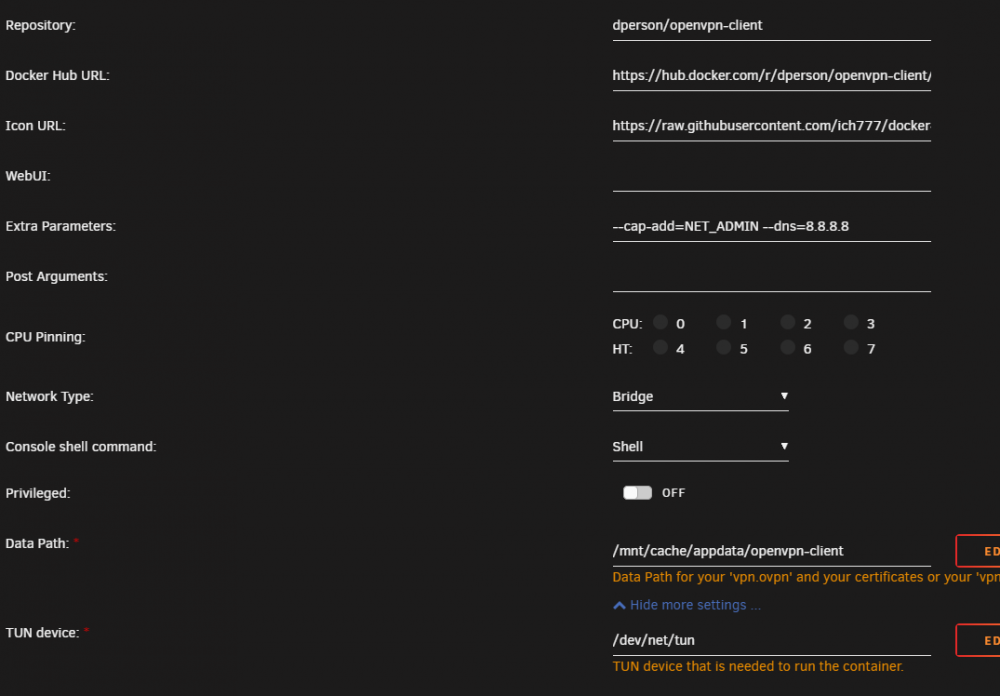
-
Trying to install the OpenVPN-client and it is failing saying that /dev/net/tun doesn't exist......so......what and where is it? Is this something that should exist in Unraid itself or just in the docker? Thanks!
-
Quick question.....I think my VPN connection has gotten hosed up so I changed servers, yet, no matter what server I tell the VPN connect to, it always pulls the same IP address, which is an impossibility. Does the VPN portion of the docker get cached somewhere? I've changed the config file in the openvpn folder under qbittorrent multiple times to servers all over the world and no matter what, the IP is always the same. When I change servers on my personal PC outside the docker, the IP changes every time I change to a new state or country. Any suggestions???
-
Weird question....anyone having issues where Mover doesn't run at all if the Tuner plugin is installed? I haven't really used the Mover much because of such a new install and I just started configuring up some things to run in the cache and be moved every night. However, haven't been able to get Mover to work at all unless I fired it off manually. Once I uninstalled the Tuner, Mover started working just fine automatically. I'll be reinstalling again and trying to figure out the issue, but was curious if anyone had run across this before.
-
I've got an issue that is absolutely driving me crazy. I've got something going on with Unraid where it just reboots out of the blue. THAT is another story.....BUT...the result is that qbittorrent config settings revert to defaults which means when Unraid comes back up and the array starts, qbittorrent starts moving all my completed and incomplete torrents to my SSD cache, which I DON'T want!!! It is a nightmare to have to try and get everything fixed and moved back around afterwards. Does anyone have any idea why the settings revert back to default? I stop the qbittorrent docker quite a bit and backups are run every night which means all the data should be flushed to disk and permanent, so I'm trying to figure out what it is that causes the revert to default and a way to stop it. Thanks!
-
I've been using Cyberpower for years. Used APC for years too (and Tripplite). Now I have 2 Cyberpower 1500 Sine on my daily machine and a 1325 Sine I just put on my Unraid box. No issues. I was even able to get Telegraf/Grafana to see the UPS and provide info using the NUT docker. Never heard anything about them catching fire and mine don't seem to be running any warmer then any other UPS I've owned.
-
Question........I'm currently having random reboots of my unRaid server (that is a different issue) but because of it, I'm having all kinds of issues with QBittorrent resetting the paths for downloads under the Options. Not only that, I'm, finding QBittorrent is automatically moving all the files it has downloaded or is downloading (incompletes) on to my cache drive. The first time it happened it took me forever to figure out it was QBittorrent spooling stuff to the cache (400GB+ of stuff). Today when it happened, after the reboot and the docker started up, the files from my array started moving to the cache. Granted, IF it was moving the files to the cache with the exact same structure as on the array, I'd be good. But in this case, it appears to be wiping out the options I set for folders in QBittorrent under options, setting it to the defaults and then moving everything over/around which is completely forcing me to do a ton of clean-up and restart over a whole bunch of downloads. Is there something I should do with the QBittorrent docker to make sure the settings don't reset to defaults if a reboot occurs? I haven't seen this issue with a simple docker restart.
-
So now that I can use GUS, was wondering if there is any special gotchas that might exist if I want to migrate my last 2 weeks of data from my stand alone InfluxDB docker to GUS? If a big issue, I'll just scrap the old data and start from scratch. Was just curious if you have heard of anyone successfully doing it before? Thanks!
-
See, something simple and I'm a dumba$$. My other Grafana install has never gone straight in. It has always asked my to log in, so I didn't even realize there was a log in icon in the lower left. What a dufus. Sorry about that and THANKS!!!
-
So, any thoughts as to why anything ipmitool related added to the post argument or within the telegraf.conf would cause telegraf to crash/stop? If I take out the ipmitool stuff, telegraf starts up fine. That, coupled with not being able to get any drive stuff to show up. And no matter what I do, the parity drive always shows as my cache drive (I don't have a parity drive at the moment). I'm following the diskio conversation so will wait and see what that says, but I did all the entries per above and still no drive stuff.
-
So, obviously I'm missing something simple, because I can't do anything in Grafana. The default dashboard is all there is and there is no way to add/import other board nor can you change any of the individual panels. I've been playing with Grafana through another implementation but wanted to try this since it is a "all-in-one". Any help pointing me in the right direction is appreciated. Thanks!
-
I might have missed it but can't seem to add more then a single torrent link at a time in the Add Link URL field. It takes multiples and appears to see multiples but only recognizes/adds the first link. Is there a way to paste a block of links in to ruTorrent? Thanks!


