





Alex.b
Members
-
Joined
Everything posted by Alex.b
-
Bug : when you try to calculate the size of a folder with an apostrophe, it returns an error : Warning: filemtime(): stat failed for /mnt/user/Softwares/Polices d'écriture in /usr/local/emhttp/plugins/dynamix.file.manager/include/Control.php on line 90
-
Tu as 20 secteurs défectueux sur ton disque de parité, il commence probablement à avoir de l'âge. Il pourrait lâcher dans 10 mins comme dans 10 ans. C'est un choix personnel que tu dois faire de le remplacer ou non.
-
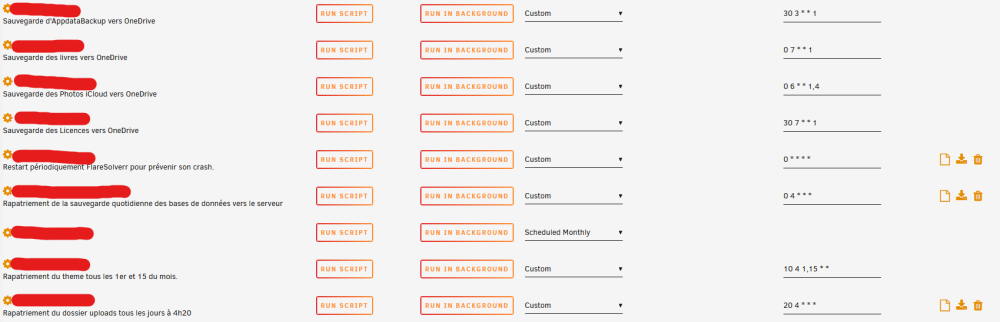
Hello, I'm using user scripts (v. 2023.07.16) for months, I saw today that missed some view logs / download / delete icons on some scripts, do you know why ?
-
Yes, it works without a hitch.
-
Same behaviour (I also deleted jackvpn appdata folder, and put again the wg0.conf file) docker run -d --name='jackettvpn' --net='bridge' --privileged=true -e TZ="Europe/Paris" -e HOST_OS="Unraid" -e HOST_HOSTNAME="Sparta" -e HOST_CONTAINERNAME="jackettvpn" -e 'VPN_ENABLED'='yes' -e 'VPN_TYPE'='wireguard' -e 'VPN_USERNAME'='' -e 'VPN_PASSWORD'='' -e 'WEBUI_PASSWORD'='' -e 'LAN_NETWORK'='192.168.0.0/24' -e 'PUID'='99' -e 'PGID'='100' -e 'RESTART_CONTAINER '='0' -e 'NAME_SERVERS'='1.1.1.1,1.0.0.1' -e 'UMASK'='002' -e 'HEALTH_CHECK_HOST'='one.one.one.one' -e 'HEALTH_CHECK_INTERVAL'='300' -e 'HEALTH_CHECK_SILENT'='1' -e 'ADDITIONAL_PORTS'='' -l net.unraid.docker.managed=dockerman -l net.unraid.docker.webui='http://[IP]:[PORT:9117]/' -l net.unraid.docker.icon='https://raw.githubusercontent.com/DyonR/docker-templates/master/Icons/jackettvpn/jackettvpn-icon.png' -p '9117:9117/tcp' -v '':'/blackhole':'rw' -v '/mnt/user/appdata/jackettvpn':'/config':'rw' --restart unless-stopped 'dyonr/jackettvpn' f6602c7f3fe865dd4b973f371b78df57ebec5463b...
-
Hello, thank you for your answer ! I added the variable and updated the container. Unfortunately, this message is blinking (it seems restart despite the variable) : Error response from daemon: Container 3925e4163c8ff69855243123aec1064 is restarting, wait until the container is running
-
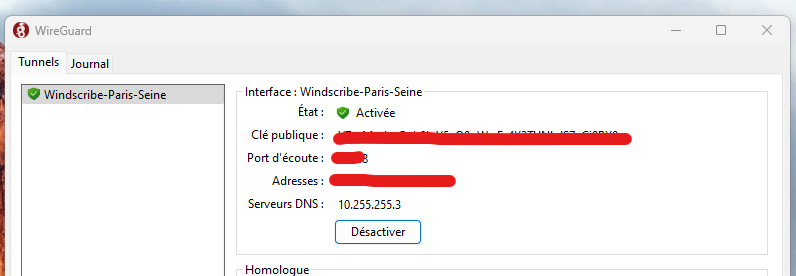
Hello, I'm triying to set JackettVPN, I'm using wireguard config file from Windscribe. If I set : VPN_ENABLED = Yes VPN_TYPE = wireguard Container starts, but log window closes itself and I can't access to the webui. If I disable the VPN env, everything works. Log : 2023-06-14 21:12:55.737948 [INFO] VPN_ENABLED defined as 'yes' 2023-06-14 21:12:55.754927 [INFO] The container is currently running iptables v1.8.7 (nf_tables). 2023-06-14 21:12:55.770428 [INFO] LEGACY_IPTABLES is set to '' 2023-06-14 21:12:55.786107 [INFO] Not making any changes to iptables version 2023-06-14 21:12:55.801926 [INFO] VPN_TYPE defined as 'wireguard' 2023-06-14 21:12:55.821946 [INFO] WireGuard config file is found at /config/wireguard/wg0.conf dos2unix: converting file /config/wireguard/wg0.conf to Unix format... 2023-06-14 21:12:55.841793 [INFO] VPN remote line defined as 'censured.windscribe.com:1194' 2023-06-14 21:12:55.858427 [INFO] VPN_REMOTE defined as 'censured.windscribe.com' 2023-06-14 21:12:55.875519 [INFO] VPN_PORT defined as '1194' 2023-06-14 21:12:55.890937 [INFO] VPN_PROTOCOL set as 'udp', since WireGuard is always udp. 2023-06-14 21:12:55.906661 [INFO] VPN_DEVICE_TYPE set as 'wg0', since WireGuard will always be wg0. 2023-06-14 21:12:55.923476 [INFO] LAN_NETWORK defined as '192.168.1.0/24' 2023-06-14 21:12:55.940121 [INFO] NAME_SERVERS defined as '9.9.9.9,149.112.112.112' 2023-06-14 21:12:55.957011 [INFO] Adding 9.9.9.9 to resolv.conf 2023-06-14 21:12:55.973795 [INFO] Adding 149.112.112.112 to resolv.conf 2023-06-14 21:12:55.989324 [INFO] Starting WireGuard... Warning: `/config/wireguard/wg0.conf' is world accessible [#] ip link add wg0 type wireguard [#] wg setconf wg0 /dev/fd/63 [#] ip -4 address add censured/32 dev wg0 [#] ip link set mtu 1420 up dev wg0 [#] resolvconf -a wg0 -m 0 -x [#] wg set wg0 fwmark 51820 [#] ip -6 route add ::/0 dev wg0 table 51820 Error: IPv6 is disabled on nexthop device. [#] resolvconf -d wg0 -f [#] ip link delete dev wg0
-
Oh yes, I see! Grrr, it was right in front of me, thank you it works perfectly.
-
Of course I read the instructions before installation but your docker keeps creating a folder instead of reading the .yaml file... or I didn't understand something.
-
Hello, I have a problem with Codex.docs I created the empty docs-config.yaml but I got an error : node:fs:723 handleErrorFromBinding(ctx); ^ Error: EISDIR: illegal operation on a directory, read at Object.readSync (node:fs:723:3) at tryReadSync (node:fs:433:20) at Object.readFileSync (node:fs:479:19) at loadConfig (/usr/src/app/node_modules/@codex-team/config-loader/dist/cjs/loadConfig.js:54:39) at file:///usr/src/app/dist/backend/utils/appConfig.js:140:22 at ModuleJob.run (node:internal/modules/esm/module_job:195:25) at async Promise.all (index 0) at async ESMLoader.import (node:internal/modules/esm/loader:337:24) at async loadESM (node:internal/process/esm_loader:88:5) at async handleMainPromise (node:internal/modules/run_main:61:12) { errno: -21, syscall: 'read', code: 'EISDIR' } node:fs:723 handleErrorFromBinding(ctx); ^ Error: EISDIR: illegal operation on a directory, read at Object.readSync (node:fs:723:3) at tryReadSync (node:fs:433:20) at Object.readFileSync (node:fs:479:19) at loadConfig (/usr/src/app/node_modules/@codex-team/config-loader/dist/cjs/loadConfig.js:54:39) at file:///usr/src/app/dist/backend/utils/appConfig.js:140:22 at ModuleJob.run (node:internal/modules/esm/module_job:195:25) at async Promise.all (index 0) at async ESMLoader.import (node:internal/modules/esm/loader:337:24) at async loadESM (node:internal/process/esm_loader:88:5) at async handleMainPromise (node:internal/modules/run_main:61:12) { errno: -21, syscall: 'read', code: 'EISDIR' } node:fs:723 handleErrorFromBinding(ctx); ^ Error: EISDIR: illegal operation on a directory, read at Object.readSync (node:fs:723:3) at tryReadSync (node:fs:433:20) at Object.readFileSync (node:fs:479:19) at loadConfig (/usr/src/app/node_modules/@codex-team/config-loader/dist/cjs/loadConfig.js:54:39) at file:///usr/src/app/dist/backend/utils/appConfig.js:140:22 at ModuleJob.run (node:internal/modules/esm/module_job:195:25) at async Promise.all (index 0) at async ESMLoader.import (node:internal/modules/esm/loader:337:24) at async loadESM (node:internal/process/esm_loader:88:5) at async handleMainPromise (node:internal/modules/run_main:61:12) { errno: -21, syscall: 'read', code: 'EISDIR' } I think the problem is because the docker create a folder, not a file : how can I resolve this issue ? thank you

-
Hello, Since the update, less than a minut after spin down, a read smart is triggered. It constantly keep my array spinning : Sep 28 07:04:48 Sparta emhttpd: spinning down /dev/sde Sep 28 07:05:56 Sparta emhttpd: read SMART /dev/sde Sep 28 07:18:48 Sparta emhttpd: spinning down /dev/sdd Sep 28 07:19:55 Sparta emhttpd: read SMART /dev/sdd Sep 28 07:20:47 Sparta emhttpd: spinning down /dev/sde Sep 28 07:21:56 Sparta emhttpd: read SMART /dev/sde Sep 28 07:36:48 Sparta emhttpd: spinning down /dev/sde Sep 28 07:37:56 Sparta emhttpd: read SMART /dev/sde Sep 28 07:49:47 Sparta emhttpd: spinning down /dev/sdd Sep 28 07:50:55 Sparta emhttpd: read SMART /dev/sdd Sep 28 07:52:48 Sparta emhttpd: spinning down /dev/sde Sep 28 07:53:56 Sparta emhttpd: read SMART /dev/sde Sep 28 08:08:48 Sparta emhttpd: spinning down /dev/sde Sep 28 08:09:56 Sparta emhttpd: read SMART /dev/sde Sep 28 08:20:48 Sparta emhttpd: spinning down /dev/sdd Sep 28 08:21:55 Sparta emhttpd: read SMART /dev/sdd Sep 28 08:24:48 Sparta emhttpd: spinning down /dev/sde Sep 28 08:25:56 Sparta emhttpd: read SMART /dev/sde Sep 28 08:40:48 Sparta emhttpd: spinning down /dev/sde Sep 28 08:41:56 Sparta emhttpd: read SMART /dev/sde Sep 28 08:51:47 Sparta emhttpd: spinning down /dev/sdd Sep 28 08:52:55 Sparta emhttpd: read SMART /dev/sdd Sep 28 08:56:48 Sparta emhttpd: spinning down /dev/sde Sep 28 08:57:56 Sparta emhttpd: read SMART /dev/sde Sep 28 09:12:48 Sparta emhttpd: spinning down /dev/sde Sep 28 09:13:56 Sparta emhttpd: read SMART /dev/sde Sep 28 09:22:47 Sparta emhttpd: spinning down /dev/sdd Sep 28 09:23:55 Sparta emhttpd: read SMART /dev/sdd Sep 28 09:28:48 Sparta emhttpd: spinning down /dev/sde Sep 28 09:29:56 Sparta emhttpd: read SMART /dev/sde Sep 28 09:44:48 Sparta emhttpd: spinning down /dev/sde Sep 28 09:45:56 Sparta emhttpd: read SMART /dev/sde Sep 28 09:53:48 Sparta emhttpd: spinning down /dev/sdd Sep 28 09:54:55 Sparta emhttpd: read SMART /dev/sdd Sep 28 10:00:48 Sparta emhttpd: spinning down /dev/sde Sep 28 10:01:56 Sparta emhttpd: read SMART /dev/sde Sep 28 10:16:47 Sparta emhttpd: spinning down /dev/sde Sep 28 10:17:56 Sparta emhttpd: read SMART /dev/sde Sep 28 10:24:48 Sparta emhttpd: spinning down /dev/sdd Sep 28 10:25:56 Sparta emhttpd: read SMART /dev/sdd Sep 28 10:32:48 Sparta emhttpd: spinning down /dev/sde Sep 28 10:33:56 Sparta emhttpd: read SMART /dev/sde Sep 28 10:48:47 Sparta emhttpd: spinning down /dev/sde Sep 28 10:49:56 Sparta emhttpd: read SMART /dev/sde Sep 28 11:03:37 Sparta emhttpd: spinning down /dev/sdd Sep 28 11:03:54 Sparta emhttpd: read SMART /dev/sdd Sep 28 11:04:48 Sparta emhttpd: spinning down /dev/sde Sep 28 11:05:56 Sparta emhttpd: read SMART /dev/sde Sep 28 11:20:48 Sparta emhttpd: spinning down /dev/sde Sep 28 11:21:56 Sparta emhttpd: read SMART /dev/sde Sep 28 11:33:47 Sparta emhttpd: spinning down /dev/sdd Sep 28 11:34:56 Sparta emhttpd: read SMART /dev/sdd Sep 28 11:36:47 Sparta emhttpd: spinning down /dev/sde Sep 28 11:37:56 Sparta emhttpd: read SMART /dev/sde Sep 28 11:52:47 Sparta emhttpd: spinning down /dev/sde Sep 28 11:53:56 Sparta emhttpd: read SMART /dev/sde Sep 28 12:04:48 Sparta emhttpd: spinning down /dev/sdd Sep 28 12:05:56 Sparta emhttpd: read SMART /dev/sdd Sep 28 12:08:47 Sparta emhttpd: spinning down /dev/sde Sep 28 12:09:56 Sparta emhttpd: read SMART /dev/sde Sep 28 12:24:48 Sparta emhttpd: spinning down /dev/sde Sep 28 12:25:56 Sparta emhttpd: read SMART /dev/sde Sep 28 12:35:48 Sparta emhttpd: spinning down /dev/sdd Sep 28 12:36:56 Sparta emhttpd: read SMART /dev/sdd Sep 28 12:40:47 Sparta emhttpd: spinning down /dev/sde Sep 28 12:41:56 Sparta emhttpd: read SMART /dev/sde Sep 28 12:56:48 Sparta emhttpd: spinning down /dev/sde Sep 28 12:57:56 Sparta emhttpd: read SMART /dev/sde Sep 28 13:06:48 Sparta emhttpd: spinning down /dev/sdd Sep 28 13:07:56 Sparta emhttpd: read SMART /dev/sdd Sep 28 13:12:48 Sparta emhttpd: spinning down /dev/sde Sep 28 13:13:56 Sparta emhttpd: read SMART /dev/sde Sep 28 13:28:48 Sparta emhttpd: spinning down /dev/sde Sep 28 13:29:56 Sparta emhttpd: read SMART /dev/sde Sep 28 13:37:48 Sparta emhttpd: spinning down /dev/sdd Sep 28 13:38:56 Sparta emhttpd: read SMART /dev/sdd Sep 28 13:44:48 Sparta emhttpd: spinning down /dev/sde Sep 28 13:45:56 Sparta emhttpd: read SMART /dev/sde
-
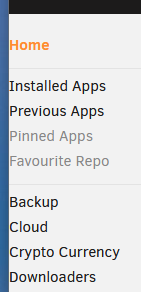
If you set width to 1921 px (and more), left column doesn't have margin :
-
Project Page info isn't available anymore with the beta ? It's a feature I like for following development.
-
I updated my server : - i5-10400 - 2x8 GB 3200Mhz - BeQuiet Gold psu - 2x8 Tb - 3 SSD With HDD spin off, I'm at 32W, 10 more watts than my previous build, but with a 3x more powerful.
-
Hey @alexta69 ! I am not the best person to answer. I'm just trying to help the community. But yes user/group are managed with PUID/PGID in unRAID. You can view the template here : https://github.com/Zazou49/unraid/blob/main/MeTube.xml Don't hesitate to tell me if you want to take ownership of the template and manage it!
-
Well seen, template updated.
-
Sure, template updated
-
Hello, No, there are no configuration that need to be saved. Everything is saved with variable on the docker template. You can learn more here : https://hub.docker.com/r/alexta69/metube
-
Overview: Support for the MeTube Docker Container. Github : https://github.com/alexta69/metube Docker Hub : https://hub.docker.com/r/alexta69/metube Web GUI for youtube-dl (using the yt-dlp fork) with playlist support. Allows you to download videos from YouTube and dozens of other sites. This is not my project. I just created the template. Credits to alexta69
-
Hey, I know isn't the best solution to use special character to name a share but for sort 20 or 30 shares, I didn't found a better solution. Few scenarios (Share naming > result) : [Archives] unRAID : displayed as [Archives in SMB Archives] unRAID : not displayed at all in SMB [Archives unRAID : displayed as expected I don't know if it's a bug or a restriction in SMB.
-
Woww 8.5W. What is PSU ? With my old config (i5-4440, 16GB, 2x1Tb ssd), I’m at 22W average on idle. I know diff between 22w and 8.5w is about 20€ of electricity by year but I need to lower my power consumption. Thinking to change CPU and MB !
-
Hey, It seems amazing ! How is the CPU / Ram consumption of this all dashboard ?
-
Hello I just want power on for 30 mins a Windows 10 VM to execute a software every day. How Can I achieve this ? I’m a total beginner with user script. I read to use « virsh start »
-
Un angevin 🥳
-
Bonjour, Qu’il est agréable de trouver une section française ! Mon parcours est assez simple. J’avais un simple serveur Plex et Homebridge sous Windows 10. Ça a duré 4 ans, il y a quelques semaines je me suis dit qu’il était grandement temps de passer à l’étape supérieur ! J’ai donc installé OpenMediaVault, mais j’ai du mal à accrocher, depuis je me renseigne pour UnRaid et j’avoue que je suis très enthousiaste ! J’attends encore quelques jours avant de tout migrer, je veux emmagasiner le maximum de connaissances et éviter de faire des bêtises...




