





jimeez
Members
-
Joined
-
Last visited
-
Sorry to hear. And thank you for all your hard work and efforts while it lasted.
-
I ended up putting it on another Ubuntu headless server that wasn't doing much of anything. All went well. You have to make sure to update the UniFi Network application before restoring from backup. Otherwise the backup file will be incompatible.
-
Thank you. Not sure how I missed that discussion back in early March. I follow this thread pretty religiously. But alas, i did. Thank you for getting me there.
-
I was looking to see if someone provided instruction, but didn't see it. Care to point me in the right direction?
-
Is it safe to assume that you will no longer be maintaining this docker container? Also, I'm curious, has anyone that spun up a VM of the UniFi OS care to share their experience with it?
-
A second restart seems to have fixed the spin-down issue.
-
I also have the white background banner situation since updating. Grey theme is broken now it seems. Also, my drives don't automatically spin down anymore.
-
So I'm not crazy after all.
-
Thank you for the replies. I do understand everything mentioned by both PeteAsking and bmartino1. But why I posted the question is that I have never (to the best of my knowledge) used a repository version that was NOT posted in post 1. it's the only place I get the version info and I only ever use the Stable version. So I have no idea where else I would have gotten the .114 version number other than post 1. Anyway, thank you again for the replies. No complaints here.
-
Did I miss a downgrade somewhere along the line? I tried searching and came up empty. My install is working just fine (thank you again for this wonderful app by the way). But I went in to check my current version against the one posted at the beginning of this thread (as I sometimes do) and I noticed they are different. The one I am using is "11notes/unifi:9.0.114-unraid" however the stable version listed at the start of this thread says "11notes/unifi:9.0.108-unraid". Not sure how that's possible. 😬
-
Hmmm...must have missed that one. Thanks for the info. Wish they hadn't done that though. It also does NOT show up in my footer bar, but can successfully see it on the actual PreClear page. Thanks again.
-
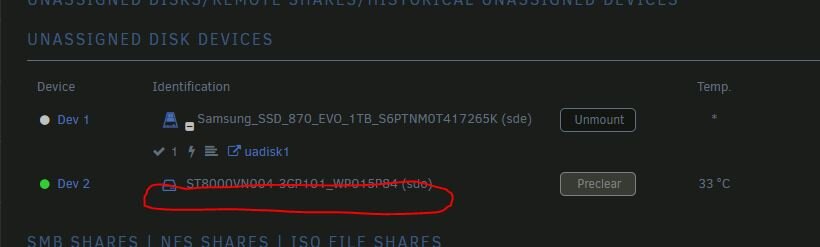
If this was already posted, my apologies, but I searched and did not find it. It looks like the PreClear status no longer shows up on the Main tab page under the Unassaigned Disk listing. Pretty sure it used to display the status here. Or am I crazy? unRAID version 7.0.1
-
I did not try these previously, but same here as well.
-
Are the preclear signatures server-specific? I'd like to preclear some drives on unRAID Sever #1 then put them in unRAID server #2. Will this work? Thanks.
-
Oh, man, thank you! Works like a charm. Much appreciated.





