






Steace
Members
-
Joined
-
Last visited
-
Probably really soon, they started updating plugins for 6.13
-
Thanks for this! Did you encounter any problems with this script? Like disks or server not going to sleep, etc. ? Edit: I'll be using it for now because I don't have time to find what is misconfigured. It's always better to have a correct configuration than messing with permissions.
-
Steace changed their profile photo
-
try df -h in your terminal and make sure no disks are at 100% utilizations. Edit: I was certain this was posted today lol. I'm exactly 1 year too late...
-
Someone know where the info for the Kill switch is? I've looked in the folder /boot/config/wireguard/wg*.conf I don't see anything in the .conf file that looks like a kill switch. I was hoping for something like this: PostUp = iptables -I OUTPUT ! -o %i -m mark ! --mark $(wg show %i fwmark) -m addrtype ! --dst-type LOCAL -j REJECT && ip6tables -I OUTPUT ! -o %i -m mark ! --mark $(wg show %i fwmark) -m addrtype ! --dst-type LOCAL -j REJECT PreDown = iptables -D OUTPUT ! -o %i -m mark ! --mark $(wg show %i fwmark) -m addrtype ! --dst-type LOCAL -j REJECT && ip6tables -D OUTPUT ! -o %i -m mark ! --mark $(wg show %i fwmark) -m addrtype ! --dst-type LOCAL -j REJECT Should I add a script at boot to add those or it's now completely unnecessary? Thank for any help ☺
-
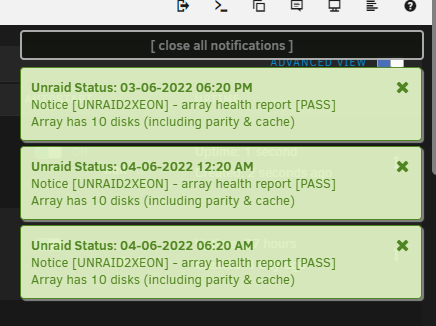
Hi everyone, I have lots of notifications about health of disks (probably SMART), about 5-8 per days. I also have a problems with one of my cache pool, it's not correctly reporting the size. The pool have 3 SSD's 2x 250GB and 1 240GB. This gives me 370GB, I have used 295GB and have 57.8GB left, I should have 75GB left. That may be normal(not sure) but I try to find what's happening with all those smart check. I had only the first for a couple years then added the 2 extras recently after I upgraded to 6.10.2. Note that I also upgraded my parity drive to 4TB and I now use the old parity drive as a disk in my array. <-- I don't think it matters but, in case. ** I included screenshots and diagnostics. I see nothing that can be related to that, maybe someone could. Thank you in advance for any help. unraid2xeon-diagnostics-20220604-1031.zip

-
[Interface] PrivateKey = ****** Address = 100.98.122.24/32 DNS = 10.255.255.3 [Peer] PublicKey = ****** AllowedIPs = 0.0.0.0/0 Endpoint = bos-298-wg.whiskergalaxy.com:65142 PresharedKey = *******
-
Confirmed, I added a new location a everything work as intended! Thank you and sorry for the late response, I was busy as hell.
-
Windscribe also support WireGuard, I've been using them for years without any problems. There's a config generator for WireGuard/IKEV2/OpenVPN so you can use it anywhere you want (not locked to their app). You can even make your own plan. I currently pay 3$CAD per month for all USA location + unlimited bandwidth + free location. I used an affiliate link, if for some reason you don't want to use it just remove everything after .com. I'm also not working for them... It's really the one that I use and highly recommend and I used a lot. Perfect for users like us. I'll stop selling them and let see by yourself 😆, I really just love them ! EDIT: If you use my link you also get 1GB of extra bandwidth for the free plan. Note that you need a paid account to use WireGuard. EDIT: I found out that the PresharedKey is not imported from the config file, you need to enter it manually in the Unraid/Wireguard interface. Work like a charm. Thank you very much Fixed In 6.10.RC6
-
Hi, I just got this too, did you managed it?
-
First, sorry if I got the wrong section, but it seems compulsive in my opinion 😁 I have scavenged 3 switches from work since they moved to cloud. I have a Cisco 2960-S, a 2960-X <-- this one is pretty loud! and a 4 ports unmanaged switch the 100 series. I also want to pfsense, I'm gonna use this no matter what. What I need: One VLAN for Unraid, docker and VMs. One VLAN for my work computer One VLAN for my wife's work computer One VLAN for everything else (TV, etc), I also have a cisco router with some AP. I want to separate all of that so nothing can "talk" to each other. I still want to access my docker containers from my work computer. Can it be done? Is there a better way, not implying all of this? I need to know before beginning this "journey", time is not on my side. Thank you for any suggestion.
-
Great idea!
-
haha, I have a bad case, the button is at the same height as the case and it's pretty big. I often press it accidentally.
-
I found the problem, Windows automatically changed my time zone when I rebooted, I accidentally press the power button with my ass when I went to take the Unraid USB from the server. In a matter of fact, it's that or something reseated properly when I put back my 2 sticks of memory. The memory error from system log are also gone.
-
Thanks, I didn't knew that. I looked into the logs and found nothing, even the unraid-api is starting successfully. There's something about NUMA node not being recognized successfully but also tell that's it's just going to affect performance. I forgot to put my hardware in the initial post, i'll update it now. thanks unraid2xeon-diagnostics-20211129-1345.zip
-
it does


