





pharpe
Members
-
Joined
-
Last visited
Everything posted by pharpe
-
I'm not sure if this the right place for this question but this is the Treadfin support links so I'll start here. I noticed that there is a docker tag for nvidia. fyb3roptik/threadfin:latest-nvidia https://hub.docker.com/r/fyb3roptik/threadfin/tags I assume that this is a build with nvidia GPU support. However, I don't see any documentation around it at all on hub.docker.com or https://github.com/Threadfin/Threadfin Can anyone explain exactly what the Nvidia version does and if there are additional docker variables required for it to work? Or possibly point me to a resource that can help?
-
Thanks I did read that but it's still not clear to me what this does. You take existing content and program your own live TV stream? I just don't understand why anyone would want to do this when you could just watch the content on demand. Not trying to be critical I just don't understand the use case. All the documentation is very vague. I guess I should just load it up and play with it.
-
I saw that a new app Tunarr was recently published to Community Apps. I'm trying to understand what the use case is for this app. I see in the description "utilize generated M3U files with any 3rd party IPTV player app." Which sounds like it's an alternative to Threadfin. But I've read some things that sounds it works in conjunction with Threadfin.
-
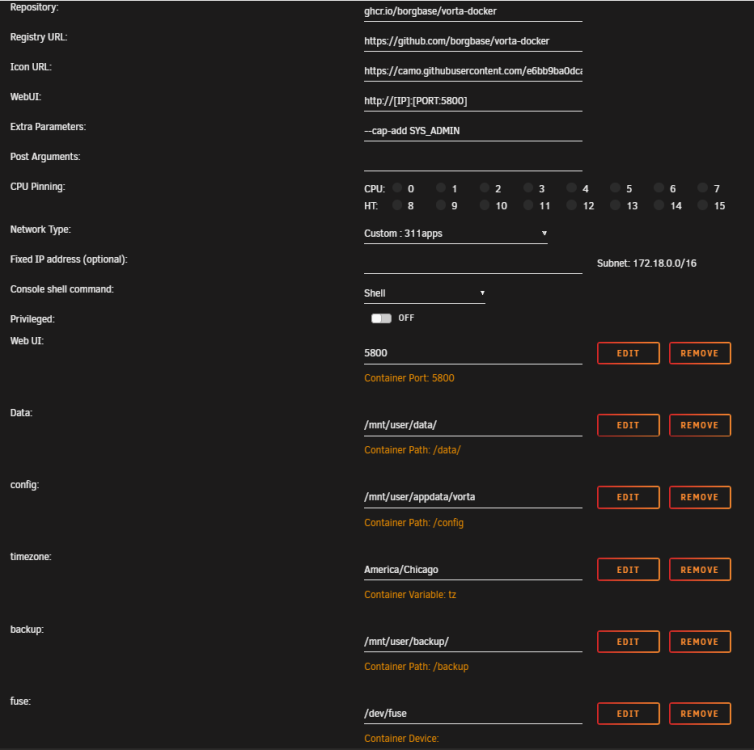
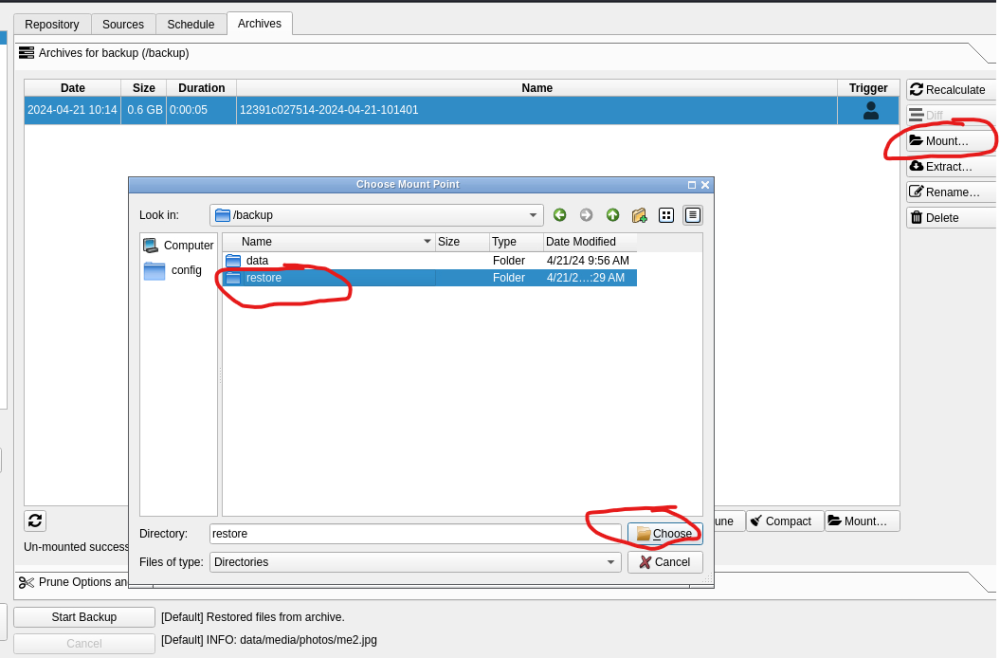
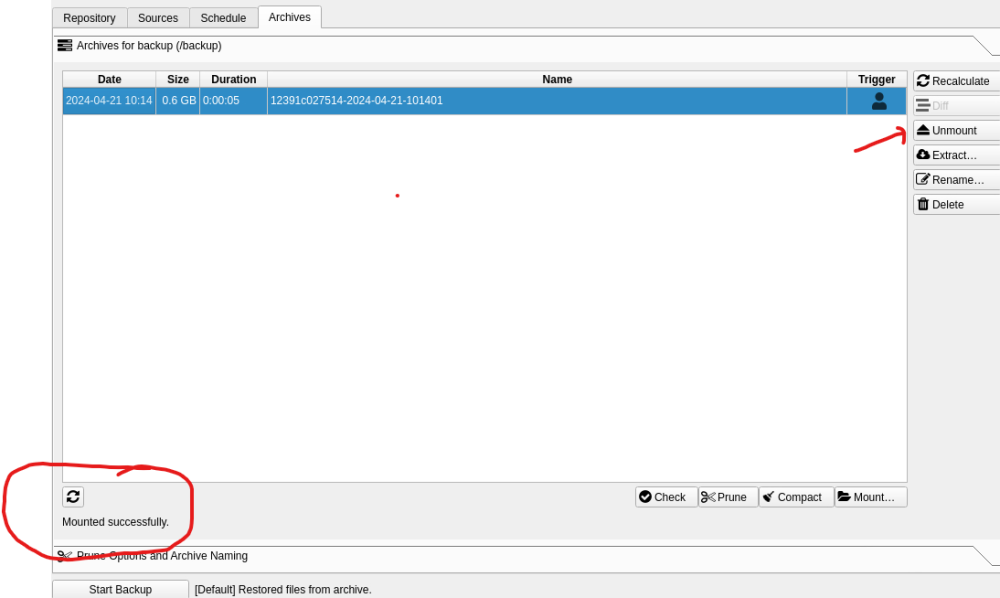
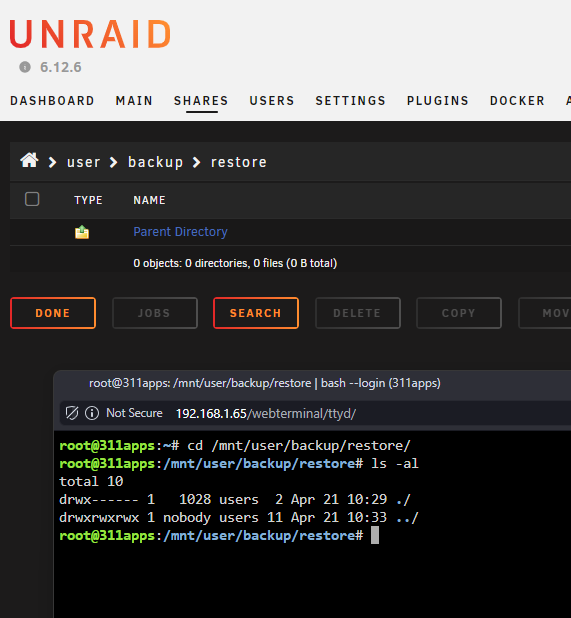
I have Vorta running on Unraid and backups are working and I can extract (restore) files. However I cannot get the Mount option to work so that I can mount the whole archive as a folder. I added the device /dev/fuse and --cap-add SYS_ADMIN to extra parameters. This is what Im doing. Going to the archive, selecting the Mount option and then created a restore folder in my backup share. (mounted r/w). I get this "Mounted succesffuly" message at the bottom and the Mount option changes to unmount But there are no files in the restore folder: This is my docker setup:
-
Was wondering this myself. I'm using xteve now with marginal success. Would like to give Threadfin a try
-
Wow so no feedback what so ever?
-
I currently have a Proxmox server with three 8 TB drives in an ZFS Raidz1 container with about 10 TB of data on it. I am building a new server and I want to use Unraid as the OS. I would like to use the drives in my old server in the new Unraid but I need to figure out how to keep the data. In addition I have these empty drives available to use in the new Unraid server: 4 - 4 TB HHDs 2 - 1 TB SSDs 4 - 512 GB SSDs From what I have read I think this is the best plan but wanted to get feedback. Fyi I am new to Unraid but have a moderate background in linux, proxmox, and docker. Plan to setup Unraid with the following Parity - 4 TB HHD Disk 1 - 4 TB HHD Disk 2 - 4 TB HHD Disk 3 - 4 TB HHD Cache 1 - 512 SSD Cache 2 - 512 SSD Cache 3 - 512 SSD Cache 4 - 512 SSD According the this disk calculator , https://unraid.category5.tv/, that should give me about 10.88 TB. I could then copy all files off my old server over to the new Unraid server. At that point I would shut the old server down and move the 3 - 8 TB drives over to the new server. If I understand correctly I can replace the 4 TB parity drive with one of the 8 TB drives (this is what I'm uncertain about). I can then add the other two 8 TB drives into the array as additional disks. End result looking like this: Parity - 8 TB HHD Disk 1 - 4 TB HHD Disk 2 - 4 TB HHD Disk 3 - 4 TB HHD Disk 4 - 4 TB HHD Disk 5 - 8 TB HHD Disk 6 - 8 TB HHD Cache 1 - 512 SSD Cache 2 - 512 SSD Cache 3 - 512 SSD Cache 4 - 512 SSD Questions: Is what I'm thinking possible? Is it the best/easiest/safest method to get to the end goal? Does having four 512 GB cache drives even make sense? I also have two 1 TB SSDs that I can use somewhere. Was thinking of creating a second array, mirroring these drives, for fast storage to host SQL DBs. Can Unraid do this?
-
Hi. I keep getting an error No OpenVPN config file located in /config/openvpn/ but they are there. I'm running on Ubuntu 18.04 running Docker CE 19.03.12. I installed with these options: docker run -d \ --cap-add=NET_ADMIN \ -p 8112:8112 \ -p 8118:8118 \ -p 58846:58846 \ -p 58946:58946 \ --name=delugevpn \ -v /apps/docker/deluge/data:/data \ -v /apps/docker/deluge/config:/config \ -v /etc/localtime:/etc/localtime:ro \ -e VPN_ENABLED=yes \ -e VPN_USER=<my_user> \ -e VPN_PASS=<my_pass> \ -e VPN_PROV=pia \ -e STRICT_PORT_FORWARD=yes \ -e ENABLE_PRIVOXY=yes \ -e LAN_NETWORK=192.168.1.0/24 \ -e NAME_SERVERS=209.222.18.222,84.200.69.80,37.235.1.174,1.1.1.1,209.222.18.218,37.235.1.177,84.200.70.40,1.0.0.1 \ -e DELUGE_DAEMON_LOG_LEVEL=info \ -e DELUGE_WEB_LOG_LEVEL=info \ -e ADDITIONAL_PORTS=1234 \ -e DEBUG=false \ -e UMASK=000 \ -e PUID=0 \ -e PGID=0 \ binhex/arch-delugevpn When I start the container I get: 2020-07-15 21:44:00.972750 [info] System information Linux 91cc90260a59 5.4.44-2-pve #1 SMP PVE 5.4.44-2 (Wed, 01 Jul 2020 16:37:57 +0200) x86_64 GNU/Linux 2020-07-15 21:44:01.016926 [info] OS_ARCH defined as 'x86-64' 2020-07-15 21:44:01.050212 [info] PUID defined as '0' 2020-07-15 21:44:01.084879 [info] PGID defined as '0' 2020-07-15 21:44:01.119972 [info] UMASK defined as '000' 2020-07-15 21:44:01.153461 [info] Permissions already set for volume mappings 2020-07-15 21:44:01.189918 [info] DELUGE_DAEMON_LOG_LEVEL defined as 'info' 2020-07-15 21:44:01.221706 [info] DELUGE_WEB_LOG_LEVEL defined as 'info' 2020-07-15 21:44:01.253360 [info] VPN_ENABLED defined as 'yes' 2020-07-15 21:44:01.288049 [crit] No OpenVPN config file located in /config/openvpn/ (ovpn extension), please download from your VPN provider and then restart this container, exiting... The /config/openvpn folder did not exist so I started the container again, per the instructions, to try to get it to auto create but it didn't. So I manually created it and loaded the crt, pem and ovpn files from PIA in there. tom@vpnserver:~$ ls -al /config/openvpn total 23 drwxrwxrwx 2 root root 5 Jul 15 21:23 . drwxrwxrwx 3 root root 3 Jul 15 21:03 .. -rwxrwxr-x 1 tom tom 3157 Jul 15 21:23 'US West.ovpn' -rwxrwxrwx 1 root root 2025 Jul 15 21:14 ca.rsa.2048.crt -rwxrwxrwx 1 root root 869 Jul 15 21:14 crl.rsa.2048.pem I tried changing the name of the ovpn file to remove spaces but that didn't make any difference so I changed it back to the PIA name. I set the whole folder structure to 777 to rule out permissions.


