






Jandrop
Members
-
Joined
-
Last visited
-
The paid add-ons are sold and verified through Google Play Billing, and push notifications rely on Firebase. A Google-free build would need its own licensing and payment system, plus a second app to maintain, and that's more than I can take on as a solo developer. So for now it's Google Play only. On GrapheneOS it works fine with sandboxed Google Play installed.
-
Hey Liam, glad you're enjoying it! The device check was a Google Play setting, not something in the app itself. I already turned it off after a similar report on Reddit, and people on GrapheneOS have since been able to install it straight from Google Play, so it should work for you now. If Play still shows it as incompatible, give it a little while or clear the Play Store cache. The rest of the Play protections stay on, though. They're what protects the paid add-ons, so I'm not planning an F-Droid repo for now.
-
Hi there, I wanted to let you know that shutdown and reboot will be available in the next beta release, either today or tomorrow. Cheers.
-
Plugin author here, sorry for the trouble. JorgeB's diagnosis is spot on: the companion replaces how the API lists disks (so it doesn't wake spun-down drives), and that code reported sizes as a few bytes instead of the real value, so every disk failed the Internal Boot size check. This is fixed in U-Manager Companion 2026.10.04.1, released today. Updating the plugin from the Plugins page is enough: the fix applies immediately and no reboot or uninstall is needed. If you already removed it to set up internal boot, you can reinstall it and disk sizes will now be reported correctly. GitHub issue for reference: https://github.com/jandrop/u-manager-companion/issues/3 Longer term, I'd rather not patch the API for this at all. I've opened a work intent on the Unraid API to fix the spin-up problem upstream (https://github.com/unraid/api/issues/2105, building on https://github.com/unraid/api/issues/2018). If it's accepted and lands, the companion can drop this patch and the API will handle disks on its own. Thanks @JorgeB for tracking it down.
-
Hi! Thanks a lot for the feedback, and I’m glad you like the UI! 😊 The shutdown and reboot functionality is now handled by the backend plugin, and I’m currently finishing the implementation in the app. I’m hoping to have it ready by the end of the month. It won’t make it into the next release, but it should be included in the one after that with the Power Pack And yeah, I agree it’s a pretty important feature for situations like yours, especially if the UPS is about to run out of battery!
-
Hi I recommend you to install Unraid Connect from Unraid CA to update the API to the latest version and then install U-Manager Companion to patch the API with some fixes, all the documentation is on the App Help Section. Regarding the bottom menu, for now is not editable, but I can take this as a suggestion for the next release.
-
Hi, sorry for the late response, if your phone doesn't pass the google play integrity then the app is not compatible.
-
Hi, sorry for the late response, I'm planning to add this feature in the future.
-
Hello everyone, First of all, I sincerely apologize for the radio silence. I ran into some technical issues accessing my forum account and wasn’t receiving any email notifications for this thread. I’m back now and will be keeping an eye on this regularly. Regarding the "Core File API" plugin: I’m happy to share that the File Manager API is now officially available in the Unraid Community Apps store. There’s no need to manually install XML templates anymore—just search for "File Manager API" and install it directly. For a bit more context, FileCoreAPI runs as a Docker container that you install from the Unraid App Store. It provides API-based access to the file system, allowing any app to interact with your files and perform operations like browsing, uploading, or managing them. In the case of U-Manager, this enables a built-in file manager, allowing you to use Unraid more like a real file server directly from your mobile device. As for the other feedback: Dashboard & Shares issues: I’ve seen reports of these sections failing to load for some users. Bug reporting: If you’re still experiencing these (or any other issues), please open an issue on the official GitHub repository: https://github.com/jandrop/u-manager/issues Opening issues on GitHub helps me track and manage them much more effectively than through the forum. Please include your Unraid version and whether you’re using a VPN or reverse proxy. Again, sorry for the delay, and thanks for your support!
-
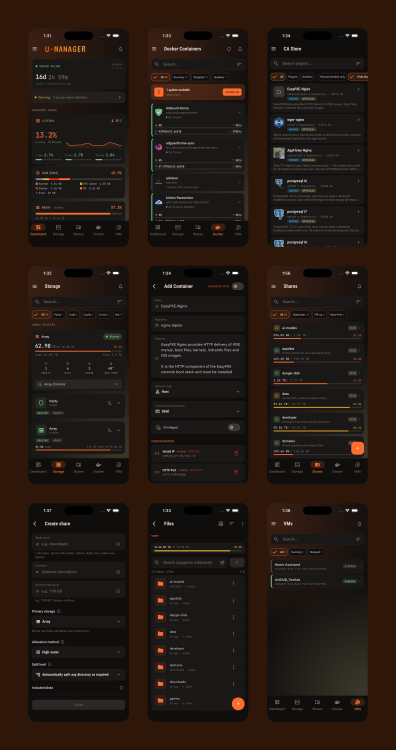
Hey everyone! 👋 I’ve been working on a new Android app to monitor and control Unraid servers directly from your phone, and I wanted to share the first public version with the community. The app is called U-Manager, and the goal is to offer a clean, fast and modern mobile experience for managing your Unraid box. Features (current version)DashboardLive CPU, RAM and Disk usage Quick stats (Docker containers, VMs, uptime, etc.) MonitoringReal-time resource charts (CPU & Memory) Smooth, low-overhead polling Docker ManagementView all containers (All / Running / Stopped) Start / Stop / Restart containers Runtime info (uptime, image, state) Sorting & filtering options Edit / Delete containers Check logs VM ManagementStart / Stop / Pause / Reboot / Force Stop VM states in real-time UUID + key info visible Array OverviewParity, data and cache drives Usage, temperature, free space Quick filtering by drive type Disk health status SharesCreate/Delete/Edit shares FILE ManagerCopy, Move operations Download and upload file operations. Search Hard link creation. Torrent SupportMonitoring qBittorrent and Transmission Basic operations supported: Start, pause, check, force start, and delete. Filters With a small in-app purchase, you can also get Upload torrents, add magnet links, turtle mode, and multiselection. A few notesThe app is 100% free to use. It’s not open source — I prefer keeping a single consistent version to ensure stability and avoid fragmented forks. Absolutely no data is sent to external servers. Everything runs locally between your phone and your Unraid server. Credentials are stored using Android’s secure storage. If you enjoy the app and want to support development, you can do so here (totally optional): https://ko-fi.com/jandrop Android https://play.google.com/store/apps/details?id=es.atrapandocucarachas.umanager iOS https://apps.apple.com/us/app/u-manager-for-unraid/id6766693828
-
Jandrop changed their profile photo
-
Well, If you are a hard docker user like me, you will know that when you map a port this port is binded to the unraid ip, so I have mulple services like sonarr, radarr, gitlab, etc binded to the unraidip:portservice. I´m interested to block this ports if were possible. If not I can use the udm vpn.
-
I just want to give access to the shared folders to my family, but I'm not interested in expose all the ports of my Unraid server. Right now they are using a vpn with l2tp and I have multiple firewall rules only to give access to smb and block the rest.
-
Hi, the point is allow to another users to connect to the shared folders and block the access to the docker services. With wireguard on unRaid I can't see the option.
-
I don't know if anybody is at the same situation as me, I have a UDM Pro and I use the vpn integrated l2tp to access to unraid, so I can use the firewall rules to block all port services on unraid and on my lan, If I use the wireguard vpn to access to unraid all the ports are exposed and I don't know how to block them, because the gw is unraid and the firewall rules of my router doesn't work. So my question is simple, there's any way to block all the ports on unRaid and only allow to connect the shared services SMB, NFS?



