





96dpi
Members
-
Joined
-
Last visited
Everything posted by 96dpi
-
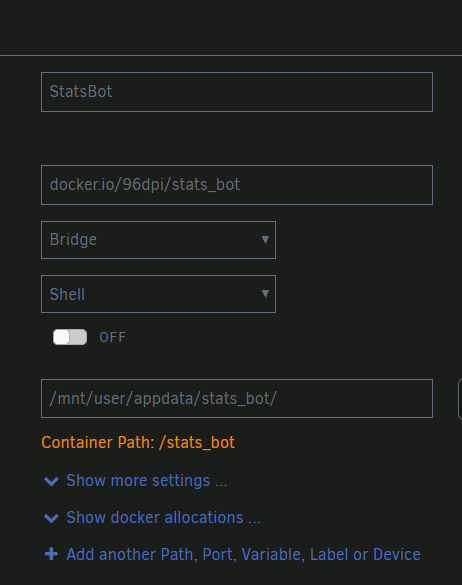
My Docker image is a simple Python script that writes to two files. I want to be able to access (read/write) those files while the script is running. I've tried adding a container path, but I really don't know how to set this up properly. How can I make this happen?
-
Oh man, that's a kick in the junk. Thank for the confirmation!
-
Doing a parity swap, copy operation completed after 36 hours (16 TB), tried to add a new drive in an empty slot, didn't realize you can't do that before this parity swap is completed so I just removed it, never started the array. Now it's making me complete the entire copy operation all over again! Is this really how this is supposed to work? Just simply selecting a different drive in a different slot basically reset the entire process that already completed. Is this a bug, or working as intended?
-
My PMS is on an unRAID docker container (obviously) I will provide some backstory below, please bear with me, this will be lengthy... This problem started when I was adding dozens of new TV series through Sonarr (hundreds of episodes) at one time. Everything has been working fine up to this point. I noticed the problem when there was a bad match, I tried to fix it, but Plex would not update it with the correct show. I tried to delete it, but I get a "There was a problem deleting this item" error. I tried to add a movie (different library), Plex is set to auto scan, and it will scan and see the movie, but it does not show up in the library. After a bit of searching, I see a few forum posts that says database corruption is fairly common on unRAID dockers. So I try to restore from a backup following the steps here, but when I stop the server, the -shm and -wal files disappear (I see them while the server is running). I did the rest of the process anyway, but when I start the server again, it never actually comes online. I waited about 30 minutes, but then I just restored the original corrupted files so that it would come back online again. I posted on Reddit about this same issue, someone said they suspect I filled the cache drive and it corrupted the docker image. This makes sense, especially since I do remember getting cache drive warning through the UR UI. Well, after a reboot at one point, one of the HDDs was just unavailable and being emulated. Thinking the HDD was fine and the SATA cable was bad, I connected all HDDs to a SAS controller and removed all SATA cables (except for two cache SSDs), which was something I had been planning to do anyway, due to several issues with SATA cables in the past. UR came back up with a valid configuration, then I started the data rebuild process, but at some point in the process everything stopped working, the Log memory was at 100%, one of the HDDs (a different one than above) was recording constant errors, and the transfer rate slowed to KB/second. I stopped that process, rebooted, came back up as valid, but there was no 'Start' button, completely missing. Rebooted again, 'Start' button came back, started the data rebuild process, and everything seems to be working okay this time. Currently at about 90% and about 1.5 hours remaining. No drive errors at all. This is where I am currently at and I'm not sure exactly how I should proceed. Once the data rebuild is done, I'm just going to fire everything up and see if replacing the cables magically fixed everything, but if not, I'm not sure what I should do next. Delete the PMS docker container and re-add it? Restore an older database file? Any help is appreciated!
-
Thank you. I tried changing the transcoding directories, but it didn't fix the issue. I ended up installing a different docker image (binhex-plexpass) and everything appears to be working now. Not sure what/when/where got corrupted. Very strange.
-
I hope this is the correct space for this, please let me know if not. Let me start with some background... This is a new issue that arose after a series of previous events TL;DR: Failing HDD after a power outage (I do have a UPS, long story) I moved all data from bad HDD onto existing HDDs I shrunk the array in unRAID in order to remove the disk Everything seemed to working okay, but I soon found out that only some media was not playing. I dug further and found that it is only not playing if it's trying to transcode, and further, this only occurs on some clients. The same file will transcode fine to one client, but not to a different one (different client OS/hardware). I have tried rolling back Docker versions, but it didn't help. I tried changing transcoding directories from /tmp to /dev/shm and this actually changed the behavior of the issue. Instead of just being stuck on the play screen indefinitely, it would now display an error saying the disk does not have enough free space for the transcode (paraphrasing). I googled it and didn't find any further help. My next step was going to be to transcode to the `appdata/binhex-plex/transcode` folder on an SSD cache drive, but I couldn't get this to work. Any idea how to do this, or is there something else I should try? unRAID Version: 6.8.3 binhex/arch-plex:1.20.5.3600-1-01 I can provide logs if you think it's necessary.
