





LakersFan
Members
-
Joined
-
Last visited
Everything posted by LakersFan
-
Thanks Frank, they’re all XFS. I’ll start researching recovery.
-
Ok, I take the “astute” part out of the above post. I reviewed the script I used and this is my fault. I had an “-mtime +7 -delete” command to remove a daily backup after seven days. Above that was the directory I was supposed to have it directed to, however I commented that line out (and another accompanying line). So I guess it deleted anything and everything over 7 days. Damn. Welp, I assume they’re gone forever, but need someone to confirm it’s a lost cause so I can move on. Thanks guys, appreciate the support!
-
Yes sir, sorry. I meant the config folder. You’re correct in that parity had zero errors and nothing was rebuilt. I’d like to think I’m a pretty astute guy when it comes to PC’s. I know I didn’t agree to format anything for sure. I clicked the user script I created a while ago and it ran differently then it had before… it started checking for empty folders then it buckled my server. I couldn’t log into the tower either via telnet or using a browser. So I had to hard boot it. The script was a simple script to sync an EPG. I’ll see if I can find it. Nothing crazy though. No clue what happened. I’m anonymous here, I’d tell you if I did something wrong. Bottom line, is there any other troubleshooting, rebuilding or recovery I can try? I’ll send the drives off if some wizard out there can find the home videos folder on it and recovered any files that were seemingly deleted. If not, is what it is. Life moves on. I do have some backed up, but not all. Lesson learned.
-
One thing I'd like to add is I noticed the only media I have seems to be on Disk 6 (and it looks like it's not all there ... but honestly can't remember how full the HDD was). Tonight I took my flash drive and replaced the config file that I initially pulled off it when this all started. I also added the new key that I received the other day when I was troubleshooting. It boot up and it appears to be doing a "Parity check" right now. The media is still mostly missing, but hopefully it'll rebuild? I really just want the home movies. The rest is garbage collected over the years lol
-
Unfortunately I do not have an array status report. It looks accurate from my recollection. Yes, I have a backup of the flash drive when I first pulled it out. I did run a disk scan on it and there were errors that it said were corrected. It wasn't in there when I first pulled it out. When trying to fix this on my own, I had to request a new key.
-
Unfortunately I'm unable to locate it. Here's the issue ... had it on my PC. Then one day I decided to set up Nextcloud. Moved everything over to my Nextcloud account and completely forgot I had a backup of it (that was now moved over to Nextcloud). Haven't needed it in 10 years. Dumb mistake? Absolutely.
-
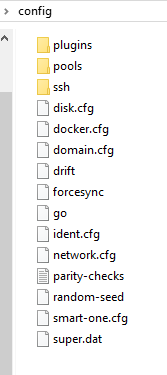
Attached, thank you for looking at it. Where would I find the array status report? Thanks guys. Attached is a pic of what's in my config folder that was on the flash drive when it stropped working... Does it look complete? What can I do with it? tower-diagnostics-20220912-1924.zip
-
Hey all, Let me just start by saying I've been rolling along with Unraid for 10 years without an issue. No joke... I bought my key on 9/14/2012 But today something happened and I have no idea where it began. I ran a User Script (one that I've ran multiple times) and it froze up Unraid to the point where I got a internal server error when trying to login in. I made the mistake of hard resetting my PC and that was clearly a bad idea. When restarting it, it wouldn't boot. So I hooked up the monitor to find it was starting into the bios. Weird... I looked at my flash drive and it appears many files were missing. I tried to troubleshoot based off what I could from this website. Ultimately, I reflashed my drive and replaced the "leftover" files from my (what was once) working drive and put them on the newly installed flash drive. Some things returned, like nfo and png files from movies, but not the mp4's/mkv's. Docker's looks to have returned, but I no longer have the option to login into any of their GUI's. I did make a backup of the "fubared" flash drive before i erased it for the new. Hopefully something can be done. I made a diagnostics file of where's I'm at right now. And like I said, I have the old contents of the flash drive that I backed up "as-is" if needed. I *think* I may have a backup of my flash drive, but of course it's on my array that i can't access. Any help would be appreciated. Thanks all! tower-diagnostics-20220911-2029.zip
-
I'm getting the same issue [ALERT]: Dropbox needs to rename your existing folder or file named Dropbox to finish installing. Please close any open documents and try again. Any update on this or is it unusable?
-
I'm unable to add the PRO key in. Won't paste. Is this a known issue? Tried right-clicking -> paste and tried control-v. Thanks! EDIT - ended up adding the tmm.lic file to the data folder and restarted tmm to get it working.
-
Just updated. I'm getting "Too many errors. Giving up" when trying to play anything.
-
Thank you! That fixed it. I have zero idea why or how that got changed... I wish I did. But I honestly don't believe I ever touched that file, as I would have had to unhide my flash drive to even access it.
-
I made sure my primary graphics was set to CPU in the bios. Still no luck. Still shows not supported. Attached is my latest diagnostics. tower-diagnostics-20220226-2136.zip
-
Hey guys, Not sure why, but I am getting a "GVT-g not supported" error even though I have a newly purchased Intel Core i5-10400 and an ASUS Prime B560-PLUS motherboard. It worked for a short period then stopped. I didn't touch the bios after I initially got it working, so not sure where I went wrong. Any help would be appreciated. Thanks!
-
Josh.5’s applications and thank you for responding about the subtitles.
-
Tried asking in discord but it’s not letting me post… Question… does the “remove all subtitle streams” plugin also remove forced subtitles?
-
Hi guys, hoping you can help me out. I have a user profile that I can’t log into. I left the password blank and it’s been working for months. Now when I try to sign in, it says invalid username or password. My username is my first name and it’s not hidden, so really you can just click it. So I know it’s not a username issue. So I clicked the forgot password button and try to reset it but it states to try again within your home network (which I’m already doing). Is there a file I can open and change (or delete) to clear the password without losing the data of the user… we have watched shows, etc that we’d lose if I just created a new user. Thank you!
-
Thanks binhex!
-
Same here. Just updated and having the same issue.
-
Same errors here. Was there a fix for this?
-
Thank you! Would not have been able to figure it out without this post!
-
Sorry, but the very bottom of what? Attached was the entire error. Thank you!
-
Hey there, I've been getting this error lately and was wondering if anyone here can help me figure out what's going on. ERROR 7 hours ago [06/Sep/2020:10:05:54] ENGINE Error in HTTPServer.tick Traceback (most recent call last): File "/usr/lib/python3.8/site-packages/cheroot/server.py", line 1776, in serve self.tick() File "/usr/lib/python3.8/site-packages/cheroot/server.py", line 1999, in tick conn = self.connections.get_conn(self.socket) File "/usr/lib/python3.8/site-packages/cheroot/connections.py", line 180, in get_conn return self._from_server_socket(server_socket) File "/usr/lib/python3.8/site-packages/cheroot/connections.py", line 199, in _from_server_socket s, ssl_env = self.server.ssl_adapter.wrap(s) File "/usr/lib/python3.8/site-packages/cheroot/ssl/builtin.py", line 295, in wrap return s, self.get_environ(s) File "/usr/lib/python3.8/site-packages/cheroot/ssl/builtin.py", line 303, in get_environ 'SSL_PROTOCOL': cipher[1], TypeError: 'NoneType' object is not subscriptable Doesn't really seem to affect anything that I've noticed. Thanks!!
-
Same here. How did you revert back to 4.2.1-1-05?
-
It never fails ... I work on something for a week. Finally post for help, then figure it out about an hour later. lol For anyone else wondering how to do this, it turns out the port to forward is in the logs. Just follow this to clear the logs, then open the log (location is in your /config location) after restarting and it’s there. Thanks binhex. I appreciate you adding this into all of your dockers. That’s why all my dockers start with binhex-.

