





Moppen
Members
-
Joined
-
Last visited
-
Aloha, has anyone successfully got hydroxide running and can help to get it running here, too? Here is my docker run-Command docker run -d --name='hydroxide' --net='bridge' --pids-limit 2048 -e TZ="Europe/Berlin" -e HOST_OS="Unraid" -e HOST_HOSTNAME="HAL9000" -e HOST_CONTAINERNAME="hydroxide" -l net.unraid.docker.managed=dockerman -l net.unraid.docker.icon='https://raw.githubusercontent.com/clairekardas/docker-icons/refs/heads/main/hydroxide.png -p '1025:1025/tcp' -p '1143:1143/tcp' -p '8234:8080/tcp' -v '/mnt/user/appdata/hydroxide':'/root/.config/hydroxide':'rw' 'heywoodlh/hydroxide' -disable-carddav -imap-host 127.0.0.1 -smtp-host 127.0.0.1 -carddav-host 127.0.0.1 serve Thunderbird keeps telling my that the Server is denying access. Thanks in advance, Stefan
-
Okay, this looks more consistent. But it took Unraid a while. Still strange somehow.

-
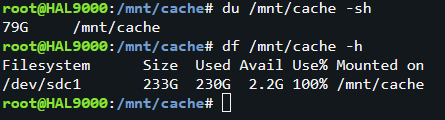
Yes, it's BTRFS. GUI shows pretty the same as df, but again. I deleted a 140 GB File, so I must have a lot of more free space then 2.2 GB
-
Hi everybody, I deleted a 140 GB File which was on my cache, but the free space, well, will not be freed? Have a look at the image, there is a difference between du and df. Does anybody know this phenomenon und how to fix it? Best Regards, Stefan
-
2025-04-13T10:04:03.215866Z WARN conduit: Not found: /_matrix/media/v3/preview_url?url=https%3A%2F%2Fyoutu.be%2FO8jfqBZDNQw&ts=1742083200000 2025-04-13T10:04:03.216155Z WARN conduit: Not found: /_matrix/media/v3/preview_url?url=https%3A%2F%2Fwww.reddit.com%2Fr%2Fmovies%2Fs%2FTJVZRJj52H&ts=1741421280000 2025-04-13T10:04:03.216346Z WARN conduit: Not found: /_matrix/media/v3/preview_url?url=https%3A%2F%2Fyoutu.be%2FCKQyjs0k-8wa&ts=1741575840000 2025-04-13T18:01:55.397566Z WARN conduit: Not found: /_matrix/client/unstable/org.matrix.msc3814.v1/dehydrated_device 2025-04-13T18:01:55.845406Z WARN conduit: Not found: /_matrix/media/v3/preview_url?url=https%3A%2F%2Fyoutu.be%2F_8-N8IIq_8I%3Fsi%3DYZdKdwN0hAKZOcYI&ts=1743700980000 2025-04-13T18:01:55.845492Z WARN conduit: Not found: /_matrix/media/v3/preview_url?url=https%3A%2F%2Fwww.youtube.com%2Fwatch%3Fv%3DkBdgqZX65t4&ts=1743706980000 2025-04-13T21:37:02.872928Z WARN conduit: Not found: /_matrix/client/unstable/org.matrix.msc3814.v1/dehydrated_device 2025-04-13T21:37:03.307212Z WARN conduit: Not found: /_matrix/media/v3/preview_url?url=https%3A%2F%2Fwww.youtube.com%2Fwatch%3Fv%3DkBdgqZX65t4&ts=1743706980000 2025-04-13T21:37:03.307237Z WARN conduit: Not found: /_matrix/media/v3/preview_url?url=https%3A%2F%2Fyoutu.be%2F_8-N8IIq_8I%3Fsi%3DYZdKdwN0hAKZOcYI&ts=1743700980000 2025-04-14T08:03:16.234339Z WARN conduit: Not found: /_matrix/client/unstable/org.matrix.msc3814.v1/dehydrated_device 2025-04-14T08:03:16.533538Z WARN conduit: Not found: /_matrix/media/v3/preview_url?url=https%3A%2F%2Fyoutu.be%2F_8-N8IIq_8I%3Fsi%3DYZdKdwN0hAKZOcYI&ts=1743700980000 2025-04-14T08:03:16.542458Z WARN conduit: Not found: /_matrix/media/v3/preview_url?url=https%3A%2F%2Fwww.youtube.com%2Fwatch%3Fv%3DkBdgqZX65t4&ts=1743706980000 2025-04-14T09:37:21.251861Z WARN conduit: Not found: /_matrix/client/unstable/org.matrix.msc3814.v1/dehydrated_device 2025-04-14T09:37:21.928791Z WARN conduit: Not found: /_matrix/media/v3/preview_url?url=https%3A%2F%2Fyoutu.be%2F_8-N8IIq_8I%3Fsi%3DYZdKdwN0hAKZOcYI&ts=1743700980000 2025-04-14T09:37:21.928791Z WARN conduit: Not found: /_matrix/media/v3/preview_url?url=https%3A%2F%2Fwww.youtube.com%2Fwatch%3Fv%3DkBdgqZX65t4&ts=1743706980000 Hi everybody, that's in my log. Any Idea how to fix this? Thanks in advance.
-
Okay, my System is back up. Phew! Thanks everybody for your support. After I formated the Pool, while copying the original data back to /mnt/cache something strange happened: I was told there was not enough space to copy the Files?!?! What? How? I did not knew how to help myself so I started the Mover and when there was enough space on the Pool I continued to copy the files back. But that seems to have f*cked up my containers because after I started the Docker-Environment evey container was acting like it was newly installed. I stopped them all, restored a backup of /mnt/appdata from 3 days ago and now everything seems to be running fine again.
-
And how do I do that? Is there a how-to somewhere? Thanks for your help.
-
Log: Mar 28 10:50:54 HAL9000 ool www[11428]: /usr/local/emhttp/plugins/dynamix/scripts/btrfs_scrub 'start' '/mnt/cache' '' Webui: UUID: 5b0d419c-f792-49d6-b3b8-a34c1789274b Scrub started: Fri Mar 28 10:50:54 2025 Status: aborted Duration: 0:00:00 Total to scrub: 419.33GiB Rate: 0.00B/s Error summary: no errors found Or do I need to stop the array first or something else?
-
Aloha everyone, I don't know what happened in the night but there seems to be a problem with a FS now Read-only? My Docker-Containers wouldn't start and when I sshd into my Server and started the Mover i got this: create_parent: /mnt/disk1/appdata/plex/Library error: Read-only file system create_parent: /mnt/disk1/appdata/plex error: Read-only file system create_parent: /mnt/disk1/appdata error: Read-only file system create_parent: /mnt/disk1/appdata/tautulli error: Read-only file system create_parent: /mnt/disk1/appdata error: Read-only file system move_object: /mnt/disk1/appdata: Read-only file system create_parent: /mnt/disk2/appdata/mariadb error: Read-only file system create_parent: /mnt/disk2/appdata error: Read-only file system move_object: /mnt/disk2/appdata: Read-only file system create_parent: /mnt/disk3/appdata error: Read-only file system file: /mnt/disk3/appdata/qbittorrent/config/ipc-socket I don't know what to do, please help, I am mildly panicking. Best Regards, Stefan hal9000-diagnostics-20250328-0904.zip
-
I have switched to Audiobookshelf a while ago. Never looked back. https://github.com/advplyr/audiobookshelf
-
Is there a guide somewhere how to set this up? The Container is running and I successfully configured NPM so if I enter https://chat.xxxxx.de it says "Hello from Conduit!" but I can't connect with a client like nheko.
-
Aloha and Welcome
-
Aloha, there is something wrong with Deemix. It seems that their Project Page and the Repo are getting forwarded to a Site which is on a Blocklist (uBlock Origin & Pi-Hole).
-
Ja, aber hat leider nichts geholfen. services.yaml - Plex: - Plex: icon: plex.png href: https://xxxxxxxxxxx description: Media server #server: my-docker # The docker server that was configured container: plex # The name of the container you'd like to connect showStats: true docker.yaml my-docker: socket: /var/run/docker.sock Unraid Template Ergebnis Kann jemand mal eine funktionierende Konfig posten? Vielen Dank.


-
Aloha, does your Dowmload have Leechers and Seeders? What does the Status for the Downloads say? Just "Downloading" or something else?


