





Philby1975
Members
-
Joined
-
Last visited
Everything posted by Philby1975
-
Hoping this is a simple fix. Calibre web was running well to my knowledge (though I haven't used it in a while) before I reset me docker.img file. Added all other dockers back without a problem using existing setting, however Calibre-Web is producing the following error in the logs. I consoled into the docker and ran the suggested command however it says that pip is an unknown command. 10500K .......... .......... .......... .......... .......... 99% 6.70M 0s 10550K ......... 100% 371M=1.6s 2023-06-04 03:11:38 (6.36 MB/s) - '/calibre-web/kindlegen/kindlegen_linux_2.6_i386_v2_9.tar.gz' saved [10813137/10813137] [INFO] Extracting kindlegen_linux_2.6_i386_v2_9.tar.gz into directory: /calibre-web/kindlegen [INFO] Change the ownership of /calibre-web/kindlegen (including subfolders) to calibre:calibre [INFO] kindlegen (Amazon Kindle Generator) will be linked into /calibre-web/app/vendor [INFO] Creating the vendor directory: /calibre-web/app/vendor [INFO] Change the ownership of /calibre-web/app/vendor (including subfolders) to calibre:calibre > create kindlegen link /calibre-web/app/vendor/kindlegen assigned to source /calibre-web/kindlegen/kindlegen > change the ownership of /calibre-web/app/vendor/kindlegen to calibre:calibre [INFO] Creating directory for temporary directories and files: /tmp [INFO] Change the ownership of /tmp (including subfolders) to calibre:calibre [INFO] Launching Calibre-Web ... *** "flask-limiter" is needed for calibre-web to run. Please install it using pip: "pip install flask-limiter" *** *** "flask-limiter" is needed for calibre-web to run. Please install it using pip: "pip install flask-limiter" *** Any help would be appreciated.
-
Hi JorgeB, just wanted to update you. Actually fried 10 of my 11 disks while testing and trying... obviously had an impact so I completely forgot about all the help you'd provided. Was very much appreciated so I didn't want to just disappear. Have shelved everything for now, and have all the important stuff on cloud backup... but one day soon I will start again. I might even swap the board on some of the drives and see if I can get anything back. Again, thank you for all your help.
-
Hi JorgeB, I hope you are well. I updated the HBA card (it was advertised as having P19... was surprised to see 9), and I have rigged another power supply to the hard drives. Had some good signs and got down to only 1 hard drive with issues at one point. Now back to three. I'm hoping to borrow some hardware tomorrow to swap the whole thing over to different gear and test as I'm starting to wonder if it's not a hardware issue. Reason for this is that I have had disks show up as SSD that aren't, A disk that was selected for the array but was actually an unnassigned device... also I have removed a bunch of dockers but they are still showing up as 'needing updates' when I run fix common problems. I have attached the diags again the way it is now with the updated HBA and separate PSU for the hard drives. Hoping it might give you some more clues. Appreciate your help. tower-diagnostics-20220225-1903.zip
-
Thankyou. Will let you know how I go.
-
Thank you so much mate. This is really appreciated as I've invested a lot into Unraid and preached far and wide amongst friends about how great it is. So power is more likely the issue than the HBA card? I will start with updating the firmware... any idea of where I might find a good simple walk through? I wouldn't put my hand up for being stupid, but linux is not my native environment. Have just put the third different disk into Disk 9 for rebuild (after preclear) and it's still going at 3-400 kb/s rather than 100+ MB/s which is what I would expect. I'm guessing this may all be part of the same problem?
-
Not sure if it might help, but around the same time that the first disk failed I noticed that write cache was disabled on a few disks. Manually enabled it, but it seems that each time I've restarted or changed the disk config more are disabled on boot so now I'm manually enabling most of them each time it boots.tower-diagnostics-20220219-1101.zip Diagnostics file is after the array has been running for a while. Preclear in progress, but stopped the rebuild on Disk 9 as it was running extremely slowly (40 odd days for a 1TB disk). Thanks in advance for any light you can shed on this issue.
-
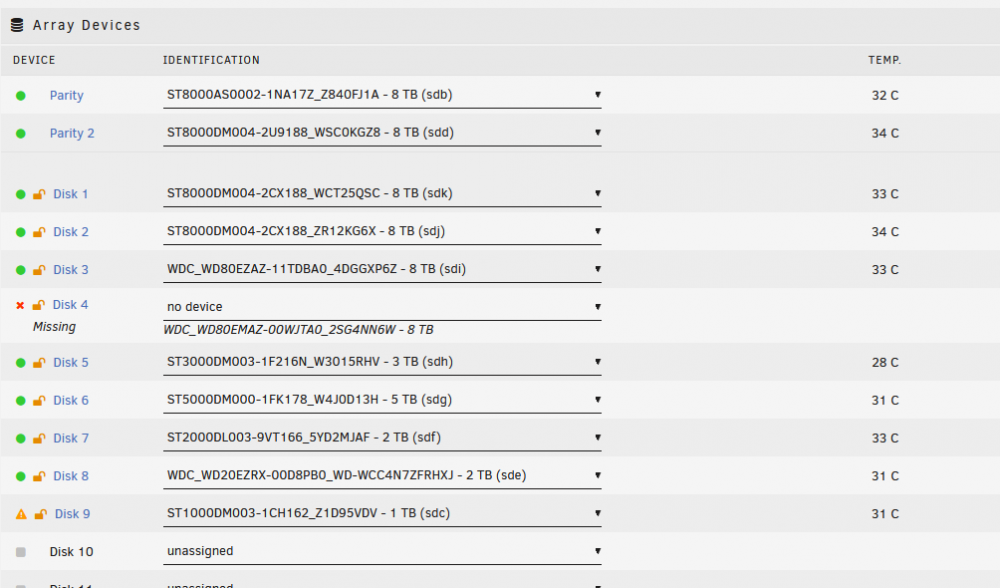
Ok, so far so good. I also plugged this in via onboard Sata and not HBA. Will restart and rebuild. In the meantime will also clean and scan disk 4. Hoping the Diags can provide some information... Any tools to test a hba card? This Diag is before starting the array. Will post another after the array is started. tower-diagnostics-20220219-0943.zip
-
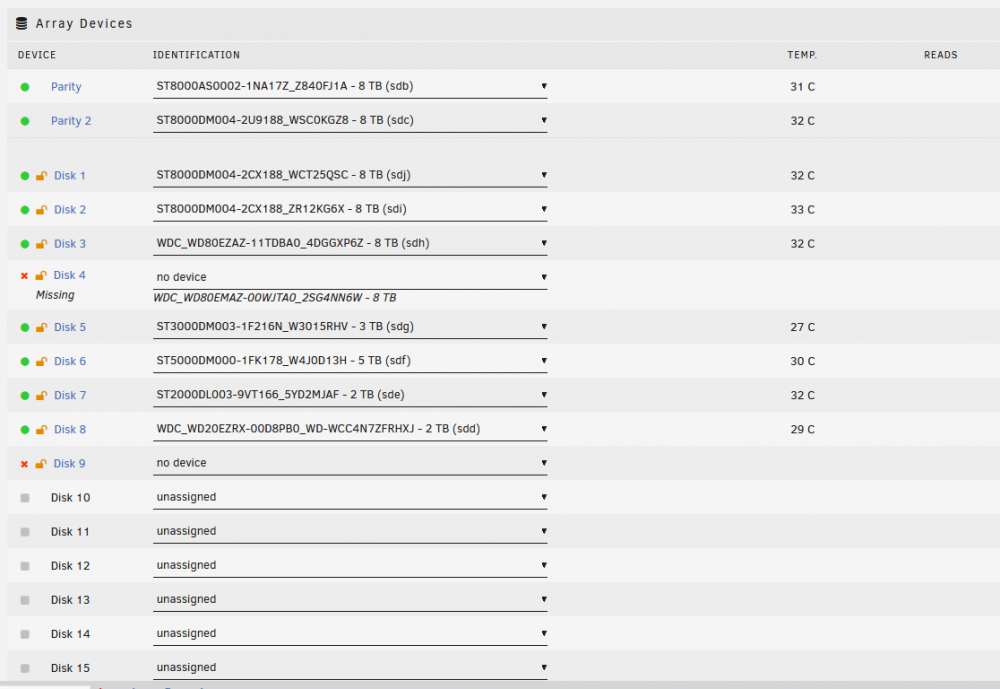
So back to previous drive config and Unraid see the same as it saw before... Did not touch disk 5 on either of the previous reboots, however changing disk 4 (also changed from onboard Sata to HBA Sata) and suddenly it's back. Don't really want to start the array like this so I'm going to replace disk 9... original disk but it has been cleaned and scanned (0 errors) on a windows machine tower-diagnostics-20220219-0935.zip
-
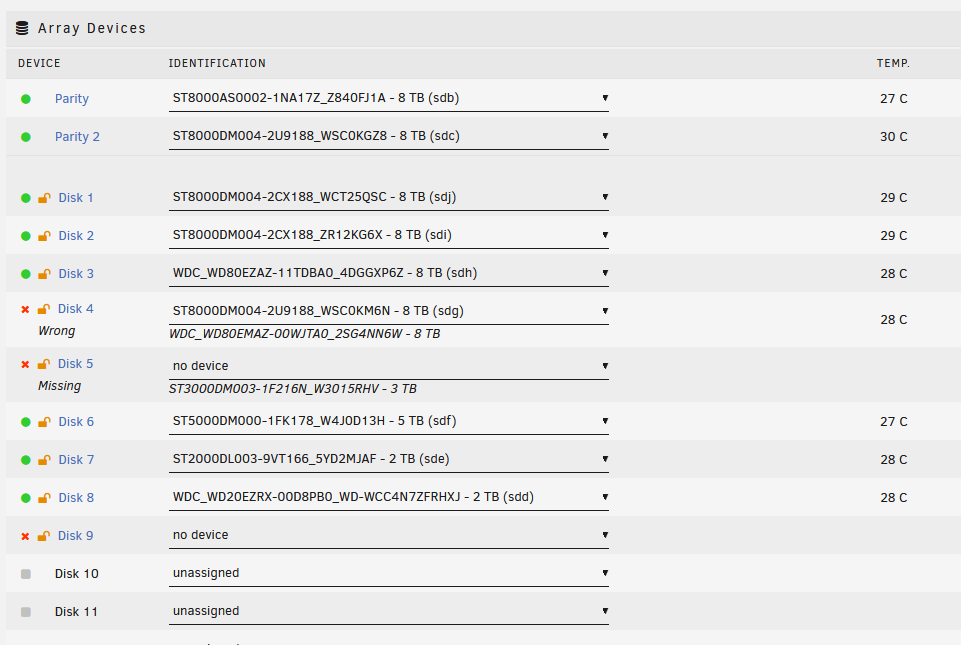
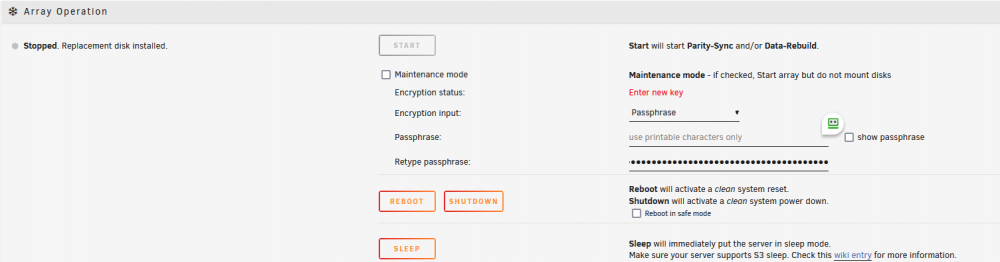
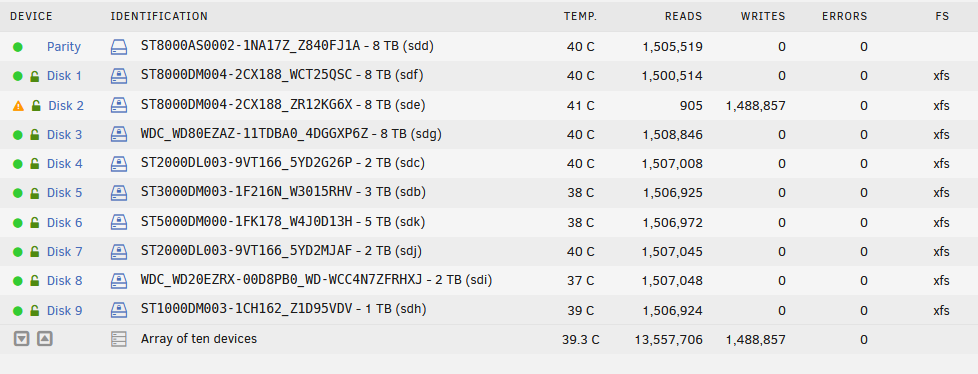
Wow, totally missed that. I've never had to put it in twice before... is there a reason that it is suddenly asking for that? Thank you so much for your reply. So I put in the passphrase twice and it was going to let me start the array, however this would have been with 2 disks down so I shutdown, replaced disk 4 with my last 8TB drive and when I restarted I had Disk 4,5, and 9 out of action (see pic). Attached is the Diagnostics before reboot. Going to return to previous drive config and see what happens. Guessing that to start the array right now would be a bad bad thing... but also quite confident that the data is still intact on Disk 5. Disk 9 had nothing on it anyway, but I really need Disk 4 to rebuild. tower-diagnostics-20220219-0922.zip
-
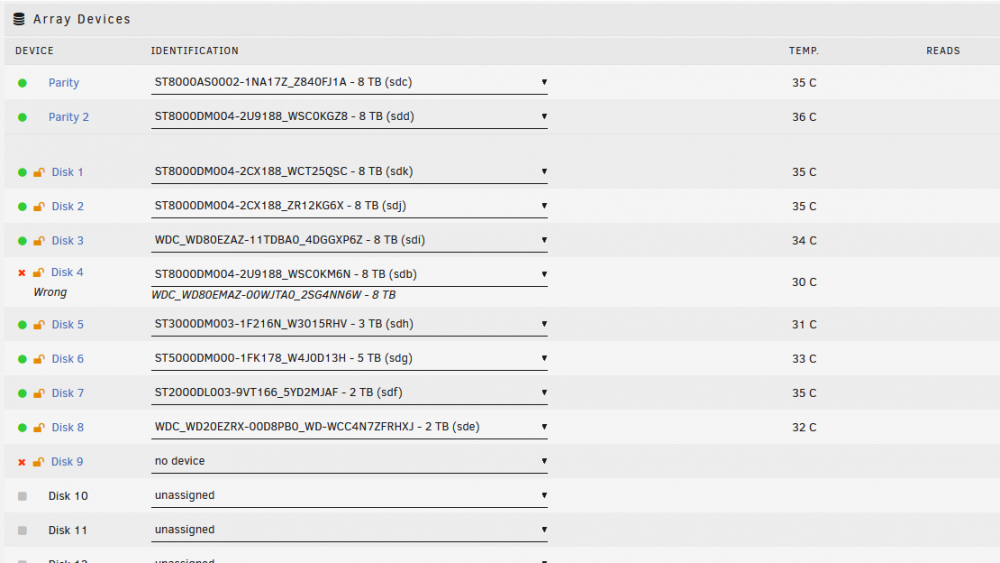
Hi, so confused I'm not sure how to explain all the steps I've taken, however I'll try not to write a novel. I hope I have posted in the right area. I did lots of searching but couldn't find anything similar. Setup: KCAS 850GM PSU, ASUS X570-P M/B, AMD Ryzen 9 3900X CPU, LSI SAS9201-16e 16 Port SAS/SATA 6Gb/s PCIe HBA, 2 8TB Parity, 9 Data Drives of various sizes. Finally purchased a 4 port HBA card (LSI SAS9201-16e 16 Port SAS/SATA 6Gb/s PCIe HBA) and installed some extra drives a couple of weeks ago - all good (only using one port at this stage). Last Friday Disk 2 was in error state (1st Pic) and being emulated - only had one parity at that time. Jumped online and ordered 3 new 8 TB drives with the idea that I would use one to replace disk 2, one for a 2nd parity (which I have been planning on) and one as a spare. Drives arrived yesterday and I used 1 to replace disk 2 - it was marked as having errors soon after parity rebuild began. Tried another new drive - marked as errors soon after parity rebuild began. Swapped Sata cable - same Swapped power cable - same Connected to HBA card - same Swapped Sata port, and started in maintenance mode - rebuilt at over 100MB/sec but Disk 4 showed read errors. This afternoon when the rebuild was complete, I simply restarted the server and Disk 4 still showed error state and being emulated. Shut down and added 2nd Parity Drive Restarted and now showing that Disk 2 is unmountable Disk 4 is in error state and disabled Started in maintenance mode and was able to rebuild 2nd parity. Remove disk 4... put disk 4 on a windows computer, did a clean and a scan ... no problems. Put back into unraid and rebuilt disk 4 and disk 9 went... just simply chasing my tail. ... A few days later. Swapped Disk 9 this morning and Array would not start, claiming that it was the wrong encryption passphrase. Checked a dozen times that it was copying and pasting correctly, swapped back to the original Disk and tried another dozen times to get the array started. Ended up shutting down as I had other more urgent things to do... then started it up again and Array started first go with the same copy and paste from where I keep it. Total mystery to me, but getting nervous about all these 'weird little issue' that keep happening. Yesterday had some time so I swapped disk 9, but then disk 4 was 'missing'. Disk 4 is recognised in a separate Ubuntu VM (physical disk attached) and I can even put in the encryption key and go through the directory so the data seems like it's all there. Tried replacing Disk 4 with my last new 8TB and it allows me to select it and then just says 'wrong disk' Took Disk 4 back to windows PC. Did a clean and created a partition, now the BIOS (unraid machine) can see it, but unraid does not show up with lsblk --scsi Currently can't start the array, not even in maintenance mode as it's greyed out. I just can't understand why it was working fine until I added the last couple of drives. It doesn't seem to have anything to do with the SATA leads, the power leads, or the HBA card as I have interchanged all those things so many times. I'm not sure if there is any way to see it BIOS is detecting a drive that is attached to the HBA card, but again... it doesn't seem to matter how the disk is attached. Any help would be greatly appreciated. tower-diagnostics-20220218-1636.zip
-
Hi, I've purchased the same card (https://www.ebay.com.au/itm/234314231438?ssPageName=STRK%3AMEBIDX%3AIT&_trksid=p2060353.m2749.l2649) and have an SFF 8087 cable but it won't fit. Seems that External is SFF 8088 and internal is SFF 8087 which seems strange to me. Do I just purchase an adaptor ? Can someone confirm that and SFF 8088 to 3 Sata's should fit in this card before I order one ? Thank you in advance.
-
Hoping someone can help me. I have the docker up and running (bridge network) and it’s forwarding to Unraid dockers just fine. I have 2 web apps running on separate Hyper V VM's - Hudu and HumHum. These two webapps work find when port forwarding go directly to them, however will not work when port forwarding goes to NPM. Both apps have letsencrypt SSL built in however I don't think that's the issue - it may however be another issue down the track. I have tried; Turning off forced SSL on NPM - HTTP2 error With SSL turned on (NPM) - Redirection error. Various 'custom location' configs - although I don't really know what I'm doing. Various 'Advanced' configs - again, basically guesswork in the hope of noticing a helpful behavioral change. Various changes to the 'default' file of Hudu I spent weeks (or more) trying to set up a reverse proxy a year or so ago but ended up giving up so I really want to get this running. Would be great to be able to host more than one thing through a single WAN connection. I have the feeling that it's as trust issue and hoping it's a simple inclusion to each app, and not individual script each and every time. Any help is greatly appreciated. EDIT : Since posting this I've notice an embarrassing oversight - http vs https selection when creating Proxy Host. I now have some consistency at least - Bad Gateway on both Web Apps. Will continue trouble shooting but hope someone can swoop in and save the day with the missing piece of the puzzle. EDIT: Thanks everyone for the help. I got it sorted. An embarrassing number of hours spent... I completely missed the HTTPS selection, and then just needed to set the port to 443 instead of 80. I hope this helps someone else.
-
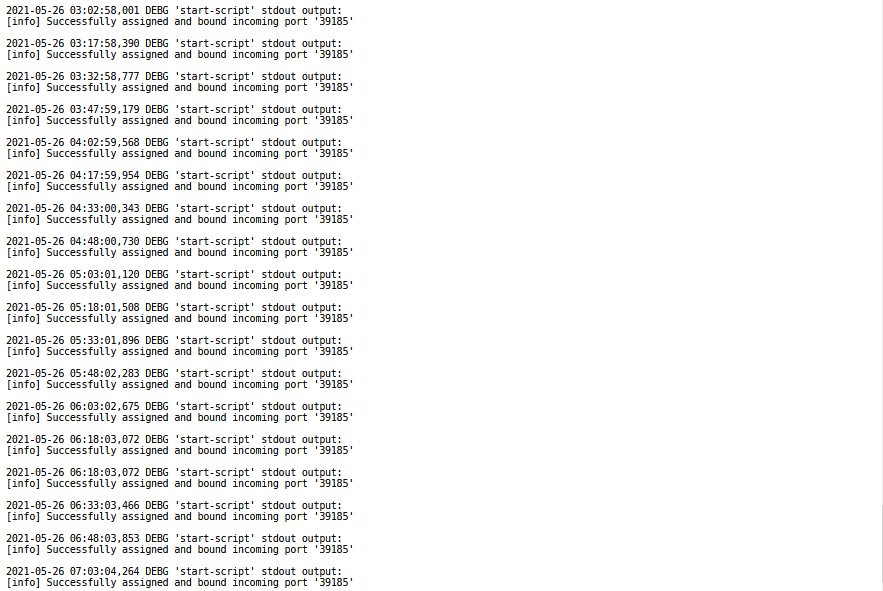
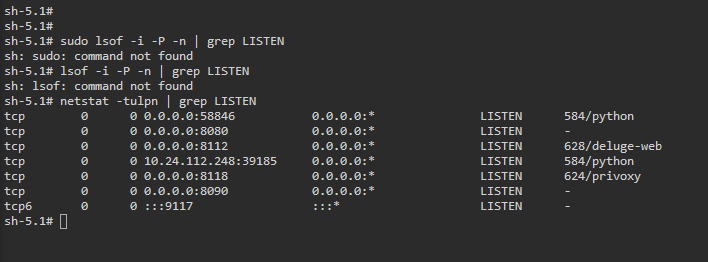
Port Forwarding Question. Below photos show logs and 'open ports' according to the console. Does this confirm that PIA VPN is port forwarding the correct port ? If not what do I need to do to a) forward the correct port; and b) confirm it is forwarding correctly. All my research so far indicates that this docker should do it all. Thanks in advance for any help.
-
I've just set up a trial for PIA and wondering if I should be using OPENVPN 2.4 or '2.3 and earlier'. Also curious about the fact that OPENVPN files are TCP but the app (running in KALI) uses UDP. Not an expert on protocols but wondering why this might be ?
-
Have edited and blocked it out. I'm guessing the worst anyone can do is use my VPN to download some stuff so this isn't urgent ?? Will sort it out in the morning and try the other stuff you suggested. Thanks so much for your response Strike.
-
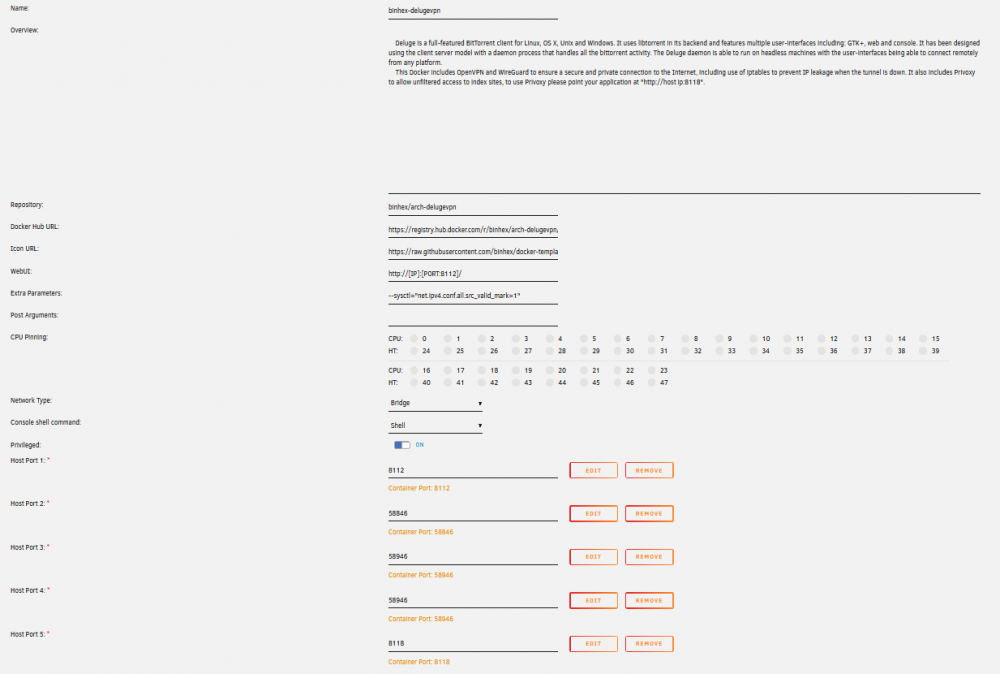
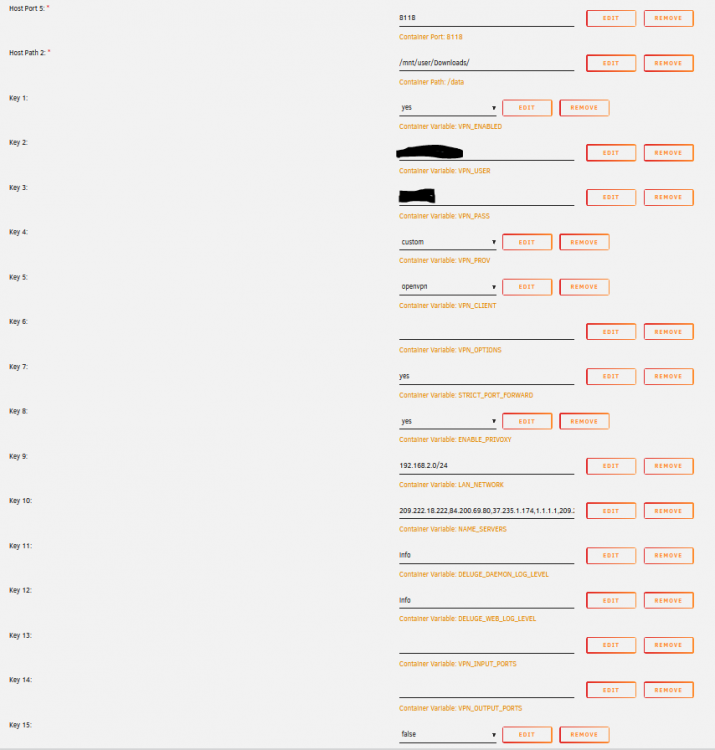
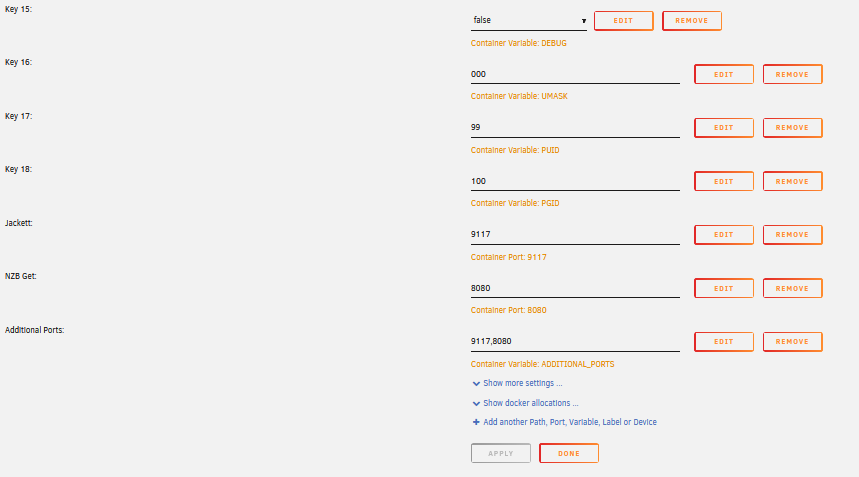
This is really starting to do my head in. I have DelugeVPN setup and everything is working fine except for the torrents themselves. All containers (SAB and Jacket) running through Deluge have the correct external IP and are accessible from the webui so I'm pretty sure I have done everything required from the Feb IP tightening; and pretty sure the torrents were working when this was done. At first I suspected my VPN provider (PureVPN) and there outdated OPENVPN files, however, downloading from SAB I get the 4-5MB/s that I would expect from my ISP (I live in Australia), so the VPN is not causing a bottleneck. Deluge torrents either don't download at all (no peers, just no activity at all) or it is extremely slow. Switch the vpn off and I can get the speeds I would expect. Things I've tried: Wiped Deluge, SAB and Jacket (including appdata files) and started again. Installed Binhex qbittorrentvpn - same behaviour. Tried running qbittorrent (without vpn) through deluge (mimicking SAB) - same behaviour. PureVPN on windows or Kali work fine and I get expected speeds using speedtest.net I'm at the point of setting up a Kali VM just for the torrent side of things, but that is presenting a whole different set of issues. Any help is greatly appreciated. Logs \_ |__ |__| ____ | |__ ____ ___ ___ | __ \| |/ \| | \_/ __ \\ \/ / | \_\ \ | | \ Y \ ___/ > < |___ /__|___| /___| /\___ >__/\_ \ \/ \/ \/ \/ \/ https://hub.docker.com/u/binhex/ 2021-05-19 23:01:41.006192 [info] Host is running unRAID 2021-05-19 23:01:41.028731 [info] System information Linux 7cb5697ec646 5.10.28-Unraid #1 SMP Wed Apr 7 08:23:18 PDT 2021 x86_64 GNU/Linux 2021-05-19 23:01:41.056890 [info] OS_ARCH defined as 'x86-64' 2021-05-19 23:01:41.083374 [info] PUID defined as '99' 2021-05-19 23:01:41.115182 [info] PGID defined as '100' 2021-05-19 23:01:41.152044 [info] UMASK defined as '000' 2021-05-19 23:01:41.177190 [info] Permissions already set for volume mappings 2021-05-19 23:01:41.204992 [info] Deleting files in /tmp (non recursive)... 2021-05-19 23:01:41.237807 [info] VPN_ENABLED defined as 'yes' 2021-05-19 23:01:41.266135 [info] VPN_CLIENT defined as 'openvpn' 2021-05-19 23:01:41.294095 [info] VPN_PROV defined as 'custom' 2021-05-19 23:01:41.337099 [info] OpenVPN config file (ovpn extension) is located at /config/openvpn/jp2-ovpn.ovpn 2021-05-19 23:01:41.399559 [info] VPN remote server(s) defined as 'jp2-ovpn.pointtoserver.com,' 2021-05-19 23:01:41.421527 [info] VPN remote port(s) defined as '80,' 2021-05-19 23:01:41.444061 [info] VPN remote protcol(s) defined as 'tcp-client,' 2021-05-19 23:01:41.471618 [info] VPN_DEVICE_TYPE defined as 'tun0' 2021-05-19 23:01:41.498277 [info] VPN_OPTIONS not defined (via -e VPN_OPTIONS) 2021-05-19 23:01:41.525234 [info] LAN_NETWORK defined as '192.168.2.0/24' 2021-05-19 23:01:41.553266 [info] NAME_SERVERS defined as '209.222.18.222,84.200.69.80,37.235.1.174,1.1.1.1,209.222.18.218,37.235.1.177,84.200.70.40,1.0.0.1' 2021-05-19 23:01:41.581384 [info] VPN_USER defined as 'XXX' 2021-05-19 23:01:41.609447 [info] VPN_PASS defined as 'XXX' 2021-05-19 23:01:41.635789 [info] ENABLE_PRIVOXY defined as 'yes' 2021-05-19 23:01:41.668736 [warn] ADDITIONAL_PORTS DEPRECATED, please rename env var to 'VPN_INPUT_PORTS' 2021-05-19 23:01:41.692031 [info] ADDITIONAL_PORTS defined as '9117,8080' 2021-05-19 23:01:41.718169 [info] VPN_OUTPUT_PORTS not defined (via -e VPN_OUTPUT_PORTS), skipping allow for custom outgoing ports 2021-05-19 23:01:41.745219 [info] DELUGE_DAEMON_LOG_LEVEL defined as 'info' 2021-05-19 23:01:41.772022 [info] DELUGE_WEB_LOG_LEVEL defined as 'info' 2021-05-19 23:01:41.796412 [info] Starting Supervisor... 2021-05-19 23:01:41,930 INFO Included extra file "/etc/supervisor/conf.d/delugevpn.conf" during parsing 2021-05-19 23:01:41,930 INFO Set uid to user 0 succeeded 2021-05-19 23:01:41,931 INFO supervisord started with pid 7 2021-05-19 23:01:42,934 INFO spawned: 'shutdown-script' with pid 177 2021-05-19 23:01:42,936 INFO spawned: 'start-script' with pid 178 2021-05-19 23:01:42,939 INFO spawned: 'watchdog-script' with pid 179 2021-05-19 23:01:42,939 INFO reaped unknown pid 8 (exit status 0) 2021-05-19 23:01:42,943 DEBG 'start-script' stdout output: [info] VPN is enabled, beginning configuration of VPN 2021-05-19 23:01:42,943 INFO success: shutdown-script entered RUNNING state, process has stayed up for > than 0 seconds (startsecs) 2021-05-19 23:01:42,943 INFO success: start-script entered RUNNING state, process has stayed up for > than 0 seconds (startsecs) 2021-05-19 23:01:42,943 INFO success: watchdog-script entered RUNNING state, process has stayed up for > than 0 seconds (startsecs) 2021-05-19 23:01:43,018 DEBG 'start-script' stdout output: [info] Adding 209.222.18.222 to /etc/resolv.conf 2021-05-19 23:01:43,022 DEBG 'start-script' stdout output: [info] Adding 84.200.69.80 to /etc/resolv.conf 2021-05-19 23:01:43,027 DEBG 'start-script' stdout output: [info] Adding 37.235.1.174 to /etc/resolv.conf 2021-05-19 23:01:43,031 DEBG 'start-script' stdout output: [info] Adding 1.1.1.1 to /etc/resolv.conf 2021-05-19 23:01:43,036 DEBG 'start-script' stdout output: [info] Adding 209.222.18.218 to /etc/resolv.conf 2021-05-19 23:01:43,041 DEBG 'start-script' stdout output: [info] Adding 37.235.1.177 to /etc/resolv.conf 2021-05-19 23:01:43,045 DEBG 'start-script' stdout output: [info] Adding 84.200.70.40 to /etc/resolv.conf 2021-05-19 23:01:43,050 DEBG 'start-script' stdout output: [info] Adding 1.0.0.1 to /etc/resolv.conf 2021-05-19 23:01:43,437 DEBG 'start-script' stdout output: [info] Default route for container is 172.17.0.1 2021-05-19 23:01:43,453 DEBG 'start-script' stdout output: [info] Docker network defined as 172.17.0.0/16 2021-05-19 23:01:43,458 DEBG 'start-script' stdout output: [info] Adding 192.168.2.0/24 as route via docker eth0 2021-05-19 23:01:43,459 DEBG 'start-script' stdout output: [info] ip route defined as follows... 2021-05-19 23:01:43,459 DEBG 'start-script' stdout output: -------------------- 2021-05-19 23:01:43,460 DEBG 'start-script' stdout output: default via 172.17.0.1 dev eth0 172.17.0.0/16 dev eth0 proto kernel scope link src 172.17.0.2 192.168.2.0/24 via 172.17.0.1 dev eth0 2021-05-19 23:01:43,461 DEBG 'start-script' stdout output: broadcast 127.0.0.0 dev lo table local proto kernel scope link src 127.0.0.1 local 127.0.0.0/8 dev lo table local proto kernel scope host src 127.0.0.1 local 127.0.0.1 dev lo table local proto kernel scope host src 127.0.0.1 broadcast 127.255.255.255 dev lo table local proto kernel scope link src 127.0.0.1 broadcast 172.17.0.0 dev eth0 table local proto kernel scope link src 172.17.0.2 local 172.17.0.2 dev eth0 table local proto kernel scope host src 172.17.0.2 broadcast 172.17.255.255 dev eth0 table local proto kernel scope link src 172.17.0.2 -------------------- 2021-05-19 23:01:43,464 DEBG 'start-script' stdout output: iptable_mangle 16384 2 ip_tables 28672 5 iptable_filter,iptable_nat,iptable_mangle x_tables 28672 14 ip6table_filter,xt_conntrack,iptable_filter,xt_tcpudp,xt_addrtype,xt_CHECKSUM,xt_nat,ip6_tables,ipt_REJECT,ip_tables,ip6table_mangle,xt_MASQUERADE,iptable_mangle,xt_mark 2021-05-19 23:01:43,465 DEBG 'start-script' stdout output: [info] iptable_mangle support detected, adding fwmark for tables 2021-05-19 23:01:43,544 DEBG 'start-script' stdout output: [info] iptables defined as follows... -------------------- 2021-05-19 23:01:43,546 DEBG 'start-script' stdout output: -P INPUT DROP -P FORWARD DROP -P OUTPUT DROP -A INPUT -s 172.17.0.0/16 -d 172.17.0.0/16 -j ACCEPT -A INPUT -s 185.242.4.59/32 -i eth0 -j ACCEPT -A INPUT -i eth0 -p tcp -m tcp --dport 8112 -j ACCEPT -A INPUT -i eth0 -p udp -m udp --dport 8112 -j ACCEPT -A INPUT -i eth0 -p tcp -m tcp --dport 9117 -j ACCEPT -A INPUT -i eth0 -p udp -m udp --dport 9117 -j ACCEPT -A INPUT -i eth0 -p tcp -m tcp --dport 8080 -j ACCEPT -A INPUT -i eth0 -p udp -m udp --dport 8080 -j ACCEPT -A INPUT -s 192.168.2.0/24 -d 172.17.0.0/16 -i eth0 -p tcp -m tcp --dport 58846 -j ACCEPT -A INPUT -s 192.168.2.0/24 -d 172.17.0.0/16 -i eth0 -p tcp -m tcp --dport 8118 -j ACCEPT -A INPUT -p icmp -m icmp --icmp-type 0 -j ACCEPT -A INPUT -i lo -j ACCEPT -A INPUT -i tun0 -j ACCEPT -A OUTPUT -s 172.17.0.0/16 -d 172.17.0.0/16 -j ACCEPT -A OUTPUT -d 185.242.4.59/32 -o eth0 -j ACCEPT -A OUTPUT -o eth0 -p tcp -m tcp --sport 8112 -j ACCEPT -A OUTPUT -o eth0 -p udp -m udp --sport 8112 -j ACCEPT -A OUTPUT -o eth0 -p tcp -m tcp --sport 9117 -j ACCEPT -A OUTPUT -o eth0 -p udp -m udp --sport 9117 -j ACCEPT -A OUTPUT -o eth0 -p tcp -m tcp --sport 8080 -j ACCEPT -A OUTPUT -o eth0 -p udp -m udp --sport 8080 -j ACCEPT -A OUTPUT -s 172.17.0.0/16 -d 192.168.2.0/24 -o eth0 -p tcp -m tcp --sport 58846 -j ACCEPT -A OUTPUT -s 172.17.0.0/16 -d 192.168.2.0/24 -o eth0 -p tcp -m tcp --sport 8118 -j ACCEPT -A OUTPUT -p icmp -m icmp --icmp-type 8 -j ACCEPT -A OUTPUT -o lo -j ACCEPT -A OUTPUT -o tun0 -j ACCEPT 2021-05-19 23:01:43,547 DEBG 'start-script' stdout output: -------------------- 2021-05-19 23:01:43,547 DEBG 'start-script' stdout output: [info] Starting OpenVPN (non daemonised)... 2021-05-19 23:01:43,555 DEBG 'start-script' stdout output: 2021-05-19 23:01:43 DEPRECATED OPTION: --cipher set to 'AES-256-CBC' but missing in --data-ciphers (AES-256-GCM:AES-128-GCM). Future OpenVPN version will ignore --cipher for cipher negotiations. Add 'AES-256-CBC' to --data-ciphers or change --cipher 'AES-256-CBC' to --data-ciphers-fallback 'AES-256-CBC' to silence this warning. 2021-05-19 23:01:43,555 DEBG 'start-script' stdout output: 2021-05-19 23:01:43 WARNING: file 'credentials.conf' is group or others accessible 2021-05-19 23:01:43 OpenVPN 2.5.1 [git:makepkg/f186691b32e68362+] x86_64-pc-linux-gnu [SSL (OpenSSL)] [LZO] [LZ4] [EPOLL] [PKCS11] [MH/PKTINFO] [AEAD] built on Feb 24 2021 2021-05-19 23:01:43 library versions: OpenSSL 1.1.1k 25 Mar 2021, LZO 2.10 2021-05-19 23:01:43,555 DEBG 'start-script' stdout output: 2021-05-19 23:01:43 NOTE: the current --script-security setting may allow this configuration to call user-defined scripts 2021-05-19 23:01:43,556 DEBG 'start-script' stdout output: 2021-05-19 23:01:43 TCP/UDP: Preserving recently used remote address: [AF_INET]185.242.4.59:80 2021-05-19 23:01:43 Attempting to establish TCP connection with [AF_INET]185.242.4.59:80 [nonblock] 2021-05-19 23:01:43,711 DEBG 'start-script' stdout output: 2021-05-19 23:01:43 TCP connection established with [AF_INET]185.242.4.59:80 2021-05-19 23:01:43 TCP_CLIENT link local: (not bound) 2021-05-19 23:01:43 TCP_CLIENT link remote: [AF_INET]185.242.4.59:80 2021-05-19 23:01:44,970 DEBG 'start-script' stdout output: 2021-05-19 23:01:44 WARNING: 'link-mtu' is used inconsistently, local='link-mtu 1559', remote='link-mtu 1552' 2021-05-19 23:01:44 WARNING: 'auth' is used inconsistently, local='auth SHA1', remote='auth [null-digest]' 2021-05-19 23:01:44 WARNING: 'comp-lzo' is present in remote config but missing in local config, remote='comp-lzo' 2021-05-19 23:01:44,971 DEBG 'start-script' stdout output: 2021-05-19 23:01:44 [Secure-Server] Peer Connection Initiated with [AF_INET]185.242.4.59:80 2021-05-19 23:01:46,412 DEBG 'start-script' stdout output: 2021-05-19 23:01:46 TUN/TAP device tun0 opened 2021-05-19 23:01:46 net_iface_mtu_set: mtu 1500 for tun0 2021-05-19 23:01:46 net_iface_up: set tun0 up 2021-05-19 23:01:46,413 DEBG 'start-script' stdout output: 2021-05-19 23:01:46 net_addr_v4_add: 172.94.56.68/28 dev tun0 2021-05-19 23:01:46 /root/openvpnup.sh tun0 1500 1554 172.94.56.68 255.255.255.240 init 2021-05-19 23:01:46,416 DEBG 'start-script' stdout output: 2021-05-19 23:01:46 Initialization Sequence Completed 2021-05-19 23:01:47,596 DEBG 'start-script' stdout output: [info] Attempting to get external IP using 'http://checkip.amazonaws.com'... 2021-05-19 23:01:49,276 DEBG 'start-script' stdout output: [info] Successfully retrieved external IP address 172.94.56.68 2021-05-19 23:01:49,277 DEBG 'start-script' stdout output: [info] Application does not require port forwarding or VPN provider is != pia, skipping incoming port assignment 2021-05-19 23:01:49,330 DEBG 'watchdog-script' stdout output: [info] Deluge listening interface IP 0.0.0.0 and VPN provider IP 172.94.56.68 different, marking for reconfigure 2021-05-19 23:01:49,334 DEBG 'watchdog-script' stdout output: [info] Deluge not running 2021-05-19 23:01:49,338 DEBG 'watchdog-script' stdout output: [info] Deluge Web UI not running 2021-05-19 23:01:49,342 DEBG 'watchdog-script' stdout output: [info] Privoxy not running 2021-05-19 23:01:49,342 DEBG 'watchdog-script' stdout output: [info] Attempting to start Deluge... [info] Removing deluge pid file (if it exists)... 2021-05-19 23:01:49,581 DEBG 'watchdog-script' stdout output: [info] Deluge key 'listen_interface' currently has a value of '172.94.56.70' [info] Deluge key 'listen_interface' will have a new value '172.94.56.68' [info] Writing changes to Deluge config file '/config/core.conf'... 2021-05-19 23:01:49,276 DEBG 'start-script' stdout output: [info] Successfully retrieved external IP address 172.94.56.68 2021-05-19 23:01:49,277 DEBG 'start-script' stdout output: [info] Application does not require port forwarding or VPN provider is != pia, skipping incoming port assignment 2021-05-19 23:01:49,330 DEBG 'watchdog-script' stdout output: [info] Deluge listening interface IP 0.0.0.0 and VPN provider IP 172.94.56.68 different, marking for reconfigure 2021-05-19 23:01:49,334 DEBG 'watchdog-script' stdout output: [info] Deluge not running 2021-05-19 23:01:49,338 DEBG 'watchdog-script' stdout output: [info] Deluge Web UI not running 2021-05-19 23:01:49,342 DEBG 'watchdog-script' stdout output: [info] Privoxy not running 2021-05-19 23:01:49,342 DEBG 'watchdog-script' stdout output: [info] Attempting to start Deluge... [info] Removing deluge pid file (if it exists)... 2021-05-19 23:01:49,581 DEBG 'watchdog-script' stdout output: [info] Deluge key 'listen_interface' currently has a value of '172.94.56.70' [info] Deluge key 'listen_interface' will have a new value '172.94.56.68' [info] Writing changes to Deluge config file '/config/core.conf'... 2021-05-19 23:01:49,748 DEBG 'watchdog-script' stdout output: [info] Deluge key 'outgoing_interface' currently has a value of 'tun0' [info] Deluge key 'outgoing_interface' will have a new value 'tun0' [info] Writing changes to Deluge config file '/config/core.conf'... 2021-05-19 23:01:49,892 DEBG 'watchdog-script' stdout output: [info] Deluge key 'default_daemon' currently has a value of 'e02ae3c7d0e949b1960dbce1e6a90c17' [info] Deluge key 'default_daemon' will have a new value 'e02ae3c7d0e949b1960dbce1e6a90c17' [info] Writing changes to Deluge config file '/config/web.conf'... 2021-05-19 23:01:50,166 DEBG 'watchdog-script' stdout output: [info] Deluge process started [info] Waiting for Deluge process to start listening on port 58846... 2021-05-19 23:01:50,395 DEBG 'watchdog-script' stdout output: [info] Deluge process listening on port 58846 2021-05-19 23:01:52,738 DEBG 'watchdog-script' stdout output: [info] No torrents with state 'Error' found 2021-05-19 23:01:52,739 DEBG 'watchdog-script' stdout output: [info] Starting Deluge Web UI... 2021-05-19 23:01:52,739 DEBG 'watchdog-script' stdout output: [info] Deluge Web UI started 2021-05-19 23:01:52,741 DEBG 'watchdog-script' stdout output: [info] Attempting to start Privoxy... 2021-05-19 23:01:53,748 DEBG 'watchdog-script' stdout output: [info] Privoxy process started [info] Waiting for Privoxy process to start listening on port 8118... 2021-05-19 23:01:53,758 DEBG 'watchdog-script' stdout output: [info] Privoxy process listening on port 8118
-
Thanks for the reply. Really wondering if it is a config issue thought as SAB (running through Deluge) gets expected speeds. Could it have something to do with port forwarding ? I was really hoping for suggestions re: config issues.
-
Not sure if I'm in the right thread; I just search best+vpn and sorted by date. I have been using PureVPN with binhex-delugevpn for some time without issue however a few months ago torrents became none existent- very slow. I'm not sure exactly when the problem started as I only noticed recently and then thought back.... I think I've done everything I'm supposed to do after the 'leak discovery' and can access SAB and Jackett running through it. I'm sure torrents were working fine afterwards. If I console in to either of the above 3 I get the correct (VPN) external address. If I turn the VPN off in the Deluge my torrents download sometimes hundreds of times faster... that's the only variable. SAB has no speed issues at all. I've had a nightmare dealing with PUREVPN support (or lack thereof) and looking for something else unless someone can point me in the direction of an issue it may be on my end. So in summary; Can anyone advise on something else (simple, I'm not an expert) that may be causing the problem on my end ? If not what is the best (most compatible) VPN to go to ? Thanks in advance for any help.
-
How do we do this ?


