





22350
Members
-
Joined
-
Last visited
-
ok, so i figured it out. The windows quickboot was keeping a configuration file, which "captured" the core configuration. disabling and a full shut down fixed it.
-
-
Hey everyone... I have a dell xeon server with 10 cores. I am running three windows 10 vm's on it. One of the vm's is for streaming and has quite a heavy load. I have allocated 5 cores to that vm. For some reason the vm is only seeing 3 cores. I have tried moving the core allocation around the three vm's, but it remains the same. I checked the xml and it shows 10 thread allocations. Any ideas?
-
Hey guys, I have a thread, where I am trying to solve a passthrough problem. If you have a second, could you take a look?? thanks
-
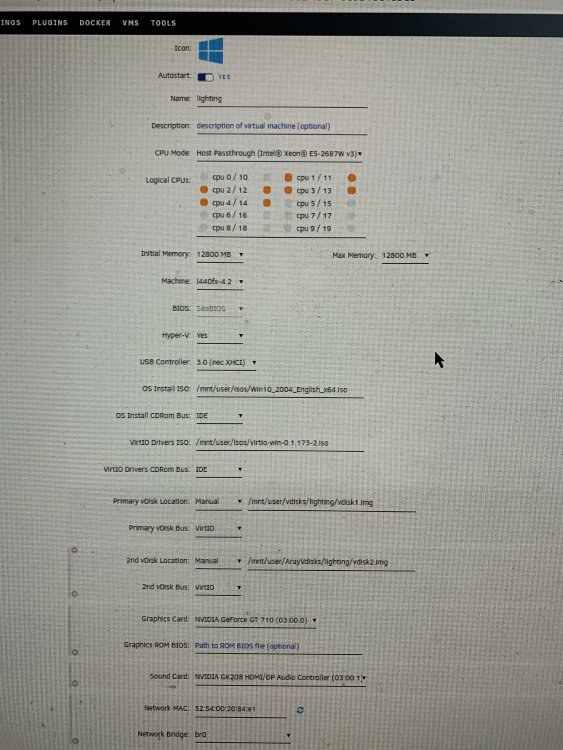
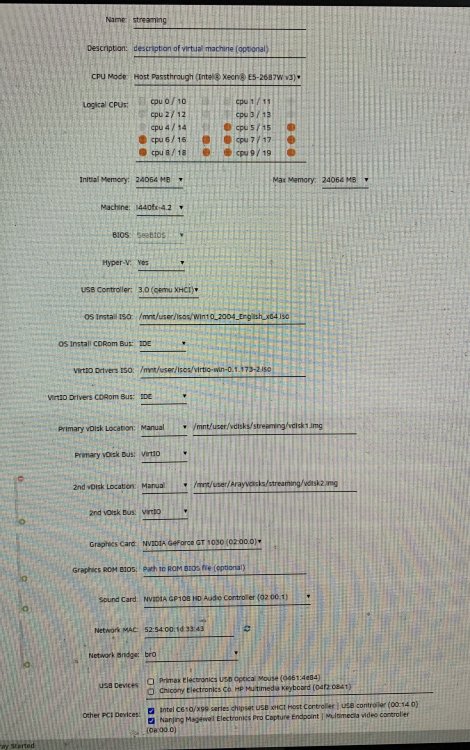
So, I have done two windows vm's on my xeon 10core 3.1ghz. I have arranged the core assignment, as indicated in the op. I can't figure out how to change from SeaBIOS. It is grayed out. I am running Nvidia cards, so maybe not good to switch?? Also not sure how to isolate the first two cores for the server. Is that with Docker? It is mentioned that you shouldn't start with more than 8 gigs. I had already assigned more than that, given that I have 64. From "pushing the power button" to both vm's ready for log in, we are looking at 6.5min. Seems like a long time The following are my two machine set up's
-
that did the trick
-
screwed up and passed through my usb controller, with the unraid startup on it. Any advice how to get out of this??


