





UnKwicks
Members
-
Joined
-
Last visited
Everything posted by UnKwicks
-
Hi together I have Pangolin running on a VPS and 2 remote sites configured. Both remote sites have an Unraid host installed for local services. I have a Newt container running on Unraid to connect via pangolin to my internal services, which works great. In addition I want to connect my Unraid host1 over the existing Pangolin tunnel to unraid host2. Therefore I would need to install the machine client (known as Olm in Pangolin) on Unraid. Then I could connect to the unraid host2 to do rsync to it for backup from host1 to host 2. Is there currently a way to install Olm on Unraid?
-
You are awesome! I removed the plugin and installed your new version. To be sure I start from scratch I did not import my folders but created them again manually. Now the folders appear correctly on the Dashboard containing the correct containers. Thanks!!
-
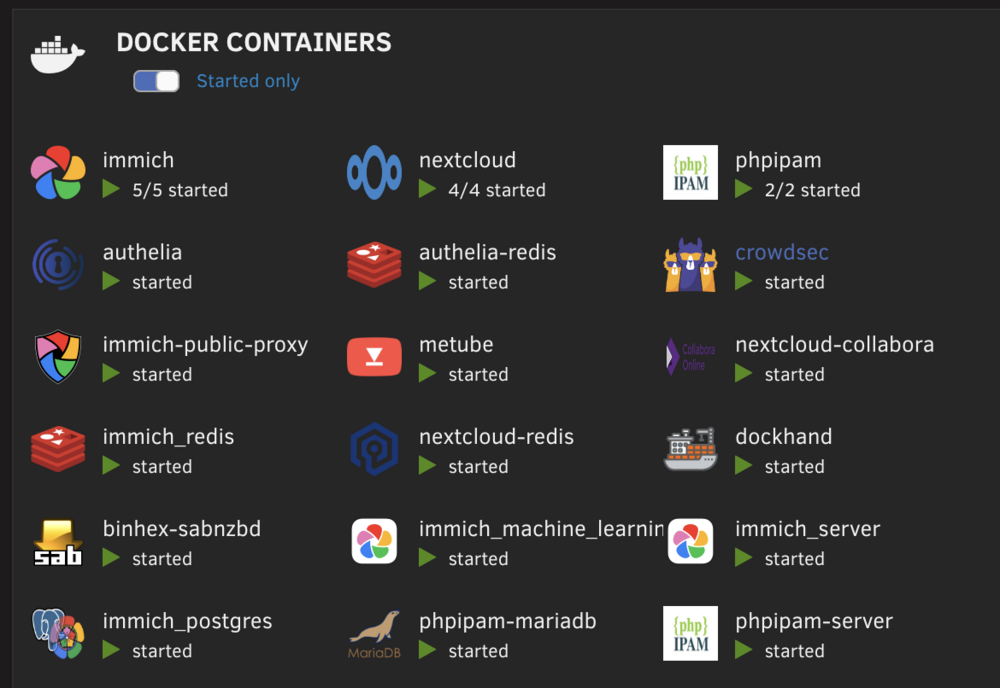
Yes I am on the stable branch of your fork. I got the toggle and tried both, on and off. I can give you more details on how it behaves. My scenario: I have 3 folders created manually. I added labels to some containers to sort them into the 3 folders. All other containers are not labeled or sorted into a folder. On the Docker tab everything is like expected. Labeled container are being sorted into the folders, not labeled containers just get listed below. On The Dashboard tab I can see the folders and the containers. But the wrong containers are being sorted into the folders. E.g. immich contains 5 other (not labeled) containers and not the immich labeled containers. When I click "expand" on the folder I can see the wrong containers getting expanded. Could this be a caching issue with the old plugin? What do I need to do to start over completely fresh (deleting all previous folders, icon and so on currently generated and maybe cached)?
-
I am having an issue on the unraid dashboard when adding the containers to the folders via labels. The dashboard shows the folders with "x/x started" but also each container of the folder as well again. When I view the folder settings I can see that the container got automatically added to folder via the label but somehow shows up again below those. On the Docker tab they are only shown within the folder. But on the Dashboard tab folder and additional containers are showing.

-
I was not aware that you forked foder.view2 and that you are heavily improving it. Thanks for your work. I just installed your version of fv2 and I am happy to help you testing with compose if you need it. I am currently migrating my containers to use compose for everything. It would be great to have folder.view2 behave like this: If labels "net.unraid.docker.managed: 'composeman'" and "folder.view2: 'phpipam'" are set for the container, create the folder with this name and sort the container into it. Add another label "folder.view2.icon: 'https://path.to.icon.png'" to make sure the automatically created folder gets an icon. folder.view2 already sorts the container into the folder given with the folder.view2 label if the folder was manually created before compose up. Kicking a compose down will result in having an empty folder which is not a huge issue I guess and I think it is not an option to remove the folder on compose down because all folder settings set manually later after auto-creation will be removed as well. Just some thoughts and let me know if I can help you with that.
-
I think there was a misunderstanding. @bmartino1 is talking about appdata folders on the filesystem. I was talking about folders in folder-view. Anyway, I testet precreating the folder.view folder. Then startet my stack and the container are getting sorted into the folder. So just adding the label is not enough, we have to create the folder.view folder before. Maybe this can be added to the first post of this thread.
-
Is this working for anybody? I am using folder.view2 - latest version. Is this only working for docker container created with the unraid GUI or should this work as well using the compose plugin? I tried several compose files but folder.view2 is not creating the folder automatically when adding a label to my service like: labels: net.unraid.docker.managed: 'composeman' net.unraid.docker.webui: 'http://10.10.20.20' net.unraid.docker.icon: 'https://phpipam.net/css/images/logo_icon.png' folder.view2: 'phpipam'Do I have to enable or trigger it somewhere or did I do it wrong?
-
I tested it today and it seems to work. My test scenario was: I created an immich stack via Docker Compose Manager Immich ran via docker compose Starting the backup script stops all running containers including the ones started via compose up. After snapshot creation by the script all containers started up again, also the compose ones
-
I found this in the logs now: WARN [Microservices:MachineLearningRepository] Machine learning request to "http://immich-machine-learning:3003" failed: fetch failed Seems like I need to set the machine learning host as well. But regarding the documentation MACHINE_LEARNING_HOST is not available anymore. And immich_machine_learning service is throwing: [08/05/25 21:55:45] ERROR connection to ('10.10.50.40', 3003) failed: [Errno 99] Cannot assign requested address [08/05/25 21:55:46] ERROR Invalid address: ('10.10.50.40', 3003) [08/05/25 21:55:46] ERROR connection to ('10.10.50.40', 3003) failed: [Errno 99] Cannot assign requested address Any advice?
-
Thanks for all your work here. I missed to add some maybe relevant information. bond0 is my host vlan bond0.50 is my DMZ vlan where my reverse proxy and other external facing services are in. There I want to place immich in. I use SWAG as my reverse proxy I already tried giving all containers only an IP from the bon0.50 vlan... does not work. Immich runs without errors, but thumbnails get not created. However, all your posts guided me into the right direction. Thank you very much!! The final solution was to add the following to my ENV file: DB_HOST=10.10.50.43 REDIS_HOST=10.10.50.42 IMMICH_HOST=10.10.50.40 # HOST for immich-machine-learning?? #My compose file now only includes IPs from the external macvlan: name: immich services: immich-server: ....... networks: bond0.50: ipv4_address: 10.10.50.40 dns: - 1.1.1.1 - 8.8.8.8 ....... immich-machine-learning: ....... networks: bond0.50: ipv4_address: 10.10.50.41 ....... redis: ...... networks: bond0.50: ipv4_address: 10.10.50.42 ...... database: ...... networks: bond0.50: ipv4_address: 10.10.50.43 ...... networks: bond0.50: external: trueI did not find a Host variable for the immich-machine-learning container. Not sure if this is needed or how I can check if immich can communicate with the service. But for now it seems to work this way. Thanks again for all the time you spent on this!
-
Hi together I currently try to install Immich on my Unraid as Docker Compose Stack using the Guide https://forums.unraid.net/topic/190532-guide-immich-docker-setup-docker-compose/ from @bmartino1 . Using his compose file immich runs fine. But I am using a custom macvlan to connect the container to my external network. As soon as I add my network, immich does not work anymore. It loads up but does not generate thumbnails anymore or find the correct path to them. Also it does not apply storage templates anymore. Using the CA method for installing immich works using my network but I prefer going the compose path because of the official immich support. This is my compose file after adding my network: # # WARNING: To install Immich, follow our guide: https://immich.app/docs/install/docker-compose # # Make sure to use the docker-compose.yml of the current release: # # https://github.com/immich-app/immich/releases/latest/download/docker-compose.yml # # The compose file on main may not be compatible with the latest release. name: immich services: immich-server: container_name: immich_server image: ghcr.io/immich-app/immich-server:${IMMICH_VERSION:-release} # extends: # file: hwaccel.transcoding.yml # service: cpu volumes: # Photo upload storage - immich-photos:/usr/src/app/upload - /etc/localtime:/etc/localtime:ro env_file: - .env ports: - '2283:2283' depends_on: - redis - database restart: always healthcheck: disable: false networks: bond0.50: ipv4_address: 10.10.50.40 immich-net: ipv4_address: 172.19.0.10 dns: - 1.1.1.1 - 8.8.8.8 labels: net.unraid.docker.icon: 'https://raw.githubusercontent.com/imagegenius/templates/main/unraid/img/immich.png' net.unraid.docker.webui: http://[IP]:[PORT:2283] folder.view: immich net.unraid.docker.managed: 'composeman' immich-machine-learning: container_name: immich_machine_learning image: ghcr.io/immich-app/immich-machine-learning:${IMMICH_VERSION:-release} volumes: - model-cache:/cache env_file: - .env restart: always healthcheck: disable: false networks: immich-net: ipv4_address: 172.19.0.11 labels: net.unraid.docker.icon: 'https://raw.githubusercontent.com/imagegenius/templates/main/unraid/img/immich.png' folder.view: immich net.unraid.docker.managed: 'composeman' redis: container_name: immich_redis image: docker.io/valkey/valkey:8-bookworm@sha256:ff21bc0f8194dc9c105b769aeabf9585fea6a8ed649c0781caeac5cb3c247884 volumes: - redis-data:/data healthcheck: test: redis-cli ping || exit 1 restart: always networks: immich-net: ipv4_address: 172.19.0.12 labels: net.unraid.docker.icon: 'https://raw.githubusercontent.com/A75G/docker-templates/master/templates/icons/redis.png' folder.view: immich net.unraid.docker.managed: 'composeman' database: container_name: immich_postgres image: ghcr.io/immich-app/postgres:16-vectorchord0.3.0-pgvectors0.3.0 environment: POSTGRES_PASSWORD: ${DB_PASSWORD} POSTGRES_USER: ${DB_USERNAME} POSTGRES_DB: ${DB_DATABASE_NAME} POSTGRES_INITDB_ARGS: '--data-checksums' volumes: - postgres-data:/var/lib/postgresql/data restart: always networks: immich-net: ipv4_address: 172.19.0.13 labels: net.unraid.docker.icon: 'https://raw.githubusercontent.com/A75G/docker-templates/master/templates/icons/db-backup.png' folder.view: immich net.unraid.docker.managed: 'composeman' networks: bond0.50: external: true immich-net: driver: bridge ipam: config: - subnet: 172.19.0.0/16 gateway: 172.19.0.1 volumes: model-cache: driver: local driver_opts: type: none device: /mnt/user/appdata/immich/config o: bind immich-photos: driver: local driver_opts: type: none device: /mnt/user/appdata/immich/photos o: bind postgres-data: driver: local driver_opts: type: none device: /mnt/user/appdata/immich/database/postgres o: bind redis-data: driver: local driver_opts: type: none device: /mnt/user/appdata/immich/database/redis o: bindDoes anyone hav an idea why this is not working? I also tried giving all containers IPs from both networks or giving them only IP addresses from my external network. Same result, it dows not communicate correctly. I would appreciate any advice.
-
Hi together When I add a new share to my 6TB ZFS pool the "minimum free space" value ist automatically set to 572.1 GB. Can someone tell ma how this value is being calculated and if its safe to change it to a lower value? Thanks!
-
Hi I plan to use @SpaceInvaderOne‘s ZFS snapshot and replication script, to replace my current backup setup. I have two pools 1. data (HDD pool for main data) 2. cache (SSD pool for appdata etc) For data I want to - Snapshot my data pool - Replicate the data snapshots to a remote server (zfs) This is possible straightforward with the script For cache I want to - Snapshot my cache pool - Replicate my cache pool to the data pool (locally) - AND replicate my cache pool the remote server (zfs) As far as I understand the script, I have to choose if I want to replicate locally OR replicate to a remote destination. Can it be configured to replicate to both destinations? Another scenario could be pretty handy. When I attach a local USB disk I want to only replicate my latest snapshots feom data AND cache to the USB disk without creating a new snapshot. But this may be a whole new script I guess
-
Ich stimme deiner Aussage zu, dass man mit Snapshot Replication eine konventionelles Backup ersetzen kann. Aber ganz korrekt ist die Formulierung oben nicht, oder? Das script legt zwar lokal einen Snapshot an (auf dem gleichen Pool) jedoch muss man sich entscheiden ob lokal repliziert werden soll ODER auf einen remote Server. Für eine saubere 3-2-1 Backup strategie würde ich mir wünschen ich könnte mit dem Script Lokal auf einen anderen Pool UND remote replizieren.
-
I realized that my fix above is not a clean solution, because even with ZFS the script creates a snapshot that is not getting deleted if I unset the variable. So my fix for now is to just remove the else where the container needs to get startet: # final container steps (unraid exclusive) if [[ ${#container_ids[@]} -gt 0 ]]; then # remove snapshot (containers are already running) if [[ $snapshot_path ]]; then rm -r "$snapshot_path" unset snapshot_path # start containers echo "Start containers (slow method):" docker container start "${container_ids[@]}" fi fi So if containers were stopped and if a snapshot_path is set (so we are in the loop for appdata right now) the snapshot is deleted and the containers get started. For the loop that backups other backup locations container do not get stopped, no snapshot is being created so no need to start the container. Not sure if this is how @mgutt meant the script to work, but maybe you can bring light into the dark? As well to answere the question if it is even possible/recommended to run the script when appdata is on a ZFS share. Thanks!
-
Is ZFS still not supported? My pool where my appdata folder is, is a zfs pool. The script runs fine (I guess) but after completing the backup the container do not start up automatically. EDIT: I guess I found a bug in the script. When appdata is on a ZFS pool then there is the following error: rm: cannot remove '/mnt/cache/.appdata_snapshot': No such file or directory As far as I understand this is because $snapshot_path is always set: else # set snapshot path snapshot_dirname=$(dirname "$src_path") snapshot_basename=$(basename "$src_path") snapshot_path="$snapshot_dirname/.${snapshot_basename}_snapshot" and because of this it always tries to delete the snapshot instead of starting the container # remove snapshot (containers are already running) if [[ $snapshot_path ]]; then rm -r "$snapshot_path" # start containers else echo "Start containers (slow method):" docker container start "${container_ids[@]}" fi Am I right? EDIT 2: It seems I am right. I added a unset snapshot_path here, and it works now: else notify "Backup causes long docker downtime!" "The source path $src_path is located on a filesystem which does not support reflink copies!" unset snapshot_path This should be fixed in the next version. OK, the script is running now, but only in "slow mode" because of ZFS. May I better switch to btrfs? I was hoping I can use automatic snapshots for my pool and array.
-
EDIT I figured it out again.... documenting it here for any other having this problem. The issue is that when I ssh to my remote server I get the following error message on the console: hostfile_replace_entries: link /root/.ssh/known_hosts to /root/.ssh/known_hosts.old: Operation not permitted update_known_hosts: hostfile_replace_entries failed for /root/.ssh/known_hosts: Operation not permitted Because of these errors the rsync command in the backup script fails. Maybe it is possible to catch this issue in a future script version? This issue and solution is covered here: so doing a ssh-keyscan -H TARGET_HOST >> ~/.ssh/known_hosts solves the errors and the script runs fine then since the last_backup date can be set with rsync. ----- FORMER Problem // SOLVED ---- Ok, I need help. For the script, please see the post above. I am able to successfully login via ssh to my remote server using a ssh key. Also rsync works from console. But when I run the script I get the following error: # ##################################### last_backup: '_' date: invalid date ‘_’ /tmp/user.scripts/tmpScripts/incremental_remote_backup/script: line 232: (1704284573 - ) / 86400 : syntax error: operand expected (error token is ") / 86400 ") I seems like the script is not able to get the last backup date via the rsync command. Is there anything else I have to configure? I set the aliases and also added a config ssh file in the meantime because I read that the alias ssh command set in the script is never used? Appreciate any advice what else I have to set in the script to do a remote backup via ssh/rsync
-
I fixed it for now. rsync was disabled on remote host 🙄 I get another error now but I check this first ---- FIXED Hi, thanks again for your awesome script. I am struggeling by running the script for backup to a remote server via ssh. I configured authentication with a ssh key file and I can successfully login to my remote server via ssh passwordless from a terminal session. No I added my remote location and configured the user-defined ssh and rsync commands. But I get this error: Error: ()! I have no idea what I am doing wrong. I added my script below. I changed nothing beside the remote destination and the user defined aliases. Thanks for any advice! incremental_remote_Backup.sh
-
Und ich dachte schon mein Supermicro war mit 350€ teuer 🫣
-
Since my USB failed again a few hours after the last reboot I put the Drive into one of the back USB 2 ports. Lets see if this helps.
-
The board has an internal USB3 port which I am using. I can plug it directly into the board. But may the usb3 port be this unstable that it loses connection? I could try a usb 2 port on the back of the board, but feels a bit bad not being able to use the port right on the mainboard itself.
-
Hello I have a problem after some time my USB boot device loses connection to my unraid server. I get the following errors Feb 8 05:43:20 Towerbunt kernel: usb 2-4: USB disconnect, device number 2 Feb 8 05:43:20 Towerbunt kernel: xhci_hcd 0000:00:14.0: WARN Set TR Deq Ptr cmd failed due to incorrect slot or ep state. Feb 8 05:43:20 Towerbunt kernel: usb 2-4: new SuperSpeed USB device number 3 using xhci_hcd Feb 8 05:43:20 Towerbunt kernel: usb-storage 2-4:1.0: USB Mass Storage device detected Feb 8 05:43:20 Towerbunt kernel: scsi host10: usb-storage 2-4:1.0 Feb 8 05:43:21 Towerbunt emhttpd: Unregistered - flash device error (ENOFLASH3) May this more be a problem with the USB device or with the board itself? I have a x11sch-ln4f mainboard with IPMI and KVM console is also not available after some time the server runs. With a reboot the USB device gets connected again and the server runs fine.
-
I have the same issue. I added "Homer" as docker container from the CAS. Using "bridge" as network for the docker does not start the container and gives me: Feb 6 16:49:53 SERVER kernel: docker0: port 5(veth9adb836) entered blocking state Feb 6 16:49:53 SERVER kernel: docker0: port 5(veth9adb836) entered disabled state Feb 6 16:49:53 SERVER kernel: device veth9adb836 entered promiscuous mode Feb 6 16:49:53 SERVER kernel: docker0: port 5(veth9adb836) entered blocking state Feb 6 16:49:53 SERVER kernel: docker0: port 5(veth9adb836) entered forwarding state Feb 6 16:49:53 SERVER kernel: docker0: port 5(veth9adb836) entered disabled state Feb 6 16:49:53 SERVER kernel: docker0: port 5(veth9adb836) entered disabled state Feb 6 16:49:53 SERVER kernel: device veth9adb836 left promiscuous mode Feb 6 16:49:53 SERVER kernel: docker0: port 5(veth9adb836) entered disabled state When I give the container an IPv4 address from my custom network on interface br0 it starts up without errors. So I guess its somehow related with the bridging. Edit: Maybe I may add: This is the only container that does not start using bridge as interface. I have several other containers running well with bridge. Edit 2: OK I guess I found it. For me it was port related. I had another docker container using port 8080. Unraid did not warn me that the port is already in use (I thought it did in the past, maybe a bug??). But I used another port and now the container starts.
-
ah, ja. Ich hatte nicht hoch genug gescrolled. Ich dachte das steht beim entsprechenden RAM Modul. Aber da seht nur: Error Information Handle: Not Provided Weiter oben habe ich dann aber auch: Physical Memory Array Location: System Board Or Motherboard Use: System Memory Error Correction Type: Single-bit ECC Maximum Capacity: 64 GB Error Information Handle: Not Provided Number Of Devices: 4 Sieht also gut aus 🙂 Bin sehr happy mit dem Board.
-
I flashed a new boot drive now with the old backup and recofigured my changes. Server is running fine so far, but it did yesterday as well. I did not delete the ._ files yet. When the drive is working now, maybe someone has an advice how to get rid of all these ._ files. But lets make sure the server runs fine for 24 hours



