





buster84
Members
-
Joined
-
Last visited
Everything posted by buster84
-
ok it finished. Ive attached the new log. I seen it read the second parity and not the first. Is there no way that the data is missing from one parity vs the other? I see in the log there were files sent to lost and found. Can i start the array now or anything else i should do? nas-diagnostics-20230826-1208.zip
-
I just used SDK, So i should re-do it with this command? xfs_repair /dev/sdk1 I also had it in Maintenance mode and im on 6.11.5 When i do it from the UI it says this "Phase 1 - find and verify superblock... Phase 2 - using internal log - zero log... Log inconsistent or not a log (last==0, first!=1) empty log check failed zero_log: cannot find log head/tail (xlog_find_tail=22) ERROR: The log head and/or tail cannot be discovered. Attempt to mount the filesystem to replay the log or use the -L option to destroy the log and attempt a repair." should i just use this instead and do -L?
-
Is it possible that the second parity was created without drive 3 contents when I did a parity rebuild or would parity 1 prevent that from happening? After the rebuild of parity two I let it rebuild drive 3 and 10 then turned off and on the array and that is when parity one got disabled. it feels like parity two is missing drive 3 contents while parity 1 still has them and that might explain why parity 1 became disabled as it doesn’t match parity two? Im just speculating as I don’t know how it all works exact but if you could explain it to me that would really help. thabks for your help. I really hope I can regain access to my photos again.
-
I choose SDK which is disk 3. Drive 3 is showing as green while the rest are grey and asleep now (I set drives to sleep at 15mins) its also showing a read speed of 250mbps and is moving up and down so it’s doing something
-
all I wrote is xfs_repair /dev/(drive name) all its doing now is showing dots and adding more to it as it goes to there next line. I tried using the webui without -n and it only went as for as what I posted above.
-
I replaced the cable and then performed this using the xfs_repair button on drive 3, but it just stops after saying this " Phase 1 - find and verify superblock... Phase 2 - using internal log - zero log... Log inconsistent or not a log (last==0, first!=1) empty log check failed zero_log: cannot find log head/tail (xlog_find_tail=22) ERROR: The log head and/or tail cannot be discovered. Attempt to mount the filesystem to replay the log or use the -L option to destroy the log and attempt a repair." I just re-ran it in terminal ands searching for a secondary superblock. I'll let it run and see what it does. Odd that it didnt say that when runing from the webui. i uploaded a new diagnostic and ill upload another once it finished (if it does and its not actually frozen). its a 600w power supply, it had enough plugs to fit the drives so i would say yes, but it is almost 10 years old. I didnt think about this being an issue, but its possible. nas-diagnostics-20230826-1003.zip
-
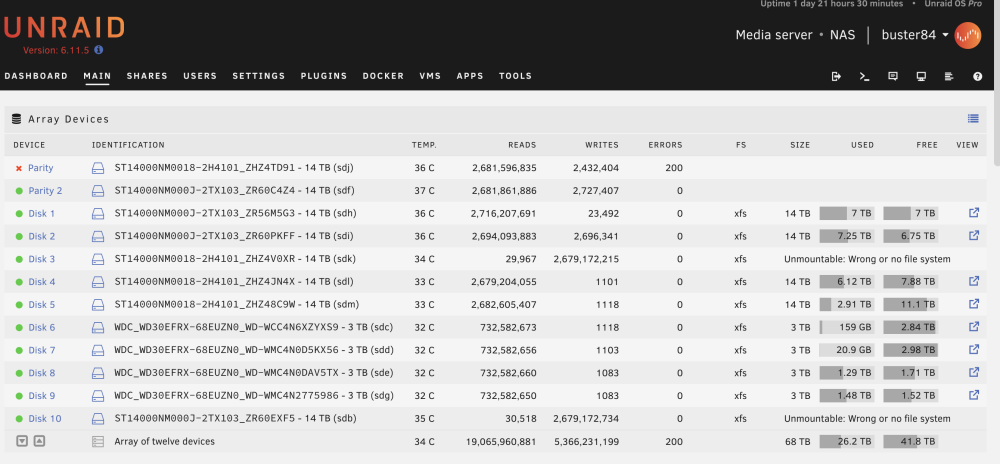
Wow, whats worse is that i just noticed that i lost my pictures folder. ITs completely missing from shares. I knew i should have backed that up. dammit. I have a feeling parity drive 1 had the data still but that is showing as disabled. Parity two is working but it missnig the photos. Is there anyway to get this data back or am i totally screwed? How can i disable parity 2 and use parity 1 to re-fix drive 3? I have a feeling the two paritys dont match which might explain why it became disabled after parity 2 synced. I really hope i didnt loose this data i only added a second parity drive to keep the data safe, not knowing that im risking it further. I truly hope someone can help me. My pet died and i kept all my photos on there. Im completly mad at myself for adding a second parity now. Something got totally screwed up and now i feel like ive lost it all forvever.
-
My unraid server worked great until i added two more disks. I added two 14tb drives to get a second parity and add osme space. Since then Disk 10 and disk 3 wont mount and keep saying un mountable. Parity one has done the same. I rebuilt the parity, then rebuilt disk 3 and 10 and then it said complete, only for the parity to go back to being disabled and disk 3 and 10 are back to unmountable. I really don't know how to fix this, ive tried all the basics. Can anyone help. Ive attached the diagnostic for the server. nas-diagnostics-20230825-2125.zip
-
Ok, i just followed your instructions and I as able to re-arrange them. Thank you!
-
So far im just using parity 1, but i do plan to change that in the future. Ive only been using unraid for a few weeks. What is the new config tool? Thanks for your help.
-
Request ability to re-name drives or re-arrange them without breaking parrity. Im OCD and I'd like to keep my highest TB drives as in my 1,2,3,4,5,6 slots but when i created it i ended up using my 3tb drives first in these spots to be able to transfer data over from the 14tb drives on the readynas. Now that the migration is complete there is no easy way to re-arrange the drivess so either the ability to re-arrange them, or even renaming them would be enough to not make my ocd go crazy.
-
Ill update for anyone else looking for the same advice. I installed all 4 of my 14tb exos drives that showed up as unassigned. I then removed my parity drive, and replaced it with one of the 14tb drives and started the rebuild process. I then used preclear to clear out the other 3 14tb drives and once the parity finished (24h) I was then able to add the other 3 drives without issue and no rebuild needed because of the preclear. Im now running a preclear on the replaced 3tb parity drive and will re-add that once its finished.
-
I guess theres no easier method. Im still transfering files so i probably wont start until tomorrow
-
Im in the process of moving my readynas 314 server over to unraid. I have 4 14tb exos drives in the readynas and 6 3tb wd reds in the unraid server. Currently the server is build with a party. I only have 16tb of data on the ready nas so im going to copy over everything i can fit to unraid, then move the rest to my pc for copy later. Once this is finished im going to remove the drives from my readynas and put them in unraid. My issue is that i only have 6 sata ports so i cant add more drives without removing one first. What would be the easyest method to remove these over? Im assuming id need to remove one at a time and then let it rebuild the party? is there another faster method or is this it?
-
since it works with 1080p and on 4k uour looking at hardware limitation. my best suggestion is to upgrade your cpu to an 11th gen or greater if you want to do 4k transcoding with the gpu. It’s best to use the Igpu on those chips as they works well with 4k. You could get a gpu as well, but it’ll cost more in the end for a newer one that supports the codecs. I looked at using my old board with a graphic slow card too but many people online said that’s it’s even more limited to 2 just 2 streams and the hardware codec support can be old if not using a modern card. I plan to use plex as well so I just built a cheap 13500 intel setup. You could easily go with a cheaper chip if you no don’t need the cpu power. I got the 13500 for $209 on Amazon and figured it was worth it and it gives me expansion room. Edit: I forgot to mention that another issue with using older hardware is that it’s not going to be able to transcode HDR files. They are to weak to transcode these as the requirements to process 4k HDR is A LOT higher than just 4k SDR.
-
Thanks for the reply. I’ll take a look at it in the coming weeks. I’m currently in the process of moving my raid from my readynas to unraid which will take a while to finish.
-
To keep it short, my wife currently used drop box to send wedding photos that she takes to her customers using 1 time download links. We have a 1GB fiber connection and have plenty of upload speed and space so i was wondering if we could ditch drop box and use unraid for this. Currently I use a VPN (private internet access) and plan to use it with unraid to keep anyone who gets one of these links from getting our IP address, if theres an app for it. Can anyone tell me if there is an app with this type of service? Paid or not? Thanks in advance for your help.

