





High-Tower
Members
-
Joined
-
Last visited
-
Entschuldigung, war schon spät und ich hab mich nicht korrekt ausgedrückt. Nein, es ist kein LACP, sonst müsste ich es in Unraid auf 802.3ad einstellen.. Ist und bleibt ein active-backup. Absolut korrekt. Danke, dass hab ich so getan. korrekt, hat auch funktioniert. Absolut korrekt, da war ich Zeitlich gesehen nicht mehr auf dem Dampfer. Trotzdem Danke. Funktioniert nun wunderbar, so wie ich es wollte.
-
Hi zusammen, frage hinsichtlich von 2 VLANs. Ich hab 2 Vlans, einen Namens Mgmt (VLAN20) und eine Intern (VLAN30). Beide sind im Switch korrekt eingestellt (2x10Gig SFP+) und in Unraid als "active-backup". Auf Unraid selbst möchte ich gerne nur über VLAN 30 kommen und die IP hab ich auch eingestellt, funktioniert soweit. Nun möchte ich aber auch eine VLAN20 Adresse für eine Docker Anwendung vergeben über die selben Schnittstellen (br0). Funktioniert das bei Unraid, bzw. wo stelle ich die VLANs ein? Hab das mal testweise in der Routing Table eingegeben: 192.168.20.0/24 br0 aber wenn ich im Docker dann eine IP Adresse mit br0 eintrage funktioniert das nicht. Danke schon mal für eure Hilfe. Grüße
-
Hi, i have installed the plugin and have installed a new virtual machine for prtg. The auto discovery search have a many result of datas over snmp. For me, the important thing is the temperature from the hdd´s and nvme´s. Unraid shows me that, but i want it in prtg. Does anyone know, how i add this information? Is the temperature a information from the snmp plugin?
-
Da hat @BiNiCKNiCHrecht. Hatte das selbe vor wie du @TraumG. Das einzige was da machen kannst, 2 disks (Virtuell, oder Physisch z.B. usb Sticks) als Parity und Disk1 benutzen und die SSDs als Pool deklarieren z.B. als RaidZ1. Danach kannst alles (System usw..) rüber schieben auf den Pool, dann ist die Disk und die Parity nur da, wird aber nicht benutzt. Hier sollte evtl. von UNRAID für die Zukunft mal drüber nachgedacht werden, evtl. eine Auswahl treffen zu können, wenn man gar keine HDDs mehr einsetzen möchte als UNRAID Disk Station sondern nurnoch SSDs einsetzen möchtest... ODER wenn du das nicht willst, bräuchtest am besten ne Enterprise SSD als Parity... ODER du erstellst dein Array so wie du es beschrieben hast und behälst die SMART Werte im Auge, gerade bei der Parity 🙂
-
Hi zusammen, ich weis, Thema Backup gibt es zu genug, nicht noch ein Backup Thema🤦♂️ Suche schon länger ein Programm, wo meine Daten aus Ordner X über z.B. SMB Share zieht und das komprimiert in der eigenen Dateiendung mit PW auf eine HDD oder einen anderen Share legt (sei es intern oder extern auf Cloud). Möchte keinen „copy“ Job, sondern ein Backup wo komprimiert in der eigenen Dateiendung. Wenn es noch DeDup könnte wäre das hammergeil. Wenns das dann noch als Docker gibt 🤪🥰😍 Kenne zwar ein Windoof Programm, wo das machen könnte, aber alleine für die Lizenz müsste ich nen Kredit aufnehmen und das was ich damit machen würde, ist leider nur ein Bruchteil, was das Programm leisten kann. Theoretisch wäre es geil, wenn es in Lucky Backup eine Funktion geben würde mit Komprimierung und PW, sowie DeDup Funktion. Kennt evtl. Jemand ein „einfaches“ Programm/Docker (im allerschlimmsten Fall über eine Windoof VM) wo die Kriterien erfüllt und wenn es was kostet, wenigstens bezahlbar ist für einen privat?! Danke schon mal im Voraus. Grüße 🖖 ✌️👍
-
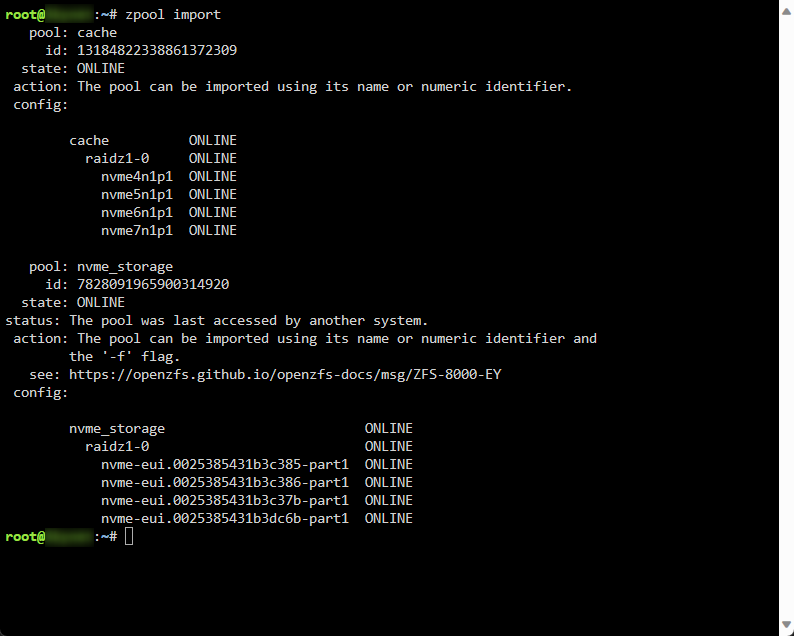
zpool import -f nvme_storage neustart tadaa... lässt sich wieder starten 🙂 JIPPI... ✌️
-
Hi, hab nun über ein Datenrettungsprogramm meine Daten direkt zum Backup geschickt (dann sind die mal sicher). D.h. ich könnte nun probieren, wie ich den vorhandenen pool "nvme_storage" wieder online bekomme. Anscheinend würde sich der pool wieder integrieren lassen.. Nur werde ich aus der Doku nicht schlau...
-
Hi zusammen, hab einen 2.ten Pool aufgebaut namens "Nvme_storage" mit 4 NVME´s und raidz. Hab da dann meine Daten drauf gehaut und wollte davon diese Woche noch ein Backup ziehen. Auf meinem Backup System hab ich die NVME Adapter Karte benötigt (vom 1.ten Pool namens "Cache" (u.a. auch ein ZFS raidz System) und habe deshalb den pool in den Tools gelöscht und das System runtergefahren. Nachdem ich nun auf meinem Backup System nun mehr oder weniger erfolgreich die Test durchgeführt habe, wollte ich nun wieder im Unraid das Array starten und habe exakt wie zuvor alles wieder eingestellt und eingesteckt (NVME Reihenfolge). Der "Cache" Pool wurde wieder gestartet in Unraid aber der "NVME_storage" Pool zeigt nun "Unmountable: Unsupported or no file system". Die Bezeichnung sowie die Einstellungen sind exakt wie zuvor eingestellt (Screenshots natürlich vorher gemacht). Problem ist nun, da dort meine Daten drauf liegen, benötige ich diese. Danach kann man ruhig den Pool neu erstellen. Frage ist nun, wie bekomme ich den Pool wieder so zum laufen, dass ich an die Daten hinkomme, kurz n Backup ziehen kann? Danke schon mal im Voraus. Grüße
-
Hi zusammen, da ich einen Stromsparenden Server gebaut habe, sind in diesem auch 5x 1TB Crucial BX500 1TB 3D NAND SSD´s verbaut worden. Eine ist als Parity und die anderen als Datenspeicher. Unraid läuft in einer VM unter Proxmox und der VM wurden 2 Cores gegeben und 8GB Ram. (I7-8700T und 32GB DDR4 Ram insgesamt). Sinn oder Unsinn, sei mal dahingestellt. Die SSD´s sind per PT direkt an Unraid durchgegeben. Dateiformat ist XFS. Kein Cache. Aktuell läuft Unraid im IDLE (kein Docker, Plugin oder sonstiges) und es wurde die Parity erstellt (was 4Std. und 48min. gedauert hat). Bevor die SSD´s in den Server kamen, hab ich einen Test unterzogen mit jeweils einer 50GB Datei an einem Win Rechner. Hier wurden im Durchschnitt ca. 286Mbit erreicht ("minimal" Schwankend) Wenn ich mir nun einen share anlege und kleinere Dateien übertrage (max. ~5GB) (aktuell noch am 1GB Ethernet LAN) hab ich von einem Client aus konstant 113MB/s. Sobald ich aber eine größere Datei übertragen möchte, (24GB) bricht andauern die Übertragungsgeschwindigkeit zusammen. Im Dashboard von Unraid sieht man, dass die Writes von 200MB/s auf einmal auf ~8MB/s einbricht. Im Dashboard von Proxmox sieht man, dass andauernd der RAM voll läuft und es danach zu diesem Einbruch kommt. Jetzt natürlich die Frage, wie bekomm ich es am besten hin, dass die Geschwindigkeit nicht andauernd einbricht?! Eine NVME als Cache ist ja auch iwi Sinnbefreit, da die SSD´s ja die Geschwindigkeit könnten... Wenn dies aber nötig ist bzw. wäre, verbaue ich noch eine (einen Platz hab ich noch). PS: Tests wie "High-Water", Fill-up, Most-free und "Turbowrite" (md_write_method), hab ich schon getestet, ergab keine Besserung. Kleiner Test noch, hab 16GB Ram Unraid gegeben und die Einbrüche waren nicht mehr so häufig, aber genauso abfallend von der Geschwindigkeit her. Danke schon mal im Voraus. Grüße
-
Danke für die Antworten. Da es für mich auch "nur" ein Datengrab ist, geh ich nun mal den Weg und schau mir die Sache an. Wenn ich in ein paar Jahren noch dran denke und die Parity wird langsamer / oder hat einen defekt, teile ich es mit 🙂
-
Hi, hab einiges gelesen, ob man UNRAID im Array einzig mit SSDs betreiben kann/soll. Hab einen neuen Server aufgesetzt, wo getrimmt ist auf Strom sparen. Für das Array hab ich 5x 1TB SSD´s gekauft und möchte die nun im Array einbinden (was ich auch aktuell nebenher laufen lasse als xfs). 1x Parity und 4x Disks. Hab gelesen, dass TRIM für das Array nicht aktiviert werden kann und wenn dann sollte man eine Enterprise SSD dafür nehmen, zumindest für die Parity, oder eine HDD. Ist das korrekt so? Was würde mit der SSD (nicht Enterprise) passieren, wenn diese trotzdem als Parity eingesetzt werden würde? System soll als Datenspeicher genutzt werden, mit einigen Docker (privates Umfeld, wenig I/O benutzung, mehr im IDLE, deswegen Stromsparend). Danke schon mal im Voraus. VIele Grüße ✌️✌️
-
Gaaaanz locker bleiben…. warum Unraid Unraid heißt, weis ich schon von Anfang an 😉 Da aktuell nichts auf dem Backup Server liegt und ich gerne das vorher ausprobier, ob es für mein Prod. Server n Sinn macht und wie es funktioniert, teste ich es auf dem. Danke für den Hinweis mit dem USB Stick als Laufwerk im Array 👍
-
Hi zusammen, hoffe das ich das Thema hier eröffnen darf... Auf meinem 2.ten Unraid Server (neuer Backup Server), hab ich das neuste Unraid installiert, da es zfs mit einbindet. Hab nun versucht, mein aktuelles BRTFS Array (aktuell keine Daten drauf) dementsprechend als RAID-Z(1) (4 Platten, 1 davon Parity), zu erstellen. Leider bin ich zu doof dafür. Array gestoppt. Unter Settings -> Disk Settings -> "Default file system" zfs ausgewählt. Dann unter Tools->New Config-> All -> Yes, I want to do this -> Apply So, nun im Main die Disk im Array auf "unassigned" gesetzt und auf Add Pool. Name: zfs Slots 4 Nun alle HDDs zugeordnet. Auf die erste HDD geklickt, damit ich in die Settings komme und dort unter "File system type" zfs ausgewählt, dahinter raidz und dahinter "1 group of 4 devices" -> APPLY -> DONE Und nun? Ein "START" kann ich nicht auswählen, da dahinter steht: "No array data disks have been assigned" Ist korrekt, möchte ich auch gar nicht mehr, möchte "nur noch" ein ZFS Array als Raid-Z haben... Was mach ich hier falsch?! Hab danach den Pool wieder gelöscht und "oben" im Array die HDDS wieder alle schön hinzugefügt (inkl. 1 Parity) und in den Settings jeder HDD das ZFS ausgewählt. Wenn ich nun auf Array Start klicke, formatiert er alle HDDS brav auf das Dateisystem zfs, aber ich kann nirgends auswählen, dass das System bitte ein RAID-Z erstellen soll als Data Array.... Sry... bin glaub echt zu blöd dafür zu kapieren, wie man das korrekt nun anwendet... 🤣🤦♂️ Danke schon mal im Voraus auf eure Hilfe ✌️
-
Hi zusammen, da mich der Papierkram echt so langsam erschlägt, hab ich mich nun dazu entschlossen, Paperless-ngx zu installieren (mit Redis) und hab das alles soweit am laufen. Funktioniert bisher echt gut, nur hätte ich 2 Fragen... 1. Habe mir Dokumententypen angelegt (wie eine Art Ordner Struktur mit "Rechnungen 2023", "Versicherungen" usw.. ) Wenn ich nun egal was für ein Dokument einscanne, landet es immer zuerst im Dokumententyp "Rechnungen 2023". Wenn das System sich nicht sicher ist (die Dokumente enthalten keine Schlagwörter für den Bezug zu "Rechnungen 2023", außer evtl. das Datum), wäre es besser, wenn das System das Dokument als "Nicht zugewiesen" deklariert. Wie kann man das einstellen, oder benötigt das Programm noch weitere ~50 Dokumente um das "selbst" zu lernen? Speicherpfad ist: {document_type}/{created_year}-{created_month}-{created_day}_{tag_list}_{title} 2. Lernt das Programm auch mit den zugewiesenen Tags dazu? Wie habt ihr das Programm soweit eingestellt? Hab mir von Anfang an den Kopf zerbrochen, wie ich das "richtig" einstelle, bzw. auch ein wenig sortiere... Grüße ✌️
-
Hi zusammen, suche ein Programm/Docker wo es ermöglicht die Bilder zu verwalten in einer Art Ordnerstruktur entweder über eine Web Page oder einer App. Hatte eine Zeitlang Piwigo am laufen inkl. der IOS App. Hatte dann einen Fehler in Piwigo und es ging nichts mehr. Nach ca 6std. Intensiver Recherche lief er wieder, aber ich konnte jedes der ~13000Bilder von Hand runterladen und sortieren, da das Plugin zum downloaden nicht mehr ging. Brauche keine AI oder sonstiges. Am liebsten wie Piwigo, aber ohne DB sondern mit richtiger Ordnerstruktur auf SMB Basis (mit App oder mit Web Zugriff und upload). Leider finde ich nichts dergleichen. Kennt ihr eine Alternative wo ich mir mal anschauen könnte? Evtl. Wäre auch ein Filebrowser eine Alternative?! Danke schon mal im Voraus. Grüße

