





progrockusa
Members
-
Joined
-
Last visited
-
So I was able to finally boot, but I have to go into the bios, select the USB drive and hit enter. Nothing has changed in the BIOS. The USB drive is the only selected bootable drive.
-
I ran the upgrade this morning (7.2.4 to 7.2.5), after the reboot. I waited a good 30 minutes and eventually had to manually reboot. On my screen it shows "WARNING please backup your data and replace your disk" "A failuire may be immanent and cause unpredictable fail" "Press F1 to run setup". The bios settings haven't changed and the USB drive is still the primary boot device. Steps I've tried so far. I reformatted the USB drive to FAT32, recopied the backup files back to the drive, attempted to boot and have the same message. I redownloaded a backup from unraid connect, used the Unraid boot tool and pointed to the backup zip file I got from connect, same thing. Does this indicate the USB failure? The drive appears readable and writeable from my laptop.
-
Does anyone else have an issue with Lidarr calling to plex to scan the library? it's never actually worked for me.
-
I understand now. Thanks!
-
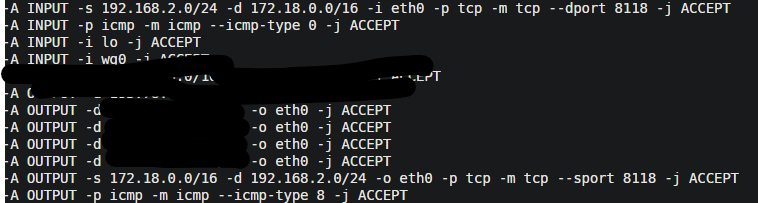
Found something interesting. I think the actual logs are not reflecting the changes I've made to the host port. When I point my browser to <IP> <port 8119> and lookup my IP address it matches whats in privoxy. even though privoxy is showing 8118 in the logs. I point my browser proxy to <IP> <port 8118> and it comes up with the IP my Deluge privoxy is using. So it doesn't appear the app is broken, it's just not logging the correct host port changes.
-
I find it strange, I'd been using privoxy along with deluge VPN for some time now. Deluge used 8118, privoxy used 8119. used privoxy for web browser only, used Deluge for all other. Never had an issue until recently. So my next question is can these both be using together? If so please explain how I can push privoxy traffic over an alternate port so it doesn't conflict with Deluge.
-
was this a recent change? I've been using port 8118 on the deluge app and 8119 on the privoxy app for about 6 or 7 months without an issue.
-
In my UNraid config template but in the logs, it's still trying to use 8118, Any idea why this is happening. I've always used this separately from the DelugeVPN privoxy for a web browser.


-
No I have it pointing to my custom network
-
I'm having an issue where this container will not use the specified port for the privoxy, always defaults to 8118 which conflicts with delugevpn privoxy. I've always had this container set to use 8119. I think the last update broke something in the template.
-
I got this error this morning, (Your server has detected hardware errors. You should install mcelog via the NerdPack plugin, post your diagnostics and ask for assistance on the unRaid forums. The output of mcelog (if installed) has been logged), something about hardware failure. I installed the mcelog from nerd pack. I have uploaded the server log files. Can someone assist me on what's going on with my server? I haven't noticed anything failing or not working. diagnostics-20211101-1058.zip
-
yeah I forgot about that I messed with that ages ago, I just reduced it to 50 gig where I initially had it. How would I go about narrowing down, an app writing to the wrong path?
-
I've uploaded the full diagnostic zip file
-
My server has been unstable for about a month, having to resort to rebooting about every 5 to 7 days. Today I've noticed a ton of errors, I did run the scrub tool but it found no errors. Is my NVMe drive failing? I can provide more logs if needed kernel: BTRFS error (device nvme0n1p1): parent transid verify failed on 388102717440 wanted 144115188076528182 found 672310 phenom-diagnostics-20210818-1323.zip
-
Go into sonarr and radarr, general under settings. Under ignored addresses. Put your local IP example 192.168.1.* Should fix it with binhex-deluge Sent from my GM1917 using Tapatalk

