





isrdude
Members
-
Joined
-
Last visited
Everything posted by isrdude
-
Made a small tweak to Calibre from an online post I found. Changed the generic LIBRARYINTERNALPATH was going and sending it to my mapped calibre library. Appears it impacted the writable size from the above previous size: calibre 3.54 GB 3.19 MB 42.6 kB
-
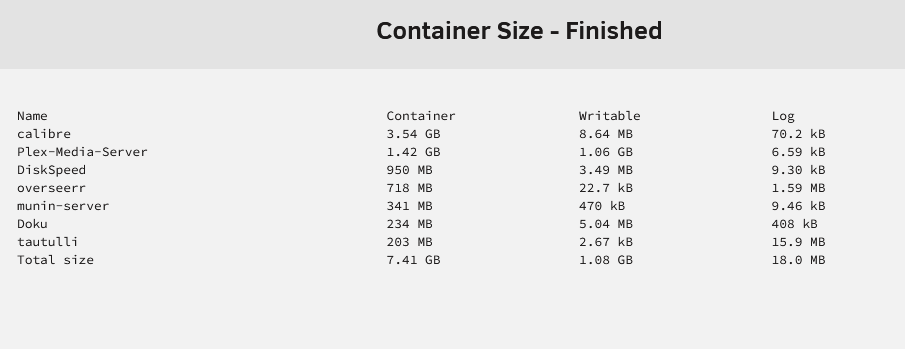
This what I get: Filesystem Size Used Avail Use% Mounted on /dev/loop2 50G 6.8G 44G 14% /var/lib/docker Part of me wonders if it isn't Calibre that is causing the issue. Things are looking OK now that I put everything back on. But it was OK before and then just started to grow. The only dockers that add data are plex and calibre. It is growing compared to what I posted above calibre 3.55 GB 15.4 MB 238 kB DiskSpeed 950 MB 3.49 MB 9.30 kB Plex-Media-Server 721 MB 363 MB 2.39 kB overseerr 718 MB 22.7 kB 2.20 MB munin-server 341 MB 470 kB 9.46 kB Doku 234 MB 5.04 MB 408 kB tautulli 203 MB 2.67 kB 22.1 MB Total size 6.72 GB 387 MB 24.9 MB
-
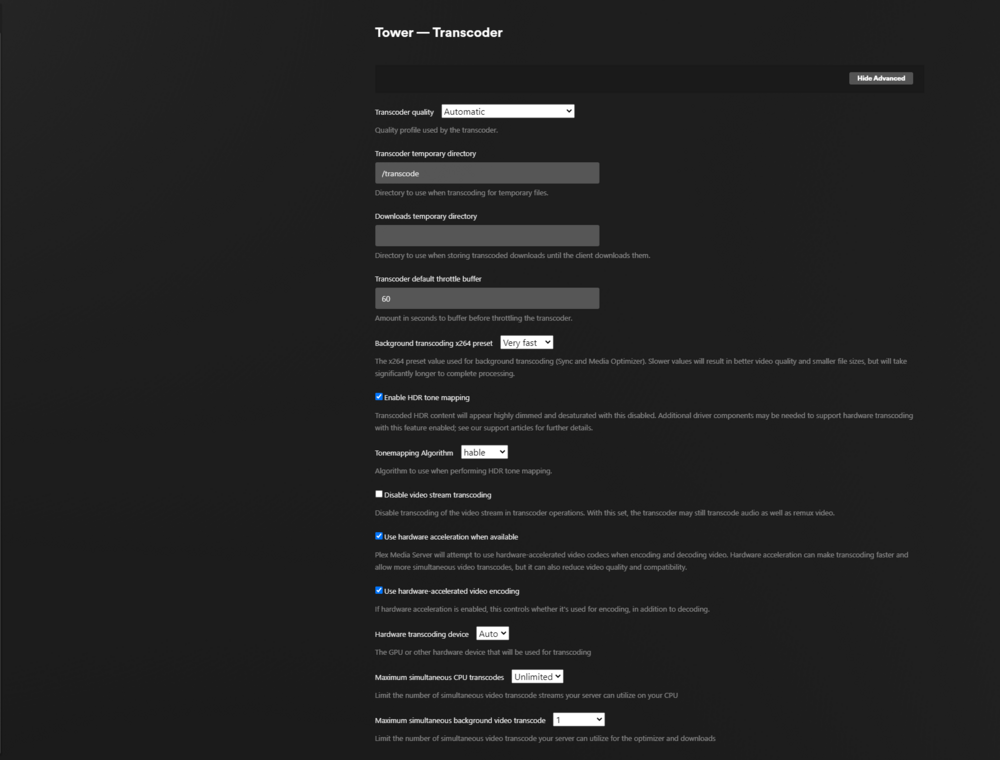
OH, gotta!
-
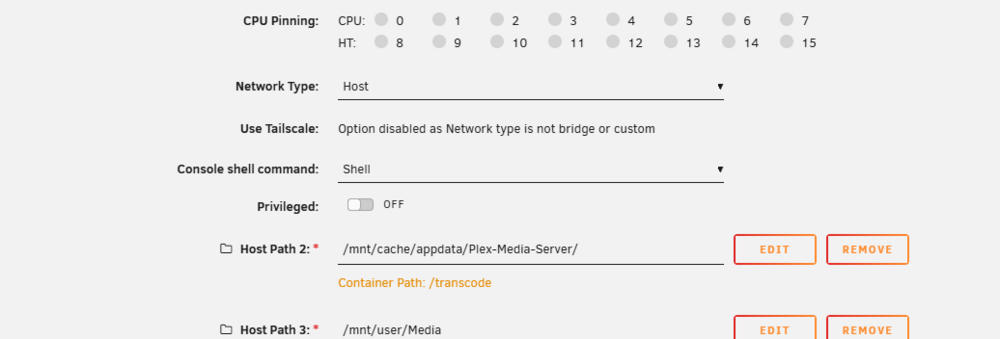
That's how I always understood it too! Here is the screenshot
-
Thank you, I missed that! No. I've never used the DVR feature. Never really had a need to use it. Yeah, I've heard that a lot about my mapping But it makes sense for me for the way I catalog and separate everything out for ease of manual search.
-
I added some data to calibre and Plex be interesting to see if there were any changes, Here is the docker run docker run -d --name='Plex-Media-Server' --net='host' --pids-limit 2048 -e TZ="America/New_York" -e HOST_OS="Unraid" -e HOST_HOSTNAME="Tower" -e HOST_CONTAINERNAME="Plex-Media-Server" -e 'PLEX_CLAIM'='claim-xxx' -e 'PLEX_UID'='99' -e 'PLEX_GID'='100' -e 'VERSION'='latest' -l net.unraid.docker.managed=dockerman -l net.unraid.docker.webui='http://[IP]:[PORT:32400]/web' -l net.unraid.docker.icon='' -v '/mnt/cache/appdata/Plex-Media-Server/':'/transcode':'rw' -v '/mnt/user/Media':'/data':'rw' -v '/mnt/user/Media/2017 Stanley Cup Final Pens vs Sharks/':'/2017 Stanley Cup Final Pens vs Sharks':'rw' -v '/mnt/user/Media/Hallmark/':'/Hallmark':'rw' -v '/mnt/user/Media/Idi Only/':'/Idi Only':'rw' -v '/mnt/user/Media/Movies/':'/Movies':'rw' -v '/mnt/user/Media/Great Courses America'\''s Founding Fathers/':'/Great Courses America'\''s Founding Fathers':'rw' -v '/mnt/user/Media/2024 Car Shows/':'/2024 Car Shows':'rw' -v '/mnt/user/Media/Baseball/':'/Baseball':'rw' -v '/mnt/user/Media/Christmas Trains/':'/Christmas Trains':'rw' -v '/mnt/user/Media/Classic Car Restoration Videos/':'/Classic Car Restoration Videos':'rw' -v '/mnt/user/Media/College Football/':'/College Football':'rw' -v '/mnt/user/Media/Documentary/':'/Documentary':'rw' -v '/mnt/user/Media/Dominique Graduation Photos/':'/Dominique Graduation Photos':'rw' -v '/mnt/user/Media/Ed Only/':'/Ed Only':'rw' -v '/mnt/user/Media/Emily & Rich - The Wedding/':'/Emily & Rich - The Wedding':'rw' -v '/mnt/user/Media/Extended Pfeifer Family Vid'\''s/':'/Extended Pfeifer Family Vid'\''s':'rw' -v '/mnt/user/Media/Family Only/':'/Family Only':'rw' -v '/mnt/user/Media/Glee HD Vid'\''s/':'/Glee HD Vid'\''s':'rw' -v '/mnt/user/Media/Golf/':'/Golf':'rw' -v '/mnt/user/Media/Hockey/':'/Hockey':'rw' -v '/mnt/user/Media/iTunes Music Vids/':'/iTunes Music Vids':'rw' -v '/mnt/user/Media/Kitchen Rebuild/':'/Kitchen Rebuild':'rw' -v '/mnt/user/Media/Lexi Texas Tech Graduation Photos 11 May 2024/':'/Lexi Texas Tech Graduation Photos 11 May 2024':'rw' -v '/mnt/user/Media/Lexi Texas Tech Graduation Video 11 May 2024/':'/Lexi Texas Tech Graduation Video 11 May 2024':'rw' -v '/mnt/user/Media/Mig Welding/Lesson Videos/':'/Mig Welding Lesson Videos':'rw' -v '/mnt/user/Media/Laura'\''s Graduation Photo'\''s/':'/Laura'\''s Graduation Photo'\''s':'rw' -v '/mnt/user/Media/Laura'\''s Wedding Photo'\''s/':'/Laura'\''s Wedding Photo'\''s':'rw' -v '/mnt/user/Media/Muniz Family Only Videos/':'/Muniz Family Only Videos':'rw' -v '/mnt/user/Media/Music DVD'\''s/':'/Music DVD'\''s':'rw' -v '/mnt/user/Media/Music Library/':'/Music Library':'rw' -v '/mnt/user/Media/Music Singles/':'/Music Singles':'rw' -v '/mnt/user/Media/O'\''Harren Family/':'/O'\''Harren Family':'rw' -v '/mnt/user/Media/Ohio State Football/':'/Ohio State Football':'rw' -v '/mnt/user/Media/OLD TIME RADIO/':'/Old Time Radio':'rw' -v '/mnt/user/Media/Old Time Radio Music/':'/Old Time Radio Music':'rw' -v '/mnt/user/Media/OSU vs Xichigan Games/':'/OSU vs Xichigan Games':'rw' -v '/mnt/user/Media/Other Music Videos/':'/Other Music Videos':'rw' -v '/mnt/user/Media/Pittsburgh Penguins/':'/Pittsburgh Penguins':'rw' -v '/mnt/user/Media/Pro Football/':'/Pro Football':'rw' -v '/mnt/user/Media/Queen Elizabeth II Funeral and Bio/':'/Queen Elizabeth II Funeral':'rw' -v '/mnt/user/Media/Rick & Monica - The Elvis Wedding/':'/Rick & Monica - The Elvis Wedding':'rw' -v '/mnt/user/Media/Rick And Monica Wedding/':'/Rick & Monica Wedding':'rw' -v '/mnt/user/Media/Rick'\''s Retirement from USAF/':'/Rick'\''s Retirement from USAF':'rw' -v '/mnt/user/Media/Rick'\''s Retierement Luncheon/':'/Rick'\''s Retierement Luncheon':'rw' -v '/mnt/user/Media/Ruby Beauty 2024/':'/Ruby Beauty 2024':'rw' -v '/mnt/user/Media/Space Apollo Program Shows/':'/Space Apollo Program Shows':'rw' -v '/mnt/user/Media/Star Trek Audiobooks/':'/Star Trek Audiobooks':'rw' -v '/mnt/user/Media/Star Trek Fan Films/':'/Star Trek Fan Films':'rw' -v '/mnt/user/Media/The Classic Adventures of Sherlock Holmes/':'/The Classic Adventures of Sherlock Holmes':'rw' -v '/mnt/user/Media/The Coronation of King Charles III and Camilla/':'/The Coronation of King Charles III and Camilla':'rw' -v '/mnt/user/Media/The D-Day Tapes/':'/The D-Day Tapes':'rw' -v '/mnt/user/Media/The Further Adventures Of Sherlock Holmes/':'/The Further Adventures Of Sherlock Holmes':'rw' -v '/mnt/user/Media/Wisehart Family Memories/':'/Wisehart Family Memories':'rw' -v '/mnt/user/Media/YouTube Car Shows/Hot Rod Drag Week 2024/':'/Hot Rod Drag Week 2024':'rw' -v '/mnt/user/Media/Audiobooks/':'/Audiobooks':'rw' -v '/mnt/user/Media/History Audiobooks/':'/History Audiobooks':'rw' -v '/mnt/user/Media/A&E Biography/':'/A&E Biography':'rw' -v '/mnt/user/Media/Car Shows & Cruise In'\''s 2023/':'/Car Shows & Cruise In'\''s 2023':'rw' -v '/mnt/user/Media/Pictures/Muniz Family 16 Feb 2014/':'/Muniz Family 16 Feb 2014':'rw' -v '/mnt/user/Media/Pictures/John Rowland Retirement 2006/':'/John Rowland Retirement':'rw' -v '/mnt/user/Media/Sports/':'/Sports':'rw' -v '/mnt/user/Media/Chrystals Uncle McQ Adventure/':'/Chrystal'\''s Uncle McQ Adventure':'rw' -v '/mnt/user/Media/comedy/':'/Comedy':'rw' -v '/mnt/user/Media/D-Day And The Bulge/':'/D-Day And The Bulge':'rw' -v '/mnt/user/Media/Great Courses America'\''s Founding Fathers/':'/Great Courses America'\''s Founding Fathers':'rw' -v '/mnt/user/Media/Harry Nile/':'/Harry Nile':'rw' -v '/mnt/user/Media/Imagination Theater/':'/Imagination Theater':'rw' -v '/mnt/remotes/TOWER3_Media3/TV SHOWS/':'/TV SHOWS':'rw' -v '/mnt/user/Media/1952 Chevy 3100 Pictures/':'/1952 Chevy 3100 Pictures':'rw' -v '/mnt/user/appdata/Plex-Media-Server':'/config':'rw' 'plexinc/pms-docker' a6c2761cce807ff4ac7b2676da8d0df5ca0a573bfdd0e03af0e9373577c9f630 The command finished successfully!
-
OK...I've attached a clip of the container size and new diagnostics thanks again tower-diagnostics-20260618-0641.zip
-
No. I have reinstalled: Plex Calibre Diskspeed Doku Munin-Server Overseerr Tautulli Plex, Calibre, Overseerr, Tautulli are the only ones that I have started up
-
OK, Good news. Found where it switched to directory and switched to btfs vDisk and set size to 50mb. Loaded all my containers back and here is where it gets interesting. It appears it's putting plex data in one of my folders (attached screenshot). How would I proceed to find out which is definitively filling up my image as I originally thought it was Plex as it appears to be putting data into a folder within the container that it desires.

-
Where am I looking to change to docker.img? I went to advance view in docker from settings, I don't see anything like that. Started docker, tried to load calibre again, and I didn't see anything like that before I tried to load it in calibre page
-
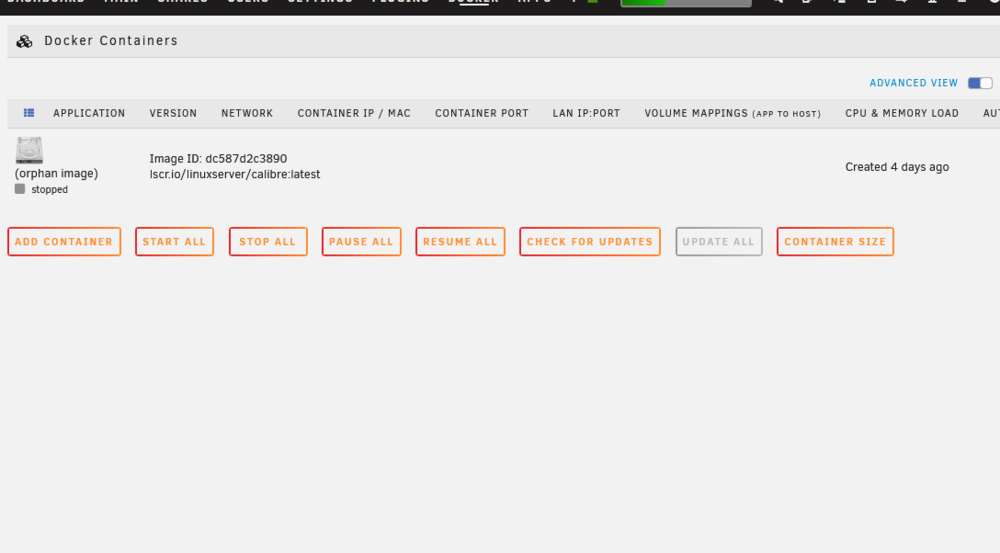
OK, I deleted the docker directory, went back in to re-add my calibre container and received this message: docker: Error response from daemon: invalid output path: stat /var/lib/docker/overlay2/d3c500dceffb37757b6c41d871deb6310b99e2cd0532ab56fe48f5f30257a829: no such file or directory Run 'docker run --help' for more information The command failed. I also had an orphan image pop up immediately (screenshot attached). I deleted it and went to add calibre again. Received same message as above, orphan also returned.
-
OK, I wasn't sure if that was doing the same as the deleting the vDisk file
-
Hi trurl The problem is, I can't reinstal previous apps. That's where I get that error message as noted above and command failed message I tried to recreate but there is no option to delete Docker vdisk file Attached is docker screenshot
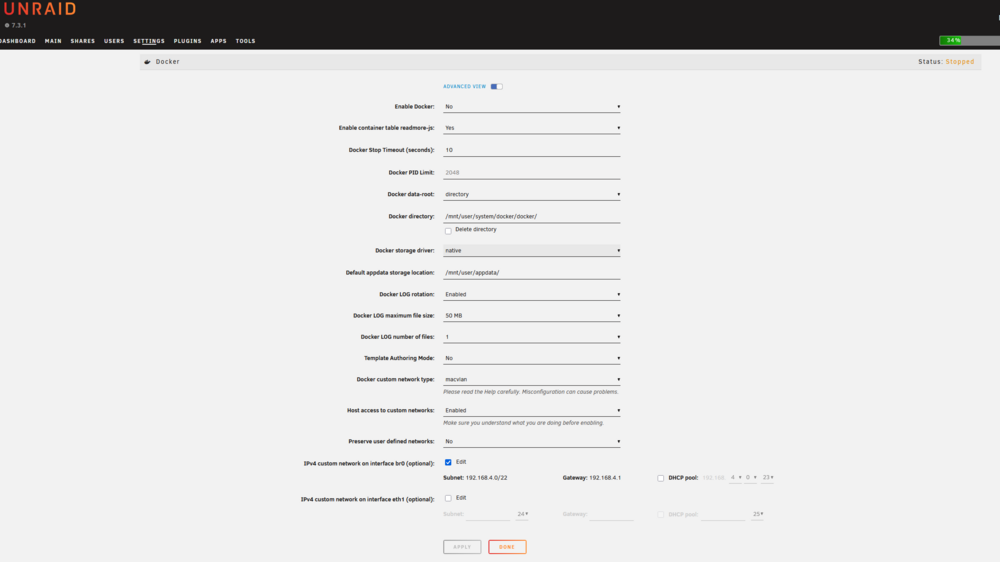
-
Hi This all started with I kept getting the dreaded docker.img full utilization message, which I traced to plex. Did some of the changes that I found on SpaceInvader One's site, as well as another post with how to change the docker image storage into a directory. That messed up things more! Searched to see if I had an orphan image. I did. Removed it, Went in to add previous containers from inside docker and they added. This afternoon, they're gone. AND BONUS, when I tried to add them back, multiple ways, I get this message (I was trying to add Plex back in) docker: Error response from daemon: invalid output path: stat /var/lib/docker/overlay2/a8e0da990e4d3948d0723d05b47dd41b11f3787e3be0866885d61887e998d649: no such file or directory Not sure what to do or what is going on. Jorge B., if you're still the docker guru, I could use your help again! Diagnostics attached. Thanks in advance for any help anyone can provide. tower-diagnostics-20260614-1255.zip
-
You're very welcome
-
You're very welcome
-
See my post above. It tells you how to fix without reinstalling!
-
Geez....all you need to do is click on calibre in docker, click edit, go down to the page to the line that says "password". Then go over to the rightwhere it says, "remove." Click on remove, hit apply, you're golden!
-
Can somebody tell me why this is happening: every time I update calibre, it rolls back my settings. I must go back and point it to the library, restart the content server, go back to share over web and click to start content server whenever calibre starts. Why???? Thanks
-
What I ended up doing to fix this was to rename my entire calibre library folder. Then I removed the docker and image. After that I removed my ebook share. Then I changed the library folder name back to original. Using SpaceInvader One's Calibre install directions: https://www.youtube.com/watch?v=jLa5sNKDAYI I completely reinstalled. I pointed the share to the original folder with all my DBs. Don't know why, but it worked after 3 attempts with the docker and image. Had to do a couple tweaks to get the remote access since it was so long since I've set that up, but now I'm up and running 100% again. The App Support page was useless. Hope this helps y'all.
-
Hi Jorge I had done that and it wasn't any help. I'm in the process of saving the library and DBs, so I can completely eliminate the library folder then the share and start all over. Don't know what is going on but starting over with an existing library isn't that tough to do. Thanks
-
Just updated Calibre. Now all the sudden, when I click on the webgui to connect to Calibre I get this: Winsock disconnected, trying to reconnect Then I get "waiting for stream" and that's it. Nothing more. Even tried to remove the calibre docker and reinstall. Problem still persist Not sure what is up as everything has been working fine until the update. Diagnostics and syslog attached. tower-syslog-20250729-0153.zip tower-diagnostics-20250728-2141.zip
-
I had to set my up my eReader using my router public IP address and I used my container port, which is 8081. I verified with "whats my ip" then plugged into my calibre settings on my eReader: (example) IP: 173.85.197.69 Port 8081 My docker container ip isn't that much different from yours. I think it's just a standard that starts with 172.xx.x.xx My docker actually shows a different IP address. But in order to get to your unraid server, at least for me, I had to use the public IP address, with Calibre's Port, so my eReader knew where to go to enter the port to get to the program. I can connect my eReader onto any wireless, anywhere, and download books. I've done it using the wireless on a flight to Dallas aboard the jet to download using this setup. My sharing over the net has the port 8081. I guess you would be using Port 8086,
-
OK, changed the cable (still don't think that was the issue) and put in new PSU....upped power from 750W to 850W. Mounted and now the drive is rebuilding. Been monitoring for 20 minutes now and it's showing a speed estimate of 195.2 mbs!!! Lesson learned, PSU going down the tubes can mimic a MOBO controller going back. Swap out the PSU first! Oh well, I have a spare MOBO now. That's something. Thanks Jorge
-
OK. Be the 4th cable on 5....still showing bad, dang. Going to get new PSU today. Will let you know. Thanks again


