





Haegar333
Members
-
Joined
-
Last visited
Everything posted by Haegar333
-
Hallo, ich glaube, du hast die Einstellung des Subnets in SCAN_SUBNETS flsch verstanden. Kannst du einen screenshot zeigen?
-
Ach, tausendmal Sorry. Ist normalerweise nicht meine Art, ist mir in den falschen tab geruscht.
-
Guten Morgen, ich habe den AIO installiert, dies hat problemlos funktioniert. Ich habe aber jetzt plötzlich Fehler beim Sync. Wie es scheint, können Verzeichnisse erstellt werden, aber keine Dateien. Ich denke, es liegt an den Rechten die in meinem NEXTCLOUD_DATADIR vergeben sind. Welchen owner für group und user und welche Rechte dazu habt ihr bei euren Verzeichnissen?
-
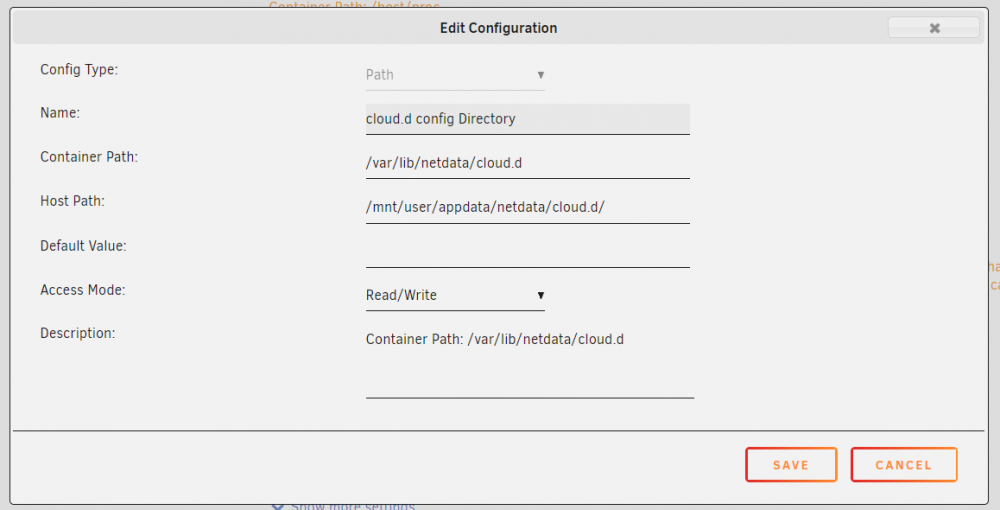
I claimed my unRaid netdata into my netdata cloud to access all data in web. The config directory of that cloud connection is not mapped into the host so it is lost on every restart. To repair this you could do the following: set up a directory under appdata/netddata/cloud.d, then map it to the container path /var/lib/netdata/cloud.d See the picture for help. If somebody already mentioned this, nevermind
-
@dlandon: I rechecked the error code today, tried around with the command UD gives in the webterminal and concluded that there must be something wrong with the share. Then i discovered that my Win machines could not connect to the share too today (checked it right at the beginning with UD, not after) Checked into my openwrt Router and bumm, it lost the user account i build and used for the share. Dont know why, but it happened. TL;DR: It works now and i am sorry wasting your time Conclusion: Mount Error Code 13 or 95: Check your share at the outside server
-
attached shado-db-diagnostics-20201117-2205.zip
-
@dlandon: I set the paramter you asked for. The error code changes to mount error 95: Operation not supported and it doesnt mount the smb share
-
Hello dlandon, attached here. Thank you very much for your work! shado-db-diagnostics-20201117-0730.zip
-
I already tested with just upper case, lower case and numbers, not more. It is a smb share on an openwrt router, with my windows machines it works.
-
Hello, i just wanted to mount a smb share wit UD and got the mount error(13) permission denied. Different than your error advice it was the first time mounting anything beside using the Unraid way. After following the ud add mount i checked the samba_mount.cfg and i see pass = "xxxxxxxxxxxxxxxxxxxxx" different than the real pass, but i think this is intentionally and the hashed password, or?

