Deep Insights
Members
-
Joined
-
Last visited
Everything posted by Deep Insights
-
Trying to kick off a secondary backup post Backup plugin execution. Is it "Path to Custom Stop Script" where I need to specify the post backup script; if not, where can I setup a script execution that is triggered after the backup has completed? Thanks.
-
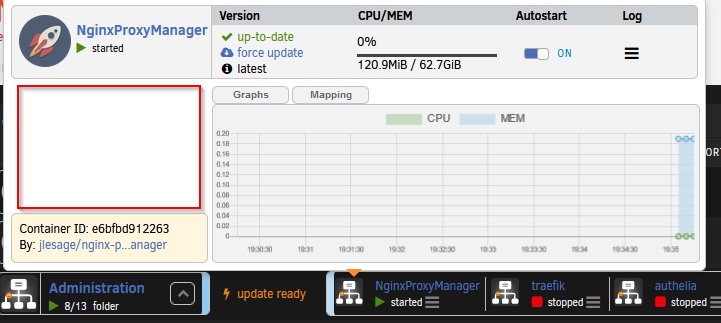
Missing Container Management Menu Options. If I expand the folder, I can then click on individual container to access management menu. Any idea how to fix this? Running latest unraid along with all the latest updates
-
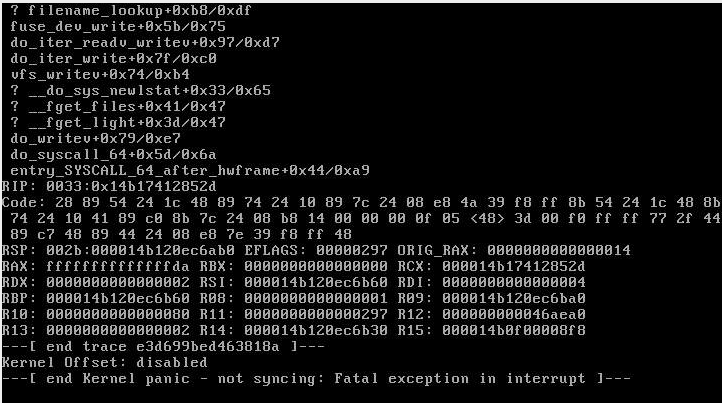
Running Unraid 6.9.2. Had tried upgrading to the latest but then resorted to downgrading as one of the docker apps (Cloudflare) stopping working. Here's the snapshot of the error: This is the first time I've seen this error so I just restarted the server. The server did restart without any issues. Looking to see the cause of this crash. Thanks.
-
I need to add a couple of custom http headers for cloudflare authentication. I tried modying the settings.yml and restarted the server, but to no avail. How/Where can I add the http headers? Cheers!
-
Unable to access console. Unable to find sh or the bash shell: Error, I'm getting: OCI runtime exec failed: exec failed: container_linux.go:367: starting container process caused: exec: "bash": executable file not found in $PATH: unknown OCI runtime exec failed: exec failed: container_linux.go:367: starting container process caused: exec: "sh": executable file not found in $PATH: unknown
-
Hi @Rob I currently have deployed Postgres12.5 container under Unraid 6.9.2. I am able to restart the container and initially everything works fine; however, hours later, I start seeing the following messages in the log: Once these warnings/errors show up, any database clients are unable to access any databases. Going into the Postgres12.5 container console, I see related file permissions to be: -rw------- 1 99 users 512 May 12 18:25 pg_filenode.map -rw------- 1 99 users 237 Sep 22 09:34 global.stat What should the correct ownership & filepermissions be for all files/directories under /var/lib/postgresql/data? Thanks -r

-
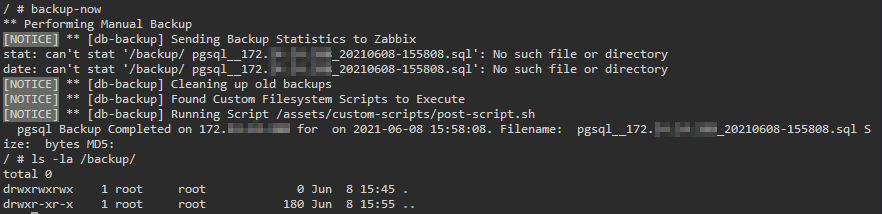
db-backup container unable to create backups I am trying to backup a postgres database. I've specified the backup location in the container template. I can go to the container console and access the /backup within the container. Permssions for /backup is set to 777 (ie: world writable). However, when I manually run 'backup-now' command in the container console, I get the following error: As you can see that /backup does exist with writable permissions. It seems like the backup-now is not able to generate the backup file (*.sql) and therefore cascading errors about "..can't stat.... *.sql: No such file or directory" I've looked at the Logs but did not see any entries relating to the manual backup.
-
How to change LOGLEVEL to INFO? Currently, in the paperless.log, I see DEBUG messages. I'm trying to minimize disk writes. In paperless-ng documentation, I only see two LOG related variables (PAPERLESS_LOGROTATE_MAX_SIZE, PAPERLESS_LOGROTATE_MAX_BACKUPS). There's nothing to change the LOGLEVEL. Any idea how do I change the log level? Thanks.
-
Would you mind sharing how you got Tika & Gotenberg installed/configured? Also, did you figure out how to use filename for tagging? Thanks.
-
I currently have FILENAME_FORMAT set as: {create_year}/{correspondent}/{title}. This works well for me but not for my better half My wife wants to have all the scans under a separate folder (different from the one above that I'm using). She would like to have all scans stored under her name. If I can have all PDFs prefixed with her name (eg: wife_document1.pdf), how can I use/extract the prefix of the filename to have all documents stored under? In summary, My documents get stored at: /usr/src/paperless/media/{create_year}/{correspondent}/{title}. My wife would like to have everything under: /usr/src/paperless/media/wife_name/{create_year}/{correspondent}/{title}.{create_year}/{correspondent}/{title}. How do I accomplish this?
-
Just starting out with Paperless-ng in home/non-commercial environment. Running on a Multi-core dual processor along with lots of memory. So resource constraints is not an issue. I've gone through the initial setup and able to access the Web UI for the paperless-ng. Now, before I start adding documents I would like to make sure that I have the optimal setup. Following are some of my questions: For home use, is it better to stay with the default SQLLite database or should I consider Postgres? For a family of four, what's the ideal setup in terms of user setup? Spouse and I would like to have a common documents and consume directory while the kids should have their own. I'm going through the documentation which is excellent! However, reading through it does take time. Wondering if there's a Video that shows a typical usecase/scenario of setting up multi-user/group environment along with setting up document tags, types, etc. Many thanks.
-
Also, getting the following warnings: How do I rectify this? Thanks.

-
Getting following warnings: [2021-05-10 21:43:37,842: WARNING/MainProcess] Importer from imap account not started.Reason: PAPERMERGE_IMPORT_MAIL_USER not defined PAPERMERGE_IMPORT_MAIL_HOST not defined I have already added to papermerge.conf.py: PAPERMERGE_IMPORT_MAIL_USER = "testuser" PAPERMERGE_IMPORT_MAIL_HOST = "mail.mydomain.com" I'm still getting the above warning.
-
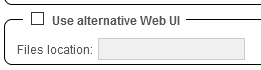
Does binhex-qbittorrentvpn container provide/include alternate Vue WebUI? If so, what value do I specify inside of the qbitttorrentvpn->Settings->Web UI file location? If Vue is not included then how do I set up the container so I can use Vue. Thanks.
-
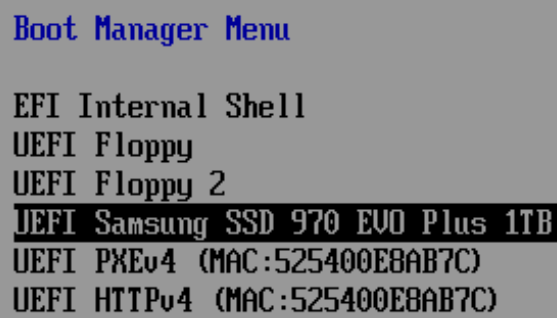
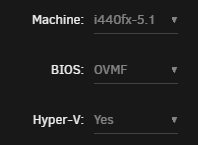
ENV: Supermicro + Intel CPU Windows 10 VM installed on a passthrough NVMe drive. PROBLEM: VM boots to UEFI Interactive Shell instead of Windows VM boots to UEFI Interactive Shell instead of the OS. Exiting out of UEFI shell, I can manually boot into Windows via Boot Manager selecting UEFI Samsung SSD drive. In the BIOS I have tried deleting/changing boot device order so only the NVMe drive is in the boot sequence; however, these changes do not persist. Please see attached snapshots.