





GGabs
Members
-
Joined
-
Last visited
Everything posted by GGabs
-
I have been using Unraid for many years now, but just recently started to have very slow parity check last few times. I had to cancel each time. Hope experts here can help me resolve this. Diagnose zip has been attached while the parity was still going on. Image attached of the parity speed. Disk details below: Parity: Seagate Exos Mach 2 14TB(Parity) - 7200rpm Disk 1: Seagate BarraCuda Pro 10TB - 7200rpm Disk 2: Western Digital Blue 6TB - 5400rpm Disk 3: Western Digital Blue 6TB - 5400rpm Disk 4: Toshiba 3TB - 7200 RPM Disk 5: Western Digital Blue 8TB - 5400rpm Disk 6: Seagate IronWolf Pro NAS 10TB - 7200 Disk 7: WD BLACK SN750 NVMe SSD 1TB (Cache) Disk 8: Toshiba 3TB - 7200 RPM (Unassigned Device Disk) Server Specs: Mobo: ASUS PRIME Z390-A CPU: Intel i5-9400 CPU @ 2.90GHz Memory: 32 GiB DDR4 I have been running this exact setup since day one. only change is that Disk6 used to be Parity. 14TB Parity is recently added and even after this addition, parity checks were running fine. Parity was upgraded last year. Thank you. ggserver-diagnostics-20250517-1524.zip

-
Could someone please point me into the right direction. Thanks!
-
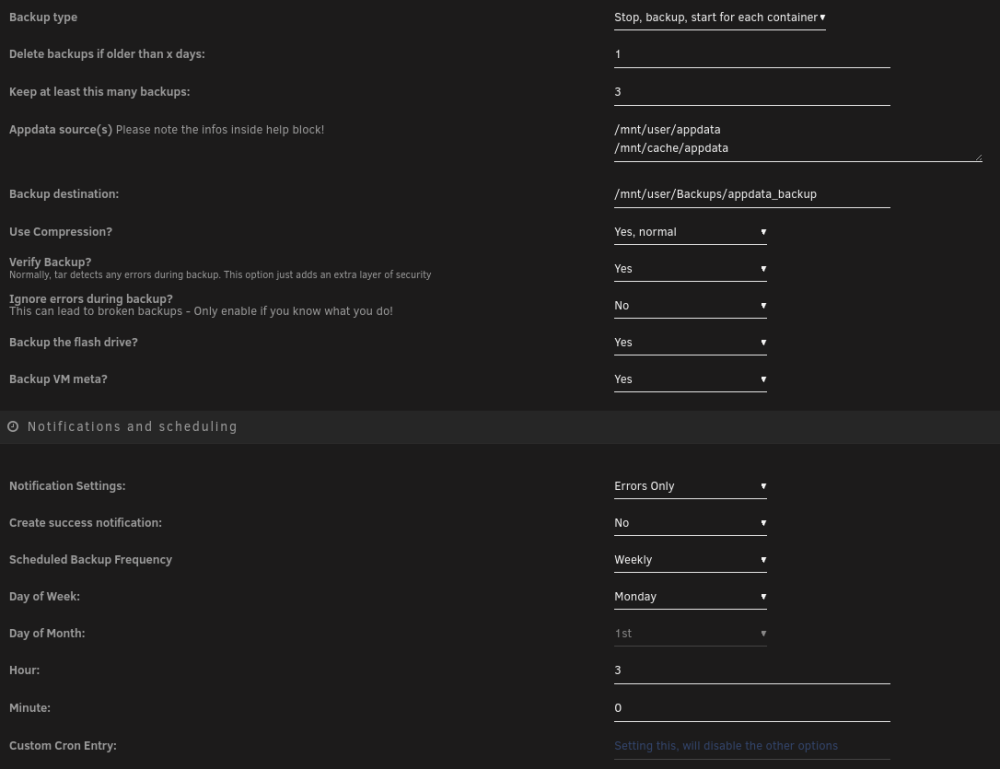
Hi, I have recently switched to this plugin and I was wondering where is the VM back stored? When I checked my backup folder I see everything is backed up in 1 folder. I see all the dockers and flash drive backed up in that folder but i do not see any VM backups, even though it is selected to be backed up. I only see VM_meta.tgz backed up, which is only 7.1 kb. I was hoping this would back up the VM images like previously there was libvirt back up with big .img file in GB. Am i missing something or misunderstanding something in terms of VM backup? Could someone please point me into the right direction. I have attached my settings. Thank you
-
HI, I am migrating from binhex-rtorrentVPN container to this one, what steps I need to take so that I can migrate all my current torrents from rttorent to this container without redownloading everything? Please help, I looked everywhere and all tools are for windows. How do i do this in this scenario. Thank you!
-
Thank you so much for your reply. Also is Nextcloud AIO same as NC 25? or NC AIO is different all together. Sorry for these questions, I am just trying to catch up with all the lingo thats out there regarding NC, as originally I set mine up in 2019. Also do you know if NC 25 will have native office support? either through collabora office or onlyoffice? after recent updates, my OnlyOffice integration has not been working. I have a separate docker for onlyoffice which was linked to NC it was a hard integration to configure in the first place and few updates back it has stopped working. Thank you for all the help.
-
can we update this to nextcloud hub or that is totally different docker all together? or is there a way to migrate from this to newest nexcloud hub?
-
so after 3 days of troubleshooting, integration is finally working. after surfing endless support pages on the internet a solution from 2018 on onlyoffice support forum worked. for anyone who runs into same error hope this helps: changed value of "rejectUnauthorized": from true to false in /etc/onlyoffice/documentserver/default.json restart OO docker and tried connecting again in NC and it worked right away. cheers!
-
any opinions? Also i have done in the docker console for onlyoffice wget command and oo docker can connect to nc.domain.com fine it seems, output bellow: # wget https://nc.domain.com --2021-02-18 23:13:40-- https://nc.domain.com/ Resolving nc.domain.com (nc.domain.com)... xxx.xx.xx.xx Connecting to nc.domain.com (nc.domain.com)|xxx.xx.xx.xx|:443... connected. HTTP request sent, awaiting response... 302 Found Location: https://nc.domain.com/login [following] --2021-02-18 23:13:40-- https://nc.domain.com/login Reusing existing connection to nc.domain.com:443. HTTP request sent, awaiting response... 200 OK Length: 10301 (10K) [text/html] Saving to: ‘index.html’ index.html 100%[====================================================>] 10.06K --.-KB/s in 0s 2021-02-18 23:13:40 (442 MB/s) - ‘index.html’ saved [10301/10301] #
-
Thank you so much. So I tried to set this docker with nextcloud and this is the error i see in the onlyoffice docker logs: [2021-02-18T01:55:51.651] [ERROR] nodeJS - error downloadFile:url=https://nextcloud_local_IP:PORT/apps/onlyoffice/empty?doc=eyJ0eXAiOiJKV1QiLCJhbGciOiJIUzI1NiJ9.eyJhY3Rpb24iOiJlbXB0eSJ9.k_tE7DNfNBVA9l62Ze27ISHoDOKGNGNThmrL1TZ-Ex0;attempt=3;code:DEPTH_ZERO_SELF_SIGNED_CERT;connect:null;(id=conv_check_1265043125_docx) Error: self signed certificate NOTE: I have removed my local nextcloud IP and port from above error ---------------------------------------------------------------- AND - I see this error in nextcloud when I click on "save" button after entering my document editing service address: Error when trying to connect (Error occurred in the document service: Error while downloading the document file to be converted.) (version 5.4.2.46) ---------------------------------------------------------------- - I see no errors in nextcloud logs is there a workaround or fix for this, seems like something to do with the cert? - I am able to open up onlyoffice docker internally and externally with my domain url no issues using https. and page shows document server is running. - I am using SWAG, i basically copied the key and crt files from SWAG/keys/ directory to onlyoffice/DocumentServer/data/certs/onlyoffice.crt onlyoffice.key - I have renamed the onlyoffice docker to documentserver - in SWAG changed the onlyoffice proxy confg file to the following: # only office doc server server { listen 443 ssl; server_name subdomain.*; < --removed my actual subdomain include /config/nginx/ssl.conf; client_max_body_size 0; location / { include /config/nginx/proxy.conf; resolver 127.0.0.11 valid=30s; set $upstream_docs documentserver; proxy_pass https://$upstream_docs:443; proxy_redirect off; proxy_set_header Host $host; proxy_set_header X-Real-IP $remote_addr; proxy_set_header X-Forwarded-For $proxy_add_x_forwarded_for; proxy_set_header X-Forwarded-Host $server_name; proxy_set_header X-Forwarded-Proto $scheme; } } could someone please look at the details above and able to help me out. Please let me know if any other information is required. I hope in near future there can be a simpler way to integrate these 2 together.
-
Anyone?
-
which version of onlyoffice I should use to connect with this nextcloud docker. I am on the latest NC 20.0.7 (fresh install) using reverse proxy, using my own subdoamin and able to access from Local and external network. I see that official onlyoffice docker is no longer in the app store, that is why I am checking here. TIA!
-
First time posting, recently got into unraid, and setting up binhex containers one by one, just want to say thanks to binhex and this community for all the support and effort. Amazing support and work with your containers binhex. 🙇♂️


